1. Hyrje
This manual provides comprehensive instructions for the safe and efficient use of your Logisys PS480D 480W ATX Power Supply. Please read this manual thoroughly before installation and operation to ensure proper functionality and to prevent damage to the unit or other components.

Figure 1: Logisys PS480D 480W ATX Power Supply, front view with cables bundled.
2. Informacion mbi sigurinë
PARALAJMËRIM: Furnizimet me energji përmbajnë volum të lartëtagkomponentët e. Mos e hapni furnizimin me energji casing. Brenda nuk ka pjesë që mund të riparohen nga përdoruesi.
- Sigurohuni që furnizimi me energji të jetë i shkëputur nga priza AC para instalimit ose mirëmbajtjes.
- Always ground yourself to prevent electrostatic discharge (ESD) when handling internal computer components.
- Mos e përdorni furnizimin me energji në lagështirë ose në ujë.amp kushtet.
- Siguroni ventilimin e duhur rreth furnizimit me energji elektrike për të parandaluar mbinxehjen.
- Use only the provided power cables and connectors.
3. Karakteristikat e produkteve
The Logisys PS480D is a 480W ATX power supply designed for personal computers. Key features include:
- Efikasitet i lartë
- Low Noise & Ripple
- Mbi Voltage Mbrojtja
- Mbrojtja nga qarku i shkurtër
- Built-in EMI Filter
- Insulation Resistance 100MΩ min.
- Complies with FCC part 15J class B 115VAC operation and CISPR 22 230 VAC operation.
- Meets UL 1950, CSA 22.2 LEVEL 3 Requirement.
- 100% Burn-in test / Vibration test / Hi-pot test / Leakage current test.
- MTBF above 100,000 hours at 25 °C.

Figure 2: Rear panel of the power supply with fan, AC inlet, and power switch.
4. Konfigurimi dhe instalimi
Follow these steps to install the Logisys PS480D power supply into your computer system.
- Përgatitja: Ensure your computer is completely powered off and unplugged from the wall outlet. Open your computer case according to its manufacturer's instructions.
- Hiqni Furnizimin e Vjetër me Energji (nëse ka): Disconnect all cables from the old power supply to the motherboard, drives, and other components. Unscrew and remove the old power supply from the case.
- Instaloni një furnizim të ri me energji: Carefully place the Logisys PS480D into the power supply bay of your computer case. Secure it with screws.
- Connect Main Power: Connect the 20+4 pin ATX mainboard connector to your motherboard. If your motherboard uses a 20-pin connector, detach the 4-pin section. If it uses a 24-pin connector, connect both sections.
- Lidhja e energjisë së CPU-së: Connect the 4-pin +12V power connector to the corresponding port on your motherboard.
- Connect Peripheral Power:
- Use the 4-pin standard drive connectors for HDDs and CD/DVD-ROM drives.
- Use the 4-pin 3.5" FDD or ZIP connectors for floppy disk drives or similar devices.
- Use the Serial ATA (SATA) connectors for SATA hard drives and SSDs.
- Menaxhimi i kabllove: Vendosni kabllot me kujdes për të siguruar qarkullimin e duhur të ajrit brenda kutisë.
- Mbyll rastin: Once all connections are secure, close your computer case.
- Lidhni rrymën AC: Plug the AC power cord into the power supply's AC inlet and then into a wall outlet.
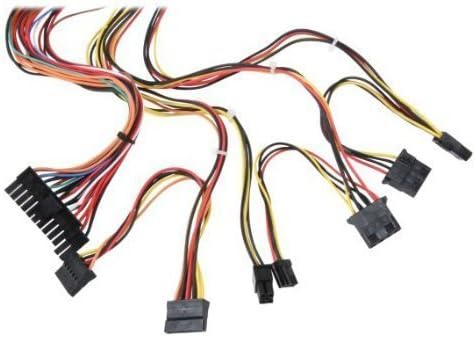
Figura 3: Mbiview of power supply connectors.

Figure 4: Power supply dimensions and included AC power cord.
5. Udhëzimet e funksionimit
After successful installation, you can power on your computer.
- Ensure the power switch on the rear of the power supply (Figure 2) is in the "ON" (I) position.
- Shtypni butonin e ndezjes në kutinë e kompjuterit tuaj.
- The power supply will provide stable power to your system components.
- To power off, shut down your operating system normally. For complete power disconnection, switch the power supply to the "OFF" (O) position and unplug the AC cord.
6. Mirëmbajtja
Mirëmbajtja e rregullt ndihmon në sigurimin e jetëgjatësisë dhe performancës optimale të furnizimit tuaj me energji.
- Pastrimi: Periodically clean dust from the power supply's fan and vents using compressed air. Ensure the power supply is unplugged before cleaning.
- Rrjedha e ajrit: Ensure that the computer case has adequate airflow and that the power supply's fan is not obstructed.
- Integriteti i kabllove: Periodically check all power cables for secure connections and signs of wear or damage.
7. Troubleshooting
Nëse hasni probleme me furnizimin me energji, referojuni hapave të zakonshëm të mëposhtëm për zgjidhjen e problemeve:
- Pa fuqi:
- Kontrolloni nëse kablloja e energjisë AC është e lidhur mirë si në furnizimin me energji ashtu edhe në prizën e murit.
- Ensure the power switch on the rear of the power supply is in the "ON" (I) position.
- Verifikoni që priza e murit është funksionale duke lidhur një pajisje tjetër.
- Check all internal power connections (20/24-pin ATX, 4-pin +12V, peripheral connectors) are firmly seated.
- Jostabiliteti i Sistemit/Mbylljet e Rastësishme:
- This could indicate an overloaded or failing power supply. Ensure your system's power requirements do not exceed the PS480D's 480W capacity.
- Check for proper ventilation and ensure the power supply fan is spinning. Overheating can cause instability.
- Zhurmë e pazakontë:
- A loud fan noise might indicate dust buildup or a failing fan bearing. Clean the fan as described in the Maintenance section.
If problems persist after attempting these steps, contact Logisys customer support or a qualified technician.
8. Specifikimet
| Veçori | Specifikimi |
|---|---|
| Markë | Logisys |
| Numri i modelit | PS480D |
| Vat e daljestage | 480 Watts |
| Faktori i formës | ATX |
| Dimensionet (LxWxH) | 6" Gjatësi x 5.5" Gjerësi x 3.25" Lartësi (15.24 x 13.97 x 8.25 cm) |
| Pesha e artikullit | 2.06 paund (0.93 kg) |
| Lidhës i tabelës kryesore | 1x 20+4 Pin ATX |
| Lidhësi i energjisë së CPU-së | 1x 4 Pin +12V |
| Standard Drive Connectors | 4x 4 Pin (Molex) |
| FDD/ZIP Connectors | 1x 4 Pin 3.5" |
| Lidhës ATA Serial | 1x SATA |
| Metoda e Ftohjes | Ajri |
| Mbrojtjet | Mbi Voltage Mbrojtja, Mbrojtja nga qarku i shkurtër |
| Certifikatat | FCC part 15J class B, CISPR 22, UL 1950, CSA 22.2 LEVEL 3 |
9. Garancia dhe Mbështetja
For warranty information, technical support, or service inquiries, please refer to the official Logisys webfaqen e internetit ose kontaktoni departamentin e shërbimit ndaj klientit. Ruajeni faturën e blerjes si provë të blerjes.

