1. Hyrje
This manual provides essential information for the safe and efficient use of your Hama USB 7.1 Surround Sound Card, Model 00051620. Please read these instructions carefully before using the device and keep them for future reference. This external sound card allows you to connect headphones, microphones, or speakers with a 3.5mm jack to your computer or tablet via a USB-A port, enhancing your audio experience with simulated 7.1 surround sound.
2. Udhëzimet e sigurisë
- Do not open the device. Opening the device voids the warranty and may lead to electric shock.
- Mbroni produktin nga papastërtia, lagështia dhe mbinxehja.
- Përdoreni produktin vetëm për qëllimin e tij të synuar.
- Do not drop the product or expose it to severe shocks.
- Mbajeni këtë produkt, si të gjitha produktet elektrike, jashtë mundësive të fëmijëve.
- Hidhni menjëherë materialin e paketimit sipas rregulloreve të zbatueshme në vend.
3. Përmbajtja e paketës
Verifikoni që paketa juaj përmban artikujt e mëposhtëm:
- 1x Hama USB 7.1 Surround Sound Card (Model 00051620)
- 1x Manual Udhëzues
4. Produkti i Mbaruarview
The Hama USB 7.1 Surround Sound Card is a compact audio adapter designed to provide enhanced sound capabilities for your computer or tablet. It features a USB-A connector for easy plug-and-play functionality and includes dedicated ports for audio input and output.
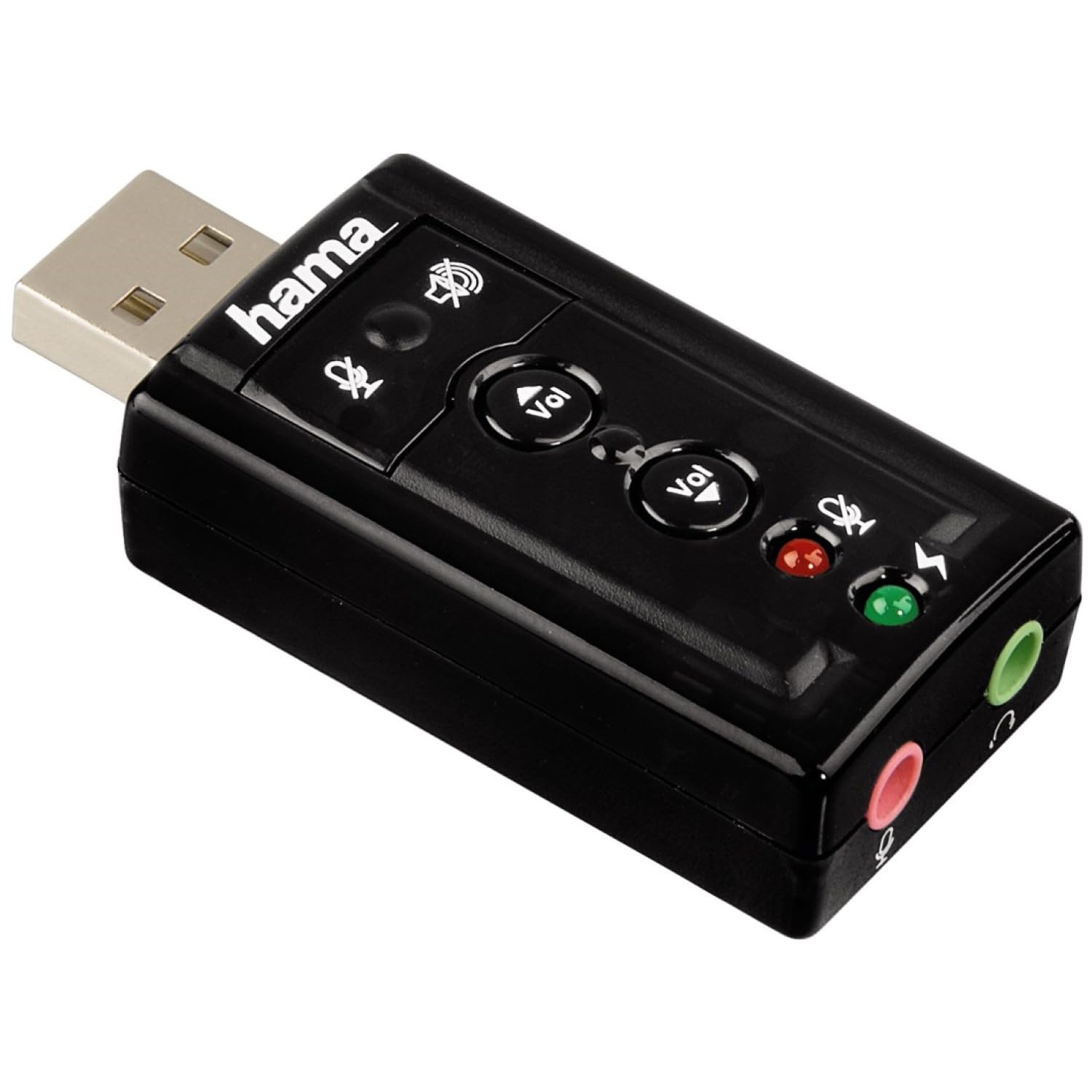
Imazhi 1: Sipër view of the Hama USB 7.1 Surround Sound Card, showing the USB-A connector, volume control buttons, and mute indicators.
Kontrollet dhe portat:
- USB-A Connector: For connecting to your computer or tablet.
- Butonat e ngritjes / uljes së vëllimit: Rregullon volumin e daljes së audios.
- Butoni i heshtjes së mikrofonit: Mutes or unmutes the connected microphone.
- Speaker Mute Button: Mutes or unmutes the audio output to headphones/speakers.
- 3.5mm Microphone Jack (Red): Për lidhjen e një mikrofoni të jashtëm.
- 3.5mm Headphone/Speaker Jack (Green): Për lidhjen e kufjeve ose altoparlantëve.

Imazhi 2: Fund view of the Hama USB 7.1 Surround Sound Card, highlighting the red microphone input jack and the green headphone/speaker output jack.
5. Kërkesat e Sistemit
- Operating System: Windows, macOS, or compatible tablet OS.
- Available USB-A port.
- Headphones, microphone, or speakers with a 3.5mm jack connector.
6. Instalimi dhe konfigurimi
- Connect the Sound Card: Plug the USB-A connector of the Hama USB 7.1 Surround Sound Card into an available USB-A port on your computer or tablet.
- Instalimi i shoferit: The device is typically plug-and-play, and your operating system should automatically detect and install the necessary drivers. If prompted, follow the on-screen instructions.
- Lidhni pajisjet audio:
- For headphones or speakers, connect the 3.5mm jack into the jeshile port on the sound card.
- For a microphone, connect the 3.5mm jack into the e kuqe port on the sound card.
- Configure Audio Settings: Access your operating system's sound settings to ensure the Hama USB 7.1 Surround Sound Card is selected as the default playback and recording device.
- Instalimi i softuerit (opsionale): For advanced features like XeaR-Sound 7.1 surround simulation, 10-band equalizer, and karaoke functions, install the dedicated software. Refer to the manufacturer's website for software downloads and installation instructions.
7. Operacioni
Basic Audio Control:
- Rregullimi i volumit: Use the 'Vol +' and 'Vol -' buttons on the sound card to increase or decrease the output volume.
- Mute Audio Output: Press the speaker mute button to temporarily silence the audio output. Press again to unmute.
- Mute Microphone Input: Press the microphone mute button to temporarily disable microphone input. Press again to enable.
Karakteristikat e Avancuara të Softuerit:
If you have installed the optional software, you can access the following features:
- XeaR-Sound Technology: Enables simulated 7.1 crystal-clear surround sound for stereo speakers or headsets.
- Barazuesi me 10 breza: Customize your audio experience with various presets (e.g., Jazz, Rock, Classic) or create your own.
- Additional Sound Effects: Apply various sound effects to your audio.
- Adjustable Room Acoustics: Modify the perceived acoustic environment.
- Karaoke Recording: Record karaoke performances with original voice suppression and tone adjustment capabilities.
8. Mirëmbajtja
The Hama USB 7.1 Surround Sound Card requires minimal maintenance.
- Pastroni pajisjen vetëm me pak damp, leckë pa garzë. Mos përdorni agjentë pastrimi agresivë.
- Ensure the USB port and audio jacks are free from dust and debris.
9. Troubleshooting
Nuk ka dalje tingulli:
- Ensure the sound card is securely plugged into a USB port.
- Check if your headphones/speakers are correctly connected to the green jack.
- Verify that the speaker mute button on the sound card is not active.
- Confirm that the Hama USB 7.1 Surround Sound Card is selected as the default playback device in your operating system's sound settings.
- Adjust the volume using the sound card's buttons and your computer's volume controls.
Mikrofoni nuk funksionon:
- Ensure your microphone is correctly connected to the red jack.
- Verify that the microphone mute button on the sound card is not active.
- Confirm that the Hama USB 7.1 Surround Sound Card is selected as the default recording device in your operating system's sound settings.
- Kontrolloni cilësimet e privatësisë së mikrofonit në sistemin tuaj operativ.
Problemet e cilësisë së zërit:
- Sigurohuni që të gjitha lidhjet të jenë të sigurta.
- Try connecting the sound card to a different USB port.
- If using the optional software, check equalizer settings and disable any sound effects that might be causing distortion.
10. Specifikimet
| Veçori | Detaj |
|---|---|
| Markë | Hama |
| Numri i modelit | 00051620 (i njohur edhe si 51620) |
| Ngjyra | E zezë |
| Lidhës | USB A male |
| Standardi USB | USB 2.0 |
| Lidhja e altoparlantit | 3.5mm female jack |
| Lidhja e kufjeve | 3.5mm female jack |
| Kontrolli i volumit | Yes, with mute function |
| Modaliteti i daljes audio | Rrethojnë |
| Konfigurimi i kanalit të tingullit rrethues | 7.1 (simulated with software) |
| S maksimaleampling Vlerësoni | 48 kHz |
| Pajisjet e përputhshme | USB (PC, Laptop, Tablets) |
| Prodhuesi | Hama EURL |
11. Informacioni për asgjësimin
Observe the applicable local regulations for the disposal of electronic devices. The product must not be disposed of with normal household waste. Dispose of the product according to the European Directive 2012/19/EU on waste electrical and electronic equipment (WEEE) at a designated collection point for electrical and electronic equipment.
12. Garancia
Hama GmbH & Co KG provides a limited warranty for this product. For detailed warranty terms and conditions, please refer to the official Hama webnë faqen e internetit ose kontaktoni shitësin tuaj lokal. Ruajeni provën e blerjes për kërkesat e garancisë.
13. Mbështetja e klientit
If you have any questions about this product or require technical assistance, please contact Hama customer support. You can find contact information on the official Hama webfaqe (www.hama.com) or through your local retailer.


