1. Hyrje
This manual provides essential information for the safe and efficient operation of your VOLTCRAFT GOS-632 FG Oscilloscope with Frequency Generator. Please read this manual thoroughly before using the device and keep it for future reference. The GOS-632 FG is a 30 MHz dual-channel analog oscilloscope integrated with a frequency generator, designed for various electronic measurement and testing applications.
2. Udhëzimet e sigurisë
Always observe the following safety precautions to prevent electric shock, injury, or damage to the instrument:
- Burimi i energjisë: Lidheni instrumentin vetëm me një burim energjie me volumin e specifikuar.tage dhe frekuencës.
- Tokëzimi: Ensure the instrument is properly grounded to prevent electric shock.
- Ventilimi: Do not block ventilation openings. Ensure adequate airflow to prevent overheating.
- Mjedisi: Operate the oscilloscope in a dry, clean environment, away from direct sunlight, high temperatures, and excessive dust or humidity.
- Sondat: Use only probes rated for the voltage and frequency being measured. Ensure probes are in good condition.
- Servisimi: Për çdo shërbim, drejtojuni personelit të kualifikuar të shërbimit. Mos u përpiqni ta hapni ose riparoni vetë instrumentin.
- Kontakti me lëng: Avoid contact with liquids. If liquid enters the device, disconnect power immediately and have it inspected by a qualified technician.
3. Përmbajtja e paketës
Please check the package contents upon receipt. If any items are missing or damaged, contact your dealer immediately.
- VOLTCRAFT GOS-632 FG Oscilloscope with Frequency Generator
- Kordoni elektrik
- Two (2) Oscilloscope Probes (1x/10x switchable)
- Manuali i Përdoruesit (ky dokument)
4. Produkti i Mbaruarview
The VOLTCRAFT GOS-632 FG is a robust analog oscilloscope designed for reliable waveform analysis. Below is a general view të pajisjes.
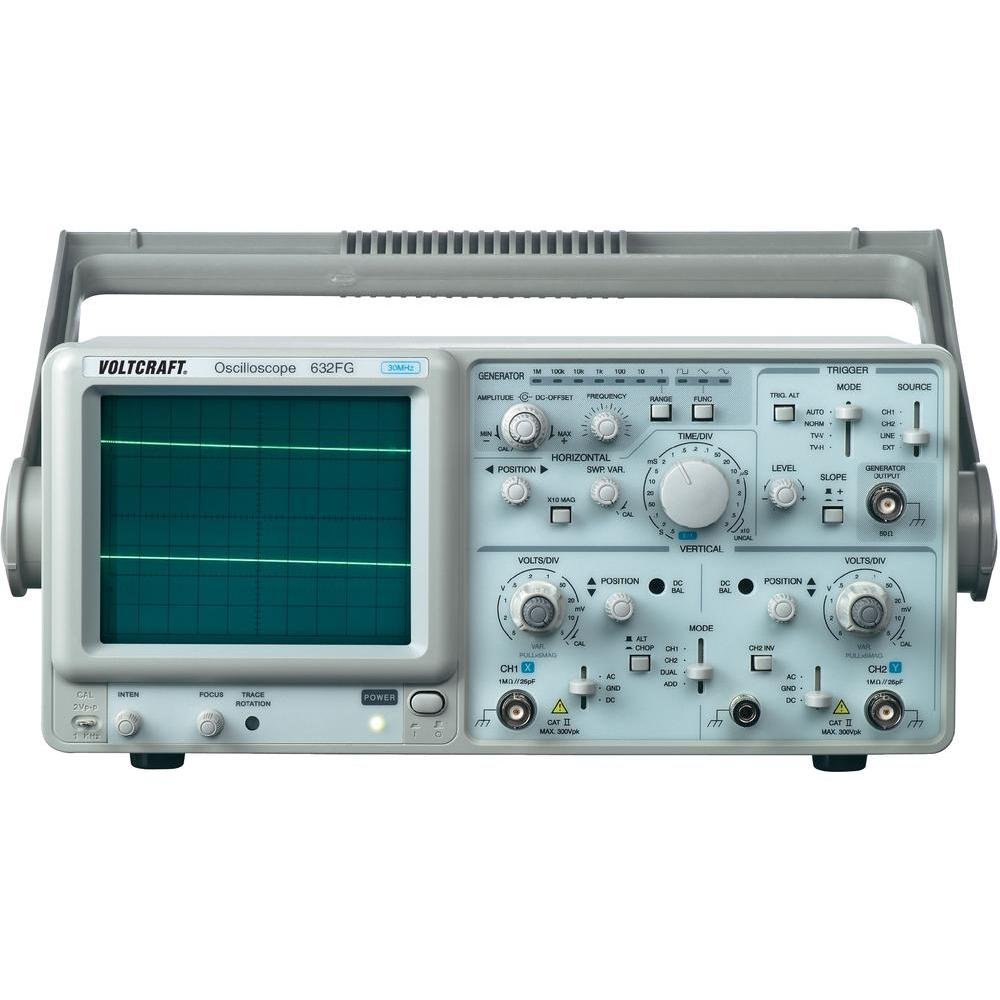
Figura 4.1: Përpara view of the VOLTCRAFT GOS-632 FG Oscilloscope. This image shows the main display, control knobs, and input connectors for the two channels and the frequency generator output.
4.1. Kontrollet e panelit të përparmë
- CRT Display: Shows the waveform.
- CH1/CH2 Input: BNC connectors for connecting oscilloscope probes.
- VOLTS/DIV: Adjusts the vertical sensitivity for each channel.
- POZICIONI: Adjusts the vertical position of the waveform.
- TIME/DIV: Adjusts the horizontal sweep speed.
- TRIGGER LEVEL: Vendos volumintage level at which the sweep starts.
- MODI: Selects trigger source (CH1, CH2, EXT, LINE).
- FREQUENCY GENERATOR OUTPUT: BNC connector for the integrated signal generator.
- FREQUENCY/AMPLITUDE: Controls for the frequency generator output.
- Ndërprerësi POWER: Ndez ose fiket pajisjen.
4.2. Lidhjet e panelit të pasmë
- Hyrja e energjisë AC: Lidhës për kordonin e rrymës.
- Terminali tokësor: For additional grounding if required.
5. Konfigurimi
- Shpaketimi: Carefully remove the oscilloscope from its packaging. Retain the packaging for future transport.
- Vendosja: Place the oscilloscope on a stable, level surface with adequate ventilation around the unit.
- Lidhja e energjisë: Connect the supplied power cord to the AC power input on the rear panel and then to a grounded electrical outlet.
- Lidhja e sondës: Connect the oscilloscope probes to the CH1 and/or CH2 BNC input connectors on the front panel. Ensure a secure connection.
- Kompensimi i sondës: Before taking measurements, compensate your probes. Connect the probe tip to the probe compensation output (usually a square wave signal on the front panel) and adjust the probe's compensation trimmer until a flat-top square wave is displayed.
6. Përdorimi i osciloskopit
6.1. Matja Bazë
- Ndezja: Press the POWER switch to turn on the oscilloscope. Allow a few minutes for the display to stabilize.
- Sinjali i hyrjes: Connect the probe to the circuit point you wish to measure.
- Vertical Adjustment (VOLTS/DIV & POSITION):
- Select the appropriate VOLTS/DIV setting to display the waveform within the screen.
- Use the POSITION knob to center the waveform vertically.
- Horizontal Adjustment (TIME/DIV & POSITION):
- Select the appropriate TIME/DIV setting to display several cycles of the waveform horizontally.
- Use the horizontal POSITION knob to move the waveform left or right.
- Konfigurimi i shkrehësit:
- Set the TRIGGER MODE (e.g., AUTO, NORM).
- Adjust the TRIGGER LEVEL knob until a stable waveform is displayed.
- Select the TRIGGER SOURCE (e.g., CH1, CH2).
6.2. Using the Frequency Generator
- Lidhni Daljen: Connect a BNC cable from the FREQUENCY GENERATOR OUTPUT to the circuit or device under test.
- Vendos frekuencën: Use the FREQUENCY control to select the desired output frequency.
- Set Ampgjeresi: Përdorni AMPLITUDE control to adjust the output signal strength.
- Përzgjedhja e formës së valës: If available, select the desired waveform type (e.g., sine, square, triangle).
7. Mirëmbajtja
- Pastrimi: Disconnect the power cord before cleaning. Use a soft, damp cloth with a mild detergent to clean the exterior. Do not use abrasive cleaners or solvents.
- Magazinimi: Kur nuk është në përdorim për periudha të gjata, ruajeni osciloskopin në një mjedis të thatë dhe pa pluhur.
- Kalibrimi: For accurate measurements, periodic calibration by qualified personnel is recommended.
8. Troubleshooting
| Problem | Shkaku i mundshëm | Zgjidhje |
|---|---|---|
| Asnjë ekran pas ndezjes | No power, brightness/focus too low | Check power cord, outlet. Adjust INTENSITY and FOCUS knobs. |
| Forma e valës së paqëndrueshme | Incorrect trigger settings, signal too noisy | Adjust TRIGGER LEVEL, TRIGGER MODE, and TRIGGER SOURCE. Check signal integrity. |
| Nuk shfaqet asnjë sinjal | Probe not connected, incorrect VOLTS/DIV, signal outside range | Ensure probe is connected and making contact. Adjust VOLTS/DIV and POSITION. Check probe compensation. |
| Frequency generator output not working | Output cable not connected, amplitude set to zero | Check output cable connection. Increase AMPLITUDE. |
9. Specifikimet
| Veçori | Detaj |
|---|---|
| Numri i modelit | GOS-632 FG |
| Prodhuesi | VOLTCRAFT |
| Gjerësia e brezit | 30 MHz (DC) |
| Kanalet | 2 Kanale analoge |
| Integrated Function | Gjeneratori i frekuencës |
| Pesha e produktit | 9.07 g (Note: This weight seems unusually low for an oscilloscope and might be a data entry error. Refer to product packaging for accurate weight.) |
| ASIN | B003IDBEYM |
| Së pari në dispozicion | 31 mars 2015 |
10. Garancia dhe Mbështetja
VOLTCRAFT products are designed for quality and reliability. For information regarding warranty terms, technical support, or service, please refer to the warranty card included with your product or visit the official VOLTCRAFT webvend. Mos u përpiqni ta riparoni vetë pajisjen, pasi kjo mund të anulojë garancinë tuaj.
For further assistance, please contact your local VOLTCRAFT distributor or customer service center.


