Manuali i Përdoruesit të Sistemit të Kinemasë në Shtëpi Sunstech XD TH-35 5.1 Subwoofer
Model: TH-XD 35
1. Hyrje
This manual provides essential information for the safe and efficient operation of your Sunstech XD TH-35 Home Cinema 5.1 Subwoofer System. Please read this manual thoroughly before using the product and retain it for future reference.
The Sunstech XD TH-35 is a 5.1 channel home cinema system designed to deliver an immersive audio experience for movies, music, and games. It includes a main unit (DVD/CD/DivX player), a subwoofer, and five satellite speakers.
2. Informacion mbi sigurinë
PARALAJMËRIM: Për të zvogëluar rrezikun e goditjes elektrike, mos e hiqni kapakun (ose mbrapa). Nuk ka pjesë të servisueshme nga përdoruesi brenda. Referojini shërbimin personelit të kualifikuar të shërbimit.
- Burimi i energjisë: Sigurohuni që furnizimi me energji voltage përputhet me etiketën e vlerësimit në njësi.
- Ventilimi: Mos bllokoni asnjë hapje ventilimi. Instalojeni në përputhje me udhëzimet e prodhuesit.
- Uji dhe lagështia: Mos e ekspozoni këtë aparat ndaj shiut ose lagështirës. Mos vendosni objekte të mbushura me lëngje, siç janë vazot, mbi aparat.
- Nxehtësia: Mos e instaloni pranë ndonjë burimi nxehtësie si radiatorë, regjistra ngrohjeje, soba ose aparate të tjera (përfshirë amplifiers) që prodhojnë nxehtësi.
- Pastrimi: Shkëputeni këtë aparat nga priza gjatë stuhive me rrufe ose kur nuk përdoret për periudha të gjata kohore. Pastrojeni vetëm me një leckë të thatë.
- Servisimi: Referojuni të gjitha servisimet te personeli i kualifikuar i shërbimit. Servisimi kërkohet kur aparati është dëmtuar në çfarëdo mënyre, si p.sh. kordoni i furnizimit me energji elektrike ose spina është dëmtuar, lëngu është derdhur ose objekte kanë rënë në aparat, aparati është ekspozuar ndaj shiut ose lagështisë, nuk funksionon normalisht , ose është hequr.
3. Përmbajtja e paketës
Ju lutemi kontrolloni që të gjitha artikujt e listuar më poshtë të jenë të përfshirë në paketën tuaj:
- Main Unit (DVD/CD/DivX Player)
- Subwoofer
- Front Left Satellite Speaker
- Front Right Satellite Speaker
- Center Satellite Speaker
- Rear Left Satellite Speaker
- Rear Right Satellite Speaker
- Telekomandë
- Kabllot audio/video
- Manuali i Përdoruesit (ky dokument)
4. Produkti i Mbaruarview
The Sunstech XD TH-35 system comprises a central player unit, a powerful subwoofer, and five compact satellite speakers, along with a remote control for convenient operation.
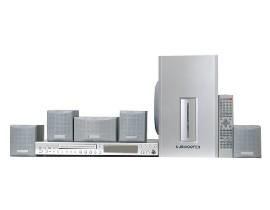
Figura 4.1: Mbiview of the Sunstech XD TH-35 Home Cinema 5.1 Subwoofer System, showing the main unit, subwoofer, five satellite speakers, and remote control.
4.1 Main Unit (DVD/CD/DivX Player)
This unit serves as the central control hub, featuring disc playback capabilities for CD, DVD, and DivX formats. It includes various input/output ports for connecting to your television and other audio sources.
4.2 subwoofer
The subwoofer is responsible for reproducing low-frequency sounds, adding depth and impact to your audio experience. It connects directly to the main unit.
4.3 Altoparlantë satelitor
Five satellite speakers (Front Left, Front Right, Center, Rear Left, Rear Right) provide the surround sound experience, distributing audio across your listening area for immersive soundscapes.
4.4 Telekomanda
The included remote control allows for convenient adjustment of volume, input selection, playback controls, and other system settings from a distance.
5. Konfigurimi
5.1 Vendosja e altoparlantëve
Optimal speaker placement is crucial for achieving the best 5.1 surround sound experience.
- Folësi qendror: Place directly above or below your television, centered.
- Altoparlantët e përparmë majtas/djathtas: Position these speakers equidistant from the television, forming an equilateral triangle with your primary listening position.
- Rear Left/Right Speakers: Place these speakers to the sides or slightly behind your primary listening position, at ear level or slightly above.
- subwoofer: The subwoofer can be placed anywhere in the room, but typically performs well in a corner or near a wall to enhance bass response. Experiment with placement for best results.
5.2 Lidhja e altoparlantëve
- Identify the speaker output terminals on the main unit and the corresponding input terminals on each speaker.
- Connect the Front Left speaker to the "FL" terminal, Front Right to "FR", Center to "CEN", Rear Left to "RL", and Rear Right to "RR".
- Connect the subwoofer to the dedicated "SUBWOOFER OUT" port on the main unit.
- Ensure all connections are secure and the correct polarity (+ to + and - to -) is observed for each speaker wire.
5.3 Connecting to a Television/Display
Use the provided audio/video cables to connect the main unit to your television. Common connection types include:
- Video e përbërë: Connect the yellow video output from the main unit to the yellow video input on your TV.
- Audio stereo: Connect the red and white audio outputs from the main unit to the corresponding red and white audio inputs on your TV.
- (Note: Depending on your TV and the system's capabilities, other connections like S-Video or Component Video might be available for better picture quality. Refer to your TV's manual for input options.)
5.4 Lidhja e energjisë
- Once all audio/video and speaker connections are made, plug the main unit's power cord into a wall outlet.
- Turn on the main unit using the power button on the front panel or the remote control.
6. Udhëzimet e funksionimit
6.1 Riprodhimi Bazë
- Ndezja: Shtypni PUSHTETI butonin në njësinë kryesore ose në telekomandën.
- Fut diskun: Gently insert a CD, DVD, or DivX disc into the disc tray. The tray will automatically close, and playback should begin.
- Zgjidhni hyrjen: If the system does not automatically switch to disc playback, press the HYRJE or BURIMI button on the remote to select the correct input.
- Kontrolli i volumit: Përdorni VOL+ dhe VOL - buttons on the remote to adjust the master volume.
- Kontrollet e luajtjes: Përdorni LUAJ, PAUZË, STOP, KAQ, dhe SHPEJT PËRPARA/KËTUAR KAPRA buttons for disc navigation.
6.2 Cilësimet e audios
Access the system's on-screen menu (usually by pressing SETUP or MENU on the remote) to adjust audio settings such as:
- Speaker Levels: Adjust the individual volume levels for each speaker (Front, Center, Rear, Subwoofer) to balance the sound.
- Cilësimet e vonesës: Compensate for different distances of speakers from the listening position.
- Mënyrat e zërit: Select from various preset sound modes (e.g., Movie, Music, Game) or customize equalizer settings.
6.3 Funksionet e telekomandës
The remote control provides full functionality for the system. Familiarize yourself with the button layout for easy operation.
(Note: A detailed diagram of the remote control with button descriptions would typically be included here in a physical manual.)
7. Mirëmbajtja
7.1 Pastrimi i njësisë
To maintain the appearance and performance of your system:
- E jashtme: Fshini sipërfaqet e jashtme me një leckë të butë dhe të thatë. Mos përdorni pastrues gërryes, dyllë ose tretës.
- Sirtari i diskut: Mbajeni sirtarin e diskut të pastër dhe pa pluhur. Shmangni prekjen e lentes brenda sirtarit të diskut.
- Ventilimi: Sigurohuni që vrimat e ventilimit të jenë të pastra nga pluhuri dhe mbeturinat për të parandaluar mbinxehjen.
7.2 Kujdesi për diskun
Handle discs by their edges. Store discs in their cases when not in use to prevent scratches and dust accumulation. Clean discs with a soft, lint-free cloth, wiping from the center outwards.
7.3 Remote Control Batteries
If the remote control's range decreases or it becomes unresponsive, replace the batteries with new ones of the specified type (e.g., AAA). Ensure correct polarity when inserting new batteries.
8. Troubleshooting
If you encounter problems with your system, refer to the following table for common issues and solutions.
| Problem | Shkaku i mundshëm | Zgjidhje |
|---|---|---|
| Asnjë fuqi | Kablloja e energjisë nuk është e lidhur; Priza e energjisë është e dëmtuar | Kontrolloni lidhjen e kabllit të energjisë; provoni një prizë tjetër |
| Asnjë zë | Volume too low; Incorrect input selected; Speaker wires loose/incorrectly connected | Increase volume; Select correct input; Check all speaker connections and polarity |
| Asnjë foto | Video cable loose/incorrectly connected; Incorrect TV input selected | Check video cable connections; Select correct input on TV |
| Disku nuk luhet | Disc inserted incorrectly; Disc is dirty or scratched; Disc format not supported | Re-insert disc correctly; Clean or replace disc; Check disc compatibility (CD, DVD, DivX) |
| Telekomanda nuk funksionon | Batteries depleted or inserted incorrectly; Obstruction between remote and unit | Replace batteries, check polarity; Remove obstructions; Ensure remote is pointed at the unit's sensor |
If the problem persists after trying these solutions, please contact Sunstech customer support or a qualified service technician.
9. Specifikimet
| Veçori | Detaj |
|---|---|
| Emri i modelit | TH-XD 35 |
| Markë | Sunstech |
| Konfigurimi i tingullit rrethues | 5.1 (5 Speakers + 1 Subwoofer) |
| Wattage | 170 vat |
| Llojet e mediave të mbështetura | CD, DVD, DivX |
| ASIN | B0044ALAEM |
| Data e parë e disponueshme | 21 shkurt 2020 |
10. Garancia dhe Mbështetja
For warranty information and customer support, please refer to the warranty card included with your product or visit the official Sunstech webvend. Ruajeni provën e blerjes për kërkesat e garancisë.
Ndihma në internet: www.sunstech.com/support (This is a placeholder link, please replace with the actual support URL nëse në dispozicion)
Kontaktoni: Refer to your regional Sunstech contact information for service inquiries.


