1. Hyrje
The SatLink WS-6909 is a versatile digital meter designed for aligning both DVB-S (satellite) and DVB-T (terrestrial) signals. Featuring a 3.5-inch high-definition TFT LCD screen, it allows users to view actual channels directly on the device, ensuring quick and accurate signal alignment. The meter includes a unique calibration system for optimal performance and supports various satellite and terrestrial signal parameters.
Shënim: DVB-T functionality may not be supported in all regions, including America.
2. Përmbajtja e paketës
Ju lutemi verifikoni që të gjitha artikujt e listuar më poshtë janë të përfshirë në paketën tuaj:
- 1 x SatLink WS-6909 Satellite Meter
- 1 x përshtatës energjie
- 1 x AV Kabllo
- 1 x Kabllo Mbushëse Makinash
- 1 x Kuti Silikoni
3. Produkti i Mbaruarview
Familiarize yourself with the components and ports of your SatLink WS-6909 meter.

Figura 3.1: Përpara view of the SatLink WS-6909 meter, showing the 3.5-inch LCD screen, control buttons, and numeric keypad, alongside its protective orange silicone case.

Figura 3.2: Poshtë view of the device, featuring the main power switch, DC power input port, and a USB port for software upgrades.

Figura 3.3: Anash view of the meter, illustrating the AV IN and AV OUT ports for connecting external video sources or displays.
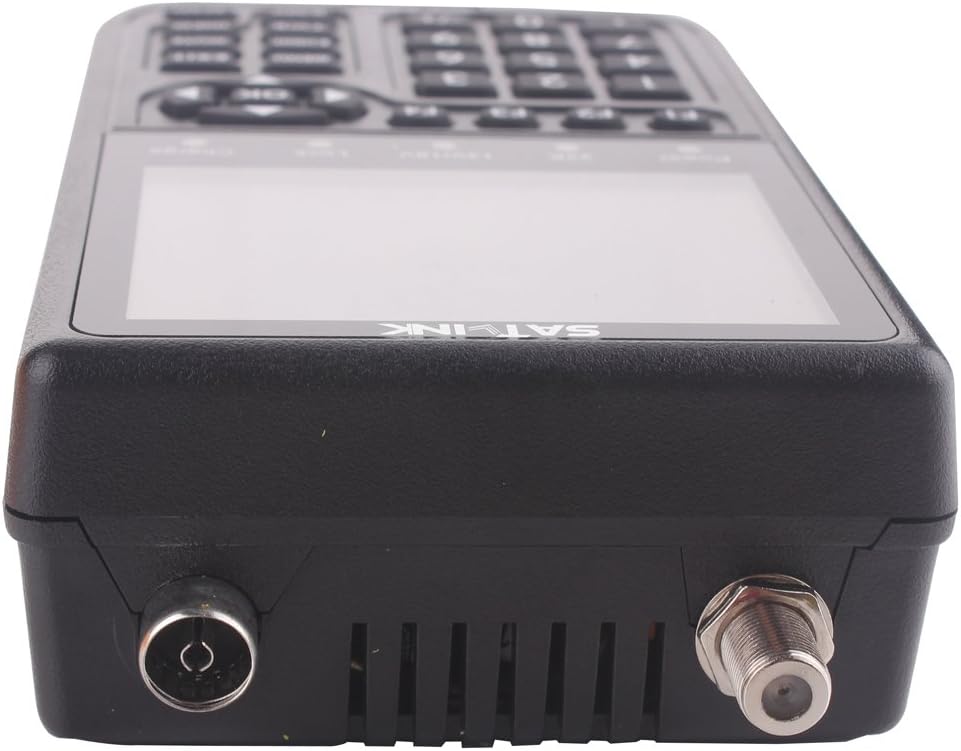
Figura 3.4: Top view of the device, displaying the F-connector for satellite input and the standard antenna input for terrestrial signals.
4. Konfigurimi
4.1 Ngarkimi i pajisjes
- Connect the provided Power Adaptor to the DC input port on the bottom of the meter.
- Plug the Power Adaptor into a standard electrical outlet. The 'Charge' indicator light on the device will illuminate.
- Allow the device to charge fully before initial use. A full charge provides approximately 4 hours of operating time.
- Alternatively, use the Car Charger Cable to charge the device in a vehicle.
4.2 Ndezja fillestare
- Sigurohuni që pajisja të jetë e ngarkuar siç duhet.
- Flip the main power switch located on the bottom of the meter to the 'ON' position.
- The device will power on and perform an automatic calibration for optimal performance.
4.3 Connecting Antennas/LNBs
- For satellite signal reception (DVB-S), connect the LNB cable from your satellite dish to the F-connector input on the top of the meter.
- For terrestrial signal reception (DVB-T), connect your terrestrial antenna cable to the standard antenna input on the top of the meter.
5. Udhëzimet e funksionimit
5.1 Navigimi bazë
- Përdorni MENU butonin për të hyrë në menunë kryesore.
- Navigate through menu options using the directional arrow buttons (Lart/Poshtë/Majtas/Djathtas).
- Shtypni OK button to confirm selections or enter sub-menus.
- Përdorni EXIT button to return to the previous screen or exit the menu.
- The numeric keypad can be used for direct input of values such as frequencies or channel numbers.
5.2 DVB-S (Satellite) Signal Finding
- From the main menu, select the DVB-S measurement mode.
- Configure parameters such as satellite, transponder frequency, symbol rate, and polarity. These settings can be modified by the user.
- The meter supports DISEQC 1.0, 1.1, 1.2, and 22kHz Tone. Adjust these settings as required for your LNB configuration.
- The meter provides LNB power supply options of 18V/13V (maximum 400mA).
- Align your satellite dish while observing the signal strength, quality, BER (Bit Error Rate), S/N (Signal-to-Noise ratio), and PWR (Power) on the 3.5-inch LCD screen.
- The device will provide a sound and light alarm when a signal is locked.
- The meter can automatically calculate Azimuth (AZ) and Elevation (EL) angles to assist with dish alignment.
- Search modes include Auto, Blind, and Manual.
5.3 DVB-T (Terrestrial) Signal Finding
- From the main menu, select the DVB-T measurement mode.
- Configure the desired frequency range.
- The meter supports ANT power supply options of 5V/12V/24V for active antennas.
- Align your terrestrial antenna while observing the signal strength, quality, MER (Modulation Error Ratio), S/N (Signal-to-Noise ratio), and PWR (Power) on the LCD screen.
- The meter supports multichannel checks and demodulation types including QPSK, 16QAM, and 64QAM.
- Search modes include Auto and Manual.
5.4 Software Upgrades
The USB port on the bottom of the device is used for software upgrades. Refer to the manufacturer's webfaqe interneti për softuerët dhe udhëzimet më të fundit.
6. Mirëmbajtja
6.1 Pastrimi
- Wipe the device exterior with a soft, dry cloth.
- Mos përdorni pastrues të lëngshëm ose tretës, pasi ato mund të dëmtojnë pajisjen.
6.2 Kujdesi për baterinë
- Për të zgjatur jetëgjatësinë e baterisë, shmangni ekspozimin e pajisjes ndaj temperaturave ekstreme.
- Recharge the battery regularly, even if the device is not in frequent use.
6.3 Përditësimet e softuerit
Kontrolloni periodikisht faqen zyrtare të prodhuesit website for available software updates. Updating the firmware can improve performance and add new features.
7. Troubleshooting
| Problem | Shkaku i mundshëm | Zgjidhje |
|---|---|---|
| Pajisja nuk ndizet | Low battery; Power switch off; Faulty power adapter | Charge the battery; Ensure power switch is ON; Try a different power source |
| No signal detected (DVB-S) | Incorrect satellite/transponder settings; LNB not powered; Dish misalignment; Cable issue | Verify satellite and transponder settings; Check LNB power (13/18V); Adjust dish alignment; Inspect cable connections |
| No signal detected (DVB-T) | Incorrect frequency; Antenna not powered (if active); Antenna misalignment; Regional DVB-T incompatibility | Verify frequency settings; Check ANT power (5/12/24V); Adjust antenna alignment; Confirm DVB-T support in your region |
| Cilësi e dobët e sinjalit | Fine-tuning needed; Obstructions; Damaged LNB/antenna | Make small adjustments to alignment; Clear line of sight; Replace faulty components if necessary |
| Ekrani është i ngrirë ose nuk përgjigjet | Gabim i softuerit | Perform a hard reset by turning the power switch OFF and then ON again. If persistent, consider a software upgrade. |
8. Specifikimet
- Shfaq: Ekran LCD TFT me definicion të lartë 3.5 inç
- Bateria: 8.4V/3000mAh Li-ion, Max Operating Time: 4 hours
- DVB-S Input Frequency: 950-2150 MHz
- DVB-S Input Level: -65 deri në -25dBm
- DVB-S Input Impedance: 75 Ω
- DISEQC Support: 1.0, 1.1, 1.2 and 22kHz Tone
- LNB Power Supply: 18V/13V (IMax 400mA)
- DVB-T Frequency Range: 46MHz-862MHz
- DVB-T Level Range: 40dBµV-110dBµV
- DVB-T Input Impedance: 75 Ω
- DVB-T Demodulation: QPSK, 16QAM, 64QAM
- ANT Power Supply: 5V/12V/24V
- Llojet e matjes: Signal strength, quality, BER, S/N, PWR (DVB-S); Signal strength, quality, MER, S/N, PWR (DVB-T)
- Mënyrat e kërkimit: Auto, Blind, Manual
- Dimensionet e produktit: 3.54 x 1.77 x 6.46 inç
- Pesha e artikullit: 1.76 paund
- Numri i modelit: NS 6909
9. Garancia dhe Mbështetja
For technical assistance, warranty information, or customer support, please contact your original retailer or refer to the manufacturer's official website for contact details. Please have your product model number (WS 6909) and purchase information ready when seeking support.


