1. Hyrje
The Sony Cyber-Shot DSC-H300 is a versatile 20.1-megapixel compact digital camera featuring a powerful 35x optical zoom lens. Designed for ease of use, it includes Optical SteadyShot image stabilization to reduce blur, various shooting modes, and the ability to capture HD videos. Its DSLR-like body provides a comfortable grip for stable shooting.
2. Çfarë ka në kuti
Verifikoni që të gjitha artikujt e mëposhtëm janë të përfshirë në paketën tuaj:
- Sony Cyber-Shot DSC-H300 Camera Body
- Bateritë AA (x4)
- Rrip Sup
- Kapaku i lentes
- Lens Strap
- Kabllo me shumë USB
- Manual udhëzimi (ky dokument)
3. Kamera Mbiview
Familiarize yourself with the main components and controls of your DSC-H300 camera.
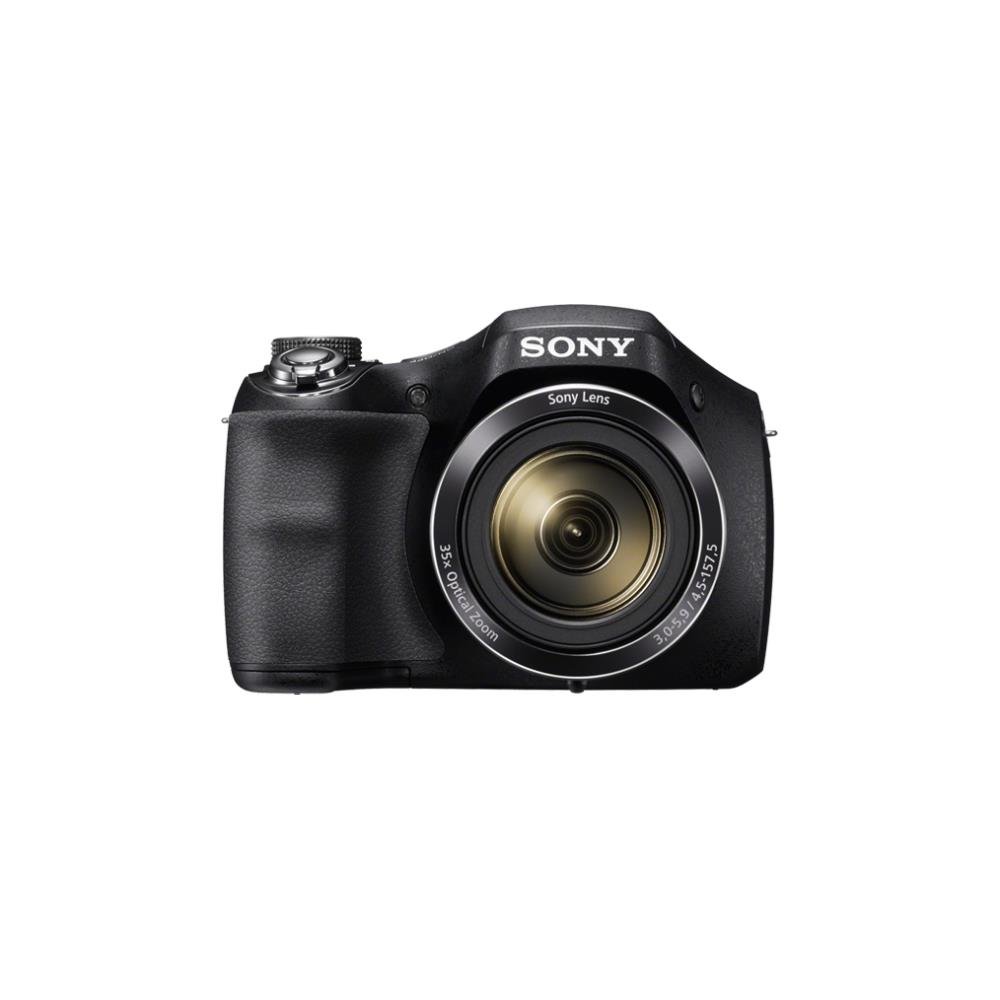
Figura 1: Përpara view of the Sony Cyber-Shot DSC-H300 digital camera, illustrating its compact size with a width of 12.75 cm (5.06 inches) and a height of 8.9 cm (3.504 inches).
Komponentët kryesorë:
- Lente: Features 35x optical zoom.
- Mbërthimi: Ergonomically designed for comfortable handling.
- Butoni i diafragmës: Për kapjen e fotove.
- Leva e Zmadhimit (W/T): Kontrollon zmadhimin optik dhe dixhital.
- Numri i modalitetit: Selects various shooting modes (Auto, Program, Manual, Scene, Movie, etc.).
- Butoni ON/OFF: Ndez ose fik kamerën.
- LCD Screen (3.0 inches): For framing shots, reviewduke përdorur imazhe dhe duke lundruar në menutë.
- Butonat e kontrollit: For menu navigation, flash settings, display options, and playback.
- Butoni i Filmit: Dedicated button for starting and stopping video recording.
4. Konfigurimi
4.1 Futja e baterive
- Hapni kapakun e ndarjes së baterisë që ndodhet në pjesën e poshtme të kamerës.
- Vendosni katër bateri AA, duke u siguruar që polariteti të jetë i saktë (+/-) siç tregohet brenda ndarjes.
- Mbyllni mirë kapakun e ndarjes së baterisë.
4.2 Futja e një karte memorie
- Hapni kapakun e vendit të kartës së memories, i cili zakonisht ndodhet pranë ndarjes së baterisë.
- Insert a compatible memory card (e.g., SD, SDHC, SDXC, Memory Stick PRO Duo) with the label facing the correct direction until it clicks into place.
- Mbyllni kapakun e folesë së kartës së kujtesës.
4.3 Attaching the Shoulder Strap and Lens Cap
- Thread the shoulder strap through the strap eyelets on the camera body and secure it.
- Attach the lens cap to the lens using the provided lens strap to prevent loss.
5. Përdorimi i Kamerës
5.1 Ndez/Fik
Shtypni ON/FIKUR button to power the camera on or off. The lens will extend when powered on.
5.2 Zgjedhja e një Modaliteti të Xhirimit
Rrotulloni Telefonimi i mënyrës to select your desired shooting mode:
- Automatik Inteligjent (iA): Camera automatically optimizes settings for various scenes.
- Programi Automatik (P): Camera sets exposure, but you can adjust other settings.
- Prioriteti i obturatorit (S): You set the shutter speed, camera adjusts aperture.
- Prioriteti i Aperturës (A): You set the aperture, camera adjusts shutter speed.
- Manuali (M): Ju kontrolloni si shpejtësinë e obturatorit ashtu edhe aperturën.
- Përzgjedhja e Skenës (SCN): Zgjidhni nga mënyra të ndryshme skene (p.sh., Portret, Peizazh, Skenë Nate).
- Modaliteti i filmit: Për regjistrimin e videove.
- Modaliteti i panoramës: For capturing wide panoramic shots.
5.3 Bërja e fotove
- Frame your shot: Use the LCD screen to compose your image.
- Fokusimi: Shtypni gjysmën e Butoni i diafragmës to activate autofocus. The camera will beep and the focus indicator will turn green when focus is achieved.
- Kapni: Fully press the Butoni i diafragmës për të marrë fotografinë.
- Zmadhimi: Përdorni Leva e zmadhimit (W/T) to adjust the focal length. 'W' for wide-angle, 'T' for telephoto.
- Blic: Press the flash control button to cycle through flash modes (Auto, Fill-flash, Slow Sync, Flash Off, Advanced Flash).
- Stabilizimi i imazhit: Optical SteadyShot image stabilization is built-in to reduce blur caused by camera shake.
5.4 Regjistrimi i videove
- Ensure the camera is in Modaliteti i filmit (selected via the Mode Dial) or simply press the dedicated Butoni i Filmit.
- Shtypni Butoni i Filmit again to start recording. A red recording indicator will appear on the screen.
- Shtypni Butoni i Filmit once more to stop recording.
- The camera records in 720p HD with clear audio captured by the built-in microphone.
5.5 Panorama Mode
Zgjidhni Modaliteti Panorama on the Mode Dial. Press the shutter button and sweep the camera horizontally or vertically across the scene to capture a wide panoramic image.
5.6 Viewing and Deleting Images/Videos
Shtypni Butoni i riprodhimit (usually indicated by a play icon) to enter playback mode. Use the navigation buttons to scroll through your captured photos and videos. To delete an item, select it and press the Butoni i fshirjes (ikona e koshit të plehrave).
6. Mirëmbajtja
6.1 Pastrimi i trupit të kamerës
Fshijeni trupin e kamerës me një leckë të butë dhe të thatë. Për papastërti kokëfortë, fshijeni pak.ampen the cloth with water and then wipe dry. Avoid using organic solvents like alcohol or thinner.
6.2 Pastrimi i Lentes
First, use a lens brush or blower to remove dust and small particles. Then, gently wipe the lens surface with a clean, soft lens cleaning cloth. Do not use excessive force or abrasive materials.
6.3 Pastrimi i ekranit LCD
Use a soft, lint-free cloth specifically designed for LCD screens. Gently wipe the screen to remove smudges or dust.
6.4 Kujdesi për baterinë
Always use fresh AA batteries. Remove batteries from the camera if it will not be used for an extended period to prevent leakage and damage.
6.5 Ruajtja
Store the camera in a cool, dry place away from direct sunlight, high temperatures, and humidity. Keep it in a camera bag or case to protect it from dust and scratches.
7. Troubleshooting
Nëse hasni probleme me kamerën tuaj, provoni hapat bazë të mëposhtëm për zgjidhjen e problemeve:
- Kamera nuk ndizet: Sigurohuni që bateritë janë futur siç duhet dhe janë ngarkuar plotësisht. Provoni bateri të reja.
- Imazhet janë të paqarta: Check that the lens is clean. Ensure the camera is focusing correctly (half-press shutter). Use a faster shutter speed in low light or for moving subjects. Optical SteadyShot is active to help.
- Blici nuk ndizet: Kontrolloni cilësimet e modalitetit të blicit; sigurohuni që të mos jetë vendosur në 'Blici joaktiv'.
- Gabim i kartës së kujtesës: Turn off the camera, remove and reinsert the memory card. Ensure the card is compatible and not full.
- Kamera ngrin: Remove the batteries, wait a few seconds, and reinsert them to reset the camera.
For more detailed troubleshooting and solutions, please refer to the comprehensive user manual provided with your product or visit the official Sony support webfaqe.
8. Specifikimet
| Veçori | Specifikimi |
|---|---|
| Emri i modelit | DSC H300 |
| Rezolucioni i sensorit të fotografisë | 20.1 MP |
| Zmadhimi optik | 35x |
| Zmadhim dixhital | 70x |
| Stabilizimi i imazhit | Digital, Optical (SteadyShot) |
| Madhësia e ekranit | 3 inç (LCD) |
| Rezolucioni i videos | 720p |
| Lloji i sensorit | CCD |
| Shpejtësia minimale e diafragmës | 30 sekonda |
| Shpejtësia maksimale e diafragmës | 30 sekonda |
| Gama ISO | 100 - 3200 (I zgjeruar) |
| Burimi i energjisë | 4 bateri AA |
| Lidhshmëria | USB |
| Kartat e memories të pajtueshme | Memory Stick Duo, SD Memory Card, SDHC Memory Card, SDXC Memory Card, microSD Memory Card, microSDHC Memory Card, microSDXC Memory Card |
| Pesha e artikullit | 495 gram |
9. Garancia dhe Mbështetja
Your Sony Cyber-Shot DSC-H300 digital camera comes with a manufacturer's warranty. Please refer to the warranty card included in your product packaging for specific terms, conditions, and duration of coverage.
For technical support, customer service, driver downloads, and additional detailed manuals, please visit the official Sony support webfaqe: