Hyrje
The DigiTech TRIO is an innovative electric guitar multi-effect pedal designed to be your personal band. It listens to your guitar playing and automatically generates accompanying bass and drum parts. This manual provides comprehensive instructions for setting up, operating, and maintaining your TRIO pedal, ensuring you get the most out of its unique features.
Karakteristikat kryesore
- Seven Music Genres and Twelve Song Styles Per Genre to Choose From
- The TRIO can learn up to three different song parts that can be recalled on-the-fly
- Adjustable Tempo & Alternate Half Time/Double Time Variants Bass & Drum Level Controls
- Hands-Free Control Using a DigiTech FS3X Footswitch (optional)
- Amp & Mixer Outputs Headphone Output w/Level Control Power Supply Included
Udhëzuesi i konfigurimit
Follow these steps to set up your DigiTech TRIO pedal:
- Lidhni furnizimin me energji 9V DC të përfshirë me PUSHTETI input on the pedal and plug it into a power outlet.
- Lidhni kitarën tuaj elektrike me KITARË NË prizë duke përdorur një kabllo standarde instrumenti 1/4 inç.
- Lidhni AMP JASHTË jack to your guitar amphyrjen e lifierit duke përdorur një kabllo tjetër instrumenti 1/4-inç.
- For connecting to a mixer or PA system, use the PIXRZIENI krik.
- Për praktikë private, lidhni kufjet me HEADPHONI JASHT krik.
- Optionally, connect a DigiTech FS3X Footswitch to the KONTROLLI NË jack for extended hands-free control.
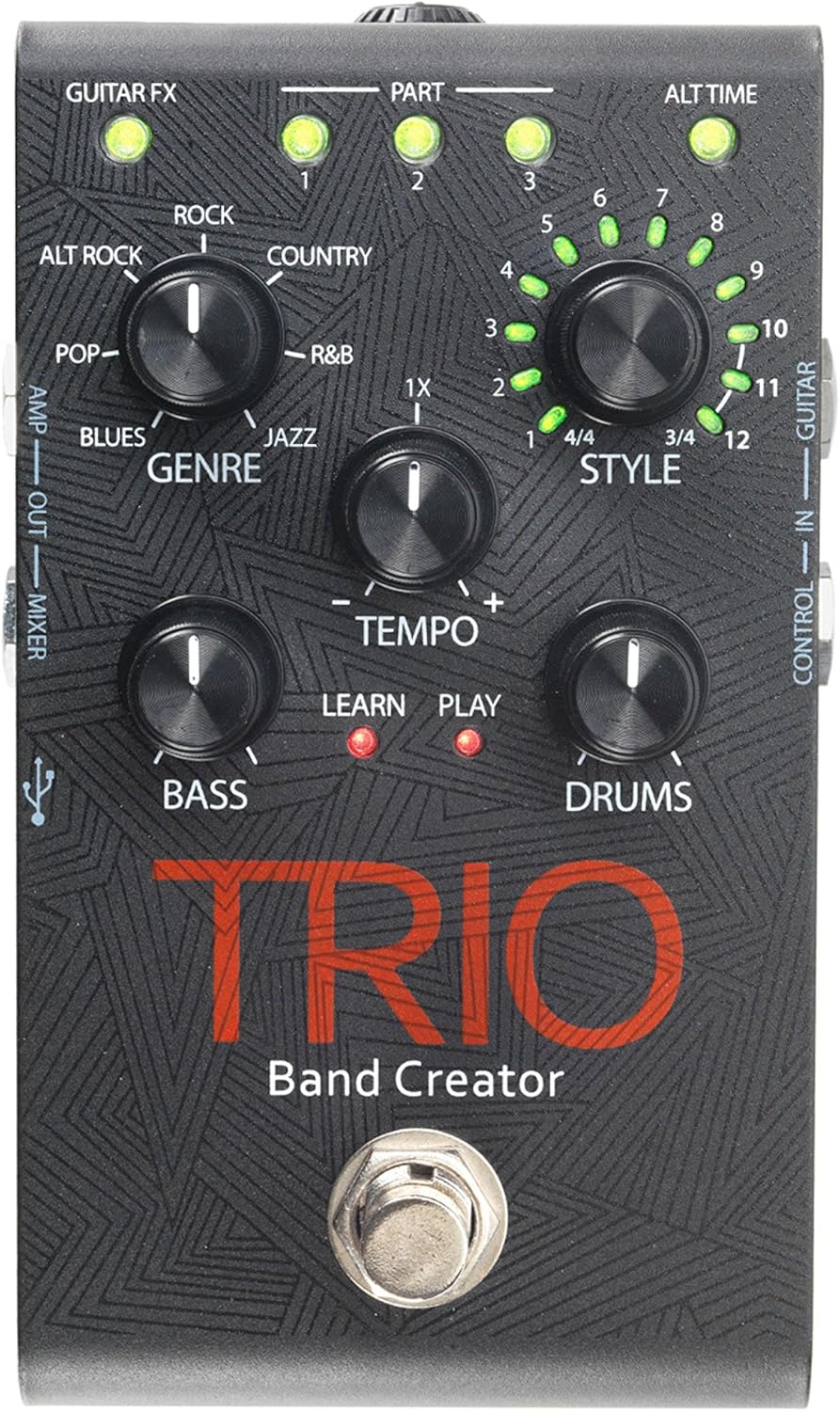
Figura 1: Top view of the DigiTech TRIO pedal, showing the main controls and footswitch.
Udhëzimet e funksionimit
Basic Operation: Teaching the TRIO a Song
- Shtypni BAND footswitch once to enter 'Listen' mode. The MËSOJMË LED do të ndizet.
- Play your desired chord progression and rhythm clearly. The TRIO will analyze your playing.
- Shtypni BAND footswitch again to stop 'Listen' mode. The LUAJ LED will illuminate, and the TRIO will immediately begin playing generated bass and drum parts.
- You can now play along with your virtual band.
Genre and Style Selection
- Përdorni ZHANRI knob to select from Blues, Pop, Alternative Rock, Rock, Country, R&B, and Jazz. The genre affects the overall feel of the generated bass and drum parts.
- Përdorni STILI knob to choose from twelve different song styles available for each genre. This allows for further customization of the rhythm and feel.
- Të ALT TIME button allows you to switch between 3/4 and 4/4 time signatures.
Looping and Song Parts
- The TRIO can learn up to 3 different song parts. To record a new part, select an empty PJESA slot (1, 2, or 3) using the corresponding buttons.
- Follow the 'Basic Operation' steps to teach the TRIO the new song part.
- During playback, you can switch between learned song parts on-the-fly by pressing the corresponding PJESA butonin.
- Të LOOPER footswitch allows you to record and playback your own guitar loops. Press once to start recording, press again to stop recording and start playback, and press and hold to clear the loop.
Adjusting Levels and Tempo
- Të TEMPO knob adjusts the playback speed of the band and loops.
- Të BASS knob controls the volume level of the generated bass line.
- Të BATORËT knob controls the volume level of the generated drum track.
- Të LAKU knob controls the volume level of your recorded guitar loop.

Figura 2: Kënduar view of the DigiTech TRIO pedal, highlighting the control knobs and input/output jacks.
Kontrollet dhe Lidhjet
The DigiTech TRIO pedal features a user-friendly layout with clearly labeled controls and versatile connection options:
Kontrollet e panelit të përparmë:
- GUITAR FX: Activates built-in guitar effects tailored to the selected genre.
- PART 1, 2, 3: Buttons to select and recall different learned song parts.
- ALT TIME: Toggles between 3/4 and 4/4 time signatures.
- TEMPO Knob: Adjusts the overall playback speed.
- GENRE Knob: Selects the musical genre (Blues, Pop, Alt Rock, Rock, Country, R&B, Jazz).
- STYLE Knob: Selects one of twelve styles within the chosen genre.
- LOOP Knob: Controls the volume of your recorded guitar loop.
- Doreza BASS: Controls the volume of the generated bass line.
- DRUMS Knob: Controls the volume of the generated drum track.
- LOOPER Footswitch: Records/plays/clears guitar loops.
- BAND Footswitch: Enters 'Listen' mode to learn chords/rhythm, or starts/stops band playback.
Side and Rear Panel Connections:
- KITARË NË: 1/4-inch input for your electric guitar.
- AMP JASHTË: 1/4-inch output to your guitar ampmë i gjallë
- MIXER OUT: 1/4-inch output for connecting to a mixer or PA system.
- HEADPHONI JASHT: 1/8-inch stereo output for headphones.
- KONTROLLI NË: 1/4-inch input for optional DigiTech FS3X Footswitch.
- FUQIA: 9V DC input for the included power supply.
- USB: Mini-USB port for firmware updates.

Figura 3: E pasme view of the DigiTech TRIO pedal, showing the power input and headphone jack.
Specifikimet
| Veçori | Detaj |
|---|---|
| Pesha e artikullit | 10.6 ons (0.3 kg) |
| Dimensionet e produktit | 4.63 x 3.19 x 2.13 inç (11.76 x 8.10 x 5.41 cm) |
| Numri i modelit të artikullit | TRIO |
| Bateritë | 1 9V battery required (for internal use, not primary power) |
| Ndërfaqja e harduerit | Audio 1/4 inç |
| Formati i sinjalit | Analoge |
| Burimi i energjisë | Corded Electric (9V DC adapter included) |
| Vëlltage | 9 volt |
| Amptërbim | 300 milionamps |
Mirëmbajtja
- Mbajeni pedalin të pastër duke e fshirë me një leckë të butë dhe të thatë. Shmangni përdorimin e pastruesve ose tretësve gërryes.
- Ruajeni pedalin në një vend të freskët dhe të thatë, larg rrezeve të diellit dhe temperaturave ekstreme.
- Sigurohuni që të gjitha kabllot të jenë të lidhura mirë për të parandaluar humbjen ose dëmtimin e sinjalit.
- Shmangni rënien e pedalit ose nënshtrimin e tij ndaj goditjeve të forta.
Zgjidhja e problemeve
- Nuk ka zë: Kontrolloni të gjitha lidhjet e kabllove (kitarë, amp, power). Ensure the pedal is powered on and the volume knobs are not set to zero.
- Cilësi e dobët e zërit: Verifikoni që instrumenti juaj dhe amplifier are functioning correctly. Check for damaged cables.
- Band Not Generating Correctly: Ensure you are playing clear, distinct chords during the 'Listen' phase. Try different genres and styles to see if a different setting better interprets your playing.
- Footswitch Unresponsive: Disconnect and reconnect the power supply. If using an optional FS3X footswitch, ensure it is properly connected.
Garancia dhe Mbështetja
Për informacion mbi garancinë dhe mbështetjen teknike, ju lutemi referojuni faqes zyrtare të DigiTech webfaqen e internetit ose kontaktoni shërbimin e tyre ndaj klientit. Ruajeni provën e blerjes për kërkesat e garancisë.


