1. Hyrje
This instruction manual provides essential information for the safe and effective use of your Canon EOS 5DS R Digital SLR camera. Please read this manual thoroughly before using the camera and retain it for future reference.

Figura 1: Përpara view of the Canon EOS 5DS R camera body, highlighting the EF lens mount and the Canon branding.
2. Konfigurimi
2.1. Shpaketimi dhe inspektimi fillestar
Carefully unpack your Canon EOS 5DS R camera and verify that all components are present. If any items are missing or damaged, contact your retailer.
Komponentët e përfshirë:
- EOS 5DS R Body
- Paketa e baterisë LP-E6N
- Karikuesi i baterisë LC-E6
- Kupa e syrit Pg
- Wide Strap EW-EOS5DSR
- Kabllo Ndërfaqeje IFC-150U
- Mbrojtësi i kabllove
- Kartë Garancie e Kufizuar Njëvjeçare
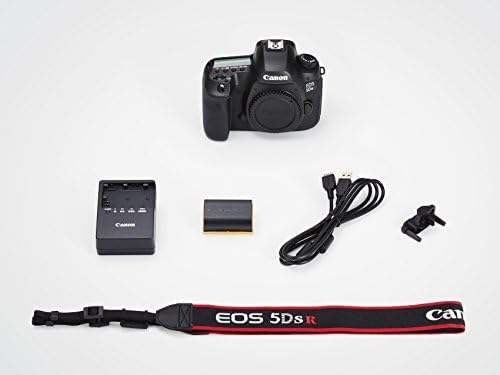
Figura 2: The image illustrates the standard contents included with the Canon EOS 5DS R camera: the camera body, LP-E6N battery pack, LC-E6 battery charger, Eyecup Eg, EW-EOS5DSR wide strap, IFC-150U interface cable, and cable protector.
2.2. Ngarkimi i baterisë
Insert the LP-E6N battery pack into the LC-E6 battery charger. Plug the charger into a power outlet. The charging indicator will illuminate, changing color to indicate charging status. A fully discharged battery typically takes approximately 2 hours to charge.
2.3. Futja e një karte memorie
The EOS 5DS R supports CF (Type I, UDMA compatible) and SD/SDHC/SDXC (UHS-I compatible) memory cards. Open the memory card slot cover, insert the card(s) until they click into place, and then close the cover. Shënim: MultiMediaCards (MMC) are not supported and will result in a card error.
2.4. Vendosja e një lenteje
Align the red or white index mark on the lens with the corresponding mark on the camera's lens mount. Turn the lens clockwise until it clicks into place. To detach, press the lens release button and turn the lens counter-clockwise.
3. Përdorimi i Kamerës
3.1. Ndezja/Fikur
To power on the camera, set the power switch to the 'ON' position. To power off, set the switch to 'OFF'.

Figura 3: Një nga lart-poshtë view of the Canon EOS 5DS R camera, illustrating the mode dial, control buttons, and the monochrome LCD panel for quick settings review.
3.2. Sensor and Low-Pass Filter
The EOS 5DS R features a newly designed 50.6 Megapixel full-frame CMOS sensor. This model includes a Low-Pass Filter (LPF) effect cancellation function, which maximizes the sensor's resolving power for even higher resolution images. This design choice may increase the possibility of moiré and color artifacts when photographing fine, repeating patterns.
3.3. Shutter and Mirror Control
The camera incorporates an advanced mirror control mechanism and user-selectable shutter release time lag settings. These features are designed to allow mirror and shutter vibrations to dissipate before exposure, enhancing image sharpness, especially with the high-resolution sensor.
3.4. Autofocus (AF) System
The EOS 5DS R utilizes a 61-Point High Density Reticular AF system, including up to 41 cross-type AF points. The EOS Scene Detection System, featuring a 150,000-pixel RGB+IR Metering Sensor, supports Canon's Intelligent Tracking and Recognition (iTR AF) system for improved subject tracking and AF precision.
3.5. Qitje e vazhdueshme
The camera supports high-speed continuous shooting at up to 5.0 frames per second, capturing full 50.6 Megapixel images.
3.6. Cropping Function
For still photography, the camera offers 1.3x (APS-H, approx. 30.5 Megapixels) and 1.6x (APS-C, approx. 19.6 Megapixels) crop shooting options. This feature can extend the effective range of telephoto lenses and improve subject tracking with AF points covering almost the entire cropped frame. Aspect ratios can also be defined, including 1:1, 4:3, and 16:9, in addition to the default 3:2.
3.7. Inteligjente Viewfinder II
Inteligjenti Viewfinder II displays approximately 100% of the composition and can show various settings such as shooting mode, exposure level, white balance, drive mode, AF operation, metering mode, and recording format. An electronic level and customizable grid lines are also available.
3.8. E qartëView LCD II Monitor
E tejdukshme 3.2 inçësheView LCD II monitor features 1,040,000 dots and an anti-reflective construction for clear viewing in various conditions. It is used for reviewing settings, images, and Live View shooting. A dedicated Magnify/Reduce button allows zooming in or out (up to 16x) for image review.
3.9. Quick Control Screen
The camera includes a customizable Quick Control screen, allowing users to quickly access and modify critical settings. Features displayed, their location, and size on the screen can be adjusted to suit individual preferences.
3.10. Regjistrimi i filmit
The EOS 5DS R supports Full HD movie recording at 30p with various manual controls. The shutter button can be programmed to capture still images during movie shooting.
Compression Methods:
- ALL-I: Compresses each frame individually, suitable for editing and frame extraction. File sizes are larger.
- IPB: Compresses frames by referencing previous and next frames, offering higher compression for longer recording times.
Recording Sizes and Approximate Times (with 16GB Card):
| Rezolucioni | Shpejtësia e kornizës | Kompresimi | Approx. Time (16GB) |
|---|---|---|---|
| 1920x1080 (HD e plotë) | 29.97/25.00/23.98 fps | ALL-I | 23 min. |
| 1920x1080 (HD e plotë) | 29.97/25.00/23.98 fps | IPB | 1 pasdite. 7 min. |
| 1280x720 (HD) | 59.94/50.00 fps | ALL-I | 26 min. |
| 1280x720 (HD) | 59.94/50.00 fps | IPB | 1 pasdite. 17 min. |
| 640x480 (VGA) | 29.97/25.00 fps | IPB | 3 pasdite. 14 min. |
Movie shooting will automatically stop if the recording time reaches 29 minutes and 59 seconds. There is no 4 GB file size limit for automatic stopping.
Time Lapse Movie Function:
The camera includes a time-lapse movie feature that captures still photos at set intervals and combines them into a silent movie. This function allows for in-camera creation of professional-quality time-lapse videos without the need for external software.
4. Mirëmbajtja
To ensure the longevity and optimal performance of your Canon EOS 5DS R camera, regular maintenance is recommended.
4.1. Pastrimi
- Trupi i kamerës: Përdorni një leckë të butë dhe të thatë për të fshirë trupin e kamerës. Për papastërti kokëfortë, një leckë pak e thatëamp Mund të përdoret një leckë, e më pas një leckë e thatë.
- Lente: Use a lens blower brush to remove dust, then gently wipe with a microfiber lens cloth. For smudges, use a specialized lens cleaning solution.
- Sensori: Sensor cleaning should be performed with extreme care. Refer to the detailed instructions in the full user manual or consult a professional service center.
4.2. Magazinimi
When not in use, store the camera in a cool, dry, and well-ventilated area, away from direct sunlight and extreme temperatures. Remove the battery if storing for extended periods.
5. Troubleshooting
This section addresses common issues you might encounter with your Canon EOS 5DS R camera.
5.1. Card Error Displayed
If a "card error" message appears, ensure you are using a compatible CF (Type I) or SD/SDHC/SDXC memory card. MultiMediaCards (MMC) are not supported by this camera. Reinsert the card or try a different compatible card.
5.2. Moiré or Color Artifacts in Images
The EOS 5DS R features LPF (Low-pass filter) effect cancellation to maximize resolution. This design may increase the possibility of moiré and color artifacts, particularly when photographing subjects with fine, repeating patterns. If this occurs, try adjusting your shooting angle or focus slightly. Post-processing software can also help mitigate these effects.
5.3. Kamera nuk ndizet
Check if the battery is properly inserted and fully charged. Ensure the power switch is in the 'ON' position. If the issue persists, try using a different charged battery.
6. Specifikimet
| Veçori | Specifikimi |
|---|---|
| Dimensionet e produktit | 5.98 x 2.99 x 4.57 inç |
| Pesha e artikullit | 1.86 paund |
| ASIN | B00T3ERT5S |
| Numri i modelit të artikullit | 0582C002 |
| Bateritë | Kërkohet 1 bateri litium-jon (e përfshirë) |
| Data e parë e disponueshme | 4 shkurt 2015 |
| Prodhuesi | Kamera Canon SHBA |
| Montime të pajtueshme | Canon EF |
| Raporti i pamjes | 16:9 (for video), 3:2 (default for stills) |
| Teknologjia e sensorit të fotove | CMOS |
| Mbështetur File Formati | JPEG (Exif v2.3, DPOF v2.0), Raw (Canon CR2, 14-bit) |
| Stabilizimi i imazhit | No (lens-based stabilization may be available) |
| Zmadhimi optik | 1x (depends on lens) |
| Hapja maksimale | 3.5 Millimeters (depends on lens) |
| Minimumi ISO i zgjeruar | 50 |
| Përshkrimi i matjes | Multi, Center-weighted, Spot, Partial |
| Markë | Canon |
7. Garancia dhe Mbështetja
7.1. Informacioni i garancisë
Your Canon EOS 5DS R camera includes a One Year Limited Warranty Card. Please refer to the warranty card for specific terms and conditions regarding coverage and service.
7.2. Additional Support Resources
- Software: The EOS Utility Webcam Beta Software (Mac and Windows) can be used to turn your compatible Canon camera into a high-quality webqelqi.
- Transferimi me valë: Connectivity to Canon's WFT-E7 (Version 2) is available for wireless transfer and Wi-Fi compatibility.
- Digital Solution Disc: A Canon EOS 5DSR CD (Digital Solution Disc) may be included for software and drivers.
- Burimet në internet: Visit the official Canon support website for updated drivers, firmware, and additional troubleshooting guides.

Figura 4: This image displays the left side of the Canon EOS 5DS R camera, showing the protective covers for the USB 3.0 and HDMI output ports, along with the microphone input. The USB 3.0 digital terminal facilitates fast data transfer to PCs and printers.


