1. Hyrje
This manual provides detailed instructions for the setup, operation, and maintenance of your EMOS E0114 Digital Thermometer and Hygrometer. This device accurately measures indoor temperature and humidity, and also functions as a quartz clock with an alarm, snooze feature, and date display. Please read this manual thoroughly before using the product to ensure correct operation and to prevent damage.
2. Informacion mbi sigurinë
- Mbajeni pajisjen larg temperaturave ekstreme, rrezeve të diellit direkte dhe lagështisë së lartë.
- Mos e ekspozoni pajisjen ndaj ujit ose lëngjeve të tjera.
- Mos u përpiqni ta çmontoni ose modifikoni pajisjen. Kjo do ta anulojë garancinë.
- Hidhni bateritë e përdorura me përgjegjësi, sipas rregullave lokale.
- Mbani bateritë jashtë mundësive të fëmijëve.
3. Përmbajtja e paketës
Ju lutemi kontrolloni përmbajtjen e paketimit kur ta shpaketoni:
- EMOS E0114 Digital Thermometer and Hygrometer
- Manuali i Përdoruesit
Note: 1 AA Mignon 1.5 V battery is required and not included in the package.

Figure 3.1: EMOS E0114 device in its retail packaging.
4. Produkti i Mbaruarview
Familiarize yourself with the components of your EMOS E0114 device.
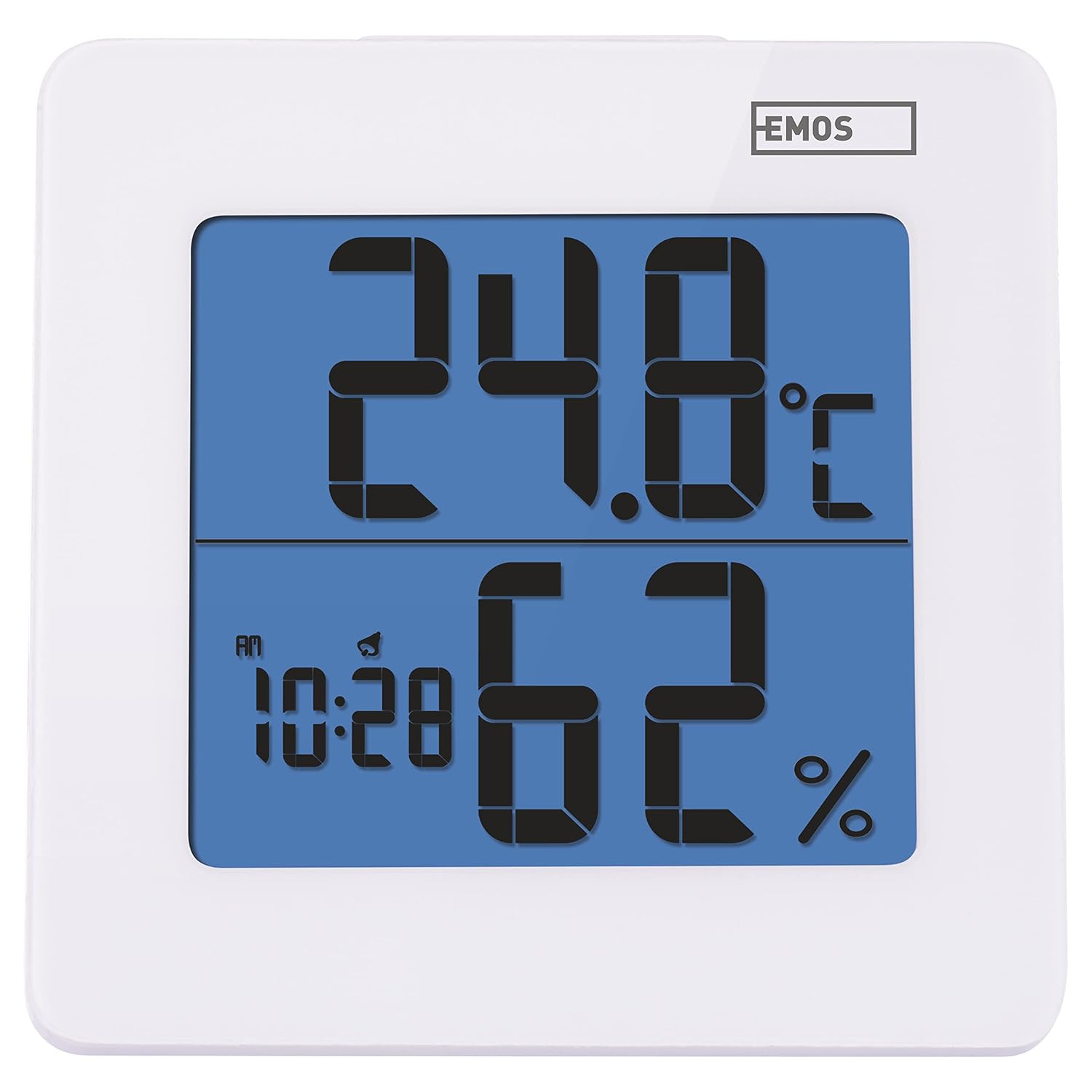
Figura 4.1: Përpara view of the EMOS E0114 display, showing temperature, humidity, and time.

Figura 4.2: Mbrapa view of the EMOS E0114, highlighting the control buttons and battery compartment.
Butonat e kontrollit:
- MODI: Switches between time display, alarm setting, and date setting.
- LART: Increases values during setting, activates/deactivates alarm.
- MEM: Displays maximum and minimum temperature/humidity records.
- C/F: Kalon midis njësive të temperaturës Celsius dhe Fahrenheit.
- Rivendosni: Rivendos pajisjen në standardet e fabrikës.
- SNOOZE/LIGHT (Top Bar): Activates snooze function during alarm, illuminates the display backlight.
5. Konfigurimi
5.1 Instalimi i baterisë
- Gjeni ndarjen e baterisë në pjesën e pasme të pajisjes (shihni Figurën 4.2).
- Hapni kapakun e ndarjes së baterisë.
- Insert one (1) AA Mignon 1.5 V battery, ensuring correct polarity (+/-).
- Mbyllni mirë kapakun e ndarjes së baterisë.
5.2 Ndezja fillestare
Upon battery installation, the device will power on automatically and display the current time (default 12:00 AM), temperature, and humidity. The backlight will briefly illuminate.
6. Udhëzimet e funksionimit
6.1 Vendosja e orës dhe datës
- Në modalitetin normal të shfaqjes së kohës, shtypni MODE Shtypni butonin një herë për të hyrë në modalitetin e vendosjes së kohës. Shifrat e orës do të pulsojnë.
- Përdorni UP butoni për të rregulluar orën.
- Shtypni MODE again to set the minutes. The minute digits will flash. Use the UP butonin për të rregulluar minutat.
- Shtypni MODE again to set the year. The year digits will flash. Use the UP butonin për të rregulluar vitin.
- Vazhdoni të shtypni MODE to set the month and then the day, adjusting each with the UP butonin.
- Pasi të keni vendosur ditën, shtypni MODE to exit setting mode and return to normal time display.
6.2 Vendosja e alarmit
- Në modalitetin normal të shfaqjes së kohës, shtypni MODE button twice to enter alarm setting mode. The alarm time will be displayed, and the hour digits will flash.
- Përdorni UP butoni për të rregulluar orën e alarmit.
- Shtypni MODE again to set the alarm minutes. The minute digits will flash. Use the UP butonin për të rregulluar minutat e alarmit.
- Shtypni MODE për të dalë nga modaliteti i vendosjes së alarmit.
- Për të aktivizuar ose çaktivizuar alarmin, shtypni butonin UP button once in normal time display mode. An alarm icon will appear on the display when activated.
6.3 Using Snooze and Backlight
- Kur të bjerë alarmi, shtypni Rrëmbej / LEHTA bar on top of the device to activate the snooze function. The alarm will pause for approximately 5 minutes and then sound again.
- To turn off the alarm completely, press any other button (MODE, UP, MEM, C/F) on the back of the device.
- Shtypni Rrëmbej / LEHTA bar at any time to briefly illuminate the display backlight for better visibility in low light conditions.
6.4 Ndërrimi i Njësive të Temperaturës (°C/°F)
Në modalitetin normal të shfaqjes, shtypni C / F button on the back of the device to toggle between Celsius (°C) and Fahrenheit (°F) temperature readings.
6.5 Viewing Maximum and Minimum Records
The device stores the maximum and minimum temperature and humidity values recorded since the last reset or battery change.
- Shtypni MEM Shtypni butonin një herë për të shfaqur temperaturën dhe lagështinë maksimale të regjistruar.
- Shtypni MEM button again to display the minimum recorded temperature and humidity.
- Shtypni MEM a third time to return to the current temperature and humidity display.
- To clear the maximum/minimum records, press and hold the MEM butonin për rreth 3 sekonda ndërsa viewduke i regjistruar.
7. Mirëmbajtja
7.1 Pastrimi
- Fshijeni pajisjen me një leckë të butë dhe të thatë.
- Do not use abrasive cleaners, solvents, or chemical agents, as these may damage the display or casing.
7.2 Ndërrimi i baterisë
When the display becomes dim or the device stops functioning, it is time to replace the battery.
- Hapni kapakun e ndarjes së baterisë në pjesën e pasme të pajisjes.
- Hiqni baterinë e vjetër AA.
- Insert a new AA Mignon 1.5 V battery, observing correct polarity.
- Mbyllni kapakun e ndarjes së baterisë.
- You may need to reset the time and date after battery replacement.
8. Troubleshooting
| Problem | Shkaku i mundshëm | Zgjidhje |
|---|---|---|
| Pa ekran ose ekran i zbehtë | Bateri e ulët ose e fikur; instalim i gabuar i baterisë. | Replace the battery with a new AA 1.5V battery. Ensure correct polarity. |
| Ora/data e gabuar | Time/date not set correctly after battery installation or reset. | Follow instructions in Section 6.1 to set the time and date. |
| Temperature/humidity readings seem inaccurate | Device placed in an unsuitable location (e.g., near heat source, vent, direct sunlight). | Relocate the device to a stable indoor environment away from direct influences. Allow 30 minutes for readings to stabilize. |
| Alarmi nuk bie | Alarmi nuk është aktivizuar. | Ensure the alarm icon is visible on the display (refer to Section 6.2). |
| Pajisja nuk përgjigjet | Defekt i përkohshëm elektronik. | Shtypni RISET button on the back of the device using a thin object (e.g., paperclip). Note: This will clear all settings. |
9. Specifikimet
- Modeli: E0114
- Marka: EMOS
- Diapazoni i Matjes së Temperaturës: 0 ° C deri +50 ° C (32 ° F deri 122 ° F)
- Rezolucioni i temperaturës: 0.1 °C / 0.1 °F
- Gama e matjes së lagështisë: 20% deri në 90% Lagështia relative (RH)
- Rezolucioni i lagështisë: 1% RH
- Ora: Quartz with 12/24 hour format
- Alarmi: Yes, with Snooze function
- Shfaq: LCD me dritë të pasme
- Funksioni i memories: Temperatura dhe lagështia maksimale/minimale
- Furnizimi me energji elektrike: 1 x AA Mignon 1.5 V battery (not included)
- Dimensionet (J x P x H): 3.7 x 9.3 x 9.3 cm (afërsisht 1.46 x 3.66 x 3.66 inç)
- Dimensionet e ekranit: 60 x 65 mm (approximately 2.36 x 2.56 inches)
- Pesha: 109 gramë (afërsisht 3.84 ons)
- Lloji i montimit: Wall mountable (integrated stand)
- Ngjyra: White (with blue display backlight)

Figure 9.1: Dimensions of the EMOS E0114 device.
10. Garancia dhe Mbështetja
EMOS products are designed for reliability and performance. For warranty information or technical support, please refer to the warranty card included with your purchase or visit the official EMOS webfaqe interneti. Ju lutemi ruani provën e blerjes për çdo kërkesë garancie.


