1. Hyrje
The Microsoft Surface 3 is a versatile 10.8-inch tablet designed for productivity and portability. Running on Windows 10 and powered by an Intel Atom processor, it offers a full PC experience in a compact form factor. This manual provides essential information for setting up, operating, maintaining, and troubleshooting your device.

Image: Microsoft Surface 3 Tablet with an attached red Type Cover keyboard and a silver Surface Pen. The screen displays a colorful image with digital annotations, demonstrating its versatility.
2. Çfarë ka në kuti
Upon unboxing your Microsoft Surface 3, verify that all standard components are present:
- Microsoft Surface 3 Tablet
- Power Supply Unit (Charger)
- Udhëzues i shpejtë për fillimin (nëse përfshihet)
Shënim: The Surface Pen and Type Cover keyboard are optional accessories and are typically sold separately. Ensure you have these if your purchase included them.
3. Pajisja Mbaroiview
Familiarize yourself with the physical features and ports of your Surface 3 tablet.
3.1 Porta dhe Butona
- Porta USB 3.0: Për lidhjen e pajisjeve USB siç janë disqet e jashtme, mausët ose tastierat.
- Porta e karikimit Micro USB: Përdoret për karikimin e pajisjes.
- Mini DisplayPort: Për t'u lidhur me ekrane ose projektorë të jashtëm.
- Jack kufje: Për dalje audio në kufje ose altoparlantë të jashtëm.
- Vendi i kartës MicroSD: For expanding storage with a microSDXC card.
- Butonat e volumit: Për të rregulluar nivelet e audios.
- Butoni i energjisë: Për ta ndezur/fikur pajisjen ose për ta vendosur në gjendje gjumi.
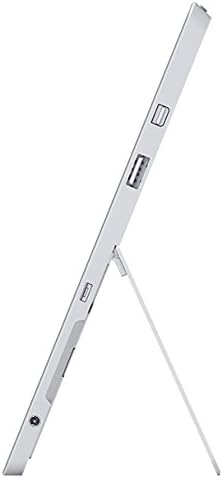
Imazh: Ana view of the Microsoft Surface 3, illustrating the various ports including USB, Mini DisplayPort, and the kickstand in an open position.

Imazh: Nga afër view of the microSD card slot on the Microsoft Surface 3, with a microSD card partially inserted, demonstrating storage expansion capability.
3.2 Kamerat
- Kamera e pasme: 8 MP for capturing photos and videos.
- Kamera e përparme: 3.5 MP për video thirrje dhe selfie.
4. Konfigurimi
4.1 Ngarkesa fillestare
Before first use, connect the Surface 3 to the power supply using the Micro USB charging port and allow it to charge fully. The battery indicator on the screen will show charging status.
4.2 Powering On and Windows Setup
- Shtypni dhe mbani shtypur Butoni i energjisë until the Microsoft logo appears on the screen.
- Follow the on-screen prompts to complete the Windows 10 setup process. This includes selecting your language, connecting to a Wi-Fi network, and creating or signing in with a Microsoft account.
- Allow the system to download and install any pending updates for optimal performance and security.
4.3 Attaching Optional Accessories
- Lloji i Mbulesës: Align the Type Cover with the magnetic connector at the bottom edge of the Surface 3 until it clicks into place.
- Stilolapsi Sipërfaqësor: The Surface Pen can be magnetically attached to the side of the Surface 3 for storage. For initial pairing, follow the instructions provided with the pen or in Windows settings.
5. Operative
5.1 Lundrimi
- Ekran me prekje: Use gestures like tap, swipe, pinch-to-zoom for navigation.
- Stilolapsi Sipërfaqësor: Use the pen for precise input, drawing, writing, and annotating.
- Type Cover (Optional): Provides a traditional keyboard and trackpad experience.

Image: Microsoft Surface 3 in use with a Type Cover keyboard and Surface Pen, displaying a Windows 10 interface with various applications.
5.2 Windows 10 Features
- Menuja e fillimit: Qasuni te aplikacionet, cilësimet dhe opsionet e energjisë.
- Qendra e Veprimit: Swipe from the right edge of the screen to access quick settings and notifications.
- Detyrë View: View open applications and virtual desktops.
- Modaliteti i tabletit: Switch to Tablet Mode for a touch-optimized interface.
5.3 Lidhja me Wi-Fi
- Hapni Qendra e Veprimit by swiping from the right edge of the screen or clicking the icon in the taskbar.
- Prekni Wi-Fi ikonën.
- Zgjidhni rrjetin e dëshiruar nga lista dhe futni fjalëkalimin nëse ju kërkohet.
6. Mirëmbajtja
6.1 Pastrimi
- Përdorni një leckë të butë, pa garzë dampened with water or a screen cleaner specifically designed for electronics to clean the screen.
- Shmangni kimikatet e ashpra, materialet gërryese ose lagështinë e tepërt.
- Clean the device exterior with a soft, dry cloth.
6.2 Përditësimet e softuerit
Kontrolloni dhe instaloni rregullisht përditësimet e Windows për t'u siguruar që pajisja juaj ka përditësimet më të fundit të sigurisë dhe përmirësimet e performancës. Shkoni te Cilësimet > Përditësimi dhe Siguria > Përditësimi i Windows.
6.3 Kujdesi për baterinë
- Shmangni temperaturat ekstreme, pasi ato mund të dëmtojnë jetëgjatësinë e baterisë.
- For optimal battery longevity, avoid consistently draining the battery to 0% or keeping it at 100% for extended periods.
- The Surface 3 has an average battery life of up to 8 hours under typical usage conditions.
7. Troubleshooting
7.1 Pajisja nuk ndizet
- Ensure the device is charged. Connect the power supply and wait a few minutes before attempting to power on again.
- Perform a force restart by holding the Butoni i energjisë for 10-15 seconds, then release and press it again briefly.
7.2 Probleme me Lidhjen Wi-Fi
- Toggle Wi-Fi off and on in the Action Center.
- Restart your Surface 3 and your Wi-Fi router.
- Ensure you are within range of the Wi-Fi network and have the correct password.
7.3 Performancë e ngadaltë
- Mbyllni aplikacionet e panevojshme që funksionojnë në sfond.
- Kontrolloni dhe instaloni çdo përditësim në pritje të Windows.
- Sigurohuni që të keni hapësirë të mjaftueshme të lirë për ruajtje.
8. Specifikimet
| Veçori | Detaj |
|---|---|
| Numri i modelit | 7G6-00014 |
| Madhësia e ekranit | 10.8 inç |
| Rezolucioni i ekranit | 1920x1280 pikselë |
| Përpunues | Intel Atom x7-Z8700 (2.4 GHz) |
| RAM | 4 GB |
| Magazinimi | 128 GB SSD |
| Sistemi Operativ | Windows 10 |
| Bashkëprocesor grafik | Quad-core Intel Atom x7-Z8700 processor |
| Lloji me valë | 802.11ac Wi-Fi, Bluetooth 4.0 |
| Portet USB | 1x USB 2.0, 1x USB 3.0 |
| Jetëgjatësia mesatare e baterisë | 8 orë |
| Pesha e artikullit | 1.37 paund |
| Dimensionet e produktit | 14.02 x 8.64 x 1.58 inç |
| E pasme WebRezolucioni i kamerës | 8 MP |
| Përpara WebRezolucioni i kamerës | 3.5 MP |
9. Garancia dhe Mbështetja
Your Microsoft Surface 3 Tablet is covered by a limited manufacturer's warranty. For detailed warranty information, including terms and conditions, please refer to the documentation provided with your purchase or visit the official Microsoft support webfaqe.
For technical assistance, software updates, and additional resources, please visit the official Microsoft Support website or contact their customer service. Keep your device's serial number (located on the back of the tablet or in Windows settings) readily available when seeking support.