1. Hyrje
This manual provides detailed instructions for the installation, operation, and maintenance of your Alpine CDE-163BT Advanced Bluetooth CD Receiver. Please read this manual thoroughly before using the unit to ensure proper operation and to prevent damage. Keep this manual for future reference.
The Alpine CDE-163BT is a versatile car stereo receiver featuring advanced Bluetooth connectivity for hands-free calling and audio streaming, CD playback, USB input, and FM/AM tuner capabilities. It is designed to deliver high-quality audio performance and user-friendly control.
2. Konfigurimi dhe instalimi
2.1 Përmbajtja e paketës
Para fillimit të instalimit, sigurohuni që të gjithë përbërësit të jenë të pranishëm:
- Alpine CDE-163BT Head Unit
- Lidhja e instalimeve elektrike
- Mounting Sleeve and Trim Ring
- Microphone for Bluetooth Hands-Free Calling
- Manuali i Pronarit (ky dokument)
- Pajisjet e montimit (vida, kllapa)
2.2 Diagrami i instalimeve elektrike
Refer to the wiring diagram provided with the unit's installation guide for specific connections. Key connections include:
- Fuqia: Yellow (constant 12V), Red (switched 12V), Black (ground).
- Folësit: White/White-Black (Front Left), Gray/Gray-Black (Front Right), Green/Green-Black (Rear Left), Purple/Purple-Black (Rear Right).
- Antena: Blue (power antenna/amplifier remote turn-on).
- Mikrofoni: Connect the supplied microphone to the dedicated input for hands-free calling.
Kujdes: Incorrect wiring can cause damage to the unit or vehicle's electrical system. If you are unsure about any wiring connections, consult a qualified professional installer.
2.3 Ndezja fillestare
Pas instalimit, ndizni ndezjen e automjetit tuaj. Njësia duhet të ndizet. Ndiqni çdo kërkesë në ekran për konfigurimin fillestar, siç është zgjedhja e gjuhës ose vendosja e orës.
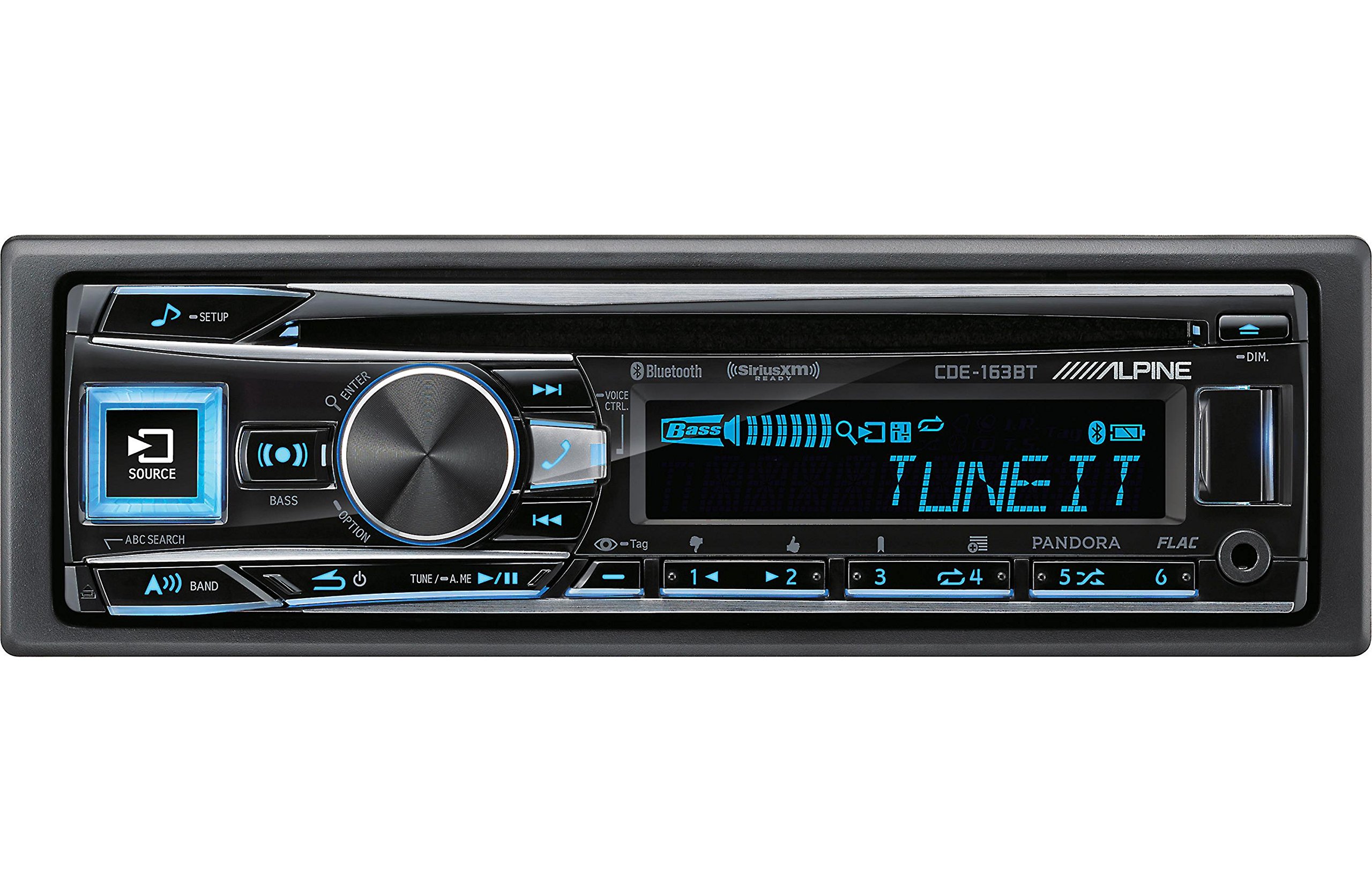
Figure 2.3.1: Front panel of the Alpine CDE-163BT receiver. This image displays the main controls, including the large rotary knob, source button, setup button, and display screen showing "TUNEIT" and "Bass" indicators.
3. Operacioni
3.1 Front Panel Controls Overview
Familiarize yourself with the main controls on the front panel:
Figura 3.1.1: E detajuar view of the Alpine CDE-163BT front panel. Key controls include the SOURCE button (left, illuminated), SETUP button (top left), large central rotary knob for volume and selection, BASS/OPTION button, VOICE CTRL button, and various preset/track skip buttons along the bottom.
- Butoni BURIMI: Selects the audio source (CD, Tuner, USB, Bluetooth Audio, AUX).
- Butoni SETUP: Accesses the main setup menu for system adjustments.
- Rotary Knob (Volume/ENTER): Turns to adjust volume. Press to confirm selections in menus.
- BASS/OPTION Button: Provides quick access to bass settings or other options depending on the current mode.
- VOICE CTRL Button: Activates voice control features on connected smartphones.
- Butoni BAND: Switches between FM1, FM2, FM3, and AM bands in tuner mode.
- TUNE/A.ME/II Buttons: Used for manual tuning, auto memory, and play/pause functions.
- Track Skip/Preset Buttons (1-6): Used for skipping tracks or selecting radio presets.
- Butoni DIM: Rregullon ndriçimin e ekranit.
3.2 Power On/Off and Source Selection
- Për të kthyer njësinë ON, press any button (e.g., SOURCE or the Rotary Knob).
- Për të kthyer njësinë FAKT, press and hold the power button (often integrated with the TUNE/A.ME button).
- Shtypni BURIMI button repeatedly to cycle through available audio sources: CD, Tuner, USB, Bluetooth Audio, AUX.
3.3 Kontrolli i volumit
Rotate the large central Knob rrotullues në drejtim të akrepave të orës për të rritur volumin dhe në drejtim të kundërt të akrepave të orës për të ulur volumin.
3.4 Cilësimet e audios
Shtypni BASS/OPTION button or navigate through the SETUP menu to adjust audio settings such as Bass, Treble, Balance (left/right), and Fader (front/rear). Use the Rotary Knob to adjust values and press it to confirm.
3.5 Radio Operation (FM/AM Tuner)
- Select "Tuner" as the source using the BURIMI butonin.
- Shtypni BAND butonin për të kaluar midis bandave FM1, FM2, FM3 dhe AM.
- Akordimi manual: Shtypni AKTONI buttons (◀ / ▶) to manually tune frequencies.
- Kërkoni Akordimin: Shtypni dhe mbani shtypur AKTONI butonat për të kërkuar automatikisht stacionin tjetër me frekuencë të fortë.
- Stacionet e paracaktuara: To store a station, tune to the desired frequency, then press and hold one of the numbered preset buttons (1-6) until you hear a beep. To recall a preset, simply press the corresponding numbered button.
3.6 Riprodhimi i CD-ve
- Vendosni një CD në vendin e diskut. Njësia do të kalojë automatikisht në burimin e CD-së dhe do të fillojë riprodhimin.
- Use the ◀ / ▶ buttons to skip tracks.
- Shtypni TUNE/A.ME/II button for Play/Pause.
- Shtypni ABC SEARCH button to search for tracks by name.
3.7 Lidhshmëria Bluetooth
The CDE-163BT features built-in Bluetooth for hands-free calling and audio streaming.
3.7.1 Çiftimi i një pajisjeje Bluetooth
- Sigurohuni që Bluetooth është i aktivizuar në pajisjen tuaj celulare.
- On the CDE-163BT, go to the SETUP menu and select "Bluetooth Setup".
- Choose "Pairing" or "Device Search".
- On your mobile device, search for available Bluetooth devices and select "Alpine CDE-163BT".
- Confirm the pairing code if prompted. Once paired, the Bluetooth icon on the receiver's display will illuminate.
3.7.2 Thirrje pa duar
- Kur të vijë një telefonatë, njësia do të shfaqë ID-në e thirrësit. Shtypni butonin HYN button (Rotary Knob) to answer.
- Për të përfunduar një telefonatë, shtypni HYN butonin përsëri.
- Use the supplied microphone for clear communication.
- Shtypni VOICE CTRL button to activate your smartphone's voice assistant.
3.7.3 Transmetim audio Bluetooth
- Select "Bluetooth Audio" as the source.
- Start playback on your paired mobile device. Audio will stream through the receiver.
- Use the ◀ / ▶ buttons on the receiver to skip tracks.
3.8 Luajtje me USB
- Connect a USB storage device (e.g., USB flash drive) to the USB port.
- Zgjidhni "USB" si burim. Njësia do të zbulojë automatikisht dhe do të fillojë të luajë audio të pajtueshme. files (including FLAC format).
- Use the ◀ / ▶ buttons to skip tracks.
- The unit supports various audio formats.
3.9 Pandora and SiriusXM Ready
- Pandora: Connect your iPhone or Android smartphone via USB or Bluetooth and launch the Pandora app. Select Pandora as the source on the receiver to control the app.
- SiriusXM: This unit is SiriusXM Ready. An optional SiriusXM Connect Vehicle Tuner and subscription are required for satellite radio reception. Connect the tuner and select SiriusXM as the source.
3.10 Cilësimet e ekranit
- Shtypni DIM button to adjust the display brightness.
- Access the SETUP menu to customize display colors for buttons and the screen.
4. Mirëmbajtja
4.1 Pastrimi i njësisë
Fshijeni panelin e përparmë me një leckë të butë dhe të thatë. Për njollat kokëforta, dampen the cloth lightly with water. Avoid using harsh chemicals, abrasive cleaners, or solvents as they can damage the finish.
4.2 Kujdesi për diskun
Handle CDs by their edges. Keep discs clean and free of scratches. If a disc is dirty, wipe it gently from the center outwards with a soft, lint-free cloth. Do not use solvents or abrasive cleaners on discs.
5. Troubleshooting
If you experience issues with your CDE-163BT, refer to the table below for common problems and solutions.
| Problem | Shkaku i mundshëm | Zgjidhje |
|---|---|---|
| Asnjë fuqi | Lidhje të gabuara instalimesh elektrike; Siguresë e djegur; Ndezja e automjetit e fikur. | Check power connections; Replace fuse; Turn vehicle ignition on. |
| Asnjë zë | Volumi është shumë i ulët; Heshtja është aktivizuar; Lidhja e gabuar e altoparlantit; Ampshfarosës jashtë. | Rrit volumin; Çaktivizo heshtjen; Kontrollo lidhjet e altoparlantëve; Kontrollo ampfuqi lifiers. |
| Bluetooth nuk lidhet | Device not in pairing mode; Bluetooth off on phone; Interference. | Ensure phone Bluetooth is on and discoverable; Re-attempt pairing; Move closer to unit. |
| CD skips or won't play | Dirty or scratched disc; Disc inserted incorrectly. | Clean disc; Insert disc correctly; Try a different disc. |
| Pajisja USB nuk njihet | Format i papajtueshëm; Pajisje USB e dëmtuar; Lidhje e lirshme. | Sigurohu files are compatible; Try a different USB device; Reconnect USB device. |
If the problem persists after attempting these solutions, please contact Alpine customer support.
6. Specifikimet
Below are the technical specifications for the Alpine CDE-163BT Advanced Bluetooth CD Receiver:
- Numri i modelit: 79380
- Dimensionet e produktit: 5 x 11 x 10 inç
- Pesha e artikullit: 4.05 paund (4.1 paund)
- Teknologjitë e komunikimit pa tela: Bluetooth
- Teknologjitë e lidhjes: Bluetooth
- Karakteristikat e veçanta: Built-In Bluetooth, FM Tuner
- Karakteristika të tjera të shfaqjes: Wireless
- Ngjyra: E ZI
- Prodhuesi: Alpine
- Teknologjia e lidhjes: Bluetooth
- Pajisjet e përputhshme: Smartphone
- Lloji i lidhësit: Jack 3.5 mm, USB
- Mënyra e daljes së audios: Mono, stereo
- Konfigurimi i kanalit të tingullit rrethues: Kanali 4
- Wattage: 200 vat
- Data e parë e disponueshme: 19 janar 2016
7. Garancia dhe Mbështetja e Klientit
7.1 Informacioni i garancisë
Alpine products are manufactured to the highest quality standards. This product is covered by a limited warranty. Please refer to the separate warranty card included with your purchase for specific terms, conditions, and duration of coverage. Retain your proof of purchase for warranty claims.
7.2 Mbështetja e klientit
For technical assistance, troubleshooting beyond this manual, or warranty service, please contact Alpine customer support:
- Webfaqe: Visit the official Alpine webfaqe interneti për burime mbështetjeje, pyetje të shpeshta dhe formularë kontakti.
- Telefoni: Refer to the Alpine website or your warranty card for regional customer service phone numbers.
- Qendrat e autorizuara të shërbimit: For repairs, locate an authorized Alpine service center through the official webfaqe.
When contacting support, please have your product model number (CDE-163BT) and serial number ready.