Hyrje
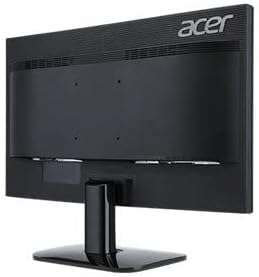
This manual provides essential information for the safe and efficient use of your Acer KA240H 24-inch Full HD Monitor. Please read this manual thoroughly before operating your monitor and retain it for future reference. This monitor is designed for general computing tasks, offering a 1920x1080 resolution display.
Informacioni i Sigurisë
- Vendoseni gjithmonë monitorin në një sipërfaqe të qëndrueshme dhe të sheshtë për të parandaluar rënien e tij.
- Mos i bllokoni hapjet e ventilimit. Sigurohuni hapësirë të mjaftueshme rreth monitorit për qarkullimin e duhur të ajrit.
- Use only the power adapter and cables supplied with the monitor or specified by Acer.
- Mbajeni monitorin larg ujit, lagështirës dhe temperaturave ekstreme.
- If smoke, strange noises, or unusual odors occur, immediately unplug the monitor and contact qualified service personnel.
- Mos u përpiqni ta servisoni vetë monitorin. Ia drejtoni të gjitha serviset personelit të kualifikuar të shërbimit.
Përmbajtja e paketës
Verify that all items are present and in good condition upon unpacking. If any items are missing or damaged, contact your retailer.
- Acer KA240H Monitor Display Panel
- Baza e qëndrimit të monitorit
- Mbështetëse monitori me qafë
- Kordoni elektrik
- Kabllo HDMI (mund të ndryshojë sipas rajonit)
- Manuali i Përdoruesit (ky dokument)
Konfigurimi
1. Montimi i Mbështetëses së Monitorit
- Carefully place the monitor display panel face down on a soft, clean cloth to prevent scratches.
- Attach the stand neck to the monitor display panel by aligning the tabs and pushing until it clicks into place.
- Bashkangjitni bazën e mbështetëses në qafën e mbështetëses. Sigurojeni atë me vidën fikse që ndodhet në pjesën e poshtme të bazës.

2. Kabllot lidhëse
Sigurohuni që monitori dhe kompjuteri juaj të jenë të fikur përpara se të bëni ndonjë lidhje.
- Lidhja e energjisë: Lidhni kabllon e energjisë me hyrjen e energjisë së monitorit dhe pastaj me një prizë elektrike të tokëzuar.
- Lidhja me video:
- HDMI: Lidhni njërën anë të kabllit HDMI me portën HDMI në monitorin tuaj dhe anën tjetër me portën HDMI në kompjuterin tuaj.
- VGA: Connect one end of the VGA cable to the VGA port on your monitor and the other end to the VGA port on your computer. Tighten the screws on the VGA connector.
- DVI: Connect one end of the DVI cable to the DVI port on your monitor and the other end to the DVI port on your computer.
Note: The monitor supports HDMI, VGA, and DVI inputs. Use only one video connection at a time.
3. Ndezja fillestare
After connecting all cables, power on your computer, then press the power button on the monitor. The monitor should automatically detect the input signal. If no image appears, refer to the Troubleshooting section.
Operimi i Monitorit
Butoni i ndezjes dhe kontrollet e ekranit në ekran
The power button and On-Screen Display (OSD) control buttons are typically located on the bottom right bezel of the monitor. Refer to the diagram below for button identification.

- Ndezja/Fikja e energjisë: Shtypni butonin e energjisë për të ndezur ose fikur monitorin.
- Menyja OSD: Press any OSD button (usually indicated by icons) to bring up the On-Screen Display menu.
- Navigimi: Use the arrow buttons to navigate through menu options.
- Zgjedhja: Press the 'Menu' or 'Enter' button to select an option or confirm a setting.
- Dalje: Press the 'Exit' button to close the OSD menu.
Common OSD Settings
- Foto: Rregulloni shkëlqimin, kontrastin, mprehtësinë dhe temperaturën e ngjyrës.
- Ngjyra: Fine-tune color settings, including gamma and color space.
- Hyrja: Manually select the input source (HDMI, VGA, DVI) if auto-detection fails.
- OSD: Rregulloni gjuhën e OSD-së, transparencën dhe kohën e skadimit.
- Menaxhimi: Access information about the monitor, reset settings to factory defaults.
Mirëmbajtja
Pastrimi i Monitorit
- Gjithmonë shkëputeni monitorin nga priza e energjisë para pastrimit.
- Ekrani: Përdorni lehtë një leckë të butë, pa garzë damplani me ujë ose me një pastrues të specializuar për ekranin. Mos e spërkatni pastruesin direkt mbi ekran.
- E jashtme: Përdorni një leckë të butë dhe të thatë për të fshirë monitorin casing. Shmangni përdorimin e pastruesve ose tretësve gërryes.
Magazinimi
If storing the monitor for an extended period, unplug it, disconnect all cables, and store it in a cool, dry place, preferably in its original packaging.
Zgjidhja e problemeve
| Problem | Zgjidhja e mundshme |
|---|---|
| Asnjë imazh në ekran |
|
| Imazhi është i turbullt ose i shtrembëruar |
|
| Monitori dridhet |
|
| Nuk ka dritë treguese të energjisë |
|
Specifikimet
| Veçori | Detaj |
|---|---|
| Numri i modelit | UM.FX0EE.005 |
| Madhësia e ekranit | 24 inç (61 cm) |
| Rezolucioni | FHD 1080p (1920 x 1080 piksel) |
| Raporti i pamjes | 16:9 |
| Shpejtësia e rifreskimit | 60 Hz |
| Koha e përgjigjes | 5 milisekonda |
| Lloji i ekranit | LED |
| Teknologjia e lidhjes | HDMI, VGA, DVI |
| Lloji i montimit | Montim në mur (i pajtueshëm me VESA) |
| Ngjyra | E zezë |
| Dimensionet e artikullit (D x P x H) | 18"D x 0.78"W x 12"H (approximate, without stand) |
| Pesha e artikullit | 3.74 kilogramë |
| Prodhuesi | Acer |
Informacioni i Garancisë
Your Acer KA240H monitor comes with a standard warranty. The warranty covers Pjesë dhe punë 1 vjeçare from the date of purchase. Please retain your proof of purchase for warranty claims. For detailed terms and conditions, refer to the warranty card included with your product or visit the official Acer support webfaqe.
This warranty does not cover damage caused by accident, misuse, abuse, improper installation or operation, natural disaster, or unauthorized modifications or repairs.
Mbështetje
If you encounter issues that cannot be resolved using the troubleshooting guide, or if you require further assistance, please contact Acer customer support. You can typically find support contact information, FAQs, and driver downloads on the official Acer webfaqe.
Për burimet më të fundit të mbështetjes, ju lutemi vizitoni: www.acer.com/support


