Hyrje
This manual provides comprehensive instructions for the setup, operation, and maintenance of your GPX Digital AM/FM Clock Radio, model C224B. Please read this manual thoroughly before using the device to ensure proper functionality and to maximize your user experience. Keep this manual for future reference.
Produkti Mbiview
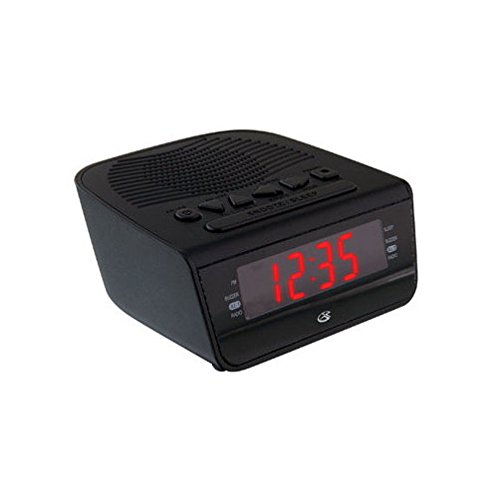
Figura 1: Përpara view of the GPX Digital AM/FM Clock Radio. This image shows the compact black unit with its digital display and control buttons.
The GPX Digital AM/FM Clock Radio (C224B) is designed for reliable timekeeping and audio entertainment. Key features include a clear multi-display clock, AM/FM radio tuner, dual alarm functionality, and a battery backup option to ensure continuous operation during power interruptions. Its compact and modern design makes it suitable for various indoor settings.
Konfigurimi
1. Shpaketimi
Carefully remove the clock radio from its packaging. Ensure all components are present: the clock radio unit and the power adapter.
2. Lidhja e energjisë
- Plug the power adapter into the DC input jack located on the back of the clock radio.
- Plug the other end of the power adapter into a standard wall outlet (AC 120V, 60Hz).
- Ekrani do të ndriçojë, duke treguar që njësia po merr energji.
3. Battery Backup Installation (Optional)
Për energji rezervë gjatë kohës së punëstages, install batteries (not included).
- Gjeni ndarjen e baterisë në pjesën e poshtme të pajisjes.
- Hapni kapakun e ndarjes së baterisë.
- Insert the required batteries (e.g., 2 x AAA, check unit for specific type) according to the polarity markings (+ and -).
- Mbyllni mirë kapakun e ndarjes së baterisë.
Shënim: Batteries are for backup only and will not power the display or radio functions continuously. They preserve time and alarm settings during a power interruption.
Udhëzimet e funksionimit
1. Caktimi i kohës
- Shtypni dhe mbani shtypur Caktimi i kohës butonin derisa ekrani të pulsojë.
- Përdorni ORË dhe MINUTE butonat për të rregulluar kohën.
- Shtypni Caktimi i kohës përsëri për të konfirmuar dhe për të dalë nga modaliteti i vendosjes së kohës.
2. Vendosja e alarmeve (Alarmi 1 dhe Alarmi 2)
This unit features dual alarms, allowing you to set two independent wake-up times.
- Shtypni dhe mbani shtypur SET ALARM 1 (ose SET ALARM 2) button until the alarm time flashes.
- Përdorni ORË dhe MINUTE buttons to adjust the desired alarm time.
- Shtypni SET ALARM 1 (ose SET ALARM 2) again to confirm the time.
- Immediately after confirming the time, use the Mënyra e alarmit button to select the alarm source: SILAMA or RADIO.
- The alarm icon (e.g., AL1 or AL2) will appear on the display, indicating the alarm is active.
Për të fikur një alarm, shtypni butonin përkatës ALARM 1 ON/FIKUR (ose ALARM 2 ON/FIKUR) button. The alarm icon will disappear.
3. Funksionimi i radios AM/FM
- Shtypni RADIO ON/FIKUR butonin për të ndezur radion.
- Shtypni BAND butonin për të kaluar midis bandave AM dhe FM.
- Përdorni TUNE + or AKORDIM - butonat për t'u sintonizuar manualisht në stacionin e dëshiruar.
- To automatically scan for the next available station, press and hold TUNE + or AKORDIM - për disa sekonda.
- Rregulloni volumin duke përdorur VOLUMI + or VËLLIMI - butonat.
- Për të fikur radion, shtypni RADIO ON/FIKUR butonin përsëri.
4. Funksioni i shtyrjes së afatit
Kur të bjerë një alarm, shtypni butonin ZGJIDH butonin për ta heshtur përkohësisht alarmin për afërsisht 9 minuta. Alarmi do të tingëllojë përsëri pas periudhës së shtyrjes.
5. Funksioni i gjumit
Funksioni i gjumit lejon që radioja të luajë për një kohëzgjatje të caktuar përpara se të fiket automatikisht.
- Ndërsa radioja është duke luajtur, shtypni butonin GJUM butonin vazhdimisht për të kaluar nëpër kohët e disponueshme të gjumit (p.sh., 90, 60, 30, 15 minuta, FIKUR).
- Radioja do të fiket automatikisht pas kohës së zgjedhur.
Mirëmbajtja
1. Pastrimi
To clean the unit, wipe the exterior with a soft, slightly damp cloth. Do not use abrasive cleaners or solvents, as these may damage the finish. Ensure the unit is unplugged before cleaning.
2. Ndërrimi i baterisë
If the battery backup function is not working, or if the unit loses time during a power outage, the backup batteries may need replacement. Follow the "Battery Backup Installation" steps in the Setup section to replace them.
Zgjidhja e problemeve
| Problem | Shkaku i mundshëm | Zgjidhje |
|---|---|---|
| Njësia nuk ndizet. | Adaptori i energjisë nuk është i lidhur ose priza është e dëmtuar. | Sigurohuni që adaptori i energjisë të jetë i lidhur mirë me pajisjen dhe me një prizë muri që funksionon. Provoni një prizë tjetër. |
| Alarmi nuk bie. | Alarmi nuk është vendosur, volumi i alarmit është shumë i ulët ose alarmi është fikur. | Verify alarm time and source (buzzer/radio) are set correctly. Ensure alarm is activated (icon visible). Increase radio volume if alarm source is radio. |
| Marrja e dobët e radios. | Sinjal i dobët ose ndërhyrje. | Adjust the position of the unit or the antenna (if external). Move away from other electronic devices that may cause interference. |
| Koha/cilësimet e humbura pas ndërprerjes së energjisëtage. | Bateritë rezervë kanë mbaruar ose nuk janë instaluar. | Install fresh backup batteries or replace existing ones. |
Specifikimet
- Modeli: C224B
- Burimi i energjisë: AC 120V, 60Hz (main); Battery Powered (backup)
- Lloji i ekranit: Ekran dixhital LED
- Bandat e radios: AM/FM
- Dimensionet (përafërsisht): 5.12" Gjerësi x 5.12" Lartësi
- Pesha (Afërsisht): 3 paund
- Ngjyra: E zezë
- Materiali: Plastike
Garancia dhe Mbështetja
For warranty information or technical support, please refer to the warranty card included with your product or visit the official GPX website. Do not attempt to repair this unit yourself, as this may void your warranty.
GPX Official Webfaqe: www.gpx.com


