1. Hyrje
This manual provides essential information for setting up, operating, maintaining, and troubleshooting your Microsoft Surface Pro Model 1796. The Surface Pro is a versatile 2-in-1 device designed to function as both a high-performance laptop and a portable tablet. Please read these instructions carefully to ensure optimal use and longevity of your device.
2. Produkti i Mbaruarview
The Microsoft Surface Pro Model 1796 features a 12.3-inch PixelSense multi-touch display, an Intel Core i5 processor, 4GB of RAM, and a 128GB SSD. It operates on Windows 10 Pro, offering a full desktop experience in a portable form factor. The device supports a detachable keyboard (Surface Pro Signature Type Cover) and a digital pen (Surface Pen), both sold separately, to enhance its functionality.

Figure 2.1: Microsoft Surface Pro in tablet mode, displaying the lock screen.
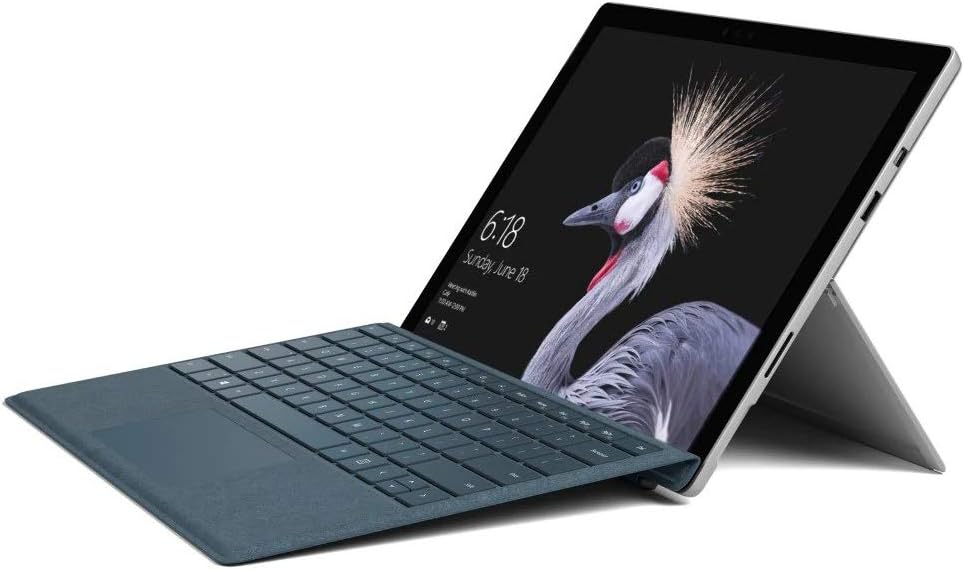
Figure 2.2: Microsoft Surface Pro with Signature Type Cover attached, configured as a laptop.

Figure 2.3: Microsoft Surface Pro tablet and detached Signature Type Cover.
3. Konfigurimi
3.1 Ndezja fillestare
- Connect the power supply to the Surface Pro and a power outlet.
- Shtypni butonin e ndezjes që ndodhet në skajin e sipërm të pajisjes.
- Ndiqni udhëzimet në ekran për të përfunduar konfigurimin fillestar të Windows 10 Pro, duke përfshirë përzgjedhjen e gjuhës, lidhjen e rrjetit dhe krijimin e llogarisë së përdoruesit.
3.2 Lidhja e Aksesorëve
- Surface Pro Signature Type Cover: Align the Type Cover with the magnetic connector along the bottom edge of the Surface Pro until it clicks into place.
- Stilolapsi Sipërfaqësor: The Surface Pen connects via Bluetooth. Go to Cilësimet > Pajisjet > Bluetooth dhe pajisje të tjera to pair the pen.
3.3 Ngarkimi i pajisjes
Use the provided power adapter to charge your Surface Pro. The charging port is located on the right side of the device. A full charge provides approximately 13 hours of typical device usage.
4. Udhëzimet e funksionimit
4.1 Navigimi bazë
- Prekni: Use multi-touch gestures on the PixelSense display for navigation, zooming, and scrolling.
- Lloji i Mbulesës: Utilize the keyboard and trackpad for traditional laptop input.
- Stilolapsi Sipërfaqësor: Write, draw, and annotate directly on the screen.
4.2 Karakteristikat e Windows 10 Pro
Your Surface Pro comes with Windows 10 Pro, offering features such as:
- Windows Përshëndetje: For fast, secure, password-free sign-in using facial recognition.
- Cortana: Your personal digital assistant.
- Microsoft Edge: Parazgjedhja web shfletuesi.
- Modaliteti i tabletit: Automatically or manually switch to a touch-optimized interface when the Type Cover is detached.
4.3 Cilësimet e ekranit
The 12.3-inch PixelSense display has a resolution of 2736 x 1824 pixels. You can adjust display settings such as brightness, resolution, and scaling through Settings > System > Display.
5. Mirëmbajtja
5.1 Pastrimi i pajisjes
- Përdorni një leckë të butë, pa garzë dampened with water or an approved screen cleaner to clean the display.
- For the device body, use a soft, dry cloth. Avoid harsh chemicals or abrasive materials.
5.2 Përditësimet e softuerit
Regularly check for and install Windows updates to ensure your device has the latest security patches and features. Go to Cilësimet > Përditësimi dhe Siguria > Përditësimi i Windows.
5.3 Kujdesi për baterinë
- Shmangni temperaturat ekstreme, pasi ato mund të dëmtojnë jetëgjatësinë e baterisë.
- Për një shëndet optimal të baterisë, shmangni shkarkimin e vazhdueshëm të saj të plotë ose mbajtjen e saj në 100% karikim për periudha të gjata.
6. Troubleshooting
6.1 Çështjet e zakonshme
- Pajisja nuk ndizet: Ensure the device is charged. Try holding the power button for 10-15 seconds to perform a force restart.
- Ekrani nuk përgjigjet: Restart the device. If the issue persists, check for driver updates.
- Performance issues: Close unnecessary applications, check for Windows updates, or run a disk cleanup.
6.2 Kontaktimi i mbështetjes
For more complex issues or technical assistance, please visit the official Microsoft Support website or contact their customer service. Have your device's model number (FJU-00001) and serial number ready.
7. Specifikimet
| Veçori | Specifikimi |
|---|---|
| Emri i modelit | FJU-00001 |
| Madhësia e ekranit | 12.3 inç |
| Rezolucioni i ekranit | 2736 x 1824 piksele |
| Përpunues | Intel Core i5 (2.6 GHz) |
| RAM | 4 GB DDR3 |
| Magazinimi | 128 GB SSD |
| Bashkëprocesor grafik | Intel HD Graphics 620 |
| Sistemi Operativ | Windows 10 Pro |
| Lloji me valë | 802.11b, 802.11g, 802.11n |
| Jetëgjatësia mesatare e baterisë | 13 orë |
| Pesha e artikullit | 1.7 paund |
| Dimensionet e produktit | 11.5 x 0.33 x 7.93 inç |
| E pasme WebRezolucioni i kamerës | 5 MP |
8. Garancia dhe Mbështetja
Your Microsoft Surface Pro Model 1796 is covered by a limited hardware warranty provided by Microsoft. For detailed warranty terms and conditions, please refer to the documentation included with your purchase or visit the official Microsoft support webvend. Ruajeni provën e blerjes për kërkesat e garancisë.
For technical support, driver downloads, and service information, please visit mbështetje.microsoft.com. You may need to provide your device's serial number and model information.