1. Hyrje
Faleminderit për blerjenasing the auna V-20 Vertical Stereo System. This manual provides essential information for the safe and efficient operation of your device. Please read it thoroughly before use and keep it for future reference.
2. Udhëzimet e sigurisë
- Lexoni me kujdes të gjitha udhëzimet përpara se të përdorni pajisjen.
- Mbajeni pajisjen larg ujit, lagështirës dhe temperaturave ekstreme.
- Mos bllokoni asnjë hapje ventilimi.
- Përdorni vetëm bashkëngjitje/pajisje shtesë të specifikuara nga prodhuesi.
- Hiqeni pajisjen nga priza gjatë stuhive me rrufe ose kur nuk përdoret për periudha të gjata.
- Referojuni të gjitha servisimet te personeli i kualifikuar i shërbimit.
- Mos e hapni c-nëasing; brenda nuk ka pjesë që mund të riparohen nga përdoruesi.
3. Përmbajtja e paketës
Ju lutemi kontrolloni që të gjitha artikujt janë të pranishëm:
- 1 x auna V-20 Vertical Stereo System
- 1 x Remote Control (including 2 x 1.5V AAA batteries)
- 1 x përshtatës energjie
- 1 x Removable Stand Base
- 1 x Wire Antenna
- User Manual (English and German)
4. Produkti i Mbaruarview
The auna V-20 is a versatile micro stereo system featuring a vertical design. It includes a CD player, DAB+ and FM radio, Bluetooth, NFC, USB, and AUX connectivity. The system can be used with its stand or mounted on a wall.

Figure 4.1: The auna V-20 Vertical Stereo System shown with its remote control in a modern living room environment.
Kontrollet dhe ekrani i panelit të përparmë
The front panel features a sleek design with a motorized CD drive cover and an LED display that shows time and operational information. Control buttons are located on the top edge of the unit.
Lidhjet e panelit të pasmë
The rear panel provides various connection ports for external devices and power.
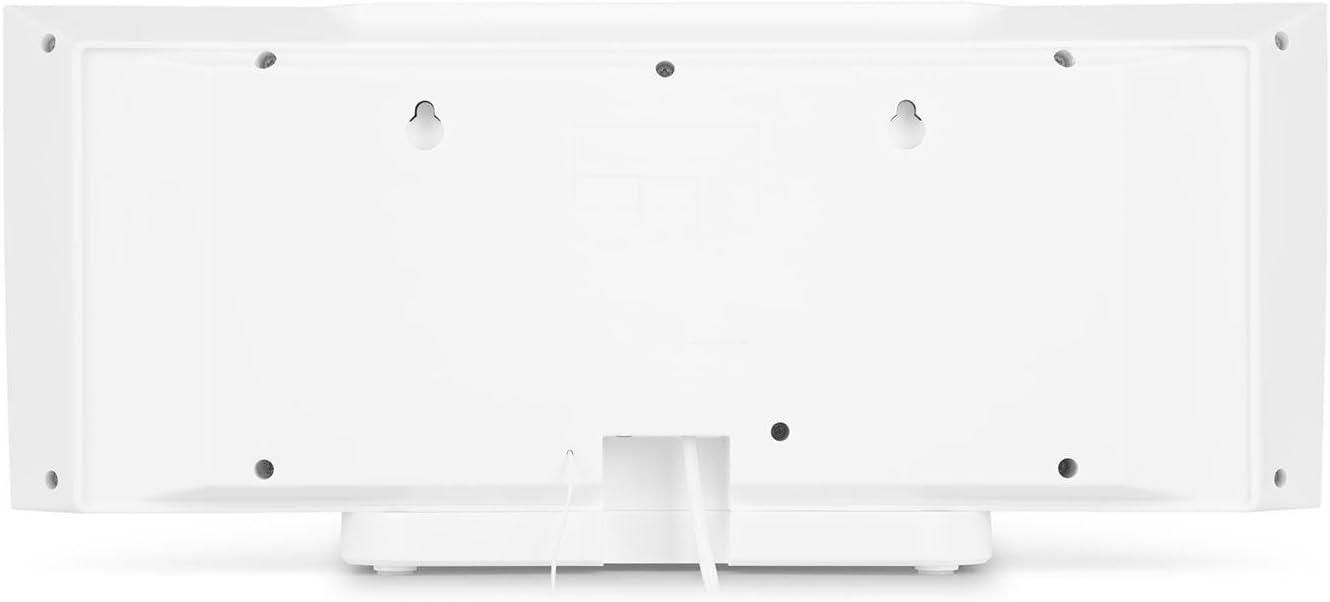
Figura 4.2: E pasme view of the auna V-20, highlighting the USB port and AUX input.
Telekomandë
The included remote control allows for convenient operation of all functions from a distance.

Figura 4.3: E detajuar view of the remote control for the auna V-20 stereo system.
5. Konfigurimi
5.1 Mundësitë e Vendosjes
The auna V-20 offers flexible placement:
- Montimi i stendës: Attach the removable stand base for desktop or shelf placement. Ensure the unit is stable on a flat surface.
- Montimi në mur: The unit can be mounted on a wall to save space. Use appropriate wall mounting hardware (not included) and ensure the wall can support the unit's weight.

Figura 5.1: E pasme view illustrating the wall mounting points and the stand attachment area.
5.2 Lidhja e energjisë
Connect the provided power adapter to the DC IN port on the rear of the unit, then plug it into a standard wall outlet (AC 230V, 50 Hz).
5.3 Lidhja e antenës
Extend the wire antenna for optimal DAB+ and FM radio reception. Adjust its position for the best signal quality.
6. Udhëzimet e funksionimit
6.1 Power On/Off and Standby
Shtypni AKTIV/STAND-BY button on the unit or remote control to switch the system on or put it into standby mode.
6.2 Zgjedhja e modalitetit
Shtypni FUNKSIONI button on the unit or the dedicated mode buttons (FM/DAB, USB, CD, AUDIO IN, BLUETOOTH) on the remote control to switch between different audio sources.
6.3 Kontrolli i volumit
Rregulloni volumin duke përdorur VOL+ dhe Vol- buttons on the unit or remote control. The LED display will show the current volume level.
6.4 Cilësimet e Ekualizatorit
The system features a 2-band equalizer and equalizer presets. Use the EQ button on the remote control to cycle through presets or adjust bass/treble. The X-BASS function can be activated for enhanced bass.
7. Lidhshmëria Bluetooth dhe NFC
7.1 Çiftimi Bluetooth
Për të transmetuar muzikë pa tel nga telefoni juaj inteligjent, tableti ose laptopi:
- Switch the stereo system to Bluetooth mode. The LED display will indicate pairing mode.
- Aktivizo Bluetooth në pajisjen tënde celulare dhe kërko për pajisjet e disponueshme.
- Select "auna V-20" from the list to pair. Once connected, you can play audio from your device.

Figure 7.1: A smartphone being used to connect to the auna V-20 via Bluetooth.
7.2 Lidhja NFC
For intuitive pairing with NFC-enabled devices:
- Sigurohuni që NFC është aktivizuar në pajisjen tuaj celulare.
- Gently swipe your NFC-enabled device over the NFC sensor on the auna V-20.
- The devices will automatically pair via Bluetooth.

Figura 7.2: Pamje nga afër view of the NFC sensor for quick device pairing.
8. Funksionimi i CD player-it
The auna V-20 features an MP3-compatible CD player with a motorized drive.

Figure 8.1: The motorized CD player mechanism with a disc inserted.
8.1 Ngarkimi i një CD-je
- Shtypni HAP/MBYLL button to open the motorized CD cover.
- Carefully place a CD (CD, CD-R/RW, MP3-CD) onto the spindle with the label side facing you.
- Shtypni HAP/MBYLL again to close the cover. The system will automatically switch to CD mode and begin playback.
8.2 Kontrollet e riprodhimit
- Luaj/Ndalu: Shtypni LUAJ/PAUZI për të filluar ose ndaluar riprodhimin.
- Kapërce këngët: Përdorni KALIM PARA or KAQ PRAPA butona për të lundruar midis këngëve.
- Ndaloni: Shtypni STOP butonin për të përfunduar riprodhimin.
- Përsëritje/Rastësisht: Përdorni PËRSËRITJE dhe RASTËSISHME butonat në telekomandë për opsionet e riprodhimit.
- Programmable Playback: The system supports programmable title display for custom playlists.
9. Funksionimi i radios (DAB+/FM)
The auna V-20 features both DAB+ digital radio and analog FM radio with RDS function.
9.1 Selecting Radio Mode
Shtypni FM/DAB button on the remote control to switch between FM and DAB+ modes.
9.2 Skanimi Automatik i Stacionit
In either FM or DAB+ mode, press the SKANI button on the remote control to automatically scan and store available stations. The system can store up to 20 presets per reception type.
9.3 Manual Tuning and Presets
- Akordimi manual: Përdorni TONE +/- buttons on the remote control for fine-tuning.
- Ruajtja e paracaktimit: Once a station is found, press the PARAPAKTUAR button, then use the number buttons (0-9, 10+) to assign a preset number. Press HYN për të konfirmuar.
- Duke kujtuar paravendosjet: Press the corresponding number button on the remote control to quickly access a saved station.
- Butoni i informacionit: Në modalitetin DAB+, shtypni INFO button to display additional information such as artist, title, album, or news.
10. Riprodhimi USB
The auna V-20 allows playback of MP3 audio files direkt nga një shkop USB.
10.1 Lidhja e një pajisjeje USB
- Insert your USB stick into the USB port on the rear of the unit.
- Switch the stereo system to USB mode using the USB butonin në telekomandë.
- The system will automatically detect and begin playing MP3 files.
10.2 USB Playback Controls
Playback controls (Play/Pause, Skip, Stop, Repeat, Random) are similar to CD player operation. Use the Dosje button on the remote to navigate through folders on the USB device.
11. Hyrja AUX
Connect external audio devices such as MP3 players, CD players, or computers using the AUX input.
11.1 Lidhja e një pajisjeje të jashtme
- Connect a 3.5mm audio cable (not included) from the headphone jack or audio output of your external device to the AUX N port on the rear of the auna V-20.
- Switch the stereo system to AUDIO IN mode using the AUDIO N butonin në telekomandë.
- Play audio from your external device. The sound will be output through the auna V-20 speakers.
12. Mirëmbajtja
12.1 Pastrimi
- Hiqeni gjithmonë pajisjen nga priza elektrike përpara se ta pastroni.
- Përdorni një leckë të butë dhe të thatë për të pastruar sipërfaqet e jashtme.
- Mos përdorni pastrues gërryes, dyllë ose tretës pasi ato mund të dëmtojnë sipërfaqen.
- For the CD lens, use a specialized CD lens cleaner if necessary.
12.2 Kujdesi i Përgjithshëm
- Shmangni vendosjen e objekteve të rënda në njësi.
- Mbajeni njësinë larg nga rrezet e diellit direkte dhe burimet e nxehtësisë.
- Siguroni ventilimin e duhur rreth njësisë për të parandaluar mbinxehjen.
13. Troubleshooting
| Problem | Shkaku i mundshëm | Zgjidhje |
|---|---|---|
| Asnjë fuqi | Power cable not connected; power outlet faulty | Check power cable connection; try a different outlet |
| Asnjë zë | Volume too low; incorrect source selected; mute activated | Increase volume; select correct source; deactivate mute |
| CD-ja nuk luhet | CD inserted incorrectly; CD dirty/scratched; unsupported format | Reinsert CD correctly; clean or replace CD; ensure CD is compatible (CD, CD-R/RW, MP3-CD) |
| Marrja e dobët e radios | Antenna not extended; weak signal | Extend and adjust antenna position; try moving the unit to a different location |
| Çiftimi me Bluetooth dështon | Device too far; Bluetooth not enabled; incorrect pairing procedure | Ensure devices are close; enable Bluetooth on mobile device; follow pairing instructions (Section 7.1) |
14. Specifikimet
| Veçori | Detaj |
|---|---|
| Markë | auna |
| Model | V-20 |
| Numri i pjesës | AUVZ-1100-ghfr |
| Dimensionet e produktit | 51 x 25 x 16 cm |
| Pesha | 2.6 kg |
| Burimi i energjisë | Elektrike |
| Wattage | 27 vat |
| Modaliteti i daljes audio | Stereo |
| Konfigurimi i altoparlantit | 2.0 |
| Formatet e mbështetura audio | MP3 |
| Lloji i medias | CD, MP3 |
| Llojet e lidhësve | Bluetooth, NFC, USB, AUX |
| E përputhshme me Bluetooth | po |
| Versioni Bluetooth | 2.1 + EDR |
| Bluetooth Profile | A2DP |
| Pajisjet e përputhshme | Smartphone, tablet, MP3 player |
| Karakteristika të veçanta | Lehtë për t'u përdorur |
| Bateritë me telekomandë | 2 x 1.5 V AAA (përfshirë) |
| Gama e frekuencës DAB+ | 174 - 240 MHz (Band III) |
15. Garancia dhe Mbështetja
This product is covered by a manufacturer's warranty. For detailed warranty information, please refer to the documentation provided at the time of purchase or contact auna customer support.
If you encounter any issues not covered in the troubleshooting section, or require further assistance, please contact auna customer service through their official webfaqen ose shitësin tuaj me pakicë.


