Hyrje
This manual provides essential information for the safe and effective use of your Canon PowerShot SX420 IS digital camera. Please read this manual thoroughly before using the camera and retain it for future reference. The Canon PowerShot SX420 IS is a compact digital camera featuring a powerful 42x optical zoom, 20.0 Megapixel sensor, and built-in Wi-Fi and NFC connectivity.

Imazhi: Përpara view of the Canon PowerShot SX420 IS digital camera.
Konfigurimi
1. Shpaketimi dhe Kontrollimi i Përmbajtjes
Sigurohuni që të gjithë komponentët janë të pranishëm:
- Canon PowerShot SX420 IS Camera Body
- Paketa e baterisë
- Karikues i baterisë
- Rrip dore
- Kapaku i lentes

Image: Canon PowerShot SX420 IS camera with included battery, charger, wrist strap, and lens cap.
2. Ngarkimi i baterisë
- Futeni paketën e baterisë në karikuesin e baterisë.
- Lidheni karikuesin në një prizë elektrike. Drita treguese e karikimit do të ndizet.
- Once charging is complete, the indicator light will change or turn off (refer to charger specific instructions).
3. Vendosja e baterisë dhe kartës së memories
- Hapni kapakun e ndarjes së baterisë/kartës në pjesën e poshtme të kamerës.
- Vendosni paketën e baterisë së ngarkuar, duke u siguruar që është e orientuar saktë.
- Insert an SDHC or SDXC memory card into the card slot until it clicks into place.
- Mbyllni mirë kapakun e ndarjes.
4. Ndezja fillestare dhe cilësimet bazë
- Shtypni ON/FIKUR butoni për të ndezur kamerën.
- Ndiqni udhëzimet në ekran për të vendosur datën, orën dhe gjuhën.
Funksionimi i kamerës
1. Kontrollet bazë
- Butoni ON/OFF: Ndez ose fik kamerën.
- Butoni i diafragmës: Shtypeni deri në gjysmë për të fokusuar, dhe plotësisht për të bërë një foto.
- Leva e zmadhimit: Controls the 42x optical zoom for telephoto and wide-angle shots.
- Numri i modalitetit: Selects shooting modes such as Auto, Program, Portrait, Landscape, and Movie.
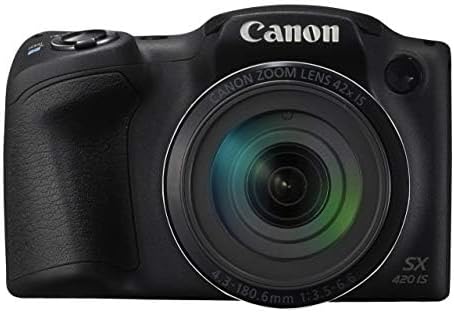
Imazhi: Përpara view of the Canon PowerShot SX420 IS, highlighting the lens and zoom capabilities.
2. Bërja e fotografive
- Turn on the camera and select your desired shooting mode using the mode dial. For general use, select Auto modaliteti.
- Vendosni në kadër foton tuaj duke përdorur ekranin LCD 3.0 inç.
- Përdorni levën e zmadhimit për të rregulluar gjatësinë fokale.
- Press the shutter button halfway down to allow the camera to focus. The focus frame will turn green when focus is achieved.
- Press the shutter button fully to capture the image. The camera's optical image stabilizer helps reduce blur from camera shake.
3. Regjistrimi i videove
- Vendosni numrin e modalitetit në Film modaliteti.
- Press the dedicated movie button to start recording. The camera records in HD 720p resolution in MP4 format.
- Shtypni përsëri butonin e filmit për të ndaluar regjistrimin.
4. ReviewImazhe dhe Video
- Shtypni Riprodhimi button (usually indicated by a play icon).
- Përdorni butonat e drejtimit për të lundruar nëpër imazhet dhe videot e kapura.
- Shtypni MENU button to access playback options.
5. Lidhshmëria me Wi-Fi dhe NFC
The camera features built-in Wi-Fi and NFC for easy sharing and transferring of images and videos.
- Enable Wi-Fi or NFC from the camera's menu.
- Follow the on-screen instructions to connect to a compatible smartphone, tablet, or computer.
- Use the Canon Camera Connect app (available for iOS and Android) for remote shooting and image transfer.
Mirëmbajtja
1. Pastrimi i Kamerës
- Trupi i kamerës: Fshijeni me një leckë të butë dhe të thatë. Për papastërti kokëfortë, përdorni një leckë pak të thatë.amp leckë dhe më pas thajeni tërësisht.
- Lente: Use a lens brush to remove dust, then gently wipe with a lens cleaning cloth and lens cleaning solution. Avoid touching the lens surface with your fingers.
- Ekran LCD: Use a soft, dry cloth. For smudges, use a screen cleaner specifically designed for electronics.
2. Kujdesi për baterinë
- Always use genuine Canon battery packs and chargers.
- Shmangni ekspozimin e baterisë në temperatura ekstreme.
- Nëse nuk do ta përdorni kamerën për një kohë të gjatë, hiqeni baterinë dhe ruajeni në një vend të freskët dhe të thatë.
3. Magazinimi
Store the camera in a dry, well-ventilated area, away from direct sunlight, high temperatures, and humidity. Use a camera bag or case to protect it from dust and physical damage.
Zgjidhja e problemeve
Nëse hasni probleme me kamerën tuaj, referojuni zgjidhjeve të zakonshme të mëposhtme:
| Problem | Zgjidhje |
|---|---|
| Kamera nuk ndizet. | Sigurohuni që bateria të jetë plotësisht e ngarkuar dhe e futur siç duhet. Provoni të përdorni një bateri tjetër të ngarkuar nëse është e mundur. |
| Imazhet janë të paqarta. | Check that the lens is clean. Ensure the camera is focusing correctly (press shutter halfway). Use the optical image stabilizer and hold the camera steady. Consider using a tripod in low light. |
| Cannot connect via Wi-Fi/NFC. | Ensure Wi-Fi/NFC is enabled on both the camera and the connecting device. Check network settings and password. Restart both devices. |
| Gabim i kartës së kujtesës. | Sigurohuni që karta e memories është futur siç duhet. Provoni ta formatoni kartën (kjo do të fshijë të gjitha të dhënat). Përdorni një kartë memorieje tjetër të përputhshme. |
| Blici nuk ndizet. | Check flash mode settings. Ensure the flash is not set to 'Off'. The flash may not fire if the battery is low or in certain shooting modes. |
Specifikimet
| Veçori | Detaj |
|---|---|
| Emri i modelit | PSSX420IS |
| Rezolutë ende efektive | 20 MP |
| Zmadhimi optik | 42x |
| Stabilizimi i imazhit | Optike |
| Teknologjia e sensorit të fotove | CMOS |
| Madhësia e ekranit | 3 inç |
| Lloji i ekranit | LCD |
| Teknologjia e lidhjes | NFC, WiFi |
| Mbështetur File Formati | JPEG, RAW |
| Rezolucioni i videos | HD 720p |
| Formati i kapjes së videos | MP4 |
| Lloji i kujtesës flash | SDHC or SDXC |
| Hapja maksimale | 3.5 f |
| Diapazoni i zgjeruar i ISO-së | 100 - 1600 |
| Pesha e artikullit | 1.5 paund |
| Ngjyra | E zezë |
Informacioni i Garancisë
This Canon PowerShot SX420 IS camera comes with a 90 ditë garanci e kufizuar. Please retain your proof of purchase for warranty claims. For detailed terms and conditions, refer to the warranty documentation provided with your product or visit the official Canon webfaqe.
Mbështetja e klientit
For further assistance, technical support, or service inquiries, please visit the official Canon support website or contact their customer service. You can typically find contact information and FAQs on the manufacturer's webfaqe.
Canon Zyrtar Webfaqe: www.usa.canon.com


