1. Hyrje
The myTouchSmart In-Wall Push-Button Countdown Timer Switch (Model 40953) is designed to simplify your routine by providing convenient automation for indoor or outdoor lighting and various appliances. This timer replaces any standard single-pole light switch and offers preset countdown times to automatically turn off connected devices. It is compatible with LED, CFL, incandescent, and halogen bulbs.

The product packaging displays the in-wall digital countdown timer switch, highlighting its key features such as preset countdown times and compatibility with various bulb types.
2. Informacion mbi sigurinë
Before beginning installation, read all instructions carefully. Improper installation can result in electrical shock or fire. Always consult a qualified electrician if you are unsure about any part of the installation process.
- FIKUR FUNKSIONIN at the circuit breaker or fuse box before wiring.
- Kjo pajisje është menduar për instalim në përputhje me Kodin Kombëtar Elektrik dhe rregulloret lokale.
- Përdorni vetëm tela bakri.
- NEUTRAL WIRE REQUIRED për operim.
3. Instalimi
3.1 Mjetet e nevojshme
- Kaçavidë (Phillips dhe Flathead)
- Strippers teli
- Shirit Elektrik
- VëlltagTestues elektronik (i rekomanduar)
3.2 Udhëzimet për instalime elektrike
- Fikni energjinë to the switch location at the circuit breaker or fuse box. Verify power is off using a voltage testues.
- Hiqni pllakën ekzistuese të murit dhe ndërrojeni nga kutia e murit.
- Carefully disconnect the wires from the old switch. Identify and label the LINE (hot), LOAD, NEUTRAL, and GROUND wires. The timer requires a neutral wire for proper operation.
- Connect the wires to the myTouchSmart timer using the screw terminals:
- Lidhni LINJA (hot) wire to the terminal labeled 'LINE'.
- Lidhni NGARKOJE wire (to the light/appliance) to the terminal labeled 'LOAD'.
- Lidhni NEUTRALE wire (typically white) to the terminal labeled 'NEUTRAL'.
- Lidhni TOKE wire (typically bare copper or green) to the terminal labeled 'GROUND'.
- Sigurohuni që të gjitha lidhjet me tela të jenë të sigurta.
- Carefully push the wired timer into the wall box.
- Mount the timer to the wall box using the provided screws.
- Attach the desired color faceplate (White or Light Almond included, wallplate not included).
- Rivendosni energjinë në ndërprerësin e qarkut.

Pjesa e pasme view of the timer, displaying the screw terminals for Line, Load, Neutral, and Ground connections, essential for proper installation.

Një profesionist anësorfile of the timer, showing its depth and how it fits into a standard electrical wall box, with wiring connections visible.
4. Udhëzimet e funksionimit
The myTouchSmart timer features an ON/OFF door panel that conceals preset buttons and LEDs when closed. Opening the door provides access to all countdown options.
4.1 Activating a Countdown
- Open the front door panel to reveal the preset buttons.
- Press the desired countdown button: 5 Min, 10 Min, 30 Min, 60 Min, 2 Hour, or 4 orë.
- A blue LED indicator light next to the selected button will illuminate, confirming the countdown is active. The connected device will turn on and remain on for the selected duration, then automatically turn off.
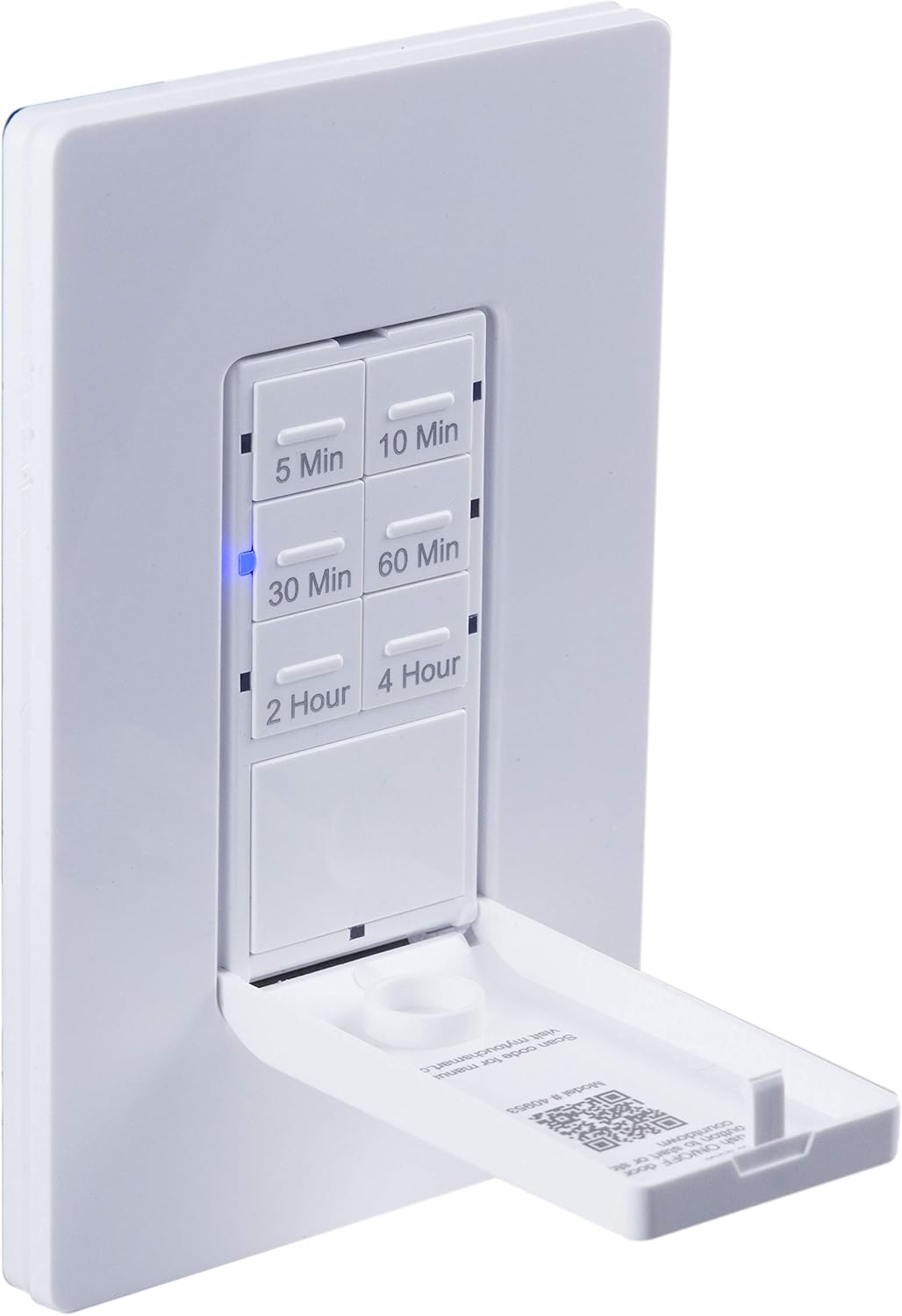
Një nga afër view of the timer with its front door panel open, exposing the six preset countdown buttons (5, 10, 30, 60 minutes, 2, and 4 hours) and the manual ON/OFF button.

The in-wall timer with its door open, showing the preset buttons and a blue LED illuminated next to the '30 Min' button, indicating an active countdown.

A hand pressing one of the preset countdown buttons on the timer, demonstrating user interaction.
4.2 Manual ON/OFF Override
- To manually turn the connected device ON or OFF at any time, press the large ON/OFF button located at the bottom of the timer (this button is also the door panel when closed).
- Pressing this button will override any active countdown. If no countdown is active, it functions as a standard ON/OFF switch.
4.3 Aplikimet
This timer is suitable for a variety of applications, including:
- Ndriçimi i brendshëm dhe i jashtëm
- Tifozët e shkarkimit
- Ngrohës
- Other compatible appliances

An image illustrating various applications for the timer, including controlling indoor/outdoor lights, ceiling fans, and exhaust fans.
5. Mirëmbajtja
The myTouchSmart timer requires minimal maintenance. Follow these guidelines:
- Pastrimi: Disconnect power at the circuit breaker before cleaning. Wipe the surface with a soft, damp pëlhurë. Mos përdorni kimikate të forta ose pastrues gërryes.
- Inspektimi: Periodically check for any loose connections or damage to the switch. If any damage is observed, discontinue use and consult a qualified electrician.
6. Troubleshooting
If you experience issues with your myTouchSmart timer, refer to the following common problems and solutions:
| Problem | Shkaku i mundshëm | Zgjidhje |
|---|---|---|
| Kohëmatësi nuk ndizet/fiket. | No power to the switch; Incorrect wiring (Line/Load reversed); Loose connections. | Check circuit breaker. Verify wiring connections (Line to Line, Load to Load, Neutral, Ground). Ensure all wires are securely fastened. |
| Countdown does not activate. | Button not fully pressed; Faulty unit. | Ensure the desired countdown button is pressed firmly until the blue LED illuminates. If issue persists, contact customer support. |
| Treguesit LED nuk funksionojnë. | No power; Unit malfunction. | Check power supply. If the timer functions but LEDs do not, contact customer support. |
| Operacioni me ndërprerje. | Loose wiring; Overload. | Check all wiring connections for tightness. Ensure the connected load does not exceed the timer's electrical ratings. |
Nëse hapat e zgjidhjes së problemeve nuk e zgjidhin problemin, ju lutemi kontaktoni mbështetjen e klientit.
7. Specifikimet
| Veçori | Specifikimi |
|---|---|
| Numri i modelit | 40953 |
| Mënyra e funksionimit | Automatically, Off, Push Button |
| Vlerësimi aktual | 15 Amps |
| Vëllimi operativtage | 120 VAC, 60 Hz |
| Ngarkesa rezistente | 15A |
| Ngarkesa e tungstenit | 1200 W |
| Vlerësimi motorik | 1 / 2 HP |
| Llamba të pajtueshme | LED, CFL, inkandeshente, halogjene |
| Lloji i montimit | Montimi në mur |
| Dimensionet (J x P x H) | 2.75 x 4.85 x 6.85 inç |
| Pesha e artikullit | 5.9 ons |
| Teli neutral | E detyrueshme |
| Komponentët e përfshirë | In-Wall Timer, White/Light Almond Door Panels |
8. Garancia dhe Mbështetja
Për informacion mbi garancinë dhe mbështetjen teknike, ju lutemi referojuni faqes zyrtare të prodhuesit webfaqen e internetit ose kontaktoni departamentin e shërbimit ndaj klientit. Ruajeni faturën e blerjes si provë të blerjes.
Prodhuesi: myTouchSmart
UPC: 030878409537
Webfaqe: www.mytouchsmart.com (Ju lutemi kontrolloni faqen zyrtare website for the most current support information.)


