Hyrje
This manual provides essential information for setting up, operating, and maintaining your HP 27f 4K Monitor. Please read these instructions carefully before using your monitor to ensure proper functionality and longevity.
Karakteristikat kryesore
- Ultra High Definition 4K: Experience cinematic quality with the incredible definition of 4K.
- Height Adjustment Stand: Easily adjust your display to the most comfortable position with 100 mm range of travel.
- Panoramike View: Kënd ultra i gjerë 178° viewing me detaje të qëndrueshme dhe ngjyra të gjalla.
- Dizajni modern: A sleek design that complements your workspace.
- Micro-edge Display: Virtually no bezel encircling the display for an ultra-wide viewing experience and seamless multi-monitor setups.
- Teknologjia e panelit IPS: Provides consistent color and image clarity across a wide viewkënd ing.
- AMD FreeSync™: Reduces blurring and tearing for smoother visuals.
Çfarë ka në Kuti
Verifikoni që të gjithë përbërësit janë të pranishëm në paketim:
- HP 27f 4K Monitor
- A/C power cable (1.9 m / 6.2 ft)
- Power adapter (1.0 m / 3.3 ft)
- HDMI cable (1.8 m / 5.9 ft)
- Quick setup poster
- Karta e listës së telefonit të shërbimit
- Dokumentacioni i garancisë
Konfigurimi
1. Montimi i monitorit
Carefully remove the monitor and stand components from the packaging. Attach the stand base to the stand column, then secure the stand to the back of the monitor. Ensure all connections are firm.
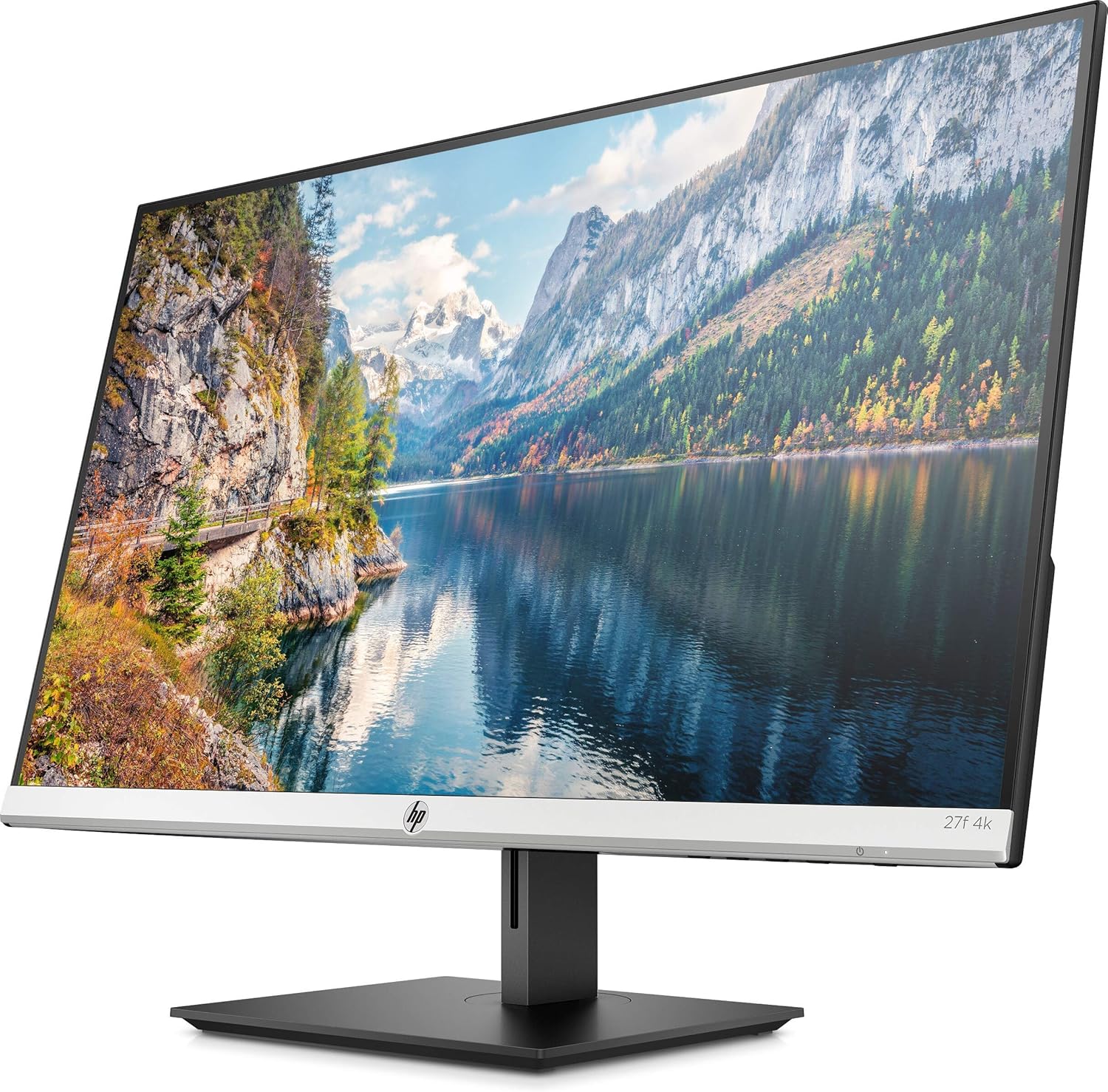
Figura 1: Përpara view of the HP 27f 4K Monitor with its stand.
2. Kabllot lidhëse
Connect the power adapter to the monitor's power input and then to a power outlet. Use the provided HDMI cable to connect your computer to one of the HDMI ports on the monitor. Alternatively, use a DisplayPort cable if your computer supports it.

Figura 2: E pasme view of the monitor displaying the HDMI and DisplayPort inputs.
3. Ndezja
Press the power button on the monitor to turn it on. The monitor should automatically detect the input signal from your computer.
Operimi i Monitorit
Rregullimi i ekranit
The HP 27f 4K Monitor features a height-adjustable stand and can be tilted and rotated for optimal viewing comfort. Adjust the height by gently pushing or pulling the monitor up or down. Tilt the screen forward or backward as needed. The monitor can also be rotated to a portrait orientation.

Figura 3: Profesioni anësorfile of the monitor demonstrating its adjustable stand.
Menyja e Ekranit në Ekran (OSD).
Use the buttons located on the bottom bezel of the monitor to access the On-Screen Display (OSD) menu. This menu allows you to adjust various settings such as brightness, contrast, color temperature, input source, and other display preferences.
Konfigurimi i shumë monitorëve
The micro-edge bezel design allows for seamless multi-monitor configurations, enhancing your productivity and immersive experience.

Figura 4: Shembample of a multi-monitor setup using HP 27f 4K Monitors.
Përvoja vizuale
The HP 27f 4K Monitor delivers stunning 4K resolution and utilizes IPS Panel Technology for wide viewing angles and vibrant colors. AMD FreeSync™ technology helps reduce screen tearing and stuttering for a smoother visual experience, especially during fast-paced content.
Video 1: An official HP video showcasing the stunning 4K clarity of the HP 27f 4K Display.
Mirëmbajtja
Pastrimi i Monitorit
To clean the screen, gently wipe it with a soft, lint-free microfiber cloth. For stubborn smudges, slightly dampen the cloth with water or a screen-cleaning solution specifically designed for monitors. Avoid using harsh chemicals, abrasive cleaners, or spraying liquid directly onto the screen.
To clean the monitor's exterior, use a soft, damp cloth. Ensure the monitor is powered off and unplugged before cleaning.
Zgjidhja e problemeve
Nuk ka fuqi
- Sigurohuni që kablloja e rrymës të jetë e lidhur mirë si me monitorin ashtu edhe me një prizë elektrike që funksionon.
- Kontrolloni nëse përshtatësi i energjisë është lidhur siç duhet.
- Verifikoni që priza e energjisë është funksionale duke lidhur një pajisje tjetër.
No Signal/Blank Screen
- Confirm that the video cable (HDMI or DisplayPort) is securely connected to both the monitor and your computer.
- Sigurohuni që kompjuteri juaj të jetë i ndezur dhe jo në modalitetin e gjumit.
- Use the OSD menu to manually select the correct input source (e.g., HDMI 1, HDMI 2, DisplayPort).
- Try connecting the monitor to a different video port on your computer or using a different video cable to rule out cable or port issues.
Display Issues (Flickering, Blurry Image)
- Kontrolloni kabllon e videos për dëmtime ose lidhje të lirshme.
- Sigurohuni që drajverët e grafikës së kompjuterit tuaj janë të azhurnuar.
- Adjust the display resolution and refresh rate settings on your computer to match the monitor's capabilities.
- If using AMD FreeSync™, ensure it is enabled in both the monitor's OSD and your graphics card settings.
Specifikimet
Detailed technical specifications for the HP 27f 4K Monitor:

Figure 5: Diagram illustrating the dimensions of the HP 27f 4K Monitor.
| Veçori | Specifikimi |
|---|---|
| Madhësia e ekranit në këmbë | 27 inç |
| Rezolucioni i ekranit | 3840x2160 (4K UHD 2160p) |
| Rezolucioni maksimal i ekranit | 3840 piksele |
| Markë | HP |
| Seria | HP 27f 4K Display |
| Numri i modelit të artikullit | 27f 4K |
| Pesha e artikullit | 10.56 paund |
| Dimensionet e produktit | 24.16 x 7.62 x 19.74 inç |
| Ngjyra | Natural silver and Black |
| Vëlltage | 240 volt (AC) |
| Raporti i pamjes | 16:9 |
| Përshkrimi i Sipërfaqes së Ekranit | Kundër shkëlqimit |
Garancia dhe Mbështetja
Your HP 27f 4K Monitor comes with a standard manufacturer's warranty. Please refer to the warranty documentation included in your product packaging for specific terms and conditions.
Për mbështetje teknike, shkarkime të drajverëve ose informacione shtesë mbi produktin, ju lutemi vizitoni faqen zyrtare të mbështetjes së HP-së. website or contact HP customer service using the contact information provided in your documentation.