1. Hyrje
Faleminderit për blerjenasing the ELECTROPRIME Digital Voice Recorder. This device is designed for high-quality audio recording and playback, functioning as both a dictaphone and an MP3 music player. Please read this manual carefully to ensure proper use and optimal performance.
Përmbajtja e paketës:
- ELECTROPRIME Digital Voice Recorder (Model: ASHA20BEBUBEB16153)
- Kabllo USB
- Manuali i Përdoruesit
2. Produkti i Mbaruarview
Njihuni me përbërësit dhe kontrollet e pajisjes.
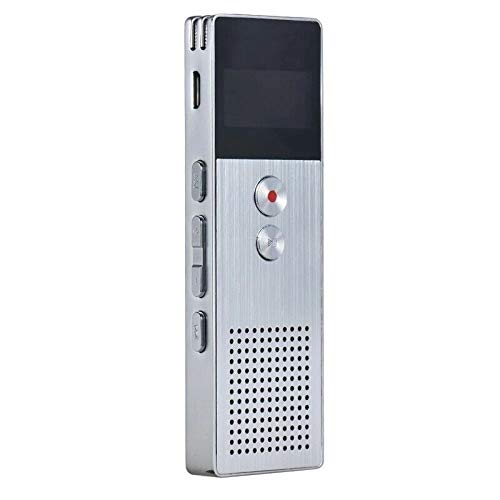
Imazhi 2.1: Përpara view of the ELECTROPRIME Digital Voice Recorder. This image displays the device's screen, the prominent red record button, and other control buttons on the front panel, along with the speaker grille at the bottom.
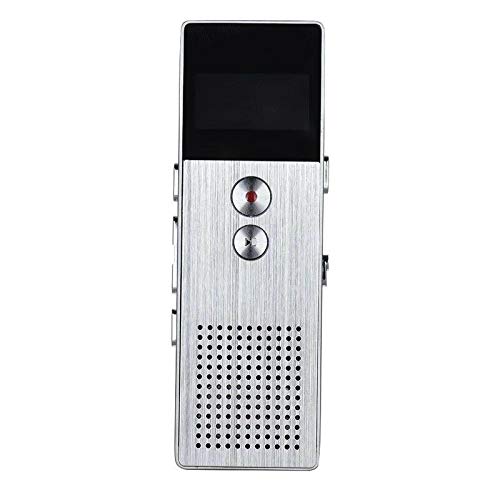
Imazhi 2.2: Anash view of the ELECTROPRIME Digital Voice Recorder. This image highlights the side controls, including the power switch, volume buttons, and the USB charging/data transfer port. The device's compact design is visible.
Përbërësit e pajisjes:
- Ekrani i shfaqjes: Tregon statusin e regjistrimit, kohën, nivelin e baterisë dhe opsionet e menysë.
- Butoni i regjistrimit: Initiates and stops audio recording.
- Butoni i luajtjes/pauzës: Starts and pauses playback of audio files.
- Butonat e volumit (+/-): Rregullon volumin e riprodhimit.
- Butoni i Menysë/Modalitetit: Navigates through menus and switches operating modes.
- Porta USB: For charging and data transfer to a computer.
- Mikrofoni: Built-in stereo microphone for audio input.
- Folësi: Për riprodhim të drejtpërdrejtë të audios.
- Jack kufje: Për dëgjim privat.
- Ndërprerësi i energjisë: Ndez ose fiket pajisjen.
3. Konfigurimi
3.1 Ngarkimi i pajisjes
Before first use, fully charge the device. Connect the recorder to a computer's USB port or a USB wall adapter (not included) using the provided USB cable. The battery indicator on the screen will show charging status. A full charge typically takes 2-3 hours.
3.2 Ndez/Fik
- Për ta ndezur, rrëshqitni Ndërprerësi i energjisë në pozicionin ON.
- Për ta fikur, rrëshqitni Ndërprerësi i energjisë në pozicionin OFF.
3.3 Cilësimet fillestare
Upon first power-on or after a reset, you may need to set the date, time, and language. Use the navigation buttons to select options and confirm with the Play/Pause button.
4. Udhëzimet e funksionimit
4.1 Regjistrimi i zërit
The device supports high-quality stereo recording in .WAV format, offering up to 23 hours of continuous recording with its 8GB internal memory.
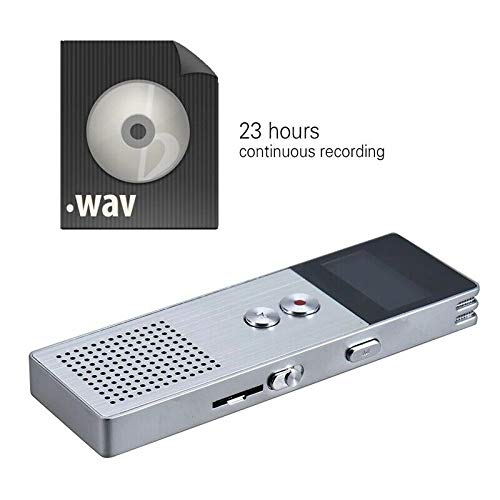
Imazhi 4.1: The recorder's capability to record in .WAV format and its impressive 23-hour continuous recording capacity are highlighted in this image, alongside the device itself.
- Sigurohuni që pajisja të jetë e ndezur.
- Shtypni Butoni i regjistrimit (red circle) to start recording. The screen will display a recording indicator and elapsed time.
- Për të ndërprerë regjistrimin, shtypni Butoni i luajtjes/pauzës. Shtypni përsëri për të rifilluar.
- Për të ndaluar regjistrimin dhe për të ruajtur file, shtypni Butoni i regjistrimit përsëri file do të ruhet automatikisht.
Këshillë: For best recording quality, ensure the microphone is not obstructed and the device is placed on a stable surface.
4.2 Riprodhimi
- In the main menu, navigate to the "Recordings" or "Music" folder using the navigation buttons.
- Zgjidhni atë që dëshironi file dhe shtypni Butoni i luajtjes/pauzës për të nisur riprodhimin.
- Gjatë riprodhimit, përdorni Butonat e volumit (+/-) për të rregulluar volumin.
- Shtypni Butoni i luajtjes/pauzës to pause playback, and again to resume.
- Për të ndaluar riprodhimin, shtypni butonin Butoni Stop (if available, otherwise navigate out of playback mode).
4.3 MP3 Music Player Functionality
The device can also function as an MP3 player. Transfer MP3 files to the device via USB connection to your computer.
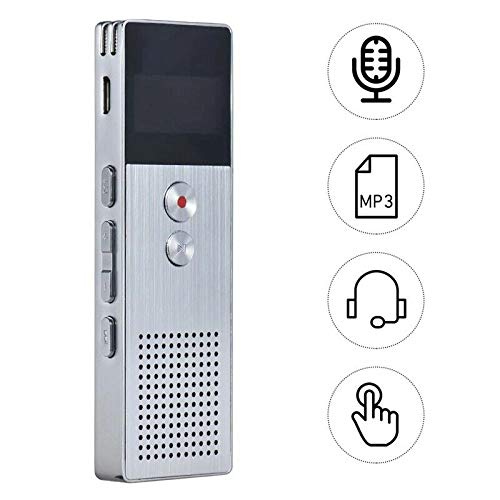
Imazhi 4.2: This image illustrates the multi-functional capabilities of the device, including its use as a voice recorder (microphone icon), an MP3 player (MP3 icon), and its compatibility with headphones (headphone icon). The touch icon suggests ease of interaction.
- Lidheni pajisjen me kompjuterin tuaj duke përdorur kabllon USB.
- The device will appear as a removable disk. Copy your MP3 files into the "Music" folder on the device.
- Safely eject the device from your computer.
- On the recorder, navigate to the "Music" menu and select your desired MP3 file për rishikim.
4.4 File Management (Connecting to PC)
To transfer, delete, or organize files, connect the recorder to your computer using the USB cable. The device will be recognized as a mass storage device. You can then drag and drop files as you would with any USB drive.
5. Mirëmbajtja
- Mbajeni pajisjen të thatë. Lagështia mund të dëmtojë qarqet e brendshme.
- Shmangni temperaturat ekstreme.
- Mos e hidhni ose mos e nënshtroni pajisjen ndaj goditjeve të forta.
- Clean the device with a soft, dry cloth. Do not use harsh chemicals or detergents.
- Bëni rregullisht kopje rezervë të regjistrimeve të rëndësishme në kompjuterin tuaj.
6. Troubleshooting
Pajisja nuk ndizet:
- Sigurohuni që bateria është e ngarkuar. Lidheni me një burim energjie dhe provoni përsëri.
- Kontrolloni nëse çelësi i energjisë është në pozicionin ON.
Nuk mund të regjistrohet:
- Check available memory. If full, transfer files to a computer and delete them from the device.
- Sigurohuni që mikrofoni të mos jetë i mbuluar.
- Verify the device is in recording mode.
Nuk ka zë gjatë riprodhimit:
- Adjust the volume using the Volume Buttons.
- Ensure headphones are properly connected if using them.
- Kontrolloni nëse audio file është i korruptuar.
Pajisja nuk njihet nga kompjuteri:
- Try a different USB port or USB cable.
- Ensure the device is powered on when connected.
- Rinisni kompjuterin tuaj.
7. Specifikimet
| Markë | ELECTROPRIME |
| Numri i modelit | ASHA20BEBUBEB16153 |
| Ruajtja e memories | 8 GB |
| Formati i regjistrimit | WAV |
| Formatet e riprodhimit | MP3, WAV |
| Mikrofoni | Stereo |
| Regjistrim i vazhdueshëm | Deri në 23 orë |
| Lidhshmëria | USB |
8. Garancia dhe Mbështetja
For warranty information or technical support, please refer to the product packaging or contact ELECTROPRIME customer service through their official website or the retailer where the product was purchased. Please have your model number (ASHA20BEBUBEB16153) and purchase details ready.