Hyrje
This manual provides detailed instructions for the ALLIMITY SHWRMC0103 replacement remote control. This remote is designed to function as a direct replacement for your original Sharp Aquos 3D TV remote, offering identical functionality without the need for complex programming. Please read this manual carefully to ensure proper use and to maximize your viewpërvojë.
Përmbajtja e paketës
- 1 x ALLIMITY SHWRMC0103 Replacement Remote Control
- (Bateritë nuk përfshihen)
Konfigurimi
1. Instalimi i baterisë
The ALLIMITY SHWRMC0103 remote control requires two AAA alkaline batteries (not included) for operation. Follow these steps to install the batteries:
- Gjeni ndarjen e baterisë në pjesën e pasme të telekomandës.
- Shtypni poshtë shulën dhe rrëshqitni kapakun e baterisë poshtë për ta hapur.
- Insert two AAA alkaline batteries, ensuring the positive (+) and negative (-) terminals align correctly with the markings inside the compartment.
- Rrëshqiteni kapakun e baterisë përsëri në vend derisa të klikojë mirë.
No programming or pairing is required. The remote control is ready for use immediately after battery installation.

Imazhi: Përpara view of the ALLIMITY SHWRMC0103 replacement remote control. This image shows the full layout of the remote's buttons, including power, channel, volume, and navigation controls.
Udhëzimet e funksionimit
The ALLIMITY SHWRMC0103 remote control is designed to replicate the functions of your original Sharp Aquos 3D TV remote. Point the remote directly at your television's infrared receiver for optimal performance.
Mbi funksionet kryesoreview
| Butoni | Funksioni |
|---|---|
| Ndezja (Butoni i Kuq) | Ndez ose fiket televizorin. |
| DTV / RADIO / USB / DVD | Selects input sources or modes. |
| Butonat me numra (0-9) | Zgjedhje e drejtpërdrejtë e kanalit. |
| GUIDA TV | Qas në udhëzuesin elektronik të programit. |
| P.MODE / S.MODE | Picture Mode / Sound Mode selection. |
| VOL +/- | Rregullon nivelin e volumit. |
| CH +/- | Ndryshon kanalet televizive. |
| MENU | Hap menynë kryesore të televizorit. |
| Në rregull / Shigjetat e navigimit | Confirms selections and navigates through menus. |
| EXIT | Dil nga menyja ose funksioni aktual. |
| BURIMI | Kalon nëpër burimet e disponueshme të hyrjes (HDMI, AV, etj.). |
| INFO | Shfaq informacion në lidhje me programin ose të dhënat e dhëna aktuale. |
| ASPECT / SLEEP / AUDIO / SUBTITLE / DISPLAY | Various TV function controls. |
| TEXT / HOLD / ZOOM | Teletext and display zoom functions. |
| DVD MENU / REC LIST / GOTO | DVD player controls and recording list access. |
| Kontrollet e riprodhimit (Luaj, Pauzë, Ndalo, Rikthehu, Përpara shpejt, Kapërce) | Kontrollon luajtjen e medias për pajisjet e lidhura ose përmbajtjen e regjistruar. |
| Butona me ngjyra (të kuqe, jeshile, të verdhë, blu) | Funksione të ndjeshme ndaj kontekstit brenda menuve ose aplikacioneve. |
| 3D | Aktivizon ose çaktivizon modalitetin 3D (nëse mbështetet nga televizori). |

Imazh: I kënduar view of the ALLIMITY SHWRMC0103 remote control, showing the ergonomic design and button layout from a top-left perspective.
Mirëmbajtja
- Pastrimi: Përdorni një leckë të butë dhe të thatë për të pastruar telekomandën. Mos përdorni pastrues të lëngshëm ose materiale gërryese.
- Ndërrimi i baterisë: Replace batteries when the remote's response becomes sluggish or stops working. Always replace both batteries at the same time with new alkaline batteries.
- Magazinimi: Nëse telekomanda nuk do të përdoret për një periudhë të gjatë kohore, hiqni bateritë për të parandaluar rrjedhjen dhe dëmtimet e mundshme.
- Shmang ekspozimin: Mbajeni telekomandën larg rrezeve të diellit, burimeve të nxehtësisë dhe lagështisë.
Zgjidhja e problemeve
| Problem | Shkaku/zgjidhja e mundshme |
|---|---|
| Telekomanda nuk funksionon |
|
| Butonat nuk përgjigjen |
|
| Gama e shkurtër e funksionimit |
|
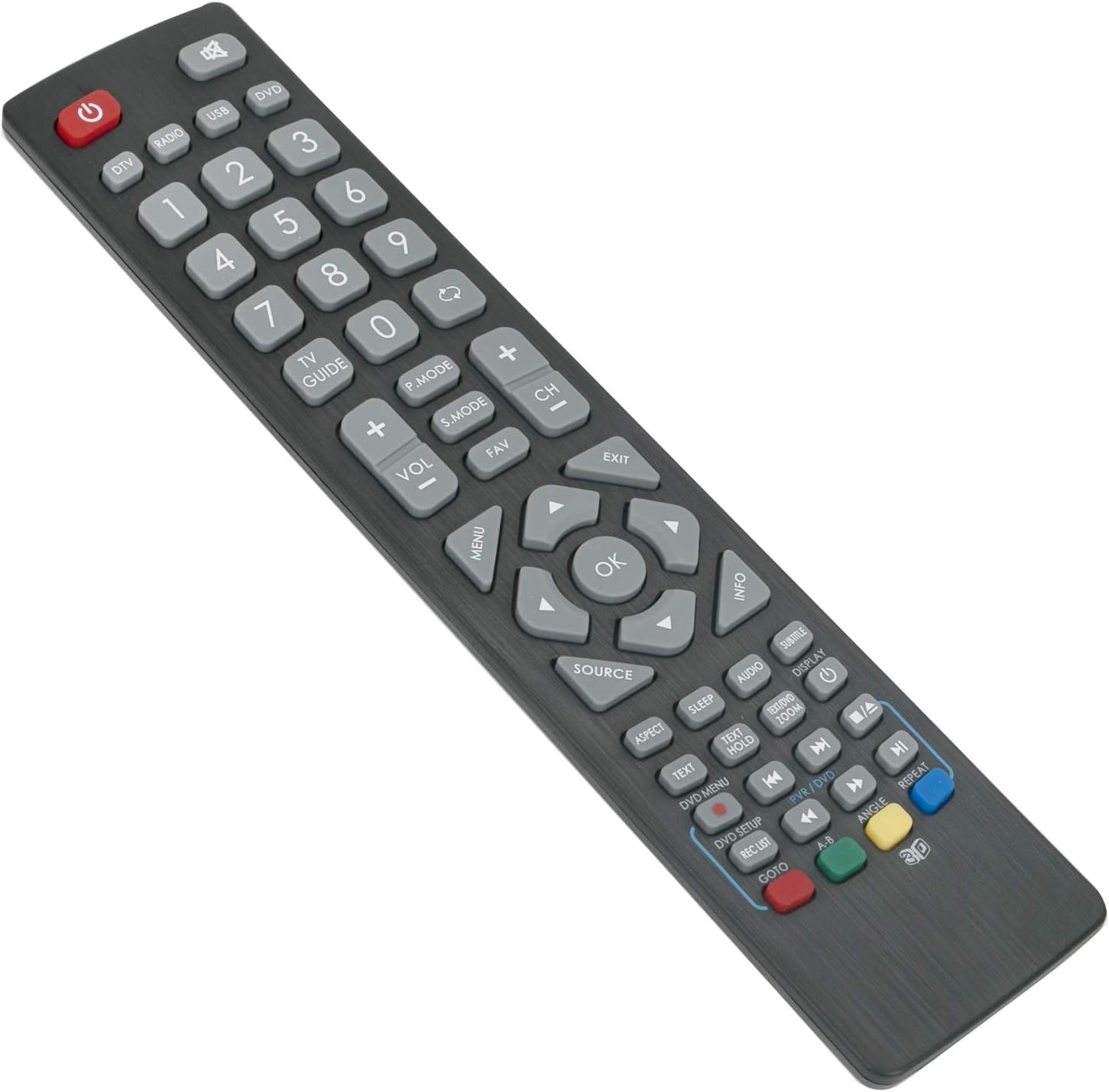
Imazh: I kënduar view of the ALLIMITY SHWRMC0103 remote control, highlighting the button arrangement and overall design from a top-right perspective.
Specifikimet
- Marka: ALIMITET
- Modeli: SHWRMC0103
- Prodhuesi: MaxControlFactory
- Dimensionet e produktit: 6 x 0.5 x 17 cm
- Pesha e produktit: 80 g
- Lloji i baterisë: Alkaline (AAA, not included)
- Teknologjia e lidhjes: Infra të kuqe
- Gama maksimale: 10 metra
- Karakteristikë e veçantë: Nuk kërkohet programim
- Modelet e TV-ve të pajtueshme:
- Sharp Aquos 3D TV models including:
- LC-32CHF4041K, LC-32DHE4041K, LC-32DHF4041K, LC-32HG3141K, LC-32HG3241K, LC-32HG3341K
- LC-43CFE4142E, LC-48CFE4041E, LC-48CFE4041K, LC-48CFE4042E
- LC-22DFE4011K, LC-22DFF4011E, LC-22DFF4011ES, LC-24CHE4000E, LC-24CHE4000ES, LC-24CHE4012E, LC-24CHE4012ES
- LC-48CFE4042K, LC-49CFE4041E, LC-49CFE4042E
- LC-22CFE4000ES, LC-22CFE4012E, LC-22CFE4012ES, LC-22CFF4011E, LC-22CFF4011ES, LC-22CFF4012E, LC-22CFF4012ES
- LC-24CHF4011E, LC-24CHF4011ES, LC-40CFE4041E, LC-40CFE4041K, LC-40CFE4042E, LC-40CFF4041K
- LC-40FG3141K, LC-40FG3241K, LC-40FG3341K, LC-24CHF4011K, LC-24CHF4012E, LC-24CHF4012ES
- LC-24DHE4011K, LC-40CFE4040E, LC-43CFE4140E, LC-43CFE4141E, LC-24DHF4011E, LC-24DHF4011ES, LC-24DHF4011K, LC-32CHE4041K
Garancia dhe Mbështetja
Specific warranty information for this product is not provided in the available data. For any issues or support inquiries, please refer to the seller or retailer from whom the product was purchased. Ensure you retain your proof of purchase for any potential warranty claims.
