Hyrje
This manual provides detailed instructions for the operation and maintenance of your GTMEDIA Z3 Portable DAB+/FM RDS Radio. Please read this manual thoroughly before using the device to ensure proper functionality and to maximize your listening experience.
Informacion i rëndësishëm për sigurinë
- Mos e ekspozoni pajisjen ndaj shiut, lagështirës ose temperaturave ekstreme.
- Shmangni rënien ose ekspozimin e pajisjes ndaj goditjeve të forta.
- Mos u përpiqni ta çmontoni ose riparoni vetë njësinë. Ia drejtoni çdo shërbim personelit të kualifikuar.
- Përdorni vetëm kabllon e karikimit dhe adaptorin e energjisë të specifikuar.
- Mbajeni jashtë mundësive të fëmijëve.
Përmbajtja e paketës
Sigurohuni që të gjitha sendet janë të pranishme në paketim:
- 1 x GTMEDIA Z3 DAB+/FM Radio
- 1 x kabllo USB karikimi
- 1 x Manuali i Përdoruesit

Image: The GTMEDIA Z3 radio, its retail box, USB charging cable, and user manual.
Produkti Mbiview
The GTMEDIA Z3 is a portable DAB+/FM RDS radio featuring a 2.4-inch TFT-LCD screen. It supports 60 preset stations for both DAB+ and FM, and includes functions such as clock, alarm, and sleep timer. The device is powered by a rechargeable 18650 lithium battery.
Kontrollet dhe ekrani i panelit të përparmë
- Butoni i ndezjes/gatishmërisë: Turns the radio on/off or puts it in standby mode.
- Butoni i skanimit: Initiates station scanning.
- Butoni DAB/FM: Kalon midis modaliteteve DAB+ dhe FM.
- Butoni i menysë: Hyn në menunë kryesore.
- Butoni i EQ: Rregullon cilësimet e ekualizuesit.
- Butoni i paracaktuar: Accesses preset stations.
- Butoni i volumit/zgjedhjes: Adjusts volume and navigates/selects menu options.
- 2.4-inch TFT-LCD Display: Tregon informacionin e stacionit, kohën dhe opsionet e menysë.
Paneli i pasmë dhe portat
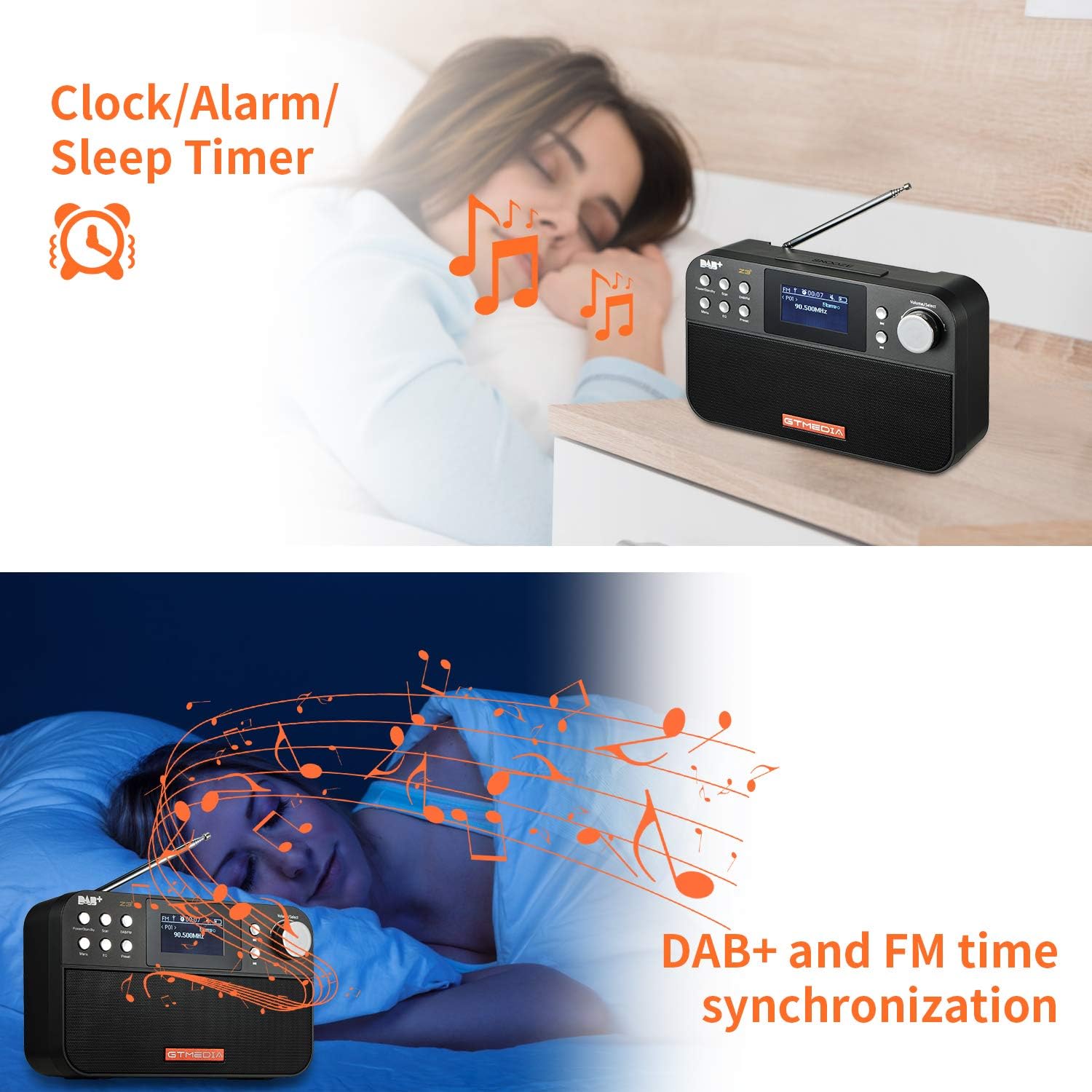
Image: The back of the GTMEDIA Z3 radio, highlighting the 18650 lithium battery compartment and the DC 5V USB charging port.
- 18650 Lithium Battery Compartment: Përmban baterinë e rikarikueshme.
- DC 5V USB Charging Port: Për karikimin e pajisjes.
Udhëzuesi i konfigurimit
1. Ngarkimi i baterisë
- Locate the USB charging port on the rear of the radio.
- Connect the provided USB charging cable to the radio and to a compatible USB power adapter (DC 5V, ≥1500mA) or a computer USB port.
- The battery indicator on the display will show charging status. A full charge typically provides 4-7 hours of operation.
Image: The GTMEDIA Z3 radio's rear panel, illustrating the USB charging port and battery specifications.
2. Ndezja fillestare dhe zgjedhja e gjuhës
- Shtypni dhe mbani shtypur Fuqia/Nga gatishmëria butonin për të ndezur radion.
- Upon first use, you may be prompted to select a language. Use the Vëllimi/Zgjidhja knob to navigate and press to confirm your choice. English is the default language.
3. Sinkronizimi i kohës
The clock can be set manually or synchronized automatically with DAB+ or FM signals.
- Sinkronizimi automatik: When tuned to a DAB+ or FM station that broadcasts time information, the radio will automatically update its clock.
- Rregullimi manual: Access the system settings via the Menyja button to manually set the time and date.
Udhëzimet e funksionimit
1. Radio Modes (DAB+/FM)
Mënyrat e ndërrimit:
Shtypni DAB/FM butonin për të kaluar midis modaliteteve të radios DAB+ dhe FM.
Duke skanuar për stacione:
- Auto Scan (FM): Në modalitetin FM, shtypni Skanoni button to automatically search for and store available stations.
- Local Scan (DAB+): Në modalitetin DAB+, shtypni Skanoni button to perform a local scan for DAB+ stations. Manual tuning is also supported.
Stacionet e paravendosjes:
The radio supports 60 preset stations for both FM and DAB+ (10 quick access presets). To save a station:
- Sintonizoni në stacionin e dëshiruar.
- Shtypni dhe mbani shtypur Paracaktuar butonin.
- Përdorni Vëllimi/Zgjidhja knob to choose a preset number and press to confirm.
Për të thirrur një stacion të paracaktuar, shtypni shkurtimisht Paracaktuar butonin dhe përdorni Vëllimi/Zgjidhja çelësi për të zgjedhur.
FM RDS Station Name Display:
When tuned to an FM station broadcasting RDS (Radio Data System) information, the 2.4-inch TFT-LCD screen will display the station name and other relevant data.
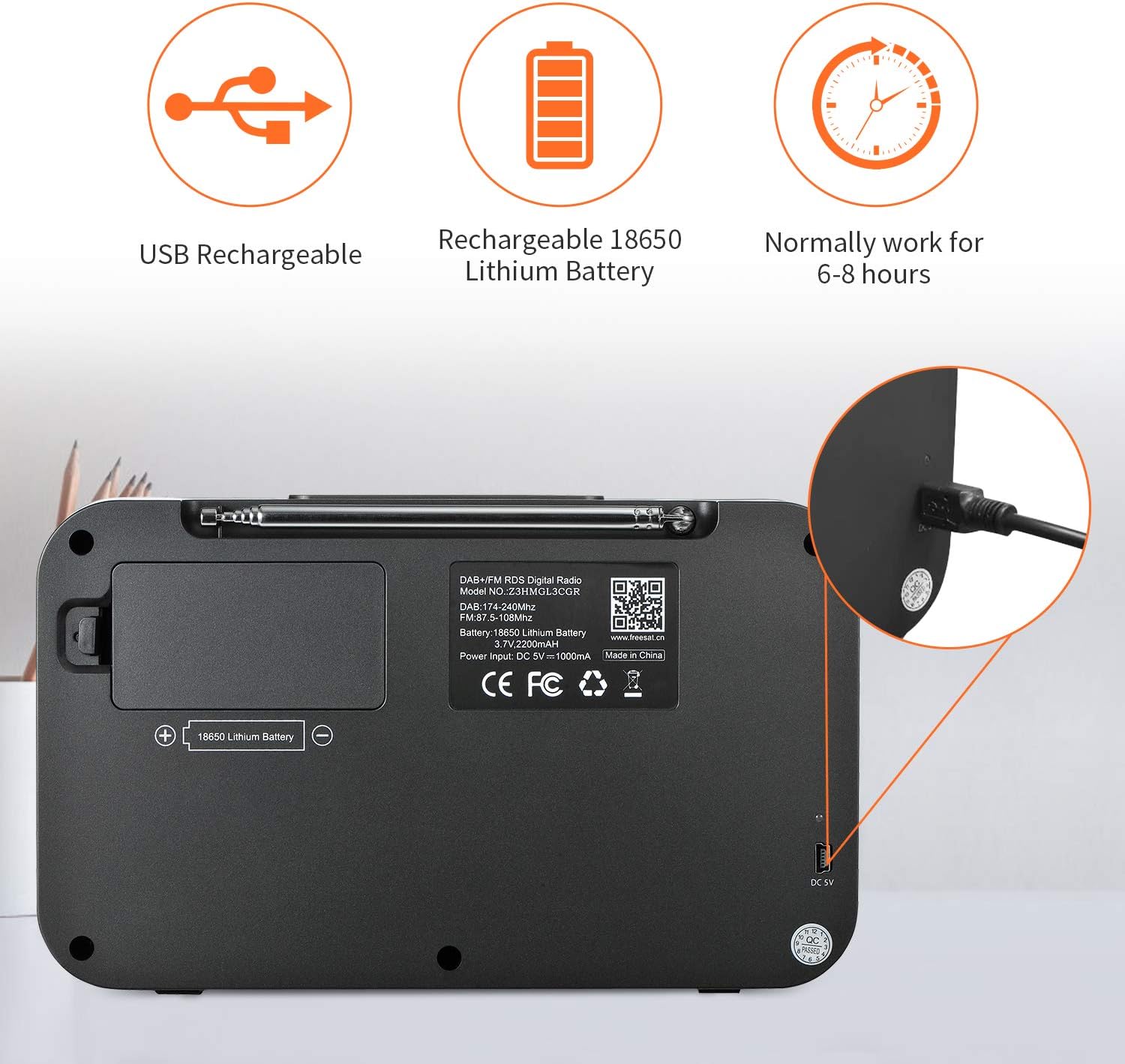
Image: The GTMEDIA Z3 radio's display showing "FM" and "90.500MHz" along with a station name, demonstrating the RDS feature.
2. Clock, Alarm, and Sleep Timer
The GTMEDIA Z3 radio includes integrated clock, alarm, and sleep timer functions for enhanced convenience.

Image: The GTMEDIA Z3 radio with icons representing clock, alarm, and sleep timer functions, depicted in a bedroom setting.
Vendosja e alarmit:
- Shtypni Menyja button and navigate to the "Alarm" settings.
- Përdorni Vëllimi/Zgjidhja knob to set the alarm time, duration, and alarm source (e.g., buzzer, DAB+, FM).
- Konfirmoni cilësimet tuaja.
Vendosja e kohëmatësit të gjumit:
- Shtypni Menyja button and navigate to the "Sleep Timer" settings.
- Përdorni Vëllimi/Zgjidhja knob to choose the desired sleep duration (e.g., 15, 30, 60 minutes).
- Radioja do të fiket automatikisht pas kohës së caktuar.
3. Luajtja e muzikës
The GTMEDIA Z3 supports playback of various music formats including MP3, FLAC, and WAV. Playback modes include single play, repeat, and shuffle. Specific instructions for accessing and controlling music playback are typically found within the device's menu system.
Mirëmbajtja
Pastrimi:
- Fshijeni radion me një leckë të butë dhe të thatë.
- Mos përdorni pastrues të lëngshëm ose materiale gërryese.
Kujdesi për baterinë:
- Për të zgjatur jetëgjatësinë e baterisë, shmangni shkarkimin e saj të plotë shpesh.
- Ngarkoni baterinë rregullisht, edhe nëse radioja nuk është në përdorim të shpeshtë.
- Ruajeni radion në një vend të freskët dhe të thatë kur nuk e përdorni për periudha të gjata.
Zgjidhja e problemeve
| Problem | Shkaku i mundshëm | Zgjidhje |
|---|---|---|
| Asnjë fuqi | Bateria është e shkarkuar. | Ngarkoni baterinë duke përdorur kabllon USB të dhënë. |
| Marrja e dobët e radios | Sinjal i dobët; antena nuk është e zgjatur. | Extend the telescopic antenna fully. Try repositioning the radio. Perform a new scan for stations. |
| Asnjë zë | Volume too low; Mute activated. | Rritni volumin duke përdorur Vëllimi/Zgjidhja knob. Check if mute is active in settings. |
| Shfaqja nuk është e qartë | Brightness setting too low. | Adjust LCD brightness in the system settings. |
Specifikimet
| Veçori | Detaj |
|---|---|
| Markë | GTMEDIA |
| Model | Z3 |
| Teknologjia e akorduesit | DAB Plus, FM RDS |
| Bandat e mbështetura të radios | DAB+ (174.92-239.20 MHz), FM (87.5-108 MHz) |
| Ekrani | 2.4-inch TFT-LCD (240 x 320 pixels) |
| Stacionet e paracaktuara | 60 FM, 60 DAB+ |
| Burimi i energjisë | Mundësuar nga bateria |
| Lloji i baterisë | Bateri Litiumi 18650 (3.7V 2200mAh) |
| Orari i punës | 4-7 hours (typical) |
| Hyrja e karikimit | DC 5V, ≥1500mA (via USB) |
| Teknologjia e lidhjes | USB |
| Veçori e veçantë | Portable, Clock, Alarm, Sleep Timer, USB Upgradeable |
| Pesha e artikullit | 620 g |
| Dimensionet e produktit | 20 x 5 x 12 cm |
| Temperatura e funksionimit | 0~+45°C |
| Temperatura e ruajtjes | -10~+60°C |
| Formatet e muzikës | MP3, FLAC, WAV |

Image: Dimensions of the GTMEDIA Z3 radio, showing approximate measurements of 200mm x 120mm x 50mm.
Përmirësimi i firmuerit
The GTMEDIA Z3 radio supports firmware upgrades via a USB connection to a PC. For the latest firmware and detailed instructions, please visit the official support webfaqe.

Image: The GTMEDIA Z3 radio connected to a laptop via a USB cable, indicating its upgradeable feature.
Garancia dhe Mbështetja
For technical support, warranty information, or any questions regarding your GTMEDIA Z3 radio, please visit the official GTMEDIA support webfaqe:


