1. Hyrje
The YABER V3 Mini Bluetooth Projector is designed to provide a versatile and high-quality viewing experience for home entertainment and outdoor use. Featuring native 1280x720p resolution with 1080P support, a 6000:1 contrast ratio, and an advanced German LED light source, it delivers clear and accurate images. This projector also includes Bluetooth 5.0 for wireless audio connectivity and supports wireless screen mirroring via Anycast or Chromecast (adapters sold separately).
2. Çfarë ka në kuti
- YABER V3 Mini Bluetooth Projector
- Kabllo HDMI
- Kordoni elektrik
- Manuali i Përdoruesit
- Cable AV
- Metrazhe pastrimi lente
- Telekomandë (bateritë nuk përfshihen)
3. Karakteristikat e produkteve
- Native 720P & 1080P Supported: Offers a native resolution of 1280x720 pixels, supporting up to 1080P input for clear images.
- Raporti i lartë i kontrastit: Features a 6000:1 contrast ratio for enhanced image depth and detail.
- Lidhshmëria Bluetooth 5.0: Allows wireless connection to Bluetooth headsets, speakers, and Airpods for enhanced audio.
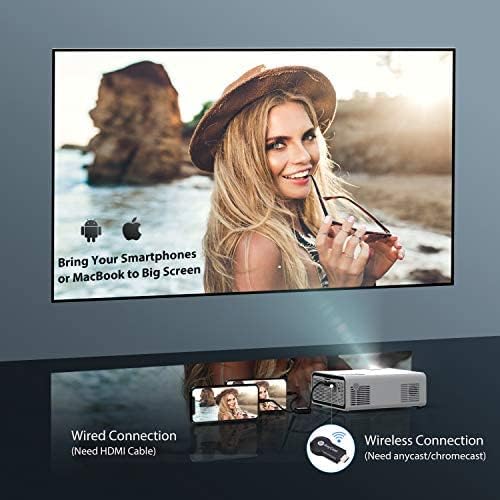
- Pasqyrimi i ekranit me valë: Supports Anycast and Chromecast for mirroring content from smartphones and other devices (adapters required).
- Funksioni i zmadhimit: Adjusts image size from 100% to 50% using the remote control without moving the projector.
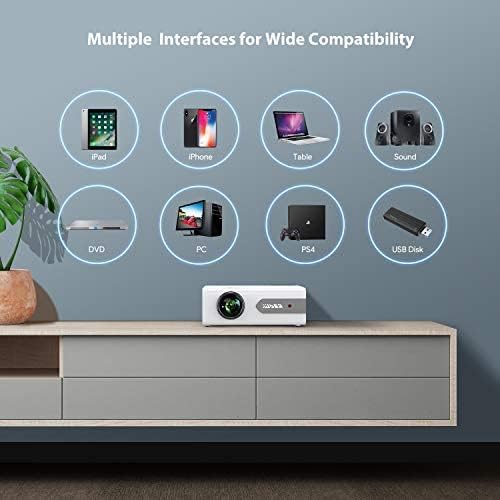
- Ndërfaqe të shumta: Equipped with HDMI, USB, VGA, AV, and Audio ports for wide compatibility with various devices.
- HIFI Stereo Sound: Built-in dual stereo speakers with an SRS sound system provide a good auditory experience.
- Sistemi i avancuar i ftohjes: Designed to minimize lamp power consumption and extend lamp jetëgjatësia deri në 100,000 orë.


4. Konfigurimi
4.1 Vendosja Fillestare
Place the projector on a stable, flat surface or mount it to the ceiling. Ensure there is adequate ventilation around the projector to prevent overheating. The projection distance and screen size can be adjusted based on your viewmjedisit.

4.2 Lidhja e energjisë
Lidhni kabllon e energjisë me hyrjen e energjisë të projektorit dhe më pas futeni në një prizë elektrike.
4.3 Ndez/Fik
Shtypni butonin e ndezjes në projektor ose në telekomandë për ta ndezur ose fikur njësinë.
5. Udhëzimet e funksionimit
5.1 Korrigjimi i Fokusit dhe i Keystone-it
Adjust the focus ring on the projector lens until the image is clear. Use the keystone correction feature (manual or digital, if available) to correct any trapezoidal distortion of the image.
5.2 Përzgjedhja e Burimit të Hyrjes
Use the 'Source' button on the remote or projector to select the desired input source (HDMI, USB, VGA, AV).
5.3 Lidhja Bluetooth
To connect to a Bluetooth audio device:
- Ensure your Bluetooth speaker or headset is in pairing mode.
- Shko te cilësimet e Bluetooth në projektor.
- Zgjidhni pajisjen tuaj nga lista e pajisjeve të disponueshme për çiftim.
- Once connected, audio will play through the Bluetooth device.
Shënim: The V3 mini projector supports Bluetooth output devices (speakers, headphones) but does not connect to phones/pads via Bluetooth for mirroring. Turn off Bluetooth when not in use to avoid potential issues.
5.4 Pasqyrimi pa tel i ekranit
The YABER V3 supports wireless screen mirroring from iOS and Android devices using an external Anycast or Chromecast dongle (purchased separately). Connect the dongle to an HDMI port and follow the dongle's instructions for mirroring.
5.5 Funksioni i zmadhimit
To adjust the image size without moving the projector, use the zoom function via the remote control. This allows you to shrink the image from 100% down to 50%.
5.6 Skenarët e Përdorimit
The YABER V3 projector is suitable for various applications:
- Kinema në shtëpi: Enjoy movies and shows on a large screen.
- Lojëra: Connect gaming consoles for an immersive experience.
- Outdoor Movies: Perfect for backyard movie nights in dark environments.

6. Mirëmbajtja
6.1 Pastrimi i lenteve
Regularly clean the projector lens using the provided lens cleaning cloth or a soft, lint-free cloth. Avoid using abrasive cleaners or harsh chemicals.
6.2 Pastrimi i filtrit të ajrit
Check and clean the air filter periodically to ensure proper airflow and prevent dust buildup, which can affect performance and lamp jeta.
6.3 Lamp Jeta
LED i projektorit lamp has a lifespan of up to 100,000 hours. Proper maintenance, including adequate ventilation and cleaning, helps maximize its longevity.
7. Troubleshooting
- Asnjë foto:
- Check if the power cable is securely connected.
- Sigurohuni që të jetë zgjedhur burimi i saktë i hyrjes.
- Verify that the connected device (e.g., TV Stick, PC) is powered on and outputting a signal.
- Adjust focus and keystone.
- Nuk ka zë:
- Kontrolloni cilësimet e volumit si në projektor ashtu edhe në pajisjen e lidhur.
- Nëse përdorni Bluetooth, sigurohuni që pajisja të jetë e çiftuar dhe e lidhur siç duhet.
- If using an external speaker via AUX, ensure the cable is fully inserted.
- Some content (e.g., certain streaming services) may have audio format incompatibilities; try a different source or content.
- Imazhi i paqartë:
- Rregulloni unazën e fokusit në lente.
- Sigurohuni që sipërfaqja e projeksionit të jetë e sheshtë dhe projektori të jetë i qëndrueshëm.
- Pastroni lentet e projektorit.
- Telekomanda nuk funksionon:
- Ndërroni bateritë në telekomandë.
- Sigurohuni që nuk ka pengesa midis telekomandës dhe marrësit IR të projektorit.
- Mbinxehje:
- Ensure adequate ventilation around the projector.
- Clean the air filter and vents to remove dust.
- Avoid operating in excessively hot environments.
8. Specifikimet
| Numri i modelit | V3 |
| Rezolucioni i ekranit | Native 1280 x 720 (Supports 1080P) |
| Raporti i kontrastit | 6000:1 |
| Raporti i pamjes | 16:9 / 4:3 |
| Burimi i dritës | LED |
| Lamp Jeta | Deri në 100,000 orë |
| Teknologjia e lidhjes | 3.5mm Jack, Bluetooth, HDMI, USB, VGA, AV |
| Versioni Bluetooth | 5.0 |
| Dimensionet e produktit | 8.19 x 6.61 x 3.07 inç |
| Pesha e artikullit | 2.2 paund |
| Përdorimet e rekomanduara | Home Cinema, Gaming, Business (not recommended for professional presentations) |
9. Garancia dhe Mbështetja
YABER provides a 6-month return policy and 3-year repair service for the V3 Mini Bluetooth Projector. Lifetime professional technical support is also available. For any issues or inquiries, please contact YABER customer service.


