Hyrje
This manual provides essential information for the proper installation, operation, and maintenance of your Zebronics Zeb-D370S DVD Player. Please read this manual thoroughly before using the device to ensure safe and efficient operation. Keep this manual for future reference.
Informacion i rëndësishëm për sigurinë
- Mos e ekspozoni pajisjen ndaj shiut ose lagështirës për të parandaluar zjarrin ose goditjen elektrike.
- Mos e hapni c-nëasing. Ia drejtoni të gjitha shërbimet personelit të kualifikuar.
- Sigurohuni që të ketë ventilim të duhur përreth njësisë. Mos i bllokoni hapjet e ventilimit.
- Use only the power adapter supplied with the unit or specified by the manufacturer.
- Shmangni vendosjen e njësisë në sipërfaqe të paqëndrueshme.
- Shkëputeni kabllon e energjisë gjatë stuhive me rrufe ose kur nuk përdoret për periudha të gjata kohore.
Përmbajtja e paketës
Verifikoni që të gjitha sendet janë të pranishme në paketim:
- Zebronics Zeb-D370S DVD Player Unit
- Telekomandë
- Cable AV
- Kabllo energjie
- Manuali i Udhëzimeve
Produkti Mbiview
The Zebronics Zeb-D370S is a versatile DVD player featuring a built-in stereo speaker and amplifier, HDMI, USB, and SD card support, and dual karaoke microphone inputs. It supports multiple formats and offers 5.1 channel, coaxial, and optical audio outputs.
Kontrollet dhe Portat e Panelit të Përparmë
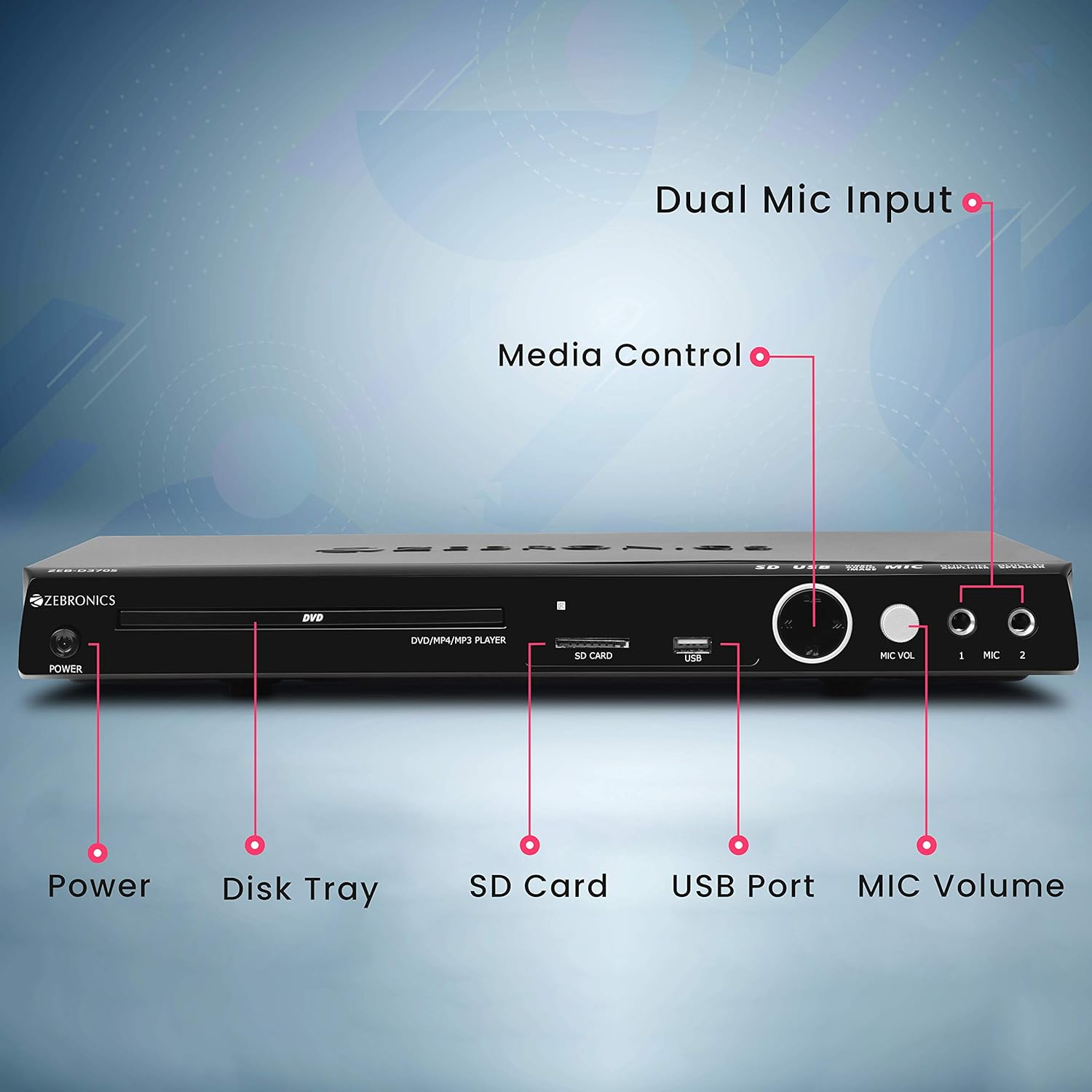
Front panel of the Zebronics Zeb-D370S DVD Player, showing the Power button, Disk Tray, SD Card slot, USB Port, MIC Volume control, and two Microphone inputs (MIC 1, MIC 2).
- Butoni i energjisë: Ndez ose fiket njësinë.
- Disk Tray: For inserting DVDs, CDs, VCDs, and SVCDs.
- Vendi i kartës SD: Për të luajtur media files nga një kartë SD.
- Porta USB: Për të luajtur media files nga një disk USB.
- Vëllimi MIC: Rregullon volumin e mikrofonave të lidhur.
- MIC 1 & MIC 2: Inputs for connecting microphones for karaoke.
- Butonat e kontrollit të medias: Play/Pause, Stop, Skip, etc.
Lidhjet e panelit të pasmë

Rear panel of the Zebronics Zeb-D370S DVD Player, detailing the Coaxial Output, Optical Output, 5.1 Channel Output, HDMI port, Composite video output, Component video output, S-Video output, and Ext-Audio Output.
- Dalja HDMI: For high-definition video and audio connection to a TV or display.
- Dalje video e përbërë: Dalje video me definicion standard.
- Dalja e videos së komponentit: Higher quality analog video output (YPbPr).
- Dalja S-Video: Improved analog video output.
- Digital Audio Output (Optical & Coaxial): For connecting to external audio receivers or sound systems.
- Analog 5.1 Channel Output: For connecting to a 5.1 channel speaker system.
- Ext-Audio Output: Additional audio output connections.
- Dalja e altoparlantit: Terminals for connecting external speakers, utilizing the built-in ampmë i gjallë

E pasme view of the Zebronics Zeb-D370S DVD Player highlighting the built-in amplifier, built-in speaker, and speaker output terminals.
Udhëzimet e konfigurimit
1. Lidhja e energjisë
- Ensure the DVD player is placed on a stable, flat surface with adequate ventilation.
- Connect the power cable to the AC input on the rear of the DVD player.
- Plug the other end of the power cable into a standard electrical outlet (110V - 260V AC).
2. Video Connection to TV/Display
Zgjidhni një nga metodat e mëposhtme të lidhjes:
- HDMI (Recommended for best quality): Connect an HDMI cable from the HDMI output on the DVD player to an HDMI input on your TV.
- Video e komponentit: Connect component video cables (Red, Green, Blue) from the DVD player's component outputs to the corresponding inputs on your TV.
- Video e përbërë: Connect a composite video cable (Yellow) from the DVD player's composite output to the yellow video input on your TV.
- S-Video: Connect an S-Video cable from the DVD player's S-Video output to the S-Video input on your TV.
3. Lidhja audio
Zgjidhni një nga metodat e mëposhtme të lidhjes audio:
- HDMI: If using HDMI for video, audio will also be transmitted via the HDMI cable.
- 5.1 Channel Analog Output: Connect RCA cables from the 5.1 channel outputs (Front Left, Front Right, Center, Subwoofer, Surround Left, Surround Right) on the DVD player to a compatible 5.1 channel ampsistem lifiers ose altoparlantësh.
- Audio dixhitale (optike/koaksiale): Connect an optical or coaxial cable from the respective output on the DVD player to a digital audio input on your amplifier or home theater system for surround sound.
- Built-in Speaker Output: If using the built-in speakers, ensure no external speakers are connected to the 5.1 channel outputs unless desired.
4. Lidhja e mikrofonit (Opsionale)
- Plug your microphones into the MIC 1 and/or MIC 2 inputs on the front panel.
- Adjust the MIC Volume knob to control microphone audio levels.
Udhëzimet e funksionimit

Zebronics Zeb-D370S DVD Player with a disc inserted, remote control, and a visual representation of content playing on a screen, illustrating its multimedia capabilities.
1. Disc Playback
- Shtypni Fuqia butonin për të ndezur DVD player-in.
- Shtypni Hap/Mbyll butonin (zakonisht në telekomandë ose në panelin e përparmë) për të hapur sirtarin e diskut.
- Place a compatible disc (DVD Video, DVD+RW/-RW/+R/-R, Dual Layer Disc, CD Audio, CD-R/-RW, VCD, SVCD) onto the disc tray with the label side facing up.
- Shtypni Hap/Mbyll button again to close the tray. The player will automatically begin playback or display a menu.
- Use the remote control for playback functions such as Play, Pause, Stop, Fast Forward, Rewind, and Chapter Skip.
2. Luajtja e mediave USB/SD
- Insert a USB drive into the USB port or an SD card into the SD card slot on the front panel.
- The player should automatically detect the media and display a menu to browse files. If not, select the USB or SD source using the remote control's Burimi or Input butonin.
- Navigoni nëpër tuajin files (VOB, MP4, DIVX, AVI, MPEG-1, MPEG-2, 3GP, MP3, WMA, AAC, JPEG, TXT) using the remote control and press Luaj për të nisur riprodhimin.
3. Funksion Karaoke
- Connect one or two microphones to the MIC 1 and MIC 2 inputs.
- Play a karaoke disc or a media file with instrumental tracks.
- Adjust the MIC Volume knob on the front panel to control the microphone audio level.
4. Funksionet e avancuara
- CD Ripping: Convert audio CDs to digital formats (refer to on-screen menu for options).
- Picture Slideshow: View JPEG images from disc, USB, or SD card as a slideshow.
- Skanimi progresiv: Provides a smoother, flicker-free image on compatible displays.
- Zoom IN/OUT: Magnify or reduce the displayed image during playback.
- High Speed Search: Quickly scan through disc or media content.
- Bllokimi prindëror: Restrict playback of certain content based on ratings.
- Përsëritje e menjëhershme: Jump back a few seconds during playback.
- Disc Resume: Resume playback from where it was last stopped on a disc.
Mirëmbajtja
- Pastrimi i njësisë: Use a soft, dry cloth to clean the exterior of the DVD player. Do not use liquid cleaners or abrasive materials.
- Kujdesi i diskut: Kapeni disqet nga skajet e tyre. Mbajini të pastra dhe pa gërvishtje. Përdorni një leckë të butë pa push për të fshirë disqet nga qendra jashtë.
- Ventilimi: Sigurohuni që hapjet e ventilimit të mos jenë të bllokuara për të parandaluar mbinxehjen.
Zgjidhja e problemeve
If you encounter issues with your DVD player, refer to the table below for common problems and solutions:
| Problem | Shkaku i mundshëm | Zgjidhje |
|---|---|---|
| Asnjë fuqi | Kablloja e energjisë nuk është e lidhur; Priza e energjisë nuk funksionon | Kontrolloni lidhjen e kabllit të energjisë; provoni një prizë tjetër |
| Nuk ka dalje video | Incorrect video cable connection; Incorrect input selected on TV | Ensure video cables are securely connected; Select the correct input source on your TV (e.g., HDMI 1, AV) |
| Nuk ka dalje audio | Incorrect audio cable connection; TV/amplifier volume too low; Mute activated | Check audio cable connections; Increase volume; Deactivate mute function |
| Disku nuk luhet | Disc is dirty or scratched; Disc format not supported; Disc inserted incorrectly | Clean the disc; Ensure disc is compatible; Insert disc with label side up |
| USB/SD media not detected | USB drive/SD card not inserted correctly; Incompatible file format; Corrupted media | Reinsert USB/SD; Check supported file formats; Try a different USB/SD device |
Specifikimet

Dimensions of the Zebronics Zeb-D370S DVD Player: 360mm (width), 220mm (depth), and 50mm (height).
| Veçori | Detaj |
|---|---|
| Emri i modelit | Zeb D370S |
| Markë | ZEBRONIKA |
| Dimensionet e produktit | 28 x 39 x 82 mm (1.4 kg) |
| Rezolucioni | 1920 x 1080 (Supported resolutions: 480i/576i/480p/576p/720p/1080i/1080p) |
| Karakteristika të veçanta | Surround Sound, Built-in Amplifier, Built-in Stereo Speaker, Karaoke Mic Input |
| Modaliteti i daljes audio | Stereo, Surround (2CH / 5.1CH / Virtual Surround Sound) |
| Konfigurimi i Kanalit të Zërit Rrethues të Altoparlantit | 5.1 |
| Formatet e mbështetura audio | Dolby Digital, MP3, WMA, AAC |
| Video Playback System | NTSC / PAL / AUTO |
| Lloji i lidhësit | HDMI, USB, SD Slot, MIC 1 & MIC 2, Composite, Component, S-Video, Digital Audio Output (Optical & Coaxial), Analog 5.1Ch Output, Ext-Audio Output x 2 |
| Media Type (Playback Disc) | DVD Video, DVD+RW/-RW/+R/-R, Dual Layer Disc, CD Audio, CD-R/-RW, VCD, SVCD |
| Media Files Mbështetur | VOB, MP4, DIVX, AVI, MPEG-1, MPEG-2, 3GP, MP3, WMA, AAC, JPEG, TXT |
| Vëllimi operativtage | 110V - 260V AC |
| Funksionet | CD Ripping, Picture SlideShow, Progressive scan, Zoom IN/OUT, High speed search, Parental lock, Instant replay, Disc resume |
Garancia dhe Mbështetja
For warranty information, technical support, or service inquiries, please refer to the warranty card included with your product or visit the official Zebronics webvend. Mos u përpiqni ta riparoni vetë pajisjen.


