1. Hyrje
This manual provides comprehensive instructions for the assembly, operation, and maintenance of your FLEXISPOT EN2 Electric Height Adjustable Standing Desk. Please read this manual thoroughly before assembly and use to ensure safe and efficient operation.
The FLEXISPOT EN2 desk features a spacious one-piece desktop, an electric height adjustment system with memory presets, and a removable clamp power strip for convenient device charging and cable management. It is designed to support a dynamic work environment, allowing seamless transitions between sitting and standing positions.
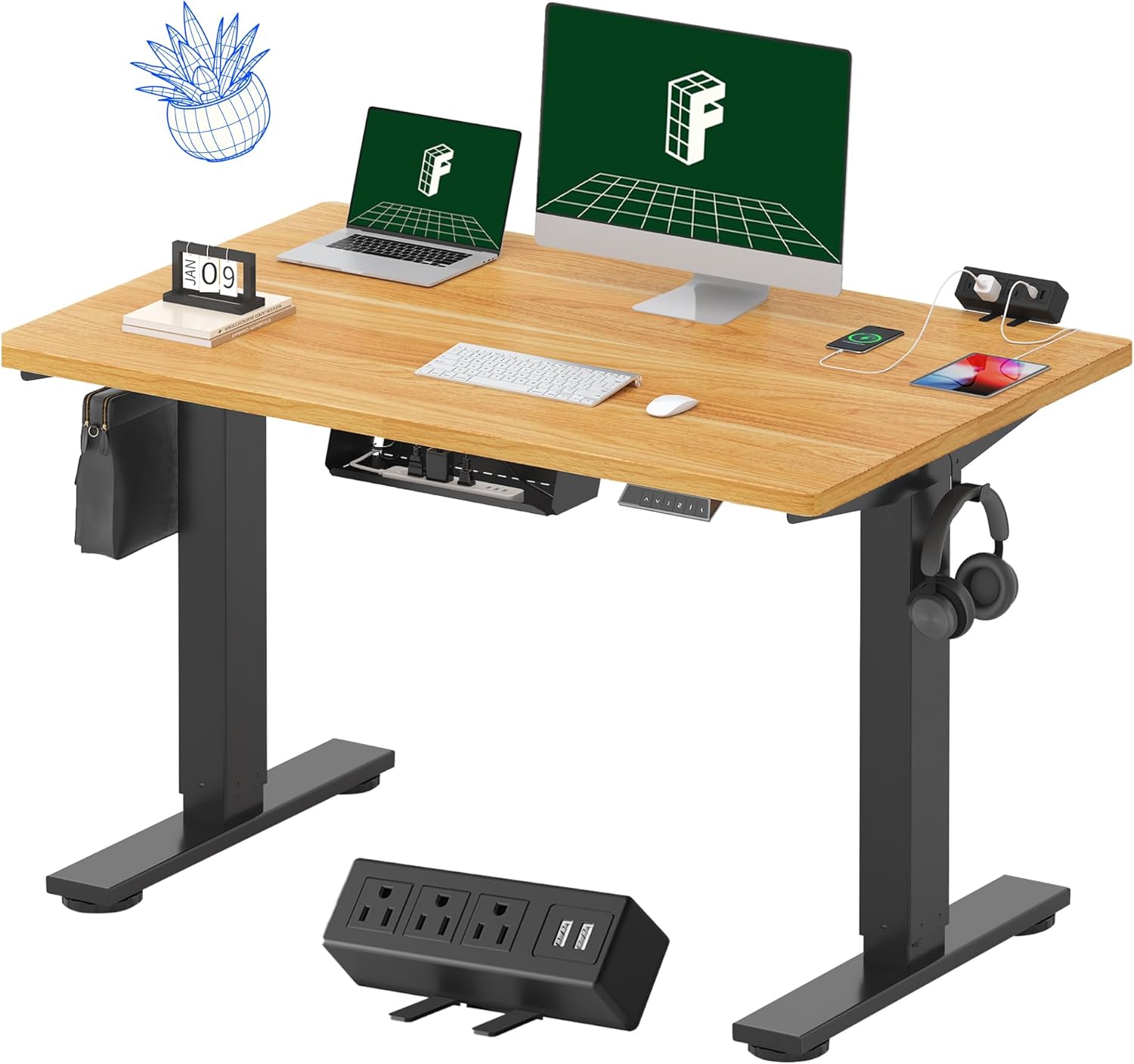
Image 1.1: FLEXISPOT EN2 Standing Desk with Maple Top and Black Frame, showcasing a typical setup with monitors, a laptop, and a clamp rrip elektrik.
2. Informacion mbi sigurinë
KUJDES: Mosndjekja e këtyre udhëzimeve të sigurisë mund të rezultojë në lëndim ose dëmtim të produktit.
- Ndiqni gjithmonë me kujdes udhëzimet e montimit.
- An electric drill (not included) may be required for assembly.
- Ensure the desk is properly anchored to prevent tipping.
- Mos e tejkaloni peshën maksimale të rekomanduar prej 176 paundësh (80 kg).
- Keep the work surface clear of items that could fall and cause injury during height adjustments.
- Always unplug the desk before performing any maintenance or making adjustments to the frame or electrical components.
- Mbajini fëmijët dhe kafshët shtëpiake larg tavolinës gjatë punës.
3. Përmbajtja e paketës
Your FLEXISPOT EN2 Standing Desk will arrive in two separate packages, which may be shipped separately. Please ensure you have received both packages and all components before beginning assembly.

Image 3.1: Illustration showing the desk components arriving in two separate packages: one for the desktop and one for the desk frame.
Komponentët e përfshirë:
- One-piece desktop (48" x 30" Maple Top)
- Electric height-adjustable frame (Black)
- 6-button digital controller with 4 memory presets
- Removable clamp power strip (3 AC outlets, 2 USB charging ports)
- Cable management device
- Assembly hardware and tools (excluding electric drill)
4. Konfigurimi dhe montimi
Assembly typically requires two people and an electric drill (not included). Follow the detailed instructions provided in the separate assembly guide included with your product. The process involves attaching the legs to the desktop and connecting the control panel and motor.
Këshilla për montimin:
- Vendosni të gjithë përbërësit në një sipërfaqe të butë dhe të pastër për të parandaluar gërvishtjet.
- Sigurohuni që të gjitha vidat të jenë shtrënguar mirë, por mos i shtrëngoni shumë.
- Properly route all cables using the provided cable management solutions to avoid interference with desk movement.
Video 4.1: Official FLEXISPOT Standing Desk Frame Installation Guide. This video demonstrates the step-by-step process of assembling the desk frame and attaching it to the desktop.
5. Udhëzimet e funksionimit
5.1 Paneli i kontrollit dixhital
The desk is operated using a 6-button digital controller, typically mounted on the underside of the desktop. It features up/down arrows, an LED display for height, and four programmable memory presets.

Image 5.1: Digital control panel with LED display showing current height, up/down arrows, and four numbered memory preset buttons.
5.2 Rregullimi i lartësisë
- Shtypni dhe mbani shtypur Up Arrow (^) buton për të ngritur tavolinën.
- Shtypni dhe mbani shtypur Down Arrow (v) butonin për të ulur tavolinën.
- The desk adjusts smoothly from 28.1 inches (71.4 cm) to 45.7 inches (116.1 cm).
- The motor operates quietly at less than 50 dB.
5.3 Vendosja e Paracaktimeve të Memories
The controller allows you to save up to four preferred height settings for quick adjustments.
- Rregulloni tavolinën në lartësinë e dëshiruar duke përdorur shigjetat lart/poshtë.
- Shtypni Memory (M) button. The LED display will flash.
- Within 3 seconds, press one of the numbered preset buttons (1, 2, 3 ose 4) për të ruajtur lartësinë aktuale në atë parazgjedhje.
- Për të rikthyer një lartësi të ruajtur, thjesht shtypni butonin përkatës të paracaktuar me numër. Tavolina do të zhvendoset automatikisht në pozicionin e ruajtur.
Video 5.2: FlexiSpot Brand Store video demonstrating the desk's height adjustment and memory preset functions.
6. Veçoritë
6.1 One-Piece Desktop
The desk features a spacious, single-piece desktop made of FSC-Certified wood. This design provides a smooth, seamless work surface, enhancing stability and aesthetics compared to multi-piece desktops.

Image 6.1: Visual comparison highlighting the smooth surface of a single-piece desktop against the visible seams of a two-piece desktop.
6.2 Removable Clamp Rrip elektrik
A desktop-mounted power strip is included, featuring 3 AC outlets (125V/12A) and 2 USB charging ports (5V/2A). This allows for convenient charging of electronic devices directly from your desk. The power strip can be clipped to the back or side of your desk.

Image 6.2: Close-up of the removable clamp power strip, detailing its 3 AC outlets and 2 USB-A ports, and how it attaches to the desk edge.
6.3 Menaxhimi i kabllove
The desk includes a cable management device to help organize and tidy up your workspace, preventing cables from dangling and interfering with desk movement.

Image 6.3: Illustration demonstrating effective cable management with an under-desk tray, showing a tidy setup compared to unmanaged cables.
7. Mirëmbajtja
- Kontrolloni rregullisht të gjitha vidat dhe lidhjet për t'u siguruar që janë të shtrënguara mirë.
- Clean the desktop surface with a soft, damp pëlhurë. Shmangni pastruesit gërryes që mund të dëmtojnë përfundimin.
- Mbajeni motorin dhe pjesët elektrike të pastra nga pluhuri dhe lagështia.
- Do not place hot items directly on the desktop without protective coasters.
8. Troubleshooting
8.1 Desk Not Moving or Displaying Error Code (e.g., "r5t")
If your desk is not responding or the LED display shows an error code like "r5t", a system reset may be required.
- Unplug the desk from the power outlet.
- Wait for at least 10-15 seconds.
- Plug the desk back into the power outlet.
- Press and hold the "Down Arrow (v)" button until the desk reaches its lowest position and then slightly rises. This indicates a successful reset.
- Nëse problemi vazhdon, kontaktoni mbështetjen e klientit.
8.2 Desk Wobbling at Higher Heights
While the desk is designed for stability, minor wobbling can occur at maximum heights. Ensure the adjustable feet on the leg bases are properly leveled to compensate for uneven flooring.
9. Specifikimet
| Veçori | Specifikimi |
|---|---|
| Markë | FLEXISPOT |
| Model | EN2 |
| Material për tavolinë | FSC-Certified Maple Wood |
| Dimensionet e desktopit | 48" (Gjerësi) x 30" (Thjellë) |
| Trashësia e Desktopit | 1 inç |
| Materiali i kornizës | Industrial-grade Alloy Steel (Black) |
| Gama e rregullimit të lartësisë | 28.1" deri në 45.7" (71.4 cm deri në 116.1 cm) |
| Motor Noise Level | < 50 dB |
| Kapaciteti i peshës | 176 lbs (80 kg) |
| Paneli i kontrollit | 6-button digital controller with 4 memory presets |
| Prizë elektrike | 3 AC outlets (125V/12A), 2 USB charging ports (5V/2A) |
| Kërkohet montim | Yes (electric drill recommended) |
10. Garancia dhe Mbështetja
10.1 Informacioni i garancisë
- Garancia 5-vjeçare: Covers frames, motors, and other mechanical devices.
- Garancia 2-vjeçare: Covers controllers, switches, and electronics.
Ju lutemi ruani provën e blerjes për kërkesat e garancisë. Garancia mbulon defektet në materiale dhe prodhim nën përdorim normal.
10.2 Mbështetja e klientit
For any questions, troubleshooting assistance, or warranty claims, please contact FLEXISPOT customer support through their official webfaqen ose shitësin me pakicë ku keni blerë produktin.


