1. Hyrje
Thank you for choosing Baseus W11 True Wireless Earbuds. This manual provides detailed instructions for the proper use and maintenance of your device. Please read it carefully before use.

Image: Baseus W11 True Wireless Earbuds and Charging Case.
2. Çfarë ka në kuti
Paketa përfshin artikujt e mëposhtëm:
- Baseus W11 True Wireless Earbuds (Left and Right)
- Kutia e karikimit me valë
- Kabllo karikimi USB-C
- Multiple sizes of silicone ear tips (XS, S, M, L)
- Manuali i Përdoruesit
Video: TWS W11 Operation Guide Video, demonstrating unboxing and initial setup steps.
3. Produkti i Mbaruarview
Kufjet e veshit
- Prekni Zonën e Kontrollit
- Mikrofoni
- Ngarkimi i kontakteve
- Këshillë silikoni për veshin
Kutia e karikimit
- Vende për karikimin e kufjeve
- Drita treguese e baterisë
- Porta e karikimit USB-C
- Butoni i funksionit

Image: Baseus W11 Earbuds inside their charging case, showing the earbuds and charging contacts.
4. Konfigurimi
4.1 Ngarkimi fillestar
Before first use, ensure the charging case and earbuds are fully charged. Remove any insulation stickers from the earbud charging contacts.
- Lidhni kabllon USB-C me kutinë e karikimit dhe një burim energjie.
- Si alternativë, vendoseni kutinë e karikimit në një platformë karikimi pa tel të pajtueshme.
- Drita treguese në kuti do të tregojë statusin e karikimit.

Image: Baseus W11 charging case on a wireless charging pad, illustrating wireless charging capability.

Image: Baseus W11 charging case connected via USB-C cable, showing fast charging feature.
4.2 Çiftimi me një pajisje
- Hapni kutinë e karikimit. Kufjet do të hyjnë automatikisht në modalitetin e çiftimit.
- Në pajisjen tuaj (smartfon, tablet, etj.), aktivizoni Bluetooth-in.
- Kërko për "Baseus Encok W11" in the list of available Bluetooth devices and select it to connect.
- Pasi të lidheni, do të dëgjoni një sinjal audio dhe kufjet do të jenë gati për përdorim.
4.3 Instalimi i Aplikacionit Baseus
For enhanced features like anti-lost function, gesture customization, and firmware updates, download the official Baseus app from your device's app store.

Image: Baseus app interface showing anti-lost function, low latency, and button customization options.
5. Udhëzimet e funksionimit
5.1 Vendosja e kufjeve
Choose the ear tips that provide the most comfortable and secure fit for your ears. Insert the earbuds into your ear canal and gently twist them to lock them in place.

Image: Man wearing Baseus W11 earbuds while running, demonstrating the secure and comfortable fit for active use.
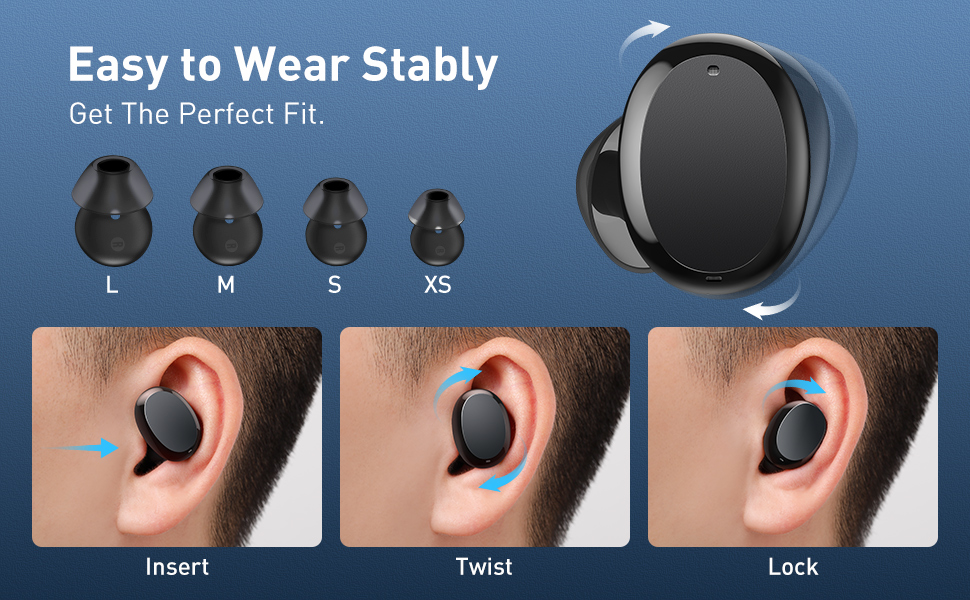
Image: Diagram illustrating the three steps to achieve a secure fit for the Baseus W11 earbuds: insert, twist, and lock.
5.2 Prekni Kontrollet
The earbuds feature smart touch controls. Functions can be customized via the Baseus app.
- Luaj/Ndalu: Double-tap Left/Right earbud.
- Pjesa tjetër: Long press Right earbud.
- Pjesa e mëparshme: Long press Left earbud.
- Aktivizo "Asistentin e zërit": Triple-tap Left/Right earbud.
- Përgjigjuni/Përfundoni thirrjen: Double-tap Left/Right earbud.
- Refuzo thirrjen: Long press Left/Right earbud.

Image: Diagram illustrating the various touch control functions for the Baseus W11 earbuds, including play/pause, track skipping, voice assistant, and call management.
5.3 Përdorimi i një kufjeje të vetme
The Baseus W11 earbuds support independent use. You can use either the left or right earbud individually while the other is charging or stored.
6. Ngarkimi
6.1 Karikimi i kufjeve
Place the earbuds into the charging case. They will automatically begin charging. The case's indicator light will show the charging status.
6.2 Ngarkimi i Çështjes
The charging case can be charged via the included USB-C cable or wirelessly using a compatible Qi-certified wireless charger.
6.3 Karikimi i shpejtë
The earbuds feature fast charging. A 10-minute charge can provide up to 4 hours of playback time.
7. Mirëmbajtja
Vlerësim i papërshkueshmërisë nga uji 7.1 (IPX8)
The Baseus W11 earbuds are IPX8 waterproof, providing protection against sweat and rain. This makes them suitable for sports and outdoor activities. Avoid prolonged submersion in water.
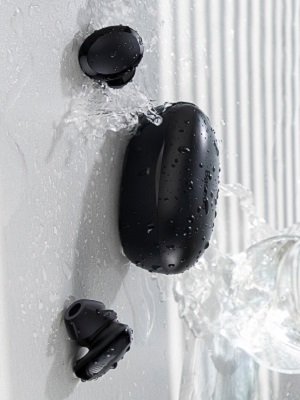
Image: Baseus W11 earbuds and case with water splashing, demonstrating IPX8 waterproof rating.
7.2 Pastrimi
Regularly clean the earbuds and charging case with a soft, dry cloth. Ensure charging contacts are free from dust and debris to maintain optimal charging performance.
8. Troubleshooting
- Kufjet nuk po çiftëzohen: Ensure both earbuds are fully charged and removed from the case. Check your device's Bluetooth settings and try reconnecting. If issues persist, try resetting the earbuds (refer to the app or full user manual for specific reset instructions).
- Një kufje nuk funksionon: Ensure both earbuds are charged. Try placing them back in the case and taking them out again. If only one earbud connects, try re-pairing them as a pair.
- Probleme me cilësinë e zërit: Ensure ear tips are properly fitted to create a good seal. Check the audio source and volume levels on both your device and the earbuds.
- Lost Earbuds: Use the anti-lost function in the Baseus app to locate misplaced earbuds by making them emit a sound.
Video: Great Waterproof Wireless Earbuds with Locator App, demonstrating the app's anti-lost feature.
9. Specifikimet
| Veçori | Specifikimi |
|---|---|
| Emri i modelit | NGTW060001 (W11) |
| Teknologjia e lidhjes | Wireless (Bluetooth) |
| Teknologjia e komunikimit pa tela | Bluetooth V5.0 |
| Kapaciteti i baterisë Earbud | 40 mAh (0.148 Wh) |
| Kapaciteti i baterisë së kutisë së karikimit | 300 mAh (1.11 Wh) |
| Gama e përgjigjes së frekuencës | 20Hz-20kHz |
| Ndërfaqja e karikimit | Lloji-C |
| Niveli i rezistencës ndaj ujit | IPX8 I papërshkueshëm nga uji |
| Lloji i drejtuesit të audios | Drejtues dinamik 10 mm |
| Metoda e kontrollit | Aplikacioni, prek |
| Pesha | 5.1 ounces (total item weight) |
| Materiali | Durable Plastic or Rubber |
10. Garancia dhe Mbështetja
Baseus products come with a standard manufacturer's warranty. For warranty claims, technical support, or any product-related inquiries, please contact Baseus customer service through their official webfaqja e internetit ose informacioni i kontaktit i dhënë në paketimin e produktit tuaj.
Për më shumë ndihmë, vizitoni: www.baseus.com/support


