Hyrje
This manual provides detailed instructions for the assembly, operation, and maintenance of your FLEXISPOT E4 Classic Electric Standing Desk. Please read this manual thoroughly before use to ensure proper function and longevity of your product.

Figure 1: The FLEXISPOT E4 Classic Electric Standing Desk, featuring a bamboo contour desktop and silver frame, set up with dual monitors in an office environment.
Informacioni i Sigurisë
- Sigurohuni që të gjithë komponentët të jenë të lidhur mirë përpara përdorimit.
- Mbajini fëmijët dhe kafshët shtëpiake larg tavolinës gjatë punës.
- Do not overload the desk beyond its specified weight capacity (220 lbs).
- Shmangni vendosjen e lëngjeve direkt mbi panelin e kontrollit ose mbi përbërësit e motorit.
- Shkëputni energjinë përpara pastrimit ose mirëmbajtjes.
- Përdorni vetëm përshtatësin e dhënë të energjisë.
Përmbajtja e paketës
Ju lutemi verifikoni që të gjitha pjesët janë të pranishme përpara se të filloni montimin. Nëse ndonjë pjesë mungon ose është e dëmtuar, kontaktoni mbështetjen ndaj klientit.
- Bamboo Contour Whole-Piece Desktop (55"x28")
- Silver Frame Legs (Dual Motor)
- Paneli i kontrollit
- Përshtatës i energjisë dhe kabllo
- Pajisjet e montimit (vida, vegla, etj.)
- Manual udhëzimi (ky dokument)
Konfigurimi dhe montimi
Montimi është i nevojshëm për këtë produkt. Ju lutemi ndiqni këto hapa me kujdes.
- Shpaketoni komponentët: Hiqni me kujdes të gjitha pjesët nga paketimi dhe vendosini ato në një sipërfaqe të pastër dhe të butë për të parandaluar gërvishtjet.
- Bashkangjitni këmbët në tavolinën e punës: Position the desktop upside down. Align the leg frames with the pre-drilled holes on the underside of the desktop. Secure them using the provided screws and tools.
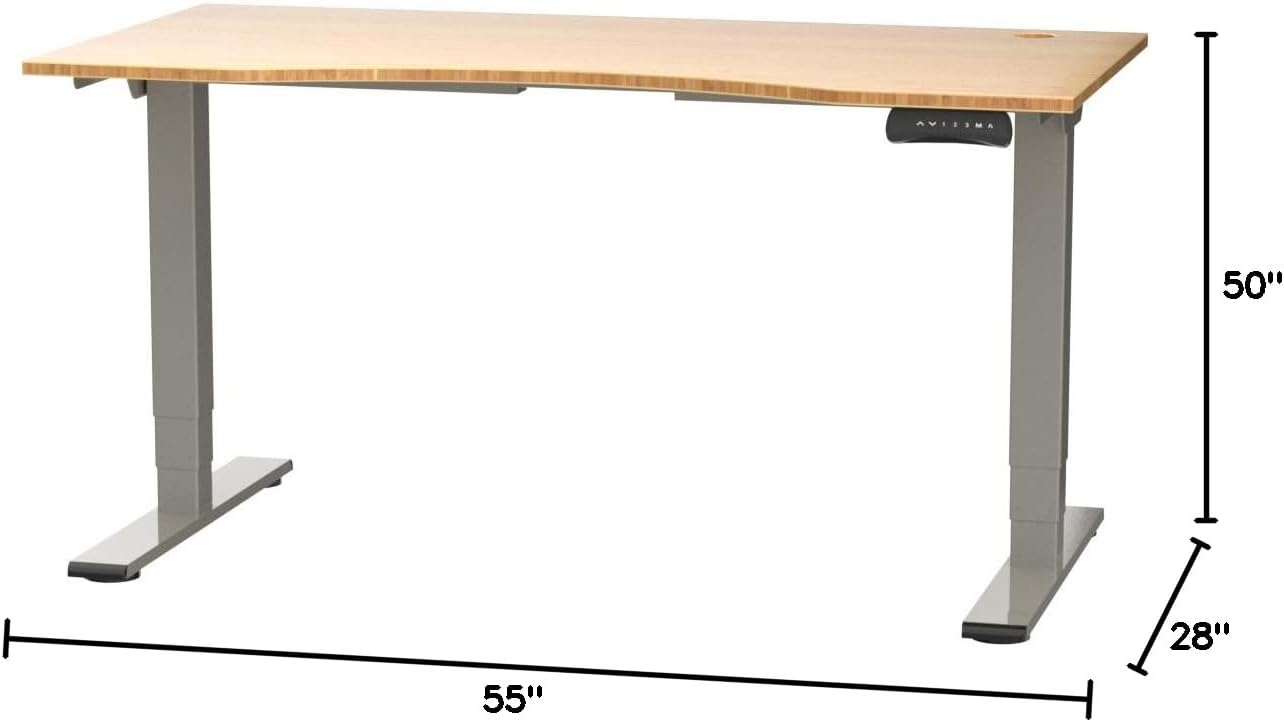
Figure 2: Desk dimensions indicating 55 inches width, 28 inches depth, and adjustable height up to 50 inches.
- Instaloni Panelin e Kontrollit: Mount the control panel to the desired location on the underside of the desktop, typically on the front edge for easy access. Connect the control panel cable to the motor control box.

Figure 3: The programmable control panel with LED display, up/down buttons, and memory presets (1, 2, 3, M, A).
- Lidhni fuqinë: Plug the power adapter into the control box, and then plug the power cable into a standard electrical outlet.
- Menaxhimi i kabllove: Utilize the two cable management holes on the desktop to route and organize your cables, preventing clutter.

Figure 4: Detail showing the integrated cable management holes and the water-resistant surface of the bamboo desktop.
- Kalibrimi fillestar: After assembly and power connection, the desk may require an initial calibration. Refer to the "Operating Instructions" section for details on resetting or calibrating the desk.
Udhëzimet e funksionimit
Rregullimi i lartësisë
The FLEXISPOT E4 Classic desk features a dual-motor lift system for smooth and quiet height adjustments.
- Ngritja e tavolinës: Shtypni dhe mbani shtypur Shigjeta lart button (▲) on the control panel. The desk will move upwards.
- Tavolina e Poshtme: Shtypni dhe mbani shtypur Shigjeta poshtë button (▼) on the control panel. The desk will move downwards.
- Release the button at your desired height. The desk can adjust from 24.4 inches to 50 inches.
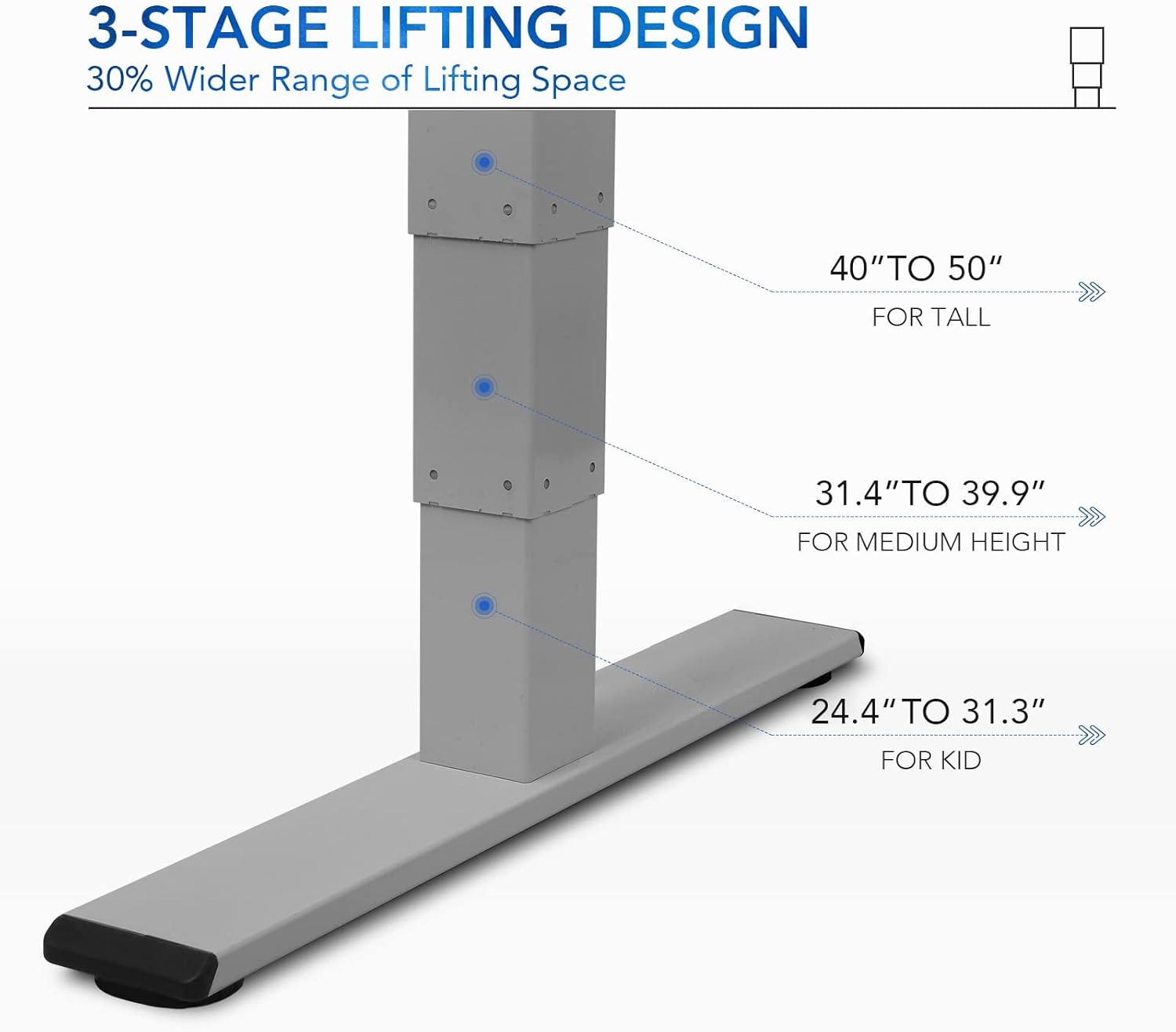
Figura 5: 3-shattage lifting design provides a wide range of height adjustments, suitable for various user heights, from 24.4" (kid) to 50" (tall).
Programmable Memory Presets
Paneli i kontrollit ju lejon të ruani deri në tre cilësime të preferuara të lartësisë për rregullime të shpejta.
- Vendosni një pozicion memorieje:
- Rregulloni tavolinën në lartësinë e dëshiruar duke përdorur butonat Lart/Poshtë.
- Shtypni "M" button. The LED display will show "S-".
- Within 3 seconds, press one of the number buttons ("1", "2", ose "3") to save the current height to that preset. The display will show "S-1", "S-2", or "S-3" to confirm.
- Rikujtoni një pozicion kujtese: Simply press the corresponding number button ("1", "2", ose "3"). Tavolina do të zhvendoset automatikisht në lartësinë e ruajtur.
Sit/Stand Reminder
The "A" button can be used to set a reminder to switch between sitting and standing positions.
- Consult the full manual for detailed instructions on setting and customizing the sit/stand reminder function.
Ergonomic Curved Design
The 55"x28" desktop features an ergonomic curved design for enhanced comfort and efficiency during work or study.

Figure 6: The ergonomic curved edge of the desktop, designed to provide a more comfortable and natural working posture.
Mirëmbajtja
- Pastrimi: Fshini sipërfaqen dhe kornizën e tavolinës me një leckë të butëamp cloth. Avoid abrasive cleaners or harsh chemicals. The bamboo surface is designed to be water-resistant, making it easy to clean.
- Kujdesi motorik: The dual-motor system is designed for low noise and durability. No specific user maintenance is required for the motors.
- Menaxhimi i kabllove: Periodically check that all cables are neatly routed through the cable management holes and are not pinched or tangled.
- Kontrolli i fiksimit: Kontrolloni herë pas here të gjitha vidat dhe elementët e fiksimit për t'u siguruar që ato mbeten të shtrënguara. Shtrëngojini përsëri nëse është e nevojshme.
Zgjidhja e problemeve
| Problem | Shkaku i mundshëm | Zgjidhje |
|---|---|---|
| Tavolina e punës nuk lëviz. | Power cable disconnected; overload protection activated; motor error. | Check power connections. Reduce weight on desk. Unplug and replug power after 10 minutes. Perform a reset (see below). |
| Tavolina lëviz në mënyrë të pabarabartë ose bën zhurmë të pazakontë. | Loose fasteners; obstruction; motor synchronization issue. | Check and tighten all assembly screws. Ensure no obstructions under the desk. Perform a reset. |
| LED display shows an error code (e.g., "E01", "RST"). | System error; need for reset. | Procedura e rivendosjes: Press and hold the Down Arrow button until the desk reaches its lowest position and then slightly rises. Release the button. If the error persists, unplug the desk for 10 minutes and try again. |
| Parametrat e paracaktuar të memories nuk funksionojnë. | Paracaktimet nuk janë ruajtur saktë. | Re-save your desired memory positions following the "Programmable Memory Presets" instructions. |
If the issue persists after attempting these solutions, please contact FLEXISPOT customer support.
Specifikimet
| Veçori | Detaj |
|---|---|
| Model | E4 Classic |
| Markë | FLEXISPOT |
| Material për tavolinë | Bamboo Contour Whole-Piece Board |
| Materiali i kornizës | Alloy Steel (Silver Frame) |
| Dimensionet e produktit (D x W x H) | 28"Th x 55"Gj x 50"L (Lartësia Maksimale) |
| Gama e rregullimit të lartësisë | 24.4" deri në 50" |
| Sistemi i ngritjes | Dual Motor, 3-Stage Lifting |
| Kapaciteti i peshës | Deri në 220 paund |
| Karakteristika të veçanta | Electric Height Adjustment, Programmable Memory Presets, Sit/Stand Reminder, Curved Ergonomic Design, Cable Management Holes, Waterproof Surface |
| Kërkohet montim | po |
Garancia dhe Mbështetja
FLEXISPOT products are designed for durability and performance. For specific warranty details regarding your E4 Classic Electric Standing Desk, please refer to the warranty card included with your purchase or visit the official FLEXISPOT webfaqe.
For technical support, troubleshooting assistance, or to inquire about replacement parts, please contact FLEXISPOT customer service:
- Webfaqe: www.flexispot.com
- Email: support@flexispot.com
- Telefoni: Referojuni zyrtarit webfaqe për numrat e kontaktit rajonal.
When contacting support, please have your product model (E4 Classic) and purchase information ready.


