1. Hyrje
Welcome to the user manual for your Ulefone Armor X9 Rugged Phone. This guide provides essential information on setting up, operating, maintaining, and troubleshooting your device. The Ulefone Armor X9 is designed for durability and performance, featuring robust protection and advanced functionalities.
Key features of your Ulefone Armor X9 include:
- IP68/IP69K Grade 360 All Round Protection: E ndërtuar për t'i bërë ballë mjediseve të vështira.
- Sistemi Operativ Android 11: Enjoy the latest Android experience.
- 4GB RAM + 128GB ROM: Ample memory and storage for your applications and data.
- 16MP Triple Rear Camera: Capture high-quality photos and videos.
- Massive 5580mAh Battery Capacity: Extended usage time.
- Triple Navigation System: Enhanced positioning accuracy.
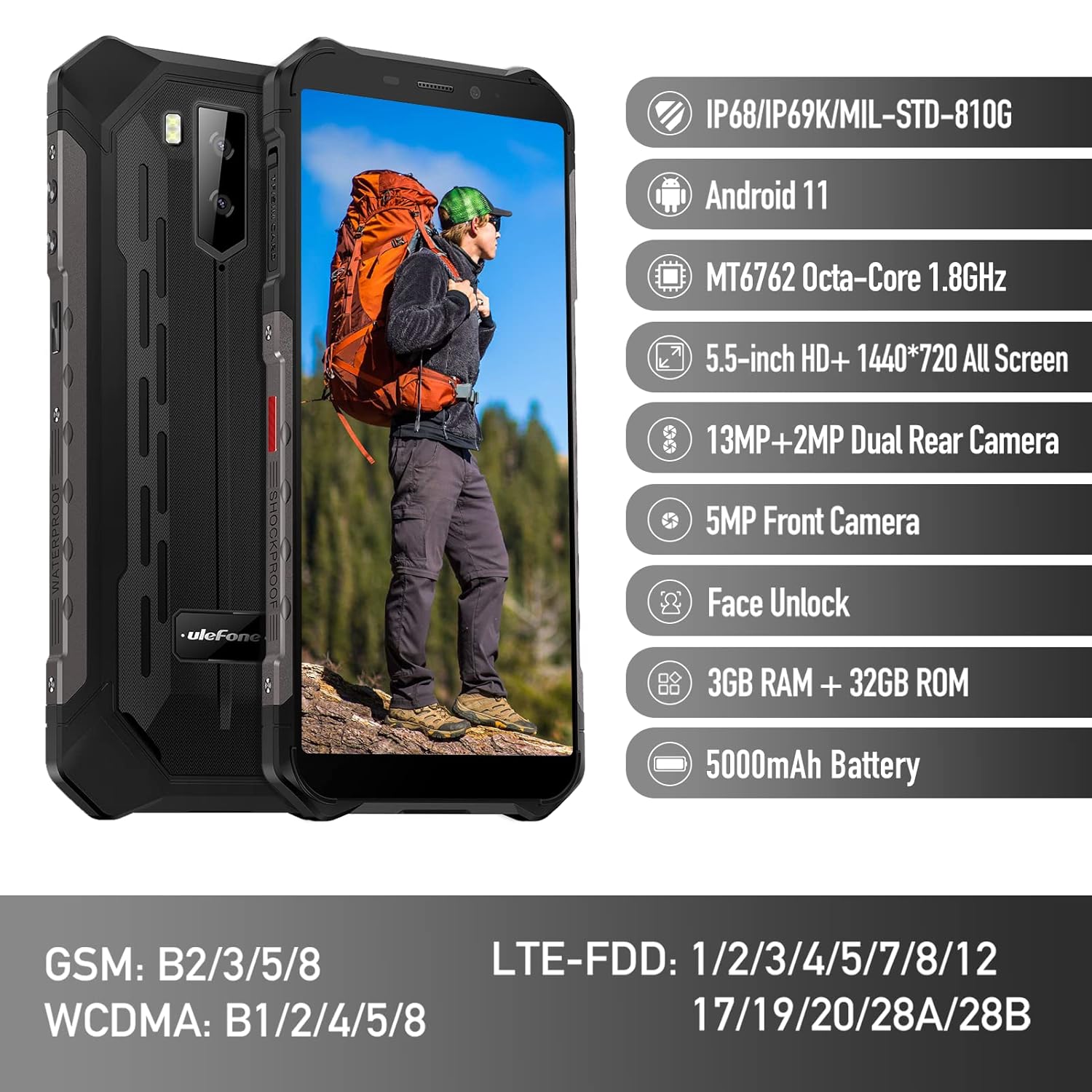
Figure 1: Ulefone Armor X9 Rugged Phone overview, highlighting its robust design and core specifications like IP68/IP69K rating, Android 11, Octa-Core processor, 5.5-inch HD+ screen, 13MP+2MP dual rear camera, 5MP front camera, Face Unlock, 3GB RAM + 32GB ROM, and 5000mAh battery.
2. Konfigurimi
2.1. Instalimi i Kartës SIM dhe Kartës TF
The Ulefone Armor X9 supports dual SIM cards and a TF (microSD) card for expandable storage. Follow these steps to install them:
- Gjeni sirtarin e kartës SIM në anën e telefonit.
- Përdorni mjetin e dhënë për nxjerrjen e kartës SIM për të hapur sirtarin.
- Carefully place your Nano-SIM cards into the designated slots (SIM1 and SIM2).
- If using a TF card, place it into the dedicated TF card slot. Note that some configurations may share a slot between SIM2 and the TF card.
- Gently push the tray back into the phone until it is flush with the device body. Ensure the tray is properly sealed to maintain water and dust resistance.

Figure 2: Illustration of the dual SIM and TF card tray, showing how to insert SIM1, SIM2, and a TF card into the Ulefone Armor X9.
2.2. Ngarkimi fillestar
Before first use, it is recommended to fully charge your Ulefone Armor X9. Use the provided USB cable and power adapter.
- Lidhni kabllon USB me portën e karikimit në telefonin tuaj.
- Lidheni anën tjetër të kabllit USB me përshtatësin e energjisë.
- Futeni përshtatësin e rrymës në një prizë muri.
- Treguesi i karikimit do të shfaqet në ekran. Lëreni telefonin të karikohet derisa ikona e baterisë të shfaqet plot.
2.3. Ndezja/Fikur
- Për të ndezur: Press and hold the Power button (usually on the right side) until the Ulefone logo appears.
- Për të fikur: Press and hold the Power button until the power options menu appears on the screen. Select "Power off" and confirm.
- Për të rifilluar: Nga menyja e opsioneve të energjisë, zgjidhni "Rinis" dhe konfirmoni.
3. Udhëzimet e funksionimit
3.1. Navigimi Bazë (Android 11)
Your Ulefone Armor X9 runs on Android 11, offering an intuitive user interface. Common gestures and navigation include:
- Rrëshqitni lart: Hyr në sirtarin e aplikacionit.
- Rrëshqitni poshtë: Hapni panelin e njoftimeve dhe cilësimet e shpejta.
- Trokit: Zgjidhni një artikull ose hapni një aplikacion.
- Shtypi i gjatë: Hyni në menutë kontekstuale ose lëvizni ikonat.
- Zmadho me gishta: Zmadhoni ose zvogëloni imazhet dhe web faqet.

Figure 3: Screenshots of the Android 11 interface on the Ulefone Armor X9, showing settings menus, quick toggles, and the sound recorder application.

Figure 4: The 5.5-inch 18:9 All Screen display of the Ulefone Armor X9, showcasing its immersive viewing experience with an image of a skier.
3.2. Përdorimi i kamerës
Your phone is equipped with a 16MP Triple Rear Camera and a Front Camera. To use the camera:
- Hap aplikacionin "Kamera" nga ekrani kryesor ose sirtari i aplikacioneve.
- Trokitni butonin e diafragmës për të bërë një foto.
- Kaloni midis modaliteteve të fotos dhe videos sipas nevojës.
- Tap the icon to switch between the front and rear cameras.
- Eksploroni modalitete dhe cilësime të ndryshme të kamerës për rezultate optimale.
3.3. Lidhshmëria
The Ulefone Armor X9 supports various connectivity options:
- Wi-Fi: Shko te Cilësimet > Rrjeti dhe interneti > Wi-Fi për t'u lidhur me rrjetet e disponueshme.
- Bluetooth: Go to Settings > Connected devices > Bluetooth to pair with Bluetooth devices.
- GPS: The phone features AGPS for accurate location services. Ensure location services are enabled in Settings > Location.
- USB: Lidhni telefonin tuaj me një kompjuter duke përdorur një kabllo USB për të transferuar të dhëna ose për ta karikuar.
3.4. Zhbllokimi me fytyrë
For convenient and secure unlocking, your Ulefone Armor X9 supports Face Unlock:
- Go to Settings > Security > Face Unlock.
- Ndiqni udhëzimet në ekran për të regjistruar fytyrën tuaj.
- Ensure good lighting and hold the phone at eye level during registration.
- Once registered, you can unlock your phone by simply looking at the front camera.
4. Mirëmbajtja
4.1. Pastrimi dhe kujdesi
To maintain the performance and appearance of your rugged phone:
- Fshijeni ekranin dhe trupin me një leckë të butë pa push.
- Për papastërtitë e forta, përdorni një damp leckë. Shmangni kimikatet e ashpra ose materialet gërryese.
- Ensure all port covers are securely closed to maintain water and dust resistance, especially after charging or using headphones.

Figure 5: The Ulefone Armor X9's 360° All Protection Design, showcasing its superior materials and superb durability against impacts and harsh conditions.
4.2. Water and Dust Resistance (IP68/IP69K)
The Ulefone Armor X9 is rated IP68/IP69K, meaning it is resistant to dust and water immersion. However, this resistance is not permanent and may decrease over time with normal wear. To ensure optimal protection:
- Do not intentionally submerge the phone in water for extended periods or beyond specified depths.
- Avoid exposing the phone to high-pressure water or extreme temperatures.
- Ensure all port covers are tightly sealed before exposure to water or dust.
- If the phone gets wet, dry it thoroughly before charging or opening any ports.
4.3. Kujdesi për baterinë
To prolong the life of your 5580mAh Lithium Polymer battery:
- Shmangni temperaturat ekstreme (të nxehta ose të ftohta) pasi ato mund të ulin performancën e baterisë.
- Use only the original charger and cable or certified compatible accessories.
- Mos e lini baterinë të shkarkohet plotësisht shpesh. Ngarkojeni atë përpara se të arrijë nivele shumë të ulëta.
5. Troubleshooting
If you encounter issues with your Ulefone Armor X9, try the following troubleshooting steps:
5.1. Telefoni nuk ndizet
- Sigurohuni që bateria është e ngarkuar. Lidheni telefonin me një karikues për të paktën 30 minuta.
- Shtypni dhe mbani shtypur butonin e ndezjes për 10-15 sekonda për të detyruar një rinisje.
5.2. Probleme me karikimin
- Verify that the charging cable and adapter are working correctly. Try a different charger if available.
- Sigurohuni që porta e karikimit të jetë e pastër dhe pa mbeturina.
- Make sure the charging cable is fully inserted into the port. Some rugged phone ports may require a firm connection due to protective covers.
5.3. SIM/TF Card Not Detected
- Ensure the SIM/TF card is correctly inserted into the tray and the tray is fully seated.
- Rinisni telefonin.
- Check if the SIM card is active with your network provider.
5.4. App Crashes or Freezing
- Mbylleni dhe rihapni aplikacionin problematik.
- Clear the app's cache and data (Settings > Apps > [App Name] > Storage & cache).
- Sigurohuni që aplikacioni të jetë përditësuar në versionin më të fundit.
- Rinisni telefonin.
5.5. Rivendosja e fabrikës
Nëse problemet vazhdojnë, një rivendosje në cilësimet e fabrikës mund t'i zgjidhë ato. Paralajmërim: Kjo do të fshijë të gjitha të dhënat në telefonin tuaj. Krijoni kopje rezervë të të dhënave të rëndësishme përpara se të vazhdoni.
- Shko te Cilësimet > Sistemi > Rivendos opsionet.
- Zgjidhni "Fshi të gjitha të dhënat (rivendosja në cilësimet e fabrikës)".
- Konfirmoni vendimin tuaj dhe futni PIN/fjalëkalimin nëse ju kërkohet.
6. Specifikimet
Below are the detailed specifications for the Ulefone Armor X9:

Figure 6: Details of the Ulefone Armor X9's Octa-Core Processor, highlighting its power-efficient yet powerful performance, along with 3GB RAM and 32GB ROM, and support for up to 256GB TF card extendable storage.
| Veçori | Specifikimi |
|---|---|
| Sistemi Operativ | Android 11.0 |
| RAM | 3 GB (Note: Feature bullets mention 4GB RAM, please verify actual model) |
| Kapaciteti i ruajtjes së memories | 32 GB (Expandable with TF card up to 256GB. Feature bullets mention 128GB ROM, please verify actual model) |
| Modeli i CPU-së | MT6762 tetë bërthama 1.8 GHz (Note: Specifications list 'Snapdragon', but image indicates MT6762. Please verify actual model) |
| Dimensionet e produktit | 15.8 x 7.75 x 1.38 cm |
| Pesha e artikullit | 472 g |
| Bateritë | 1 bateri litium-polimer (5580mAh, përfshirë) |
| Komunikimi pa tela | Celular, Bluetooth, USB, Wi-Fi |
| GPS | AGPS |
| Karakteristika të veçanta | Rear Camera, Face Unlock, IP68/IP69K, MIL-STD-810G |
| Ekrani | 5.5-inch HD+ 1440*720 All Screen |
| Kamera e pasme | 13MP+2MP Dual Rear Camera (Note: Feature bullets mention 16MP Triple Rear Camera, please verify actual model) |
| Kamera e përparme | Kamera e përparme 5 MP |
| Ngjyra | E zezë |
| Prodhuesi | Ulefone |
Note: Specifications are based on available product data and may vary slightly. Please refer to your product packaging for the most accurate information. There are discrepancies between feature bullets, specifications, and image text regarding RAM, ROM, CPU, and camera megapixels. This manual uses the most frequently cited or detailed information, with notes for clarification.
7. Garancia dhe Mbështetja
7.1. Informacioni i garancisë
Your Ulefone Armor X9 is covered by a manufacturer's warranty. The specific terms and duration of the warranty may vary by region and retailer. Please refer to the warranty card included in your product packaging or contact your point of purchase for detailed information regarding warranty coverage and claims.
7.2. Mbështetja e klientit
For technical assistance, troubleshooting beyond this manual, or warranty inquiries, please contact Ulefone customer support or your authorized dealer. You can typically find contact information on the official Ulefone webnë faqen e internetit ose në dokumentacionin e produktit tuaj.
- Visit the official Ulefone website for FAQs, software updates, and support contact details.
- Mbajeni afër faturën e blerjes dhe numrin serial të produktit kur kontaktoni mbështetjen.


