1. Hyrje
Faleminderit për blerjenasing the KEPLUG Sunrise Alarm Clock. This device is designed to enhance your waking and sleeping experience with its unique features, including sunrise and sunset simulations, dual alarms, FM radio, and various natural sounds. Please read this manual carefully to ensure proper use and optimal performance.
Përmbajtja e paketës:
- 1 x KEPLUG Sunrise Alarm Clock
- 1 x kabllo Micro USB
- 1 x Përshtatës Muri
- 1 x Manuali i Përdoruesit
2. Produkti i Mbaruarview
Familiarize yourself with the main components and controls of your KEPLUG Sunrise Alarm Clock.

Imazhi 2.1: Përpara view of the KEPLUG Sunrise Alarm Clock, showing the digital time display and the illuminated light panel. The clock face is round with a white base.
Butonat dhe Portat e Kontrollit:
Refer to the diagram below for button identification (exact button layout may vary slightly by model, but functions are consistent).
- Butoni i vendosjes së kohës: Përdoret për të hyrë në modalitetin e caktimit të kohës.
- Butoni i alarmit 1: Used to set and activate Alarm 1.
- Butoni i alarmit 2: Used to set and activate Alarm 2.
- FM Radio Button: Activates and controls FM radio functions.
- Butoni i dritës: Controls the light brightness and color modes.
- Butonat e volumit +/-: Rregullon volumin e zërit.
- Butonat lart/poshtë: Lundron nëpër menu dhe rregullon vlerat.
- Snooze/Sleep Aid Button: Activates snooze during an alarm or sleep aid function.
- Porta e karikimit USB: Për karikimin e pajisjeve të jashtme.
- Micro USB Power Input: Lidhet me përshtatësin e energjisë.
3. Konfigurimi
3.1 Lidhja e energjisë
- Connect the micro USB cable to the power input port on the back of the alarm clock.
- Lidheni adaptorin e murit në një prizë elektrike standarde.
- Ekrani do të ndizet, duke treguar që pajisja është ndezur.
The clock includes a built-in backup battery to retain settings during power outages or disconnections.
3.2 Përcaktimi i kohës
- Shtypni Butoni i vendosjes së kohës (often represented by a clock icon). The hour display will start flashing.
- Përdorni Butonat lart / poshtë për të rregulluar orën.
- Shtypni Butoni i vendosjes së kohës again to confirm the hour and move to minute setting. The minute display will flash.
- Përdorni Butonat lart / poshtë për të rregulluar procesverbalin.
- Shtypni Butoni i vendosjes së kohës a third time to confirm the minutes.
- Për të kaluar midis formatit 12-orësh dhe 24-orësh, shtypni butonin Butonat lart / poshtë while the time is flashing during setup, or refer to the specific instructions in your manual for a dedicated time format button.
3.3 Time Display Brightness
The time display offers three brightness settings: High, Low, and Off. This can typically be adjusted by repeatedly pressing a dedicated display brightness button or by holding the Time Setting button. Refer to your specific model's instructions for exact control.
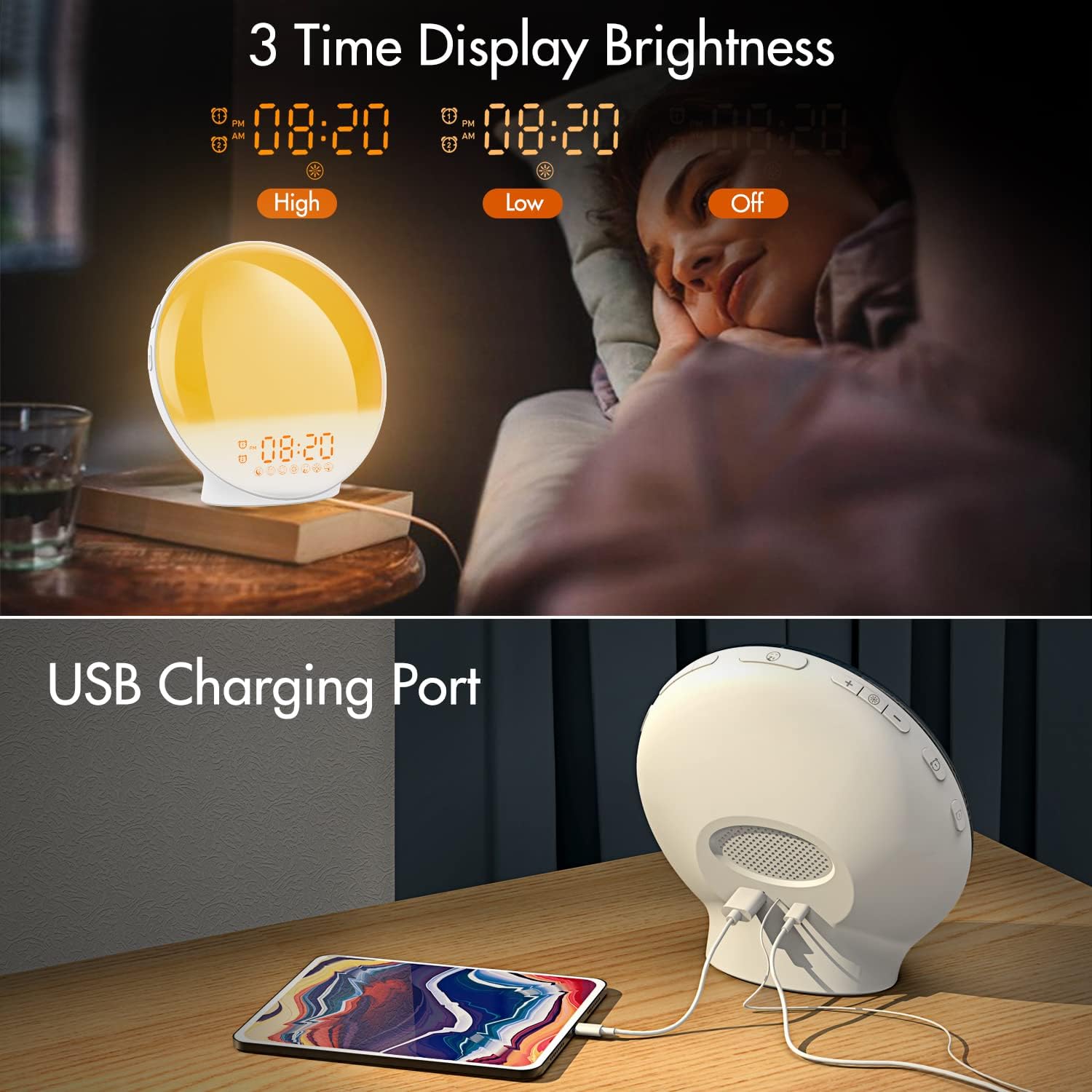
Imazhi 3.1: Illustration of the three time display brightness options: High, Low, and Off, allowing users to customize visibility for different times of day or night.
4. Udhëzimet e funksionimit
4.1 Vendosja e alarmeve (Alarmi 1 dhe Alarmi 2)
The clock features two independent alarms, allowing for separate wake-up times (e.g., weekday and weekend).

Imazhi 4.1: Depiction of the dual alarm functionality, allowing users to set different alarms for weekdays and weekends, along with the snooze feature.
- Shtypni Butoni i alarmit 1 (ose Butoni i alarmit 2) to activate and enter alarm setting mode. The alarm time will flash.
- Përdorni Butonat lart / poshtë për të vendosur orën e dëshiruar të alarmit.
- Shtypni Butoni i alarmit again to confirm the hour and set the minutes.
- Përdorni Butonat lart / poshtë për të vendosur minutat e dëshiruara të alarmit.
- Shtypni Butoni i alarmit again to select the wake-up sound. Use Butonat lart / poshtë to cycle through 7 nature sounds or FM radio.
- Shtypni Butoni i alarmit again to set the volume level (1-16) for the alarm sound. Use Butonat lart / poshtë për të rregulluar.
- Shtypni Butoni i alarmit one last time to confirm all settings and activate the alarm. An alarm icon will appear on the display.
4.2 Funksioni i Shtyrjes
When an alarm sounds, tap the Butoni i përgjumjes (often the large button on top or front) to pause the alarm for 9 minutes. This can be repeated up to 5 times.
4.3 Simulimi i Lindjes së Diellit
The sunrise simulation gradually brightens the light before your alarm time, mimicking a natural sunrise.

Imazhi 4.2: Visual representation of the sunrise simulation feature, where the light intensifies gradually over a set period before the alarm, designed for a gentle wake-up.
- When setting an alarm, after selecting the sound and volume, you will typically be prompted to set the sunrise duration.
- Përdorni Butonat lart / poshtë to choose a duration between 10 to 60 minutes. The light will gradually increase from 0% to the set brightness level (0-20) during this period.
- The light color will transition from deep red to bright yellow, simulating a natural sunrise.
4.4 Sunset Simulation / Sleep Aid
The sunset simulation gradually dims the light and can play soothing sounds to help you fall asleep.

Imazhi 4.3: Illustration of the sunset simulation, where the light gradually dims over a period of 10 to 120 minutes, accompanied by optional sleep sounds like rain, forest, river, or FM radio.
- Shtypni Snooze/Sleep Aid Button (or a dedicated Sleep Aid button) to activate the sleep aid function.
- Përdorni Butonat lart / poshtë to select a duration for the dimming process (10-120 minutes).
- You can also select a natural sound (Rain, Forest, River) or FM radio to play during this period.
- The light will gradually dim from 100% to 0% over the selected duration, and the sound will fade out.
Radio FM 4.5
The built-in FM radio allows you to listen to your favorite stations or use them as an alarm sound.

Imazhi 4.4: Mbiview of the 7 available alarm sounds and the FM radio option, providing diverse choices for waking up.
- Shtypni Butoni i Radios FM për të ndezur/fikur radion.
- Mbajeni Butoni i Radios FM për të skanuar dhe ruajtur automatikisht stacionet e disponueshme.
- Përdorni Butonat lart / poshtë to manually tune to a specific frequency or cycle through saved stations.
- Rregulloni volumin duke përdorur Vëllimi +/- Butonat.
4.6 Night Light / Color Light
The clock can function as a night light with various color options and adjustable brightness.

Imazhi 4.5: Display of the 7 color atmosphere light options and 20 brightness levels, highlighting the clock's versatility as a mood light or reading lamp.
- Shtypni Butoni i dritës për të ndezur dritën.
- Shtypni Butoni i dritës repeatedly to cycle through 7 static colors (e.g., Red, Green, Blue, Yellow, Indigo, Purple, White) or an automatic color-changing mode.
- Përdorni Butonat lart / poshtë to adjust the brightness level (0-20) of the selected color or white light.
- Mbajeni Butoni i dritës për të fikur dritën.
4.7 Porta e karikimit USB
A 5V/2.4A USB port is located on the back of the device, allowing you to charge your smartphone or other small electronic devices.
Imazhi 4.6: E pasme view of the alarm clock showing the USB charging port in use, connected to a tablet for charging.
5. Mirëmbajtja
- Pastrimi: Fshijeni pajisjen me një leckë të butë dhe të thatë. Mos përdorni pastrues ose tretës gërryes.
- Magazinimi: Ruajeni pajisjen në një vend të freskët dhe të thatë kur nuk e përdorni për periudha të gjata.
- Fuqia: Always use the provided power adapter to prevent damage.
6. Troubleshooting
| Problem | Shkaku i mundshëm | Zgjidhje |
|---|---|---|
| Clock does not power on. | Përshtatësi i rrymës nuk është i lidhur ose është i dëmtuar. | Ensure the power adapter is securely connected to both the clock and a working power outlet. Try a different outlet. |
| Alarmi nuk bie. | Alarmi nuk është aktivizuar ose volumi është shumë i ulët. | Check if the alarm icon is displayed. Re-set the alarm and ensure the volume is set to an audible level. |
| Simulimi i lindjes së diellit nuk funksionon. | Sunrise duration not set during alarm setup. | Ensure you have set a sunrise duration (10-60 minutes) when configuring the alarm. |
| FM radio static or poor reception. | Sinjal i dobët ose pozicion i antenës. | Extend the antenna wire fully. Reposition the clock to improve reception. Perform an auto-scan for stations. |
| Karikimi USB nuk funksionon. | Pajisja nuk është e përputhshme ose kablloja është e dëmtuar. | Ensure the device you are charging is compatible with 5V/2.4A USB charging. Try a different USB cable. |
7. Specifikimet
- Marka: KEPLUG
- Modeli: B09FRY71NH
- Dimensionet e produktit: 16 x 16 x 6.1 cm
- Pesha e artikullit: 481 g
- Vëlltage: 5 volt
- Burimi i energjisë: Battery Powered (with AC adapter)
- Lloji i ekranit: Dixhitale
- Karakteristikat e veçanta: Charging Port, Dimmable Light, Sunrise/Sunset Simulation, Dual Alarm, FM Radio, Nature Sounds
- Data e parë e disponueshme: 12 nëntor 2021
8. Garancia dhe Mbështetja
For warranty information or technical support, please refer to the contact details provided with your purchase documentation or visit the official KEPLUG webfaqe interneti. Ruajeni faturën e blerjes si provë të blerjes.