Hyrje
Thank you for choosing the BUFFBEE Alarm Clock with Wireless Charging Station. This device combines a digital alarm clock with a versatile wireless charging stand, designed to charge your iPhone, Apple Watch, and AirPods simultaneously. It features a dimmable LED display, adjustable volume, and multiple safety protections to ensure efficient and secure charging. Please read this manual carefully before use to ensure proper operation and to maximize the lifespan of your product.
Çfarë ka në Kuti
Pasi ta hapni paketën, sigurohuni që të përfshihen të gjitha artikujt e mëposhtëm:
- BUFFBEE Alarm Clock with Wireless Charging Station
- Kabllo karikimi USB-C
- Përshtatës i energjisë
- Manuali i Përdoruesit (ky dokument)
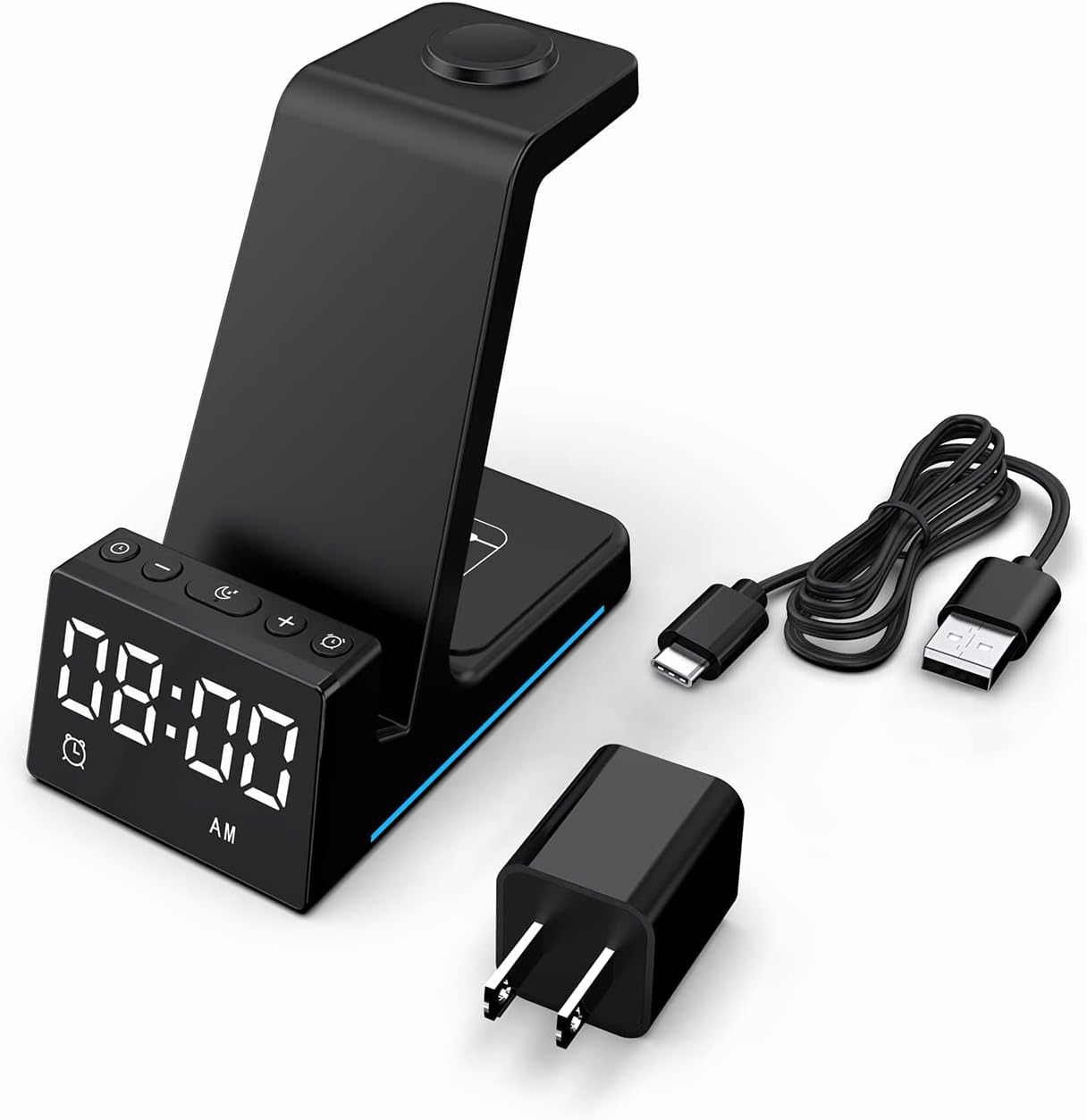
Imazh: Të gjithë përbërësit e përfshirë në paketimin e produktit.
Produkti Mbiview
The BUFFBEE Alarm Clock with Wireless Charging Station is designed for convenience and efficiency. It features dedicated charging areas for your smartphone, Apple Watch, and AirPods, alongside a clear digital clock display.
Karakteristikat kryesore:
- Ora dixhitale me zile: Features adjustable brightness and volume, with 12/24 hour format options.
- Karikim pa tel i telefonit: Supports 15W, 10W, 7.5W, and 5W output for various wireless charging enabled smartphones.
- Ngarkimi i Apple Watch: Dedicated magnetic charging spot for Apple Watch Series 2-7, SE.
- Ngarkimi i AirPods: Wireless charging pad for AirPods 2 (with wireless charging case), AirPods 3, and AirPods Pro.
- Mbrojtjet e sigurisë: Built-in overcharge, overvoltage, overheat, and overcurrent protection.

Image: The charging station with devices in place, highlighting its multi-device capability.

Image: Diagram illustrating the internal safety features and charging coils.
Konfigurimi
Follow these steps to set up your BUFFBEE Alarm Clock with Wireless Charging Station:
- Lidhni fuqinë: Insert the USB-C end of the charging cable into the port on the back of the charging station. Plug the other end of the cable into the provided power adapter, then plug the adapter into a wall outlet. The digital display will light up, indicating power is connected.
- Pajisjet e Vendndodhjes:
- Smartphone: Place your wireless charging enabled smartphone vertically or horizontally on the main charging stand. Ensure it is centered for optimal charging.
- Apple Watch: Place your Apple Watch on the magnetic charging disc at the top of the stand.
- AirPods: Vendosni AirPods-et tuaja (me kutinë e karikimit pa tel) në panelin e sheshtë të karikimit në bazën e njësisë.
- Verifiko tarifimin: A blue indicator light will briefly illuminate when a device is correctly placed and charging. Your device's screen will also show a charging icon.
Video: Official product video demonstrating the setup and charging capabilities of the BUFFBEE Alarm Clock with Wireless Charging Station for iPhone, Apple Watch, and AirPods.

Image: Universal compatibility chart for different devices and charging wattages.
Udhëzimet e funksionimit
Vendosja e kohës
- Shtypni dhe mbani shtypur Koha e caktuar button (usually marked with a clock icon) for 3 seconds. The hour digits will begin to flash.
- Përdorni + dhe - butonat për të rregulluar orën.
- Shtypni Koha e caktuar butonin përsëri për të kaluar në rregullimin e minutave. Shifrat e minutave do të pulsojnë.
- Përdorni + dhe - butonat për të rregulluar minutat.
- Shtypni Koha e caktuar Shtypni butonin edhe një herë për të konfirmuar dhe për të dalë nga modaliteti i vendosjes së kohës.
- To switch between 12-hour and 24-hour format, briefly press the Koha e caktuar button when not in setting mode.
Vendosja e alarmit
- Shtypni dhe mbani shtypur Set alarmi button (usually marked with an alarm clock icon) for 3 seconds. The alarm hour digits will flash.
- Përdorni + dhe - butonat për të rregulluar orën e alarmit.
- Shtypni Set alarmi button again to switch to alarm minute adjustment. The alarm minute digits will flash.
- Përdorni + dhe - butonat për të rregulluar minutat e alarmit.
- Shtypni Set alarmi Shtypni butonin edhe një herë për të konfirmuar dhe për të dalë nga modaliteti i cilësimit të alarmit.
- Për të aktivizuar ose çaktivizuar alarmin, shtypni shkurtimisht butonin Set alarmi butonin. Një ikonë alarmi do të shfaqet/zhduket në ekran.
- When the alarm sounds, press any button to activate the snooze function (typically 9 minutes). To turn off the alarm completely, press and hold the Set alarmi butonin.

Imazh: Mbiview of the digital alarm clock features.
Rregullimi i ndriçimit të ekranit
The LED display has multiple brightness levels to suit your preference, especially for nighttime use.
- Shtypni Shkëlqimi button (usually marked with a sun icon) repeatedly to cycle through the available brightness levels (e.g., 100%, 40%, 3%, 1%, 0% off).
- Select the desired brightness level. The '0% off' setting turns the display completely off for undisturbed sleep.

Image: Visual representation of the 5-level adjustable brightness settings.
Rregullimi i volumit të alarmit
The alarm volume can be adjusted to your preferred level.
- While the alarm is sounding, or during alarm setting mode, press the Vëllimi button (usually marked with a speaker icon) to cycle through the available volume levels.
- Zgjidhni volumin e dëshiruar.

Image: Illustration of the 3-level adjustable volume feature.
Mirëmbajtja
Për të siguruar jetëgjatësinë dhe performancën optimale të stacionit tuaj të karikimit, ndiqni këto udhëzime mirëmbajtjeje:
- Pastrimi: Disconnect the power before cleaning. Use a soft, dry cloth to wipe the surface. Do not use abrasive cleaners, solvents, or chemical sprays.
- Shmangni lëngjet: Mbajeni pajisjen larg ujit dhe lëngjeve të tjera. Mos e përdorni me duar të lagura.
- Temperatura: Store and operate the device in a dry environment at room temperature. Avoid extreme heat or cold.
- Trajtimi: Trajtojeni pajisjen me kujdes. Shmangni rënien ose ekspozimin e saj ndaj goditjeve të forta.
- Furnizimi me energji elektrike: Only use the provided power adapter and cable. Using unauthorized power sources may damage the device and void the warranty.
Zgjidhja e problemeve
If you encounter any issues with your BUFFBEE Alarm Clock with Wireless Charging Station, please refer to the following troubleshooting guide:
| Problem | Shkaku i mundshëm | Zgjidhje |
|---|---|---|
| Device is not powering on. | Power cable not connected properly; Power adapter faulty; Wall outlet not working. | Ensure the USB-C cable is securely connected to both the station and the power adapter. Try a different wall outlet. Verify the power adapter is functioning. |
| Smartphone/AirPods not charging wirelessly. | Device not placed correctly; Device not wireless charging compatible; Phone case too thick; Foreign objects on charging pad. | Reposition the device to ensure it is centered on the charging pad. Remove any thick phone cases or metallic objects. Confirm your device supports Qi wireless charging. |
| Apple Watch nuk po karikohet. | Watch not placed correctly; Watch charger not making contact; Watch model not supported. | Ensure the Apple Watch is securely placed on the magnetic charging disc. Remove any watch cases that might obstruct contact. This charger supports Apple Watch Series 2-7, SE. |
| Karikimi është i ngadaltë ose me ndërprerje. | Using a non-original power adapter/cable; Device overheating; Multiple devices charging simultaneously. | Use the provided power adapter and cable. Ensure the device is in a well-ventilated area. Charging multiple devices may slightly reduce individual charging speeds. |
| Ekrani i orës me zile është shumë i ndritshëm/i zbehtë. | Cilësimi i shkëlqimit ka nevojë për rregullim. | Shtypni Shkëlqimi button to cycle through the 5 brightness levels, including 'off'. |
| Alarm is not sounding or is too quiet/loud. | Alarm not set or deactivated; Volume level too low/high. | Verify the alarm is activated (alarm icon visible). Adjust the alarm volume using the Vëllimi butonin. |
Specifikimet
| Veçori | Detaj |
|---|---|
| Dimensionet e produktit | 6.3 x 1.5 x 3.5 inç |
| Pesha e artikullit | 15.8 ons |
| Markë | BUFFBEE |
| Lloji i lidhësit | Wireless |
| Pajisjet e përputhshme | Cellular Phones, Apple Watch, AirPods (with wireless charging case) |
| Modele të pajtueshme telefonash | Samsung Galaxy S10 series, iPhone 8 and newer, other Qi-enabled phones |
| Veçori e veçantë | Adjustable, Fast Charging, Wireless Charger, Wireless Charging |
| Volumi i hyrjestage | 9 volt |
| Totali i portave USB | 1 (për hyrjen e energjisë) |
| Wattage | 15 watts (max output) |
| Specifikimi i Met | Qi |
| Burimi i energjisë | AC Adapter (Battery Powered refers to internal clock battery backup, not main power) |
Garancia dhe Mbështetja
Your BUFFBEE Alarm Clock with Wireless Charging Station comes with a standard manufacturer's warranty. For specific warranty details, including duration and coverage, please refer to the warranty card included in your product packaging or contact BUFFBEE customer support directly.
If you require technical assistance, have questions about product operation, or need to report a defect, please reach out to BUFFBEE customer service through the contact information provided on the product packaging or the official BUFFBEE website. Please have your product model and purchase date ready when contacting support.


