1. Hyrje
The Cherry MW 8C Ergo is an ergonomic, right-handed wireless mouse designed for comfort and precision. It offers flexible connectivity options via Bluetooth or a 2.4 GHz wireless USB dongle, ensuring a stable and secure connection with AES-128 encryption. This rechargeable mouse features a high-precision sensor for accurate tracking and is built for durability and extended use. This manual provides detailed instructions for setting up, operating, maintaining, and troubleshooting your MW 8C Ergo mouse.
2. Përmbajtja e paketës
Ju lutemi kontrolloni paketën për artikujt e mëposhtëm:
- Maus me valë Cherry MW 8C Ergo
- Kabllo karikimi USB-A në USB-C
- 2.4 GHz Wireless USB Receiver (dongle)
- Storage Pouch (fabric carry pouch)
- Manual udhëzimi (ky dokument)
3. Karakteristikat e produkteve
- Dizajni ergonomik: Shaped for comfortable right-handed use, reducing strain during long periods.
- Lidhshmëri e dyfishtë pa tel: Seamlessly switch between Bluetooth and 2.4 GHz wireless modes.
- Bateria e rikarikueshme: Integrated battery provides long-lasting power and can be charged via USB-C.
- Sensor optik me precizion të lartë: Ensures accurate and smooth cursor control.
- Enkriptimi AES-128: Secure wireless transmission for data protection.
- DPI e rregullueshme: Customize cursor speed to suit your preferences.
- Ndërtim i qëndrueshëm: High-quality materials for reliability and longevity.
4. Konfigurimi
4.1. Ngarkimi i mausit
Before first use, it is recommended to fully charge the mouse. Connect the supplied USB-A to USB-C charging cable to the USB-C port on the front of the mouse and to a USB-A port on your computer or a USB power adapter.
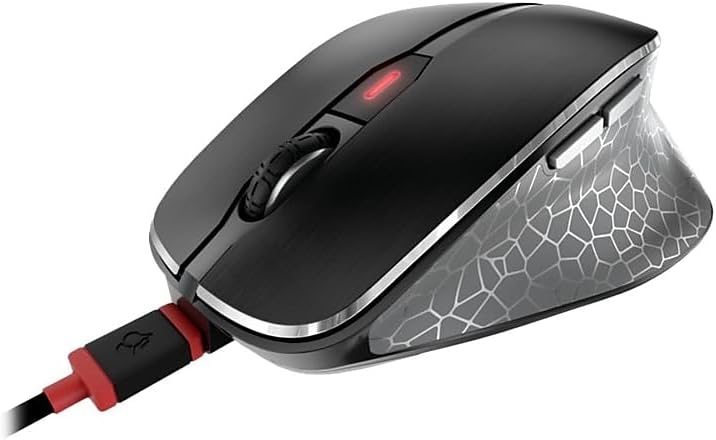
Image: The Cherry MW 8C Ergo mouse connected to its USB-C charging cable, showing the charging port and the mouse's top view.
The LED indicator on the mouse will show charging status. Once fully charged, the LED will change or turn off depending on the model's specific indicator behavior.
4.2. Lidhja nëpërmjet rrjetit pa tel 2.4 GHz (Marrës USB)
- Locate the 2.4 GHz USB receiver (dongle), usually stored magnetically in a compartment on the bottom of the mouse.
- Lidhni marrësin USB në një portë USB-A të lirë në kompjuterin tuaj.
- On the bottom of the mouse, slide the 3-position switch to the "2.4 GHz" position (often indicated by a small wireless icon).
- Your computer should automatically detect and install the necessary drivers. The mouse will be ready for use.
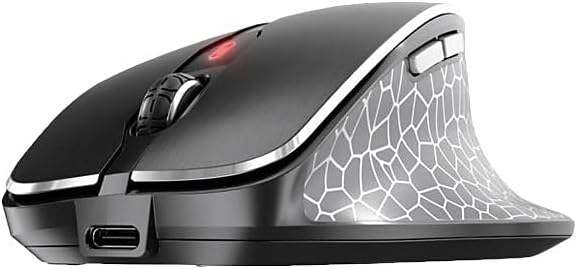
Imazh: Një anë e përparme view of the Cherry MW 8C Ergo mouse, highlighting the USB-C charging port and the scroll wheel.
4.3. Lidhja me Bluetooth
- On the bottom of the mouse, slide the 3-position switch to the "Bluetooth" position (often indicated by a Bluetooth icon).
- Press and hold the Bluetooth detection button on the bottom of the mouse for a few seconds until the LED indicator starts blinking, indicating pairing mode.
- Në kompjuterin tuaj, hapni cilësimet e Bluetooth:
- Dritaret: Go to Settings > Devices > Bluetooth & other devices. Click "Add Bluetooth or other device" and select "Bluetooth".
- MacOS: Go to System Preferences > Bluetooth.
- Select "Cherry MW 8C Ergo" from the list of available devices.
- Follow any on-screen prompts to complete the pairing process. The LED indicator on the mouse will stop blinking once successfully paired.
5. Përdorimi i mausit
5.1. Funksionet e butonave
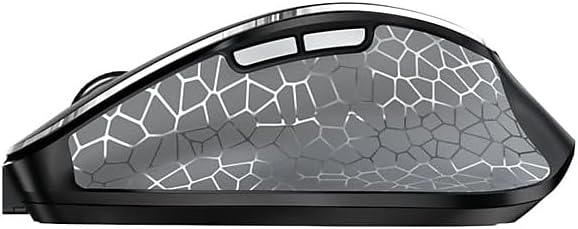
Imazh: Një anë view of the Cherry MW 8C Ergo mouse, highlighting the two programmable side buttons.
- Butoni i klikimit të majtë: Funksioni kryesor i klikimit.
- Butoni i klikimit me të djathtën: Funksioni i klikimit dytësor, zakonisht hap menutë e kontekstit.
- Rrota e lëvizjes: Lëviz lart/poshtë dokumentet dhe web faqe. Mund të shtypet edhe për një funksion klikimi në mes.
- Butoni DPI: Located behind the scroll wheel, this button allows you to cycle through different DPI (Dots Per Inch) sensitivity settings.
- Butonat anësore: Two buttons located on the thumb side of the mouse. By default, these often function as "Forward" and "Back" in web shfletuesit dhe file explorers. Their functions may be customizable via software (if available).
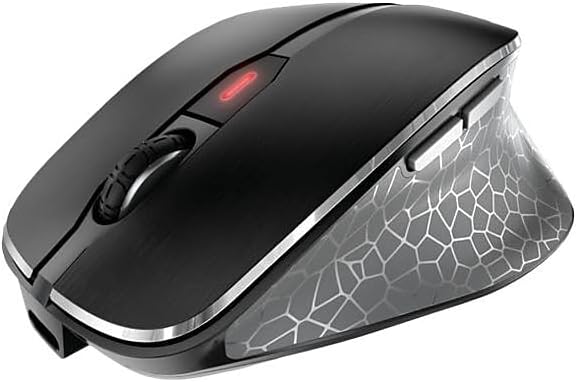
Imazh: Një nga lart poshtë view of the Cherry MW 8C Ergo mouse, clearly showing the scroll wheel and the DPI adjustment button.
5.2. Rregullimi i Ndjeshmërisë së DPI-së
Press the DPI button (located behind the scroll wheel) to cycle through the available sensitivity settings. Each press will change the cursor speed, allowing you to find the optimal setting for your tasks. The mouse typically has multiple preset DPI levels.
5.3. Switching Connectivity Modes
To switch between 2.4 GHz wireless and Bluetooth modes, use the 3-position switch on the bottom of the mouse. Ensure the correct mode is selected for your desired connection type.
6. Mirëmbajtja
6.1. Cleaning the Mouse
- Disconnect the mouse from any charging cables and turn it off using the switch on the bottom.
- Përdorni një leckë të butë, pa garzë pak damptë lagur me ujë ose një tretësirë të butë pastrimi për të fshirë sipërfaqen e mausit.
- Shmangni përdorimin e kimikateve të ashpra, pastruesve gërryes ose spërkatjen e lëngjeve direkt mbi maus.
- For the optical sensor, use a dry cotton swab to gently clean any dust or debris.
6.2. Kujdesi për baterinë
- Për të zgjatur jetëgjatësinë e baterisë, shmangni shkarkimin e plotë të mausit shpesh.
- Charge the mouse regularly, especially when the low battery indicator appears.
- If storing the mouse for an extended period, charge it to about 50% and turn it off. Recharge every few months to prevent deep discharge.
7. Troubleshooting
7.1. Miu nuk përgjigjet
- Kontrolloni fuqinë: Sigurohuni që mausi të jetë i ndezur dhe të ketë ngarkesë të mjaftueshme të baterisë.
- Check Connectivity Mode: Verify the switch on the bottom of the mouse is set to the correct mode (2.4 GHz or Bluetooth) for your connection type.
- Lidhja 2.4 GHz:
- Sigurohuni që marrësi USB të jetë i lidhur mirë në një portë USB që funksionon.
- Provo ta lidhësh marrësin me një portë tjetër USB.
- Ensure the receiver is within range of the mouse (typically up to 10 meters).
- Lidhja Bluetooth:
- Sigurohuni që Bluetooth është i aktivizuar në kompjuterin tuaj.
- Try re-pairing the mouse with your computer (refer to Section 4.3).
- Ensure the mouse is within range of your computer's Bluetooth receiver.
- Rinis: Turn the mouse off and then on again. Restart your computer if necessary.
7.2. Cursor Movement is Erratic or Inaccurate
- Sensori i pastër: Clean the optical sensor on the bottom of the mouse (refer to Section 6.1).
- Sipërfaqja: Use the mouse on a clean, non-reflective, and uniform surface. Avoid glass or highly reflective surfaces.
- Vendosja e DPI: Adjust the DPI sensitivity using the DPI button to see if a different setting improves performance.
7.3. Mouse Not Charging
- Lidhja me kabllo: Ensure the USB-C cable is securely connected to both the mouse and the power source.
- Burimi i energjisë: Try a different USB port on your computer or a different USB power adapter.
- Integriteti i kabllove: Inspect the charging cable for any damage. Try using a different USB-C charging cable if available.
8. Specifikimet
| Veçori | Detaj |
|---|---|
| Emri i modelit | MW 8C Ergo |
| Numri i modelit të artikullit | JW-8600US |
| Markë | Qershia |
| Teknologjia e lidhjes | Bluetooth, 2.4 GHz pa tel |
| Zbulimi i Lëvizjes | Optike |
| Burimi i energjisë | Me bateri (e rikarikueshme) |
| Përputhshmëria e Sistemit Operativ | Windows 7, Windows 8, Windows 10, Windows 11 |
| Pesha e artikullit | 8 ons (rreth 227 gram) |
| Dimensionet e produktit (LxWxH) | 4.72 x 3.11 x 1.75 inç (rreth 120 x 79 x 44 mm) |
| Ngjyra | E zezë |
| Enkriptimi | AES-128 (for 2.4 GHz wireless) |
9. Garancia dhe Mbështetja
9.1. Informacioni i garancisë
Cherry products are manufactured to high-quality standards. This product is covered by a limited warranty against defects in materials and workmanship. Please refer to the official Cherry website or your purchase documentation for specific warranty terms and conditions applicable to your region. Keep your proof of purchase for warranty claims.
9.2. Mbështetje Teknike
If you encounter any issues not covered in the troubleshooting section or require further assistance, please contact Cherry customer support. You can find contact information, FAQs, and additional resources on the official Cherry webfaqe:
Qershi Zyrtare Webfaqe: www.cherry.de/en/
Please have your product model number (JW-8600US) and proof of purchase ready when contacting support.


