1. Hyrje
Faleminderit për blerjenasing the DOOMAY Digital Alarm Clock. This compact and versatile alarm clock is designed for convenience and readability, featuring an adjustable LCD display, snooze function, weekend mode, and temperature display. This manual will guide you through the setup, operation, and maintenance of your new alarm clock to ensure optimal performance.
2. Informacion mbi sigurinë
- Mbajeni pajisjen larg ujit dhe mjediseve me lagështi të lartë.
- Avoid exposing the clock to direct sunlight or extreme temperatures.
- Mos u përpiqni ta çmontoni ose riparoni vetë pajisjen. Për shërbim drejtohuni te personeli i kualifikuar.
- Përdorni vetëm llojin e specifikuar të baterisë (2 bateri AAA).
- Hiqni bateritë nëse pajisja nuk do të përdoret për një periudhë të gjatë kohore për të parandaluar rrjedhjet.
- Mbani bateritë jashtë mundësive të fëmijëve.
3. Përmbajtja e paketës
- Orë dixhitale me alarm DOOMAY (1 njësi)
- Bateri AAA (2 njësi)
- Manuali i Përdoruesit (ky dokument)
4. Produkti i Mbaruarview
Familiarize yourself with the components and controls of your DOOMAY Digital Alarm Clock.
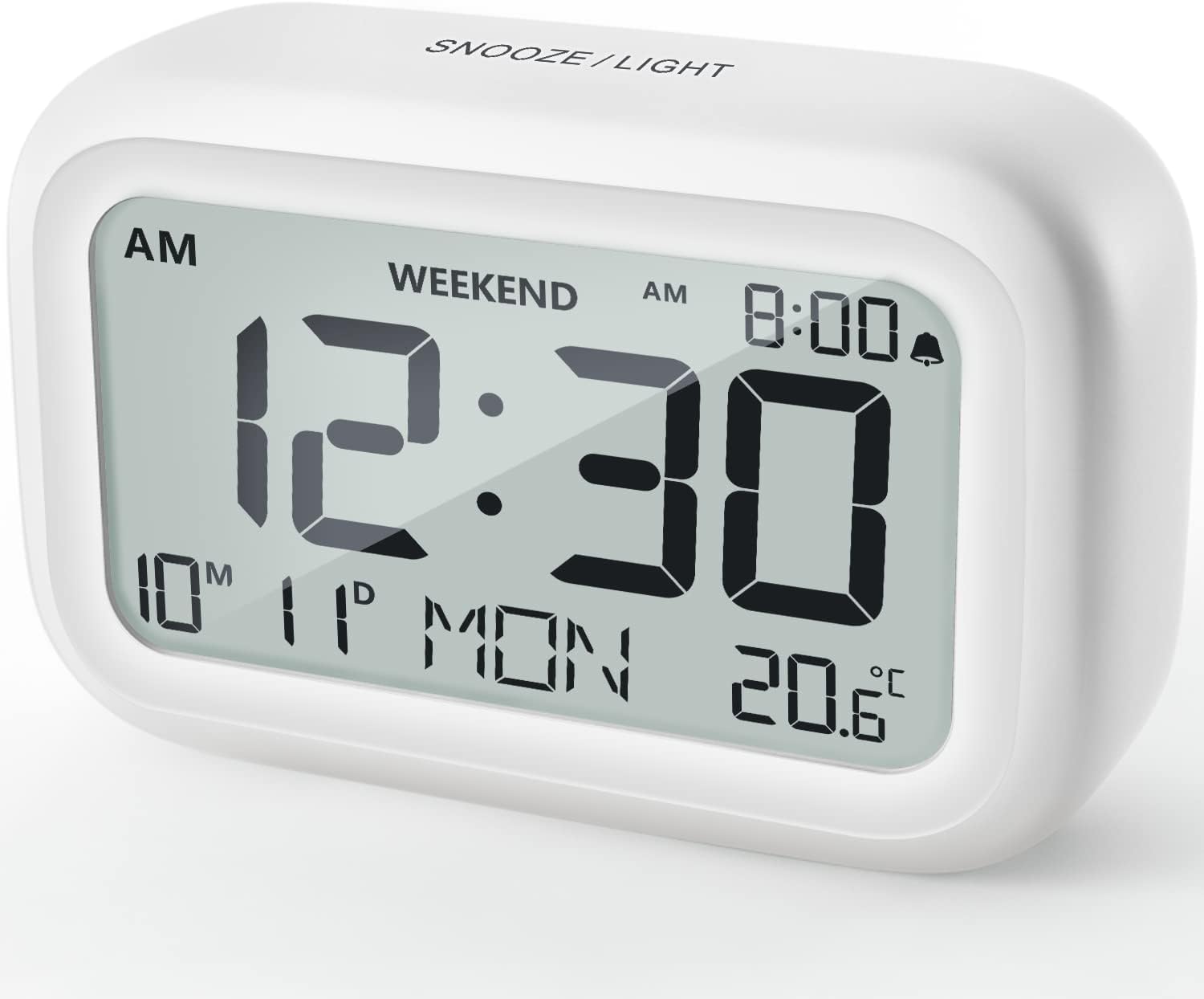
Figura 4.1: Përpara View of the Alarm Clock
This image displays the front of the DOOMAY Digital Alarm Clock, highlighting its large, clear LCD screen. The screen shows the current time (12:30), AM indicator, day of the week (MON), date (10th month, 11th day), and indoor temperature (20.6°C). The top of the clock has a "SNOOZE/LIGHT" button.

Figura 4.2: Karakteristikat kryesore mbiview
This diagram illustrates the main functionalities of the alarm clock: 12/24H time display, calendar, alarm setting, adjustable volume, snooze function, backlight, weekend mode, and temperature display. The clock itself is shown on a wooden table, displaying 7:00 AM, Friday, and 28.8 degrees.

Figure 4.3: Back Panel Controls
This image shows the rear of the alarm clock, detailing the various control buttons and the battery compartment. Buttons are clearly labeled for: 12/24H time format, Alarm setting, Weekend mode, Date setting, Minus (-) for decreasing values, Plus (+) for increasing values, and °C/°F for temperature unit selection. The battery compartment is visible, designed for two AAA batteries.
Kontrollet dhe shfaqja:
- Ekrani LCD: Shows time, date, day of week, AM/PM indicator, alarm status, and temperature.
- Butoni SNOOZE/NDIZ (Sipër): Activates snooze function during alarm; illuminates backlight for 5 seconds.
- 12/24H Button (Back): Kalon midis formateve të kohës 12-orëshe dhe 24-orëshe.
- ALARM Button (Back): Hyn në modalitetin e vendosjes së alarmit.
- WEEKEND Button (Back): Activates/deactivates weekend mode.
- DATE Button (Back): Enters date setting mode.
- MINUS (-) Button (Back): Decreases values during setting; adjusts alarm volume.
- PLUS (+) Button (Back): Increases values during setting; adjusts alarm volume.
- °C/°F Button (Back): Kalon midis njësive të temperaturës Celsius dhe Fahrenheit.
5. Konfigurimi
5.1 Instalimi i baterisë
- Hapni kapakun e ndarjes së baterisë që ndodhet në pjesën e pasme të orës.
- Vendosni dy (2) bateri AAA, duke u siguruar që polariteti i saktë (+ dhe -).
- Mbyllni mirë kapakun e ndarjes së baterisë.
- The display will light up, and the clock will be ready for initial setup. A low battery symbol will appear when batteries need replacement. If the display shows "8888" flashing, it's also an indication to change batteries.
5.2 Vendosja fillestare e orës dhe datës
- Cakto kohën:
- Shtypni 12/24 orë button to switch between 12-hour (with AM/PM) and 24-hour formats.
- Shtypni dhe mbani shtypur 12/24 orë butonin për 3 sekonda për të hyrë në modalitetin e vendosjes së kohës. Shifrat e orës do të pulsojnë.
- Përdorni + or - butonat për të rregulluar orën.
- Shtypni 12/24 orë button again to confirm the hour and move to minute setting. The minute digits will flash.
- Përdorni + or - butonat për të rregulluar minutën.
- Shtypni 12/24 orë button one more time to exit time setting.
- Cakto datën:
- Shtypni dhe mbani shtypur DATA button for 3 seconds to enter date setting mode. The year digits will flash.
- Përdorni + or - butonat për të rregulluar vitin.
- Shtypni DATA button again to confirm the year and move to month setting.
- Adjust the month using + or -.
- Shtypni DATA again to move to day setting.
- Adjust the day using + or -.
- Shtypni DATA one more time to exit date setting. The day of the week will automatically adjust.
6. Udhëzimet e funksionimit
6.1 Vendosja e alarmit
- Shtypni dhe mbani shtypur ALARM butonin për 3 sekonda. Shifrat e orës së alarmit do të pulsojnë.
- Përdorni + or - butonat për të vendosur orën e dëshiruar të alarmit.
- Shtypni ALARM button again to confirm the hour and move to minute setting. The alarm minute digits will flash.
- Përdorni + or - buttons to set the desired alarm minute.
- Shtypni ALARM button one more time to exit alarm setting. The alarm icon (bell symbol) will appear on the display, indicating the alarm is active.
- To turn the alarm ON/OFF, simply press the ALARM button once. The bell icon will appear/disappear.
6.2 Funksioni i Shtyrjes
Kur të bjerë alarmi, prekni lehtë butonin e madh Rrëmbej / LEHTA button on the top of the clock. The alarm will pause for 9 minutes and then sound again. This can be repeated multiple times.

Figure 6.1: Activating Snooze
This image demonstrates how to activate the snooze function by touching the top of the alarm clock. The text highlights that this action provides an additional 9 minutes of sleep after the alarm sounds.
To completely turn off the alarm after it sounds (without snoozing), press any button on the back of the clock.
6.3 Modaliteti i Fundjavës
The weekend mode allows the alarm to sound only from Monday to Friday, preventing it from ringing on Saturday and Sunday.

Figure 6.2: Weekend Mode Activated
This image shows the alarm clock display with the "WEEKEND" indicator prominently displayed, signifying that the weekend mode is active. The accompanying text clarifies that in this mode, the alarm will only sound from Monday to Friday, ensuring undisturbed weekends.
- To activate Weekend Mode, press the FENDJAVA button once. The "WEEKEND" indicator will appear on the display.
- To deactivate Weekend Mode, press the FENDJAVA button again. The "WEEKEND" indicator will disappear.
6.4 Adjustable Alarm Volume
The alarm clock offers two volume levels: Low (70 dB) and High (85 dB).

Figure 6.3: Alarm Volume Levels
This image visually represents the two available alarm volume settings: L01 (85 dB) for a louder alarm and L02 (70 dB) for a softer alarm. The alarm clock is shown in a bedroom setting, emphasizing its use as a bedside device.
- Ndërsa jeni në modalitetin e shfaqjes normale të kohës, shtypni + or - buttons to cycle between the two alarm volume levels. The current volume level will be briefly displayed.
6.5 Funksioni i ndriçimit të prapmë
To illuminate the display in low light conditions, simply tap the Rrëmbej / LEHTA button on the top of the clock. The backlight will activate for approximately 5 seconds, providing clear visibility of the time and other information.
Figure 6.4: Backlight in Action
This image provides a side-by-side comparison of the alarm clock's display. On the left, the clock is shown in a well-lit environment. On the right, the same clock is shown in a dark setting with its 5-second backlight activated, demonstrating how the display becomes clearly visible at night.
6.6 Ekrani i temperaturës
Ora shfaq temperaturën e brendshme. Mund të kaloni midis njësive Celsius (°C) dhe Fahrenheit (°F).
- To change the temperature unit, press the ° C / ° F butonin në anën e pasme të orës.
7. Mirëmbajtja
7.1 Pastrimi
Wipe the clock with a soft, dry cloth. Do not use abrasive cleaners or solvents, as they may damage the surface.
7.2 Ndërrimi i baterisë
When the low battery indicator appears on the display, or if the display shows "8888" flashing, it is time to replace the batteries. Follow the steps in Section 5.1 Battery Installation to replace the two AAA batteries.
8. Troubleshooting
| Problem | Shkaku i mundshëm | Zgjidhje |
|---|---|---|
| Ekrani është bosh ose i zbehtë. | Bateritë janë të ngordhura ose të instaluara gabimisht. | Zëvendësoni bateritë me bateri të reja AAA, duke u siguruar që polariteti të jetë i saktë. |
| Alarmi nuk bie. | Alarm is not activated, or Weekend Mode is ON. | Ensure the alarm icon is displayed. Check if Weekend Mode is active and deactivate if necessary. |
| Funksioni i shtyrjes nuk funksionon. | Not tapping the SNOOZE/LIGHT button correctly. | Ensure a firm, brief tap on the top SNOOZE/LIGHT button when the alarm is sounding. |
| Ora/Data është e pasaktë. | Nuk është vendosur saktë ose janë hequr bateritë. | Refer to Section 5.2 Initial Time and Date Setting to re-set. |
9. Specifikimet
| Veçori | Detaj |
|---|---|
| Numri i modelit | 5293 MB |
| Markë | DOMAY |
| Dimensionet (J x P x H) | 10.9 x 3.81 x 6.9 cm (4.29 x 1.5 x 2.72 inç) |
| Pesha | 127.01 gram (0.28 lbs) |
| Materiali | Akrilonitril butadien stiren (ABS) |
| Burimi i energjisë | 2 x bateri AAA (të përfshira) |
| Lloji i ekranit | LCD dixhital |
| Nivelet e Volumit të Alarmit | Low (70 dB), High (85 dB) |
| Kohëzgjatja e shtyrjes | 9 minuta |
| Kohëzgjatja e dritës së prapme | 5 sekonda |
| Njësitë e temperaturës | Celsius (°C) / Fahrenheit (°F) |
10. Garancia dhe Mbështetja
DOOMAY products are designed for reliability and performance. For any questions, technical support, or warranty claims, please contact your retailer or visit the official DOOMAY website for assistance. Please retain your proof of purchase for warranty purposes.
For further information, you may visit the brand's Amazon store page: DOOMAY Store on Amazon


