Hyrje
This manual provides instructions for the Belkin 5-in-1 Multiport Hub Adapter, Model INC008btBK. This adapter is designed to expand connectivity for Chromebook and Chrome OS devices, offering ports for 4K video output, power delivery, USB peripherals, and a wired internet connection. It supports fast charging up to 86W and video resolutions up to 4K at 60Hz via its HDMI port. The hub includes two USB-A 3.1 Gen 1 ports and a Gigabit Ethernet port. It is Works With Chromebook certified, ensuring compatibility with Chrome OS.

The Belkin 5-in-1 Multiport Hub Adapter, a compact black device with an integrated USB-C cable.
Karakteristikat e produktit
- Chromebook optimized adapter provides automatic firmware updates directly through Chrome OS.
- Certified to meet Google's compatibility standards for Chrome OS devices.
- Features 2x USB-A 3.1 Gen 1 ports for connecting peripherals.
- Includes a Gigabit Ethernet port for a stable wired internet connection.
- Equipped with a 4K HDMI port supporting resolutions up to 4K at 60Hz.
- USB-C port supports pass-through charging up to 100W (minus 15W for adapter operation), delivering up to 86W to connected devices.
- Tethered USB-C cable for easy connection to your Chromebook.
Përmbajtja e paketës
- Belkin 5-in-1 Multiport Hub Adapter (Model INC008btBK)
Udhëzimet e konfigurimit
Follow these steps to set up your Belkin 5-in-1 Multiport Hub Adapter:
- Connect to your Chromebook: Plug the integrated USB-C cable from the hub into an available USB-C port on your Chromebook or compatible device.
- Connect Power (Optional): For charging your Chromebook and connected devices, connect a USB-C power adapter (minimum 65W recommended) to the USB-C Power Delivery (PD) port on the hub. This port supports up to 100W pass-through charging.
- Connect HDMI Display (Optional): Use an HDMI cable to connect your external monitor or display to the HDMI port on the hub. Ensure your display is set to the correct input source.
- Connect USB Peripherals (Optional): Plug your USB-A devices, such as a mouse, keyboard, or external storage, into the two USB-A 3.1 Gen 1 ports on the hub.
- Lidh Ethernet-in (Opsional): Për një lidhje interneti me kabllo, lidhni një kabllo Ethernet nga routeri ose modemi juaj në portën Gigabit Ethernet në qendër.
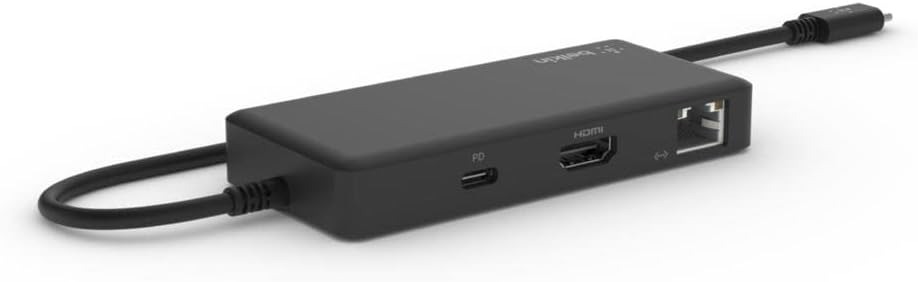
A view of the Belkin Multiport Hub's side, displaying the HDMI, USB-C Power Delivery, and Gigabit Ethernet ports.
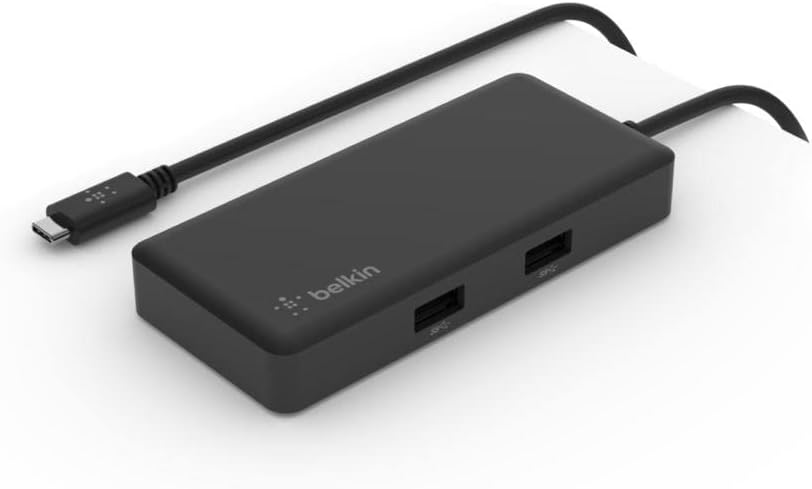
Një këndor view of the Belkin Multiport Hub, highlighting the two USB-A 3.1 Gen 1 ports on its top surface.
Udhëzimet e funksionimit
Once connected, the Belkin 5-in-1 Multiport Hub Adapter operates automatically with your Chromebook. Chrome OS will detect connected devices and displays.
- Prodhimi i ekranit: Your Chromebook should automatically extend or mirror its display to the connected HDMI monitor. Adjust display settings in Chrome OS if needed.
- Pajisjet USB: USB-A peripherals will function as soon as they are plugged into the hub.
- Lidhja me rrjetin: The Gigabit Ethernet port provides a stable wired network connection, which will be prioritized over Wi-Fi when connected.
- Ofrimi i energjisë: Ensure your external USB-C power adapter meets the recommended wattage for optimal charging performance, especially when using multiple hub functions.

The Belkin Multiport Hub connected to a laptop, demonstrating its use with an external monitor (via HDMI) and other USB peripherals.
Mirëmbajtja
To ensure the longevity and optimal performance of your Belkin Multiport Hub:
- Keep the adapter clean by wiping it with a soft, dry cloth. Avoid liquid cleaners.
- Ruajeni adaptorin në një vend të freskët dhe të thatë, larg rrezeve të diellit dhe temperaturave ekstreme.
- Avoid bending or stressing the integrated USB-C cable excessively.
Zgjidhja e problemeve
- Nuk ka ekran në monitorin e jashtëm:
- Sigurohuni që kablloja HDMI të jetë e lidhur mirë si me qendrën ashtu edhe me monitorin.
- Verify the monitor's input source is set to HDMI.
- Check your Chromebook's display settings to ensure the external display is detected and configured correctly.
- Provo një kabllo HDMI ose monitor tjetër nëse është e mundur.
- Pajisjet USB nuk funksionojnë:
- Ensure the USB-A devices are fully inserted into the hub's ports.
- Test the USB device by connecting it directly to your Chromebook (if possible) to rule out device issues.
- If using high-power USB devices, ensure the hub is connected to a power adapter.
- No Internet Connection via Ethernet:
- Verify the Ethernet cable is securely connected to both the hub and your router/modem.
- Check the network status on your Chromebook.
- Sigurohuni që ruteri/modemi juaj të funksionojë siç duhet.
- Chromebook Not Charging:
- Ensure a USB-C power adapter is connected to the hub's USB-C PD port.
- Verify the power adapter is functioning and provides sufficient wattage (minimum 65W recommended for optimal pass-through charging).
- Check the charging indicator on your Chromebook.
Specifikimet
| Markë | Belkin |
| Numri i modelit | INC008btBK |
| Ndërfaqja e harduerit | Ethernet, USB-C, HDMI, USB-A |
| Numri i Porteve | 5 (2x USB-A, 1x HDMI, 1x USB-C PD, 1x Ethernet) |
| Portet USB-A | 2x USB 3.1 Gjeneral 1 |
| Dalja HDMI | Deri në 4K @ 60Hz |
| Dorëzimi i energjisë USB-C | Up to 86W to host (100W pass-through minus 15W for adapter) |
| Ethernet | Gigabit Ethernet (1 Gbps) |
| Pajisjet e përputhshme | Laptops (Chromebooks, Chrome OS devices) |
| Sistemi Operativ | Chrome OS |
| Materiali | Plastike |
| Dimensionet e artikullit (L x P x H) | 5.91" x 0.50" x 30.31" (approximate, based on provided data) |
| Pesha e artikullit | 0.12 kilogramë |
Garancia dhe Mbështetja
For warranty information and technical support, please visit the official Belkin website or contact Belkin customer service. Product registration may be available for extended warranty benefits.
Mund të gjeni më shumë informacion dhe burime mbështetëse në Belkin Store.


