1. Hyrje
The Echo Dot (4th Gen) is a smart speaker designed to bring the convenience of Alexa into any room of your home. Its spherical design delivers crisp vocals and balanced bass for a full sound experience. With Alexa, you can control your entertainment, manage your smart home devices, get information, set alarms, and connect with others hands-free.
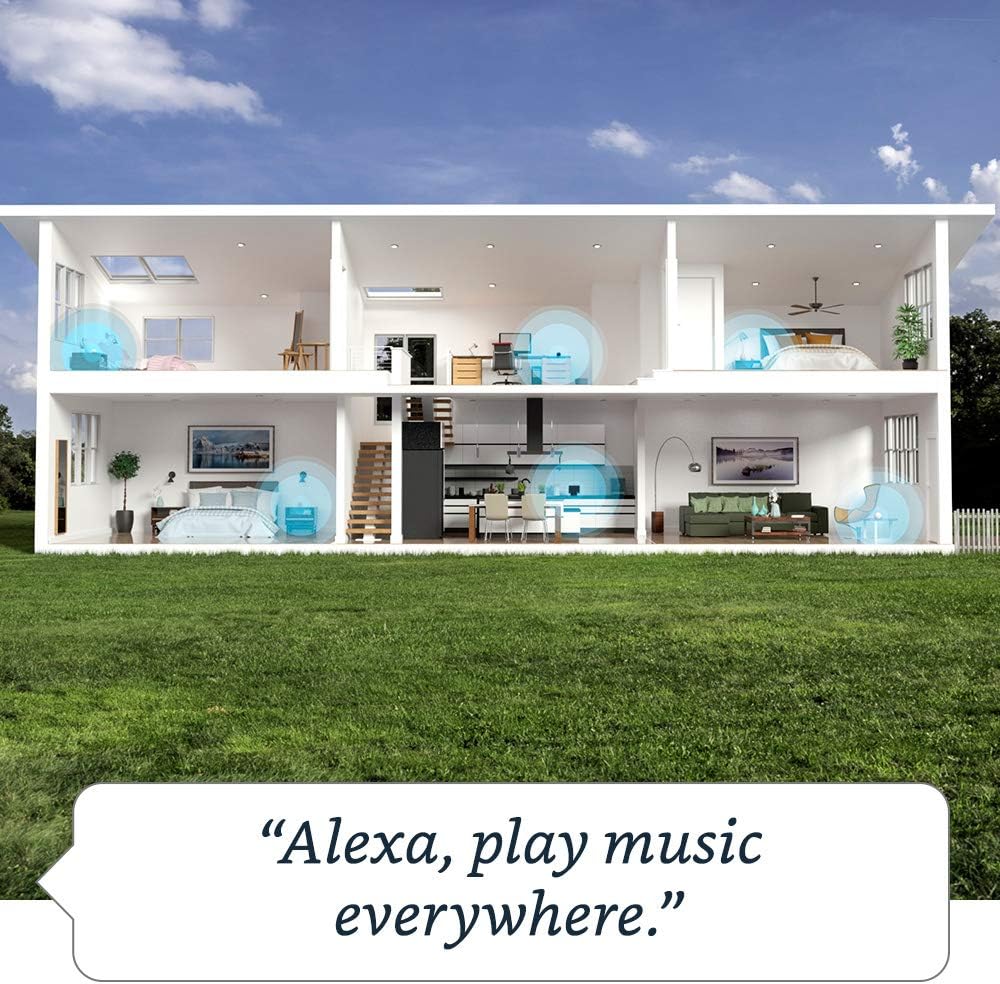
Image: The Echo Dot (4th Gen) showcasing its various capabilities, including music playback, timers, smart home control, information retrieval, intercom features, and news updates.
2. Udhëzuesi i konfigurimit
Follow these steps to set up your Echo Dot (4th Gen):
- Lidhni Echo Dot-in tuaj: Connect the included power adapter to your Echo Dot and then to a power outlet. The light ring on the bottom will turn blue, then orange, indicating it's ready for setup.
- Shkarkoni aplikacionin Alexa: Në telefonin tuaj inteligjent ose tablet, shkarkoni aplikacionin Amazon Alexa nga dyqani i aplikacioneve të pajisjes suaj (App Store për iOS, Google Play Store për Android).
- Hapni aplikacionin Alexa: Log in with your Amazon account credentials. If you don't have an Amazon account, you will need to create one.
- Shtoni pajisjen tuaj: In the Alexa app, tap the "Devices" icon at the bottom right. Tap the "+" icon in the top right corner, then select "Add Device". Choose "Amazon Echo" and then "Echo Dot".
- Ndiqni udhëzimet në ekran: The app will guide you through connecting your Echo Dot to your Wi-Fi network. Ensure your phone is connected to the same Wi-Fi network you want your Echo Dot to use.
- Konfirmo lidhjen: Once connected, the light ring on your Echo Dot will turn off, and Alexa will greet you. Your Echo Dot is now ready to use.
For optimal performance, place your Echo Dot in a central location, away from walls or other obstructions that might block the microphone.
3. Përdorimi i Echo Dot-it tuaj
Your Echo Dot is voice-controlled using the wake word "Alexa". Here are some common functionalities:
Komandat zanore
- Muzika dhe audio: "Alexa, play pop music." "Alexa, play my workout playlist on Spotify." "Alexa, volume up." "Alexa, next song."
- Informacion: "Alexa, what's the weather today?" "Alexa, tell me a joke." "Alexa, what's the news?" "Alexa, how tall is Mount Everest?"
- Kohëmatësit dhe alarmet: "Alexa, set a timer for 10 minutes." "Alexa, set an alarm for 7 AM." "Alexa, cancel my alarm."
- Kontrolli i zgjuar i shtëpisë: "Alexa, turn on the living room lights." "Alexa, set the thermostat to 72 degrees." (Requires compatible smart home devices)
- Komunikimi: "Alexa, call Mom." "Alexa, drop in on the kitchen Echo Dot." "Alexa, announce 'Dinner is ready!'"
Muzikë me shumë dhoma
You can group multiple Echo devices to play music simultaneously across different rooms.

Image: A visual representation of multi-room music, demonstrating how Echo Dots can be linked to play synchronized audio throughout a home.
To set up multi-room music, open the Alexa app, go to "Devices", tap the "+" icon, and select "Combine Speakers" > "Multi-room music".
Rutinat
Automate daily tasks by creating routines in the Alexa app. For example, you can set a routine to turn on lights and play news when you say "Alexa, good morning."

Image: The Echo Dot (4th Gen) integrated into a smart home setup, illustrating its ability to trigger routines based on motion or other events.
Kontrollet e Privatësisë
Your Echo Dot is designed with multiple layers of privacy controls. You can press the microphone off button on the top of the device to electronically disconnect the microphones. The light ring will turn red when the microphones are off.
4. Mirëmbajtja
- Pastrimi: Use a soft, dry, lint-free cloth to clean your Echo Dot. Do not use abrasive cleaners or sprays.
- Përditësimet e softuerit: Your Echo Dot automatically receives software updates over Wi-Fi. Ensure it is connected to the internet for these updates.
- Vendosja: Shmangni vendosjen e pajisjes në rrezet e diellit direkte, pranë burimeve të nxehtësisë ose në mjedise tepër të lagështa.
5. Troubleshooting
| Çështja | Zgjidhje |
|---|---|
| Echo Dot nuk po përgjigjet. | Ensure the microphone is not muted (red light ring). Try saying "Alexa" clearly. Unplug the power adapter from the device or the wall outlet, wait 30 seconds, then plug it back in. |
| Nuk mund të lidhet me Wi-Fi. | Check your Wi-Fi password. Ensure your Echo Dot is within range of your Wi-Fi router. Restart your router and modem. Use the Alexa app to re-configure Wi-Fi settings. |
| Cilësi e dobët audio. | Adjust the volume. Ensure the device is not placed in an enclosed space. If connected to external speakers, check the cable connection. |
| Alexa nuk po i kupton komandat. | Speak clearly and at a normal volume. Reduce background noise. Ensure you are using the correct wake word ("Alexa"). |
6. Specifikimet
| Veçori | Detaj |
|---|---|
| Madhësia | 3.9” x 3.9” x 3.5” (100 x 100 x 89 mm) |
| Pesha | 12 oz (341.3 g) |
| Lidhja Wi-Fi | Wi-Fi me dy banda mbështet rrjetet 802.11a/b/g/n/ac (2.4 dhe 5 GHz). |
| Lidhshmëria me Bluetooth | Mbështetje A2DP për transmetim audio; AVRCP për kontrollin me zë të pajisjeve mobile të lidhura. |
| Audio | 1.6” speaker. 3.5 mm line out. |
| Kërkesat e Sistemit | Wi-Fi connection, Alexa app (Fire OS, Android, iOS, web shfletuesi). |
| Gjenerata | Echo Dot (Gjenerata e 4-të) - Publikimi në vitin 2020 |
| Gjuha | Alexa flet anglisht dhe spanjisht |
| Të përfshira në kuti | Echo Dot, power adapter, Quick Start Guide. |
7. Garancia dhe Mbështetja
Garancia: Your Echo Dot (4th Gen) comes with a 90-day limited warranty and service. Optional 1-year, 2-year, and 3-year extended warranties are available for U.S. customers, sold separately.
Përditësimet e Sigurisë së Softuerit: Kjo pajisje merr përditësime të garantuara të sigurisë së softuerit deri të paktën katër vjet pasi pajisja të jetë e disponueshme për herë të fundit për blerje si një njësi e re në faqen tonë webfaqet.
Mbështetja e klientit: For further assistance, visit the Amazon Device Support page or contact Amazon Customer Service. You can also find more information and manage your device settings through the Alexa app or by visiting the Alexa Privacy Hub for privacy-related inquiries.


