1. Hyrje
Thank you for choosing the Karlsson LED Mirror Alarm Clock. This digital alarm clock features a modern design with a clear LED display integrated into a silver mirror surface, showing time and temperature. This manual provides essential information for the safe and efficient use of your device.
Çfarë ka në kuti:
- Karlsson LED Mirror Alarm Clock
- Kabllo energjie USB

Figura 1: Përpara view of the Karlsson LED Mirror Alarm Clock, showing the time (15:08) and temperature (19°C) on its reflective display.
2. Informacion mbi sigurinë
- Mos e ekspozoni pajisjen ndaj ujit ose lagështirës së tepërt.
- Avoid extreme temperatures, direct sunlight, or dusty environments.
- Mbajeni jashtë mundësive të fëmijëve.
- Use only the provided USB cable or a compatible power adapter.
- When inserting batteries, ensure correct polarity (+/-).
- Mos përzieni bateritë e vjetra dhe të reja, ose lloje të ndryshme baterish.
- Hiqni bateritë nëse pajisja nuk do të përdoret për një periudhë të gjatë.
3. Produkti i Mbaruarview
Njihuni me përbërësit dhe kontrollet e orës suaj me zile.
Ekrani i përparmë:
- Shfaqja e kohës: Tregon kohën aktuale në format 12-orësh ose 24-orësh.
- Shfaqja e temperaturës: Shows ambient temperature in Celsius or Fahrenheit.
Kontrollet e pasme:
- Butoni SET: Used to enter setting modes (time, alarm).
- Butoni UP: Përdoret për të rritur vlerat ose për të lundruar në menu.
- Butoni Poshtë: Used to decrease values or navigate menus.
- MODE/V Button: Used to switch display modes or activate voice control (if available).
- Butoni RESET: Rivendos pajisjen në cilësimet e fabrikës.
- Hyrja DC 5 V: Për lidhjen e kabllit të energjisë USB.
- Ndarja e baterisë: Holds 3 x AAA batteries for backup power.
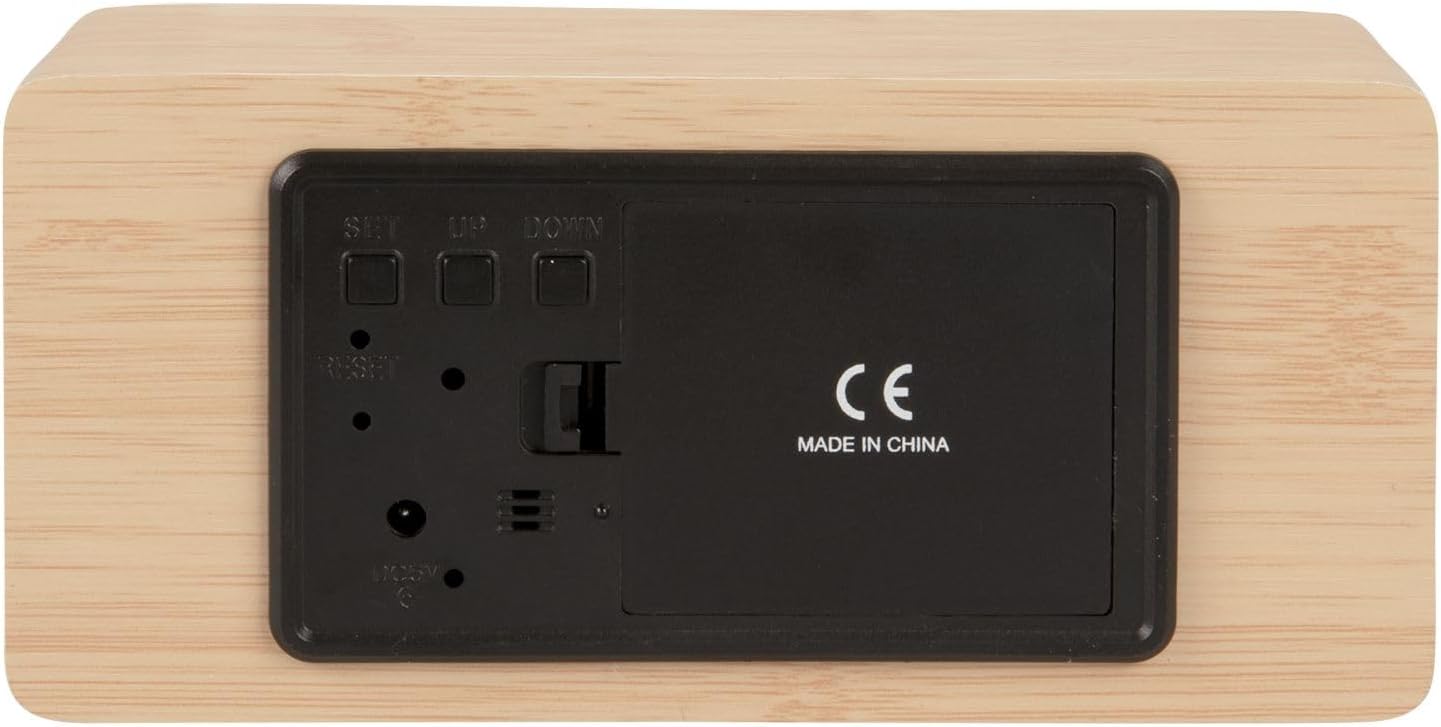
Figura 2: E pasme view of the alarm clock, highlighting the SET, UP, DOWN buttons, power input, and battery compartment.
4. Konfigurimi
Fuqizimi i pajisjes:
The alarm clock can be powered via the included USB cable or by 3 x AAA batteries (not included) for backup.
- Fuqia USB: Connect the small end of the USB cable to the DC 5V input port on the back of the alarm clock. Connect the other end to a USB power adapter (not included) or a powered USB port.
- Rikthimi i baterisë: Open the battery compartment cover on the back of the clock. Insert 3 x AAA batteries, ensuring correct polarity. Close the cover securely. Batteries are primarily for backup and may not power the display continuously.

Figura 3: The USB power cable provided for connecting the alarm clock to a power source.
5. Udhëzimet e funksionimit
Vendosja e kohës:
- Shtypni dhe mbani shtypur SET butonin derisa shifrat e orës të fillojnë të pulsojnë.
- Përdorni UP or POSHTE butonat për të rregulluar orën.
- Shtypni SET përsëri për të konfirmuar orën dhe për të kaluar te cilësimi i minutave.
- Përdorni UP or POSHTE butonat për të rregulluar minutat.
- Shtypni SET to confirm the minutes and exit time setting mode.
Vendosja e alarmit:
- Shtypni SET button once (do not hold) to cycle through display modes until 'AL' or an alarm icon appears.
- Shtypni dhe mbani shtypur SET button again until the alarm hour digits flash.
- Përdorni UP or POSHTE butonat për të vendosur orën e dëshiruar të alarmit.
- Shtypni SET to confirm the alarm hour and move to alarm minute setting.
- Përdorni UP or POSHTE butonat për të vendosur minutat e dëshiruara të alarmit.
- Shtypni SET to confirm and exit alarm setting mode.
- Për të aktivizuar/çaktivizuar alarmin, shtypni butonin UP button while in normal time display mode. An alarm icon will appear/disappear on the display.
Switching Display Modes (12/24 Hour, Temperature Unit):
- Në modalitetin normal të shfaqjes së kohës, shtypni UP button to switch between 12-hour and 24-hour formats.
- Shtypni POSHTE button to switch between Celsius (°C) and Fahrenheit (°F) temperature units.
6. Mirëmbajtja
- Clean the alarm clock with a soft, dry cloth.
- Do not use abrasive cleaners, solvents, or harsh chemicals, as these may damage the mirror surface or casing.
- Ensure the device is unplugged and batteries are removed before cleaning.
7. Troubleshooting
- Ekrani është bosh: Check if the USB cable is securely connected to a power source. If using batteries, ensure they are inserted correctly and are not depleted.
- Alarmi nuk bie: Verify that the alarm is set and activated (alarm icon visible on display). Check the alarm volume if adjustable (this model may not have adjustable volume).
- Incorrect time/settings: Shtypni RISET button on the back of the unit using a thin object (e.g., a paperclip) to restore factory settings, then re-set the time and alarm.
- Temperature reading seems inaccurate: Ensure the clock is placed in a location away from direct heat sources or drafts that could affect ambient temperature readings.
8. Specifikimet
| Numri i modelit | PTG-KA5879WD |
| Materiali | Rimeso druri |
| Dimensionet (J x P x H) | 15 cm x 7 cm x 4.5 cm (afërsisht 5.9 x 2.76 x 1.77 inç) |
| Pesha | 245 g (afërsisht 0.54 lbs) |
| Ngjyra | Light wood casing, silver mirror display |
| Lloji i ekranit | LED dixhital |
| Veçori e veçantë | Alarmi |
| Burimi i energjisë | USB powered (cable included), 3 x AAA batteries (not included) for backup |
9. Garancia dhe Mbështetja
This product is manufactured by Karlsson. For any support inquiries, warranty information, or service requests, please refer to the retailer where the product was purchased or visit the official Karlsson website for contact details. Please retain your proof of purchase for warranty claims.


