1. Hyrje
Thank you for choosing the AgfaPhoto Powerstation PPS 600 Pro. This portable power bank is designed to provide reliable power for various devices during outdoor activities, travel, and emergency situations. This manual provides essential information for safe operation, setup, maintenance, and troubleshooting. Please read it thoroughly before using the product.
2. Udhëzimet e sigurisë
- Mos e çmontoni, riparoni ose modifikoni njësinë. Montimi i gabuar mund të shkaktojë zjarr ose lëndime.
- Do not expose the unit to fire or extreme temperatures (above 60°C / 140°F).
- Do not use or store the unit in a bathroom or in an area exposed to water or moisture.
- Do not drop, hit, or subject the unit to strong impacts.
- Mbajeni jashtë mundësive të fëmijëve.
- Përdorni vetëm aksesorët dhe kabllot e karikimit të rekomanduara.
- Sigurohuni që të ventiloni siç duhet gjatë përdorimit dhe karikimit për të parandaluar mbinxehjen.
- In case of leakage from the battery, avoid contact with skin and eyes. Rinse affected areas with water and seek medical attention.
3. Përmbajtja e paketës
Verifikoni që të gjitha sendet janë të pranishme në kuti:
- AgfaPhoto Powerstation PPS 600 Pro
- Power Cord (for AC charging)
- Car Cigarette Lighter Adapter
- Manuali i Përdoruesit
4. Produkti i Mbaruarview
Familiarize yourself with the ports, buttons, and display of your Powerstation PPS 600 Pro.

Image: Front panel of the AgfaPhoto Powerstation PPS 600 Pro, showing the LCD screen, DC output, USB-A ports, USB-C port, and AC output switch.
The unit features a clear LCD display that shows battery level, input power, and output power. Various ports are available for charging different devices simultaneously.
- Ekrani LCD: Shows battery status, input/output wattage, and error indicators.
- Prodhimi DC: For devices requiring DC power.
- Portat USB-A: Për karikimin e telefonave inteligjentë, tabletëve dhe pajisjeve të tjera me energji USB.
- Porta USB-C: Për pajisje të pajtueshme me karikim të shpejtë.
- Dalja AC: Standard wall outlet for appliances.
- Porta e hyrjes: For charging the power station itself.
5. Konfigurimi
5.1 Ngarkimi fillestar
Before first use, fully charge your AgfaPhoto Powerstation PPS 600 Pro. This ensures optimal battery performance and longevity.
- Connect the provided power cord to the AC input port on the power station.
- Lidhni anën tjetër të kabllit të energjisë në një prizë standarde muri.
- The LCD display will show the charging status. The unit is fully charged when the battery indicator shows 100%.
Charging can also be done via a solar panel (sold separately) or a car cigarette lighter adapter.

Image: Illustration of the three charging methods for the power station: via car cigarette lighter, AC wall adapter, and solar panel.
6. Udhëzimet e funksionimit
6.1 Ndezja/Fikja
- To turn on the unit, press and hold the main power button for a few seconds. The LCD display will illuminate.
- To turn off the unit, press and hold the main power button again until the display turns off.
6.2 Ngarkimi i pajisjeve të jashtme
The Powerstation PPS 600 Pro offers multiple output options:
- Dalja USB: Connect your USB-powered devices (smartphones, tablets, drones, cameras) to the USB-A or USB-C ports. The unit will automatically detect and begin charging.
- Dalja AC: For devices requiring standard wall power (laptops, mini-refrigerators, LED TVs), press the AC ON/OFF button to activate the AC outlet. Plug your device into the AC outlet. Remember to turn off the AC output when not in use to conserve battery.
- Prodhimi DC: For 12V DC devices, connect them to the DC output port.

Image: The AgfaPhoto Powerstation PPS 600 Pro connected and charging a laptop, demonstrating its use for portable electronics.

Image: The power station in use during a power outage, providing light and charging a smartphone, highlighting its emergency backup capability.
7. Mirëmbajtja
7.1 Ruajtja
- Ruajeni termocentralin në një vend të freskët dhe të thatë, larg rrezeve të diellit dhe burimeve të nxehtësisë.
- Për ruajtje afatgjatë, ngarkojeni pajisjen afërsisht 50-80% çdo 3-6 muaj për të ruajtur gjendjen e baterisë.
- Avoid storing in environments with high humidity or extreme temperatures.
7.2 Pastrimi
- Përdorni një leckë të butë dhe të thatë për të pastruar pjesën e jashtme të njësisë.
- Mos përdorni pastrues gërryes ose tretës.
- Sigurohuni që të gjitha portat të jenë të pastra nga pluhuri dhe mbeturinat.
8. Troubleshooting
If you encounter issues with your Powerstation PPS 600 Pro, refer to the following common problems and solutions:
| Problem | Shkaku i mundshëm | Zgjidhje |
|---|---|---|
| Njësia nuk ndizet | Bateria është shkarkuar plotësisht. | Charge the unit using the AC adapter. |
| No output from AC port | AC output not activated. Device exceeds power limit. | Shtypni butonin e ndezjes/fikjes së kondicionerit. Kontrolloni fuqinë e pajisjes.tage against unit specifications. |
| Slow charging of external devices | Device requires higher current. Cable issue. | Ensure you are using the correct USB port (e.g., USB-C PD). Try a different cable. |
| Njësia po mbinxehet | Ventilim i dobët. Ngarkesë e tepërt. | Ensure vents are clear. Reduce the number or power of connected devices. Allow unit to cool down. |
Nëse problemi vazhdon, ju lutemi kontaktoni mbështetjen e klientit.
9. Specifikimet
Technical details for the AgfaPhoto Powerstation PPS 600 Pro:
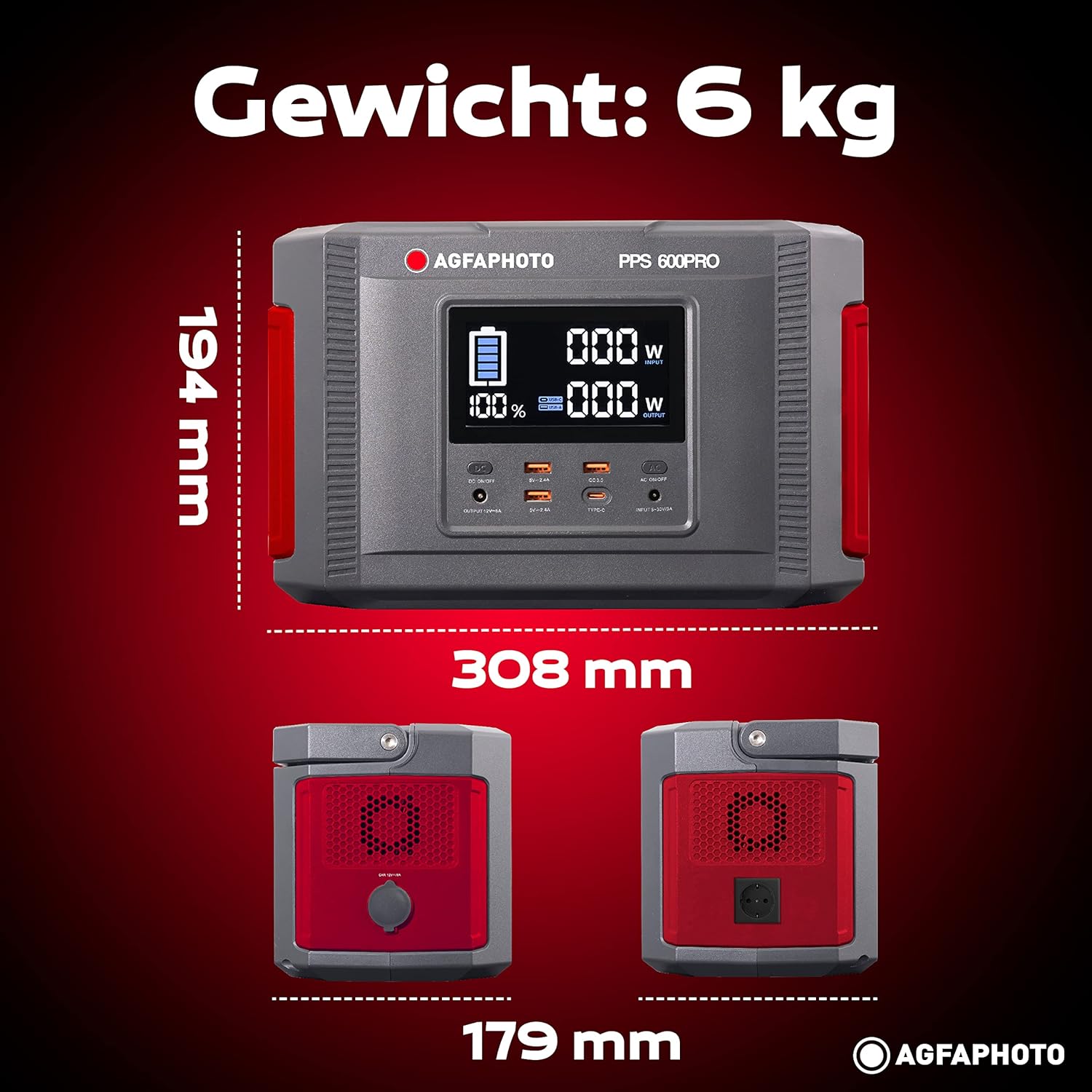
Image: Visual representation of the AgfaPhoto Powerstation PPS 600 Pro's dimensions (308 x 179 x 194 mm) and weight (6 kg).
| Veçori | Specifikimi |
|---|---|
| Markë | AgfaPhoto |
| Numri i modelit | 717-854742 (PPS600) |
| Kapaciteti i baterisë | 644 Wh |
| Output Power (Continuous) | 600 W |
| Fuqia e daljes (Pak) | 1000 W |
| Vëlltage | 220 volt |
| Pesha e artikullit | 6.1 kilogramë |
| Dimensionet (J x P x H) | 308 x 179 x 194 mm |
| Burimi i energjisë | Battery Powered (Solaire, électricité) |
| Përdorimet e rekomanduara | Mobile phones, cameras, laptops, tablets |
| Komponentët e përfshirë | Power cord, USB ports, LCD screen, car cigarette lighter adapter |
| Veçori e veçantë | Dizajn kompakt |
10. Garancia dhe Mbështetja
AgfaPhoto products are manufactured to high-quality standards and are covered by a manufacturer's warranty. For specific warranty terms and conditions, please refer to the warranty card included with your product or visit the official AgfaPhoto webfaqe.
For technical support, troubleshooting assistance, or spare parts inquiries, please contact AgfaPhoto customer service. Contact details can typically be found on the product packaging or the official brand webfaqe.


