1. Informacion i rëndësishëm për sigurinë
Ju lutemi lexoni me kujdes të gjitha udhëzimet e sigurisë përpara se të përdorni këtë produkt. Mosndjekja e këtyre udhëzimeve mund të rezultojë në lëndime ose dëmtime.
- Vendosja: Avoid placing the camera in unstable locations or within reach of children or pets.
- Fuqia: Use only the provided AC adapter and power cable. Disconnect power before moving the device.
- Mjedisi: Keep the camera away from high humidity, dust, and extreme temperatures. This product is not waterproof.
- Mirëmbajtja: Do not attempt to disassemble or repair the camera yourself. Contact customer support for any issues.

Image: General safety guidelines for camera usage.
2. Përmbajtja e paketës
Verifikoni që të gjitha artikujt janë të përfshirë në paketën tuaj:
- Galayou G2 Camera Unit
- Përshtatës AC
- Kabllo energjie
- Kit Montimi (vida, spiranca)
- Japanese Instruction Manual

Image: The Galayou G2 camera and a smartphone displaying its live feed.
3. Udhëzuesi i konfigurimit
3.1 Konfigurimi fillestar
- Ndezja: Connect the camera to power using the provided AC adapter and cable. The indicator light will turn red.
- Shkarkim aplikacioni: Download the dedicated 'blurams' app from the App Store (iOS) or Google Play Store (Android).
- Lejet e aplikacionit: Ensure Bluetooth and Location permissions are enabled for the 'blurams' app in your smartphone settings.
- Rivendosni Kamerën: Press and hold the reset button on the camera until you hear a beep sound. The indicator light will flash red and blue alternately, indicating it's ready for network connection.
- Shto pajisje në aplikacion: Open the 'blurams' app, tap 'Add Device' or the '+' icon. Select your camera model (G2 or similar D1 model) and choose 'Wi-Fi connection via Bluetooth'.
- Lidhja Wi-Fi: Enter your 2.4GHz Wi-Fi network name and password. The camera only supports 2.4GHz Wi-Fi.
- Skanimi i kodit QR: The app will display a QR code. Hold your smartphone in front of the camera lens to scan the QR code. You will hear a beep sound from the camera upon successful scan.
- Konfirmimi i lidhjes: The camera will announce 'Connection successful' and then 'Connecting to network'. Once connected, the indicator light will turn solid blue.
3.2 Video Guide: Bluetooth Wi-Fi Connection
Video: This video demonstrates the Bluetooth-assisted Wi-Fi connection method for the D1 camera, which is similar to the G2 model. It shows the steps from app permissions to successful network connection.
3.3 Video Guide: Camera Setup Method
Video: This video provides a general guide on how to set up a Skyworth pet camera, which can be used as a reference for the Galayou G2's setup process.
4. Udhëzimet e funksionimit
4.1 Drejtpërdrejt View dhe Kontroll Panoramike/Pjerrësi
Once connected, you can access the live feed through the 'blurams' app. The camera offers a 355° horizontal rotation and 52° vertical rotation for comprehensive coverage.
- Pan/Pjerrësi: Use the directional controls in the app to remotely adjust the camera's viewkënd ing.
- Zmadhimi dixhital: The camera supports 4x digital zoom to view detajet.

Image: The camera's pan and tilt capabilities, offering a wide field of view.
4.2 Video Quality and Night Vision
The G2 camera features 2K high-resolution video (1440p) and a 3-megapixel CMOS sensor for clear images. It also provides advanced night vision capabilities.
- Rezolucioni 2K: Shijoni video të qarta dhe të detajuaratage.
- Mënyrat e shikimit të natës: The camera supports three night vision modes: Smart Night Vision (auto-switches between color and black & white based on motion), Color Night Vision (always color), and Infrared Night Vision (always black & white).
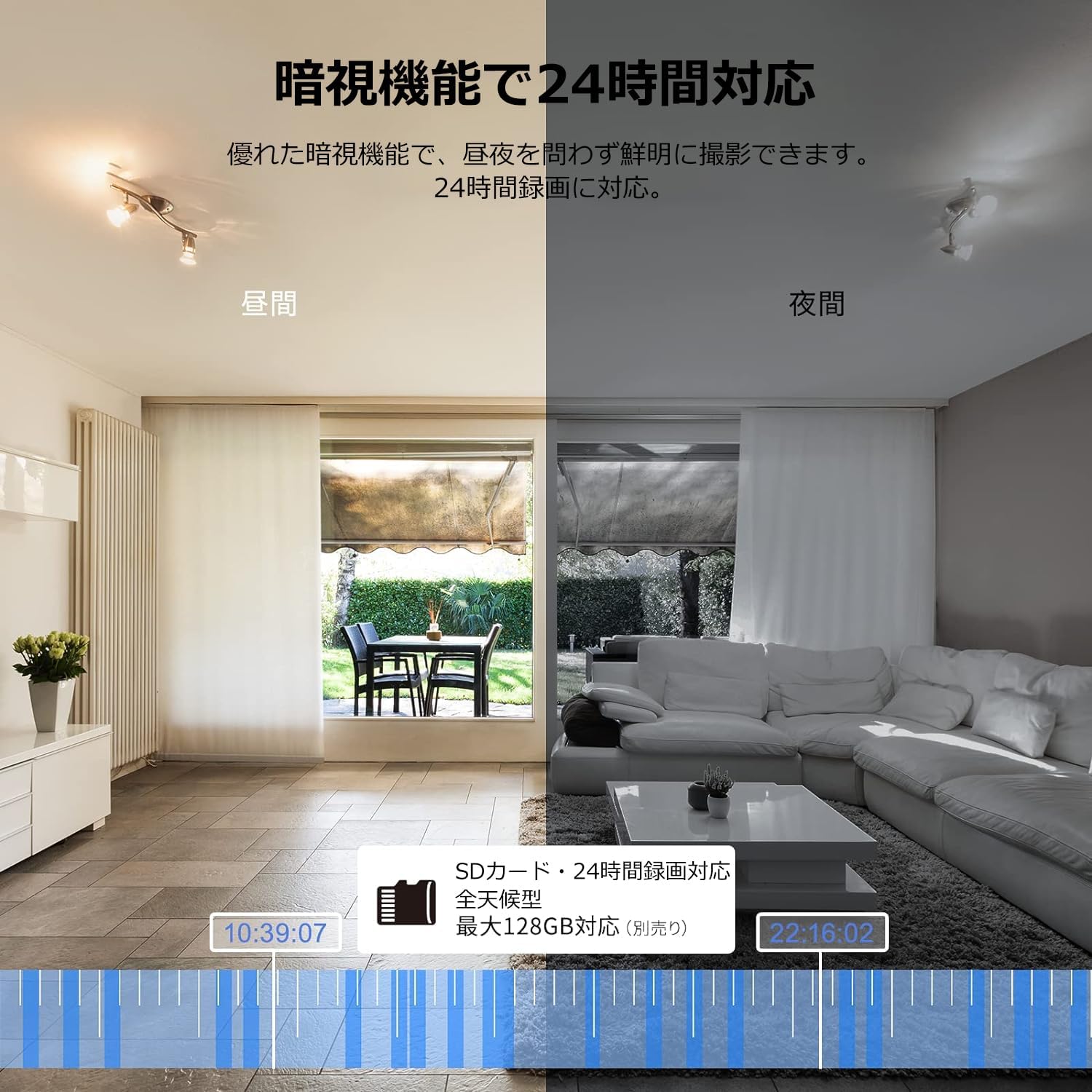
Image: Comparison of day and night vision, demonstrating the camera's ability to record clearly in low light.
4.3 Audio me dy drejtime
Equipped with a microphone and speaker, the camera allows for real-time two-way communication.
- Speak and Listen: Talk to family members or pets through the app, and hear their responses.
- Reduktimi i zhurmës: The two-way audio features noise reduction for clearer sound.

Image: The camera's two-way audio feature, allowing interaction with pets.
4.4 Motion Detection & Automatic Tracking
The camera can detect motion and automatically track subjects within its field of view.
- Alarmet e lëvizjes: Receive instant notifications on your smartphone when motion is detected.
- Gjurmimi Automatik: The camera will follow detected movement, keeping the subject in frame.
- Zbulimi i njeriut: Advanced AI can differentiate between humans and other moving objects, reducing false alarms.
- Funksioni i alarmit: Trigger an alarm sound from the camera via the app to deter intruders.

Image: Motion detection and alarm features, showing alerts on a smartphone.
4.5 Regjistrimi dhe ruajtja
The camera supports both local and cloud storage options for continuous recording.
- Karta MicroSD: Supports up to 128GB microSD cards (sold separately) for 24-hour continuous recording with automatic overwriting.
- Ruajtja në renë kompjuterike: Optional paid cloud storage service is available for extended recording and backup.
- Kompresimi i videos: Utilizes H.264 and H.265 compression formats for efficient storage.


Images: MicroSD card recording and cloud storage options.
4.6 Modaliteti i privatësisë
Activate privacy mode to physically cover the camera lens, ensuring your privacy when needed.
- One-Tap Activation: Easily turn off the lens via the app.
- Physical Cover: The camera physically rotates its lens downwards, blocking the view.

Image: Privacy mode icon.
4.7 Integrimi i Alexa-s
The Galayou G2 is Alexa-certified, allowing for voice control and viewing the camera feed on compatible Alexa devices.
- Komandat zanore: Përdorni komandat zanore për view the camera feed on an Echo Show or other Alexa-enabled screen.

Image: Alexa integration with the Galayou G2 camera.
4.8 Multi-Camera Support & Sharing
The app supports adding multiple cameras and sharing access with family members.
- Kamera të shumta: Monitor different areas of your home by adding several cameras to the app.
- Ndarja e familjes: Share camera access with up to 4 family members simultaneously.

Image: Family sharing and multi-camera viewing.
4.9 Video Guide: Product Features
Video: This video showcases various features of a Skyworth pet camera, including its monitoring capabilities, which are comparable to the Galayou G2.
4.10 Video Guide: Blurams 300万画素 見守りカメラ
Video: This video highlights the features of a Blurams 3-megapixel monitoring camera, demonstrating functionalities similar to the Galayou G2.
4.11 Video Guide: JUFLSKY 300万画素 360°PTZ機 (Preview)
Video: Një paraprirje e shkurtërview shfaqje videoasing a 300-megapixel 360° PTZ camera, similar in functionality to the G2.
5. Troubleshooting
- Nuk mund të lidhet me Wi-Fi:
- Sigurohuni që rrjeti juaj Wi-Fi është 2.4 GHz. Kamera nuk mbështet rrjetet 5 GHz.
- Kontrolloni fjalëkalimin e Wi-Fi-t tuaj për saktësi.
- Zhvendoseni kamerën më afër routerit tuaj Wi-Fi.
- Perform a factory reset on the camera and try the setup process again.
- No Live Feed:
- Kontrolloni lidhjen tuaj të internetit.
- Ensure the camera is powered on and the indicator light is solid blue.
- Rinisni aplikacionin dhe/ose telefonin tuaj inteligjent.
- Zbulimi i lëvizjes nuk funksionon:
- Verifikoni që zbulimi i lëvizjes është aktivizuar në cilësimet e aplikacionit.
- Rregulloni ndjeshmërinë e zbulimit të lëvizjes.
- Sigurohuni që nuk ka pengesa që bllokojnë kamerën view.
- Cilësi e dobët e videos:
- Check your internet speed. A stable connection is required for optimal streaming.
- Sigurohuni që lentet e kamerës të jenë të pastra.
- Adjust the video quality settings in the app (e.g., from SD to 2K).
6. Specifikimet
| Veçori | Specifikimi |
|---|---|
| Emri i modelit | G2 |
| Lloji i montimit | Tabletop and Ceiling Mount |
| Rezolucioni i kapjes së videos | 1440p (2K) |
| Ngjyra | Automatic Tracking Camera |
| Komponentët e përfshirë | Camera body, AC adapter, Japanese instruction manual, mounting set, power cable |
| Teknologjia e komunikimit pa tela | Wi-Fi (vetëm 2.4 GHz) |
| Rezolucioni efektiv i videos | 2 Megapixels (300万画素) |
| Fusha e View | 95 gradë |
| Gama e Vizionit të Natës | 7 metra |
| Shpejtësia e kornizës | 15 fps |
| Materiali | Plastike |
| Dimensionet e produktit (LxWxH) | 7.2 x 7.2 x 10.9 cm |
| Niveli i rezistencës ndaj ujit | Jo i papërshkueshëm nga uji |
| Burimi i dritës | Infra të kuqe |
| Përdorimi i rekomanduar | Siguria e brendshme |
| Përdorimi i brendshëm/jashtë | Të brendshme |
| Pajisjet e përputhshme | Telefon inteligjent, tablet, desktop, laptop |
| Burimi i energjisë | Elektrike me kabllo |
| Lloji i kontrolluesit | Aplikacioni |
7. Garancia dhe Mbështetja
The Galayou G2 camera comes with a manufacturer's warranty and customer support.
- Garancia: 1-year manufacturer's warranty.
- Mbështetje Teknike: For any issues or questions, please contact GALAYOU customer support through the app or visit the official GALAYOU store on Amazon.


