Hyrje
This manual provides detailed instructions for the assembly, operation, and maintenance of your Claiks Standing Desk with Drawers, Model P1.01.002. This electric adjustable height desk features a 2-tier shelf stand, two integrated drawers for storage, and a smooth height adjustment mechanism. Please read this manual thoroughly before beginning assembly or operation to ensure safe and correct usage.
Informacioni i Sigurisë
Ensure the desk is properly assembled and the load does not exceed the recommended 176 pounds to maintain stability and prevent damage or injury. Always keep hands and objects clear of moving parts during height adjustment. Do not allow children to operate the desk unsupervised. Avoid placing liquids directly on the control panel or near electrical components. Regularly check all screws and connections to ensure they remain tight.
Përmbajtja e paketës
Before beginning assembly, verify that all parts listed below are present and undamaged. If any parts are missing or damaged, please contact Claiks customer support.

Image: All components of the Claiks Standing Desk laid out, including desktop panels, frame components, drawers, and hardware. A note indicates that the table consists of two pieces and a Phillips screwdriver is not included.
- Desktop panels (2 pieces)
- Desk frame components (legs, crossbars)
- Motor and control panel
- 2-Tier shelf stand components
- Fabric drawers (2 pieces)
- Hardware (screws, bolts, tools)
- Përshtatës i energjisë dhe kabllot
- Kapëset për menaxhimin e kabllove
- Manuali i udhëzimeve
Konfigurimi dhe montimi
Assembly of the Claiks Standing Desk is designed to be straightforward. It is recommended to have two people for assembly due to the weight of some components. A detailed video guide is available to assist you.
Video: Official Claiks installation manual for the standing desk with drawers. This video provides step-by-step visual guidance for assembling the desk components.
- Përgatitni hapësirën e punës: Lironi një zonë të bollshme për montim. Vendosni të gjitha pjesët dhe pajisjet, duke i organizuar ato sipas etiketave të tyre.
- Montoni kornizën e tavolinës: Follow the detailed instructions in the provided manual to connect the leg components and crossbars. Ensure all screws are tightened securely.
- Bashkangjitni desktopin: Carefully place the desktop panels onto the assembled frame and secure them using the designated hardware.
- Install the 2-Tier Shelf Stand: Assemble the monitor stand components and attach them to the desktop.
- Vendosni sirtarët: Place the fabric drawers into their designated compartments on the shelf stand.
- Lidhja e Komponentëve Elektrikë: Attach the control panel, motor, and power adapter according to the wiring diagram in the manual. Use cable management clips to keep wires tidy.
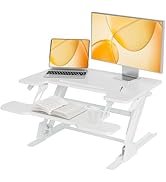
Image: A hand using a screwdriver to fasten a screw into a desktop panel, illustrating the ease of installation.
Udhëzimet e funksionimit
Your Claiks Standing Desk features an intuitive control panel for easy height adjustment and preset memory functions.

Image: A close-up of the multi-function intelligent keypad with up/down arrows and three memory preset buttons (1, 2, 3).
- Rregullimi i lartësisë: Përdorni Lart (^) dhe Poshtë (v) arrow buttons on the control panel to manually adjust the desk height. The current height is displayed on the digital screen.
- Ruajtja e paracaktimit: To save a preferred height setting, adjust the desk to the desired height, then press the S button followed by one of the memory buttons (1, 2, ose 3). The height will be saved to that button.
- Përdorimi i paracaktimit: Thjesht shtypni butonin përkatës të memories (1, 2, ose 3) to automatically move the desk to your saved height.
- Sirtarët: The two fabric drawers provide convenient storage for office supplies.
- 2-Tier Shelf Stand: The mid-desk top features two adjustable heights, allowing for ergonomic monitor placement.
Karakteristikat Mbaruanview
The Claiks Standing Desk is designed for comfort, organization, and durability.
- 2-Tier Shelf Stand: Unique felt fence design with 2 adjustable heights for ergonomic monitor viewing.
- 2-Drawers for Storage: Ample storage and organization space for home office tasks.
- Rregullim i butë i lartësisë: Electric motor allows height adjustment from 28.35" to 46.46" with 3 savable preset settings.
- Motori i fuqishëm: Custom motor provides strong power while keeping noise levels under 50 dB.

Image: A visual representation comparing the desk's operating noise level (45dB) to other common sounds like falling leaves (10dB), normal voice (60dB), and engine sound (90dB), highlighting its ultra-quiet operation.

Image: A house of cards standing on the desk surface, illustrating the smooth and stable movement during height adjustment.
Mirëmbajtja
To ensure the longevity and optimal performance of your Claiks Standing Desk, follow these maintenance guidelines:
- Pastrimi: Fshijeni tavolinën e punës dhe kornizën me një peshqir të butëamp leckë. Shmangni kimikatet e ashpra ose pastruesit gërryes.
- Menaxhimi i kabllove: Kontrolloni dhe riorganizoni periodikisht kabllot për të parandaluar ngatërrimin ose dëmtimin.
- Shtrëngimi i vidave: Over time, screws may loosen. Regularly inspect all fasteners and tighten them as needed.
- Kujdesi motorik: Keep the motor area free from dust and debris. Do not attempt to lubricate the motor or internal mechanisms.
Zgjidhja e problemeve
If you encounter any issues with your desk, refer to the following common troubleshooting steps or consult the provided video guides.
- Desk Not Adjusting: Check all power connections. Ensure the power adapter is securely plugged into both the desk and a working wall outlet.
- Kodet e gabimit: If the control panel displays an error code (e.g., "rES"), refer to the specific troubleshooting video for resolution.
Video: Step-by-Step guide from Claiks on resolving the "rES" mode error on desk control panels. This video is applicable to various standing desk models with similar control systems.
- Uneven Legs: If the desk legs appear uneven during adjustment, a reset or synchronization procedure may be required.
Video: Claiks guide on how to fix asynchronous elevation of the non-motor side leg on a standing desk. This video provides instructions for correcting uneven leg movement.
Specifikimet
| Veçori | Detaj |
|---|---|
| Markë | Claiks |
| Numri i modelit | P1.01.002 |
| Dimensionet e produktit | 24"D x 48"L x 28"H |
| Ngjyra | E zezë |
| Stili | Moderne |
| Materiali bazë | Metal (Çelik Inox) |
| Lloji i materialit të lartë | Druri i përpunuar |
| Lloji i përfundimit | Llakuar |
| Veçori e veçantë | E rregullueshme |
| Lartësia minimale | 28.35 inç |
| Lartësia maksimale | 46.46 inç |
| Rekomandimi për peshën maksimale | 176 paund |
| Numri i sirtarëve | 2 |
| Numri i rafteve | 1 |
| Asambleja e nevojshme | po |
| Numri i rekomanduar i njerëzve për Asamble | 2 |
Garancia dhe Mbështetja
The Claiks Standing Desk comes with a Limited Warranty. For specific warranty details, please refer to the documentation included with your product. For any support inquiries, missing parts, or troubleshooting assistance, please contact Claiks customer service directly.
Visit the Claiks Store for more information: Claiks Store on Amazon


