1. Informacion i rëndësishëm për sigurinë
Please read all safety instructions carefully before using the BYINTEK P70 Smart WiFi Projector. Keep this manual for future reference.
- Burimi i energjisë: Përdorni vetëm adaptorin e energjisë të ofruar. Sigurohuni që volumitage përputhet me kërkesat e projektorit.
- Siguria e baterisë: The projector contains a built-in lithium-ion battery. Do not expose to extreme temperatures, puncture, or disassemble.
- Ventilimi: Sigurohuni që projektori të ketë ventilim të duhur për të parandaluar mbinxehjen. Mos i bllokoni hapjet e ventilimit.
- Nxehtësia: The projector may become warm during operation. This is normal. Avoid touching the lens or vents immediately after use.
- Ekspozimi i dritës: Mos shikoni drejtpërdrejt në lentet e projektorit kur lamp is on, as the bright light can cause eye strain or damage.
- Uji dhe lagështia: Mbajeni projektorin larg ujit, shiut dhe lagështirës së tepërt. Mos e përdorni me duar të lagura.
- Pastrimi: Shkëputni energjinë elektrike para pastrimit. Përdorni një leckë të butë dhe të thatë. Mos përdorni pastrues të lëngshëm ose me aerosol.
- Fëmijët: Mbajeni projektorin dhe aksesorët e tij larg fëmijëve.
2. Produkti i Mbaruarview
The BYINTEK P70 is a portable smart DLP projector designed for versatile entertainment and presentation needs. It features an 8000mAh built-in battery, Android 9.0 operating system, auto-focus, and 3D support.
2.1 Përmbajtja e paketës
- BYINTEK P70 Projector x 1
- Telekomanda x 1
- Përshtatës i energjisë x 1
- Mini trekëmbësh x 1
- Çanta e magazinimit x 1
- Manuali i përdorimit x 1
2.2 Karakteristikat kryesore
- Dizajni portativ: Kompakt dhe i lehtë për transport të lehtë.
- Bateria e integruar: 8000mAh battery provides 1.5 to 3 hours of playback.
- Sistemi operativ Android i zgjuar: Android 9.0 for app downloads, online streaming, and gaming.
- Fokusimi automatik: Automatic focus adjustment for clear images.
- Korrigjimi 6D i gurit kryesor: Advanced keystone correction for flexible placement.
- Mbështetje 3D: Shijoni përmbajtje 3D gjithëpërfshirëse.
- Lidhja pa tel: Supports wireless screen mirroring from Android, iOS, and PC devices.
- Lidhja me tela: USB data cable sync for iOS and select Android devices.
- Madhësia e madhe e projeksionit: Up to 200 inches.
- 4K Playback: Supports up to 4K video input.
- LED i gjatë Lamp Jeta: 30,000 orë.
- Altoparlantë të dyfishtë stereo: Integrated 2x5W speakers for clear audio.

Image: Infographic detailing the BYINTEK P70's features including 4K support, DLP display, 6D keystone, 8000mAh battery, 3D, Type-C charge, 2G+32G memory, Android OS, and stereo speakers.
3. Konfigurimi
3.1 Ngarkimi i Projektorit
Before first use, fully charge the projector. Connect the provided power adapter to the projector's Type-C port and plug it into a power outlet. The charging indicator will show the charging status.

Image: The BYINTEK P70 projector connected to a power bank via a Type-C cable, illustrating its portable charging capability.
3.2 Vendosja Fillestare
Vendoseni projektorin në një sipërfaqe të qëndrueshme dhe të sheshtë. Për një viewing, position it directly in front of your projection screen or wall. The included mini tripod can be used for angle adjustments.
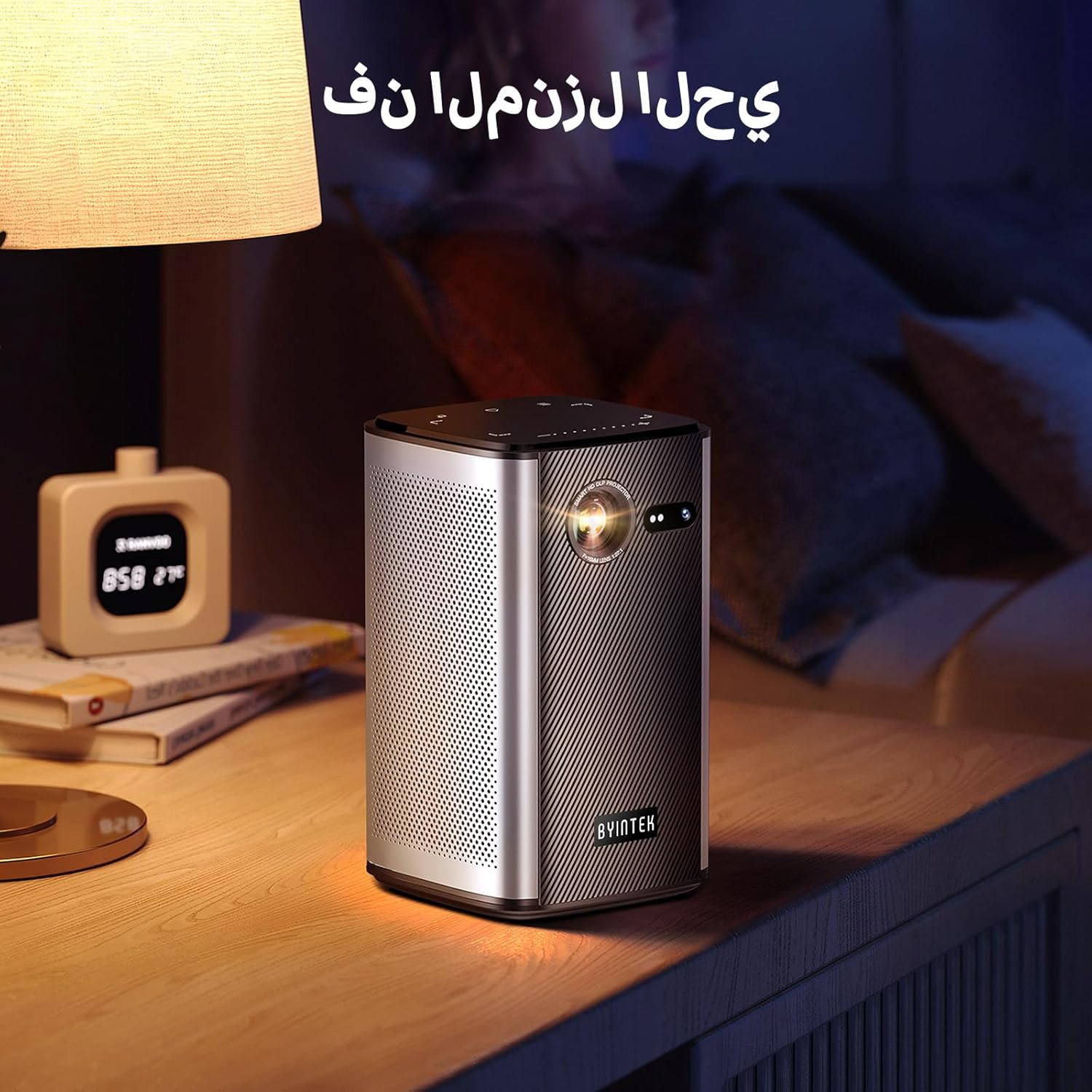
Image: The BYINTEK P70 projector placed on a bedside table, ready for indoor use.
3.3 Ndezja/Fikja
Press and hold the power button on the projector or remote control to turn the device on or off.
3.4 Korrigjimi i Fokusit dhe i Keystone-it
The BYINTEK P70 features automatic focus. For keystone correction, navigate to the settings menu using the remote control. The 6D keystone correction allows for precise image adjustment, even with side projection.

Image: A visual representation of the projector's auto-focus feature, showing a clear image projected onto a wall.
4. Udhëzimet e funksionimit
4.1 Lundrimi në sistemin operativ Android
Use the remote control to navigate the Android 9.0 interface. The home screen provides access to pre-installed apps and settings. You can download additional applications from the app store.

Image: The projector displaying its Android operating system interface with various application icons like Miracast, Settings, AirPlay, Market, File Explorer, YouTube, and Netflix.
4.2 Pasqyrimi pa tel i ekranit
The projector supports wireless screen mirroring for Android, iOS, and PC devices. Access the 'Miracast' or 'AirPlay' app on the projector's home screen and follow the on-screen instructions to connect your device.
4.3 Wired Screen Mirroring
For iOS devices and some Android devices, you can use a USB data cable for wired screen synchronization. Connect your device to the projector's USB port using its original data cable.
4.4 3D Playback
The BYINTEK P70 supports 3D content. To enjoy 3D movies, ensure your media file is in a compatible 3D format (e.g., Blu-ray 3D, SBS, TNB) and use active shutter 3D glasses (sold separately).

Image: A family wearing 3D glasses, enjoying a 3D movie projected by the BYINTEK P70, showcasing its 3D capability.
4.5 Zmadhimi dixhital
Adjust the image size from 50% to 100% using the digital zoom function on the remote control. This allows you to fit the image perfectly to your screen without moving the projector.
5. Mirëmbajtja
5.1 Pastrimi i Lentes
Përdorni një leckë të butë pa push, të projektuar posaçërisht për lentet optike, për të fshirë butësisht lentet e projektorit. Shmangni përdorimin e materialeve gërryese ose kimikateve të ashpra.
5.2 Pastrimi i pjesës së jashtme
Fshijeni pjesën e jashtme të projektorit me një leckë të butë dhe të thatë. Mos përdorni pastrues të lëngshëm ose sprej direkt mbi pajisje.
5.3 Ruajtja
When not in use, store the projector in a cool, dry place, away from direct sunlight and extreme temperatures. Use the provided storage bag to protect it from dust and scratches.
5.4 Kujdesi për baterinë
Për të zgjatur jetëgjatësinë e baterisë, shmangni shkarkimin e plotë të saj shpesh. Nëse e ruani për një periudhë të gjatë kohore, karikojeni baterinë deri në rreth 50% dhe karikojeni çdo disa muaj.
6. Troubleshooting
| Problem | Shkaku i mundshëm | Zgjidhje |
|---|---|---|
| Nuk projektohet imazh | Projector not powered on; input source not selected; cable not connected. | Ensure projector is on. Select correct input source (HDMI, USB, Wireless). Check cable connections. |
| Imazhi është i paqartë | Out of focus; projector too close/far from screen; lens dirty. | Allow auto-focus to adjust. Adjust projector distance. Clean the lens. |
| Telekomanda nuk funksionon | Batteries low/dead; remote not paired; obstruction. | Replace remote batteries. Ensure line of sight to projector's IR receiver. Re-pair remote if necessary (refer to specific pairing instructions in the full manual). |
| Asnjë zë | Volume too low; external audio device connected; audio format not supported. | Increase projector volume. Disconnect external audio devices. Check audio format compatibility. |
| Probleme me pasqyrimin pa tel | Poor Wi-Fi signal; device compatibility; firewall settings. | Ensure strong Wi-Fi signal. Check device compatibility with Miracast/AirPlay. Disable firewalls temporarily for testing. |
| Projektori mbinxehet | Blocked ventilation; prolonged use in hot environment. | Sigurohuni që kanalet e ventilimit të jenë të lira. Përdoreni në një zonë të ajrosur mirë. Lëreni projektorin të ftohet. |
7. Specifikimet
| Veçori | Specifikimi |
|---|---|
| Markë | BYINTEK |
| Numri i modelit | P70 |
| Dimensionet e produktit | 8.2 x 8.2 x 14.2 cm |
| Pesha e artikullit | 1.58 kilogramë |
| Bateria | 1 Lithium Ion battery (included), 8000mAh, 29.6 Wh |
| Sistemi Operativ | Android |
| Rezolucioni i ekranit | 960 x 540 |
| Rezolucioni Maksimal i Ekranit | 4K Ultra HD Megapixel |
| Teknologjia e lidhjes | Wi-Fi |
| Karakteristika të veçanta | Auto-focus, 3D Ready, Built-in Wi-Fi Receiver |
| Përdorimet e rekomanduara | Kinema në shtëpi |
| Lloji i ekranit | DLP |
| Faktori i formës | Portativ |
| Lloji i montimit | Mali i trekëmbëshit |
| Portet USB 3.0 | 1 |
| Portet HDMI | 1 |
| Vëlltage | 12 volt |
| Wattage | 25 Watts |
| Burimi i energjisë | AC & Bateria |
8. Garancia dhe Mbështetja
The BYINTEK P70 Smart WiFi Projector comes with a standard manufacturer's warranty. For specific warranty details, please refer to the warranty card included in your product packaging or contact BYINTEK customer support.
If you encounter any issues or have questions regarding your projector, please contact BYINTEK customer support through their official website or the contact information provided in your product documentation. Please have your model number (P70) and purchase details ready when contacting support.


