1. Hyrje
Welcome to the instruction manual for your new Sunstech CELT23 flip phone. This phone is specifically designed for ease of use, featuring large keys, a clear display, and essential functions like an SOS button for emergencies. Please read this manual carefully to understand how to operate your device safely and efficiently.
2. Produkti i Mbaruarview
The Sunstech CELT23 is a clamshell-style mobile phone, offering simplicity and security. Its design prioritizes user comfort and accessibility.
Karakteristikat kryesore:
- Flip Design: Protects the screen and keypad when closed.
- Çelësat e mëdhenj: Oversized buttons for easy dialing and texting.
- Butoni SOS: Located on the back for emergency calls and SMS.
- Ekrani 2.4 inç: Clear screen for easy viewing.
- Quick Dial: Assign contacts to speed dial keys.
- Loud Sound: Enhanced audio for calls and ringtones.
- FM radio: Built-in radio for entertainment.
- Bateria 1100 mAh: Provides reliable battery life.
Phone Components:
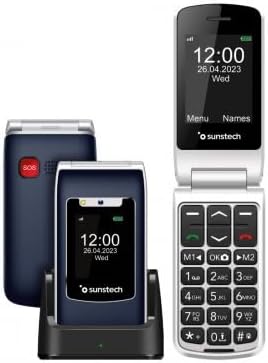
Përshkrimi i imazhit: This image displays the Sunstech CELT23 flip phone in two states: open, showing the screen and large keypad, and closed, resting in its charging dock. The back of the closed phone, featuring the red SOS button, is also visible. This illustrates the phone's compact design and user-friendly interface.

Përshkrimi i imazhit: This image shows the Sunstech CELT23 flip phone in its charging dock, with the phone in a closed position. The prominent red SOS button on the back of the phone is clearly visible, highlighting a key safety feature. The phone's external display is also visible, showing the time and date.

Përshkrimi i imazhit: This image presents a collection of Sunstech CELT23 flip phones, showcasing different color options (blue and black) and configurations. Some phones are open, displaying their keypads and screens, while others are closed and placed in their charging docks. This provides a comprehensive view of the product's design and available variations.
3. Konfigurimi
3.1. Vendosja e kartës SIM dhe baterisë
- Hapni telefonin: Gently open the back cover of the phone.
- Fut kartën SIM: Locate the SIM card slot. Carefully insert your activated SIM card into the designated slot, ensuring the gold contacts face downwards and the cut corner aligns correctly.
- Fut baterinë: Place the provided Lithium-ion battery into the battery compartment, aligning the contacts.
- Mbyll Kopertinën: Vendoseni përsëri kapakun e pasmë derisa të fiksohet mirë në vendin e tij.
3.2. Ngarkimi i telefonit
- Përdorimi i stacionit të karikimit: Place the phone into the charging dock, ensuring it sits firmly and the charging indicator light (if present) illuminates.
- Direct USB Charging: Alternatively, connect the USB Type C cable to the phone's charging port and the other end to a compatible power adapter.
- Ngarkesa e parë: Për performancë optimale të baterisë, ngarkojeni plotësisht telefonin para përdorimit të parë.
3.3. Ndezja/Fikur
- Për të ndezur: Shtypni dhe mbani shtypur butonin e Ndezjes/Mbarimit të Thirrjes (zakonisht i kuq) derisa të ndizet ekrani.
- Për të fikur: Shtypni dhe mbani shtypur butonin Ndezje/Mbaro thirrjen derisa të shfaqen opsionet e fikjes, pastaj zgjidhni "Fik".
4. Udhëzimet e funksionimit
4.1. Kryerja dhe marrja e thirrjeve
- Për të bërë një telefonatë:
- Hap telefonin.
- Dial the number using the large keypad.
- Shtypni butonin e Gjelbër të Thirrjes për të filluar thirrjen.
- Për të marrë një telefonatë:
- When the phone rings, open the flip or press the Green Call button.
- Për të përfunduar një telefonatë, shtypni butonin e kuq për të përfunduar thirrjen.
4.2. Sending SMS Messages
- Nga menyja kryesore, shkoni te "Mesazhet".
- Select "Write Message" or "New SMS".
- Fut numrin e marrësit ose zgjidh nga kontaktet.
- Shkruani mesazhin tuaj duke përdorur tastierën.
- Shtypni "Dërgo".
4.3. Funksioni i Emergjencës SOS
The SOS button is designed for emergencies. When pressed, it will activate an audible warning signal and automatically dial up to 5 pre-set emergency contacts. It will also send a customizable emergency SMS message to these contacts.
- Konfigurimi i Kontakteve SOS:
- Go to "Settings" > "SOS Settings".
- Shtoni deri në 5 numra kontakti për raste urgjence.
- Customize the emergency SMS message if desired.
- Using the SOS Button:
- In an emergency, press and hold the red SOS button on the back of the phone for a few seconds.
- The phone will emit an alarm and begin dialing your emergency contacts sequentially until one answers.
- An emergency SMS will also be sent to all pre-set contacts.
4.4. Telefonimi i shpejtë
Caktoni numra të thirrur shpesh në taste specifike për thirrje të shpejtë.
- Go to "Contacts" or "Settings" > "Speed Dial".
- Select an available key (e.g., M1, M2, or number keys 2-9).
- Assign a contact from your phonebook or enter a new number.
- To use, simply press and hold the assigned speed dial key.
4.5. Radio FM
To listen to the FM radio, ensure headphones are connected (they act as an antenna).
- Connect 3.5mm headphones to the phone's audio jack.
- Navigate to "Multimedia" or "Tools" > "FM Radio".
- Përdorni tastet e navigimit për të kërkuar stacione ose për t'u akorduar manualisht.
5. Mirëmbajtja
- Pastrimi: Përdorni një leckë të butë dhe të thatë për të pastruar ekranin dhe trupin e telefonit. Shmangni pastruesit e lëngshëm.
- Kujdesi për baterinë:
- Shmangni temperaturat ekstreme.
- Mos e lini baterinë plotësisht të shkarkuar për periudha të gjata.
- Përdorni vetëm karikuesin dhe baterinë origjinale.
- Magazinimi: Ruajeni telefonin në një vend të freskët dhe të thatë, larg rrezeve të diellit dhe lagështirës.
6. Troubleshooting
| Problem | Shkaku/zgjidhja e mundshme |
|---|---|
| Telefoni nuk ndizet. | Battery is discharged. Charge the phone. Battery not inserted correctly. Reinsert the battery. |
| Nuk mund të kryejë ose të marrë thirrje. | No SIM card inserted or SIM card not activated. Check SIM card. Out of network coverage. Move to an area with better signal. |
| Nuk ka zë gjatë telefonatave. | Volume is too low. Adjust the call volume using the side keys. Speaker/earpiece might be blocked. Clean gently. |
| Butoni SOS nuk funksionon. | SOS contacts not set up. Configure emergency contacts in SOS settings. |
7. Specifikimet
- Marka: Sunstech
- Modeli: CELT23
- Lloji i produktit: Rrotulloni telefonin
- Sistemi operativ: RTOS
- Madhësia e ekranit: 2.4 inç
- Rezolucioni: 240 x 320
- Lidhjet: USB Type C, 3.5 mm Jack
- Karakteristikat e veçanta: SOS Button, FM Radio
- Përbërja e baterisë: Litium-jon
- Kapaciteti i baterisë: 1100 mAh (inferred from product description)
- Madhësia RAM: 48 MB
- Kapaciteti i ruajtjes: 128 GB (Note: This capacity is typically for external memory card support in basic phones)
- Shpejtësia e CPU: 800 MHz
- Prodhuesi: SUNSTECH
- Vendi i origjinës: Kinë
8. Garancia dhe Mbështetja
This product is manufactured by SUNSTECH. For specific warranty details, please refer to the warranty card included with your purchase or contact Sunstech customer support.
- Disponueshmëria e pjesëve rezervë: 10 Years (as per manufacturer information).
- Përditësimet e softuerit: Informacioni nuk disponohet.
For further assistance, please visit the official Sunstech webfaqe ose kontaktoni departamentin e tyre të shërbimit ndaj klientit.


