Hyrje
This manual provides essential information for the setup, operation, maintenance, and troubleshooting of your Star Micronics mC-Label3 MCL32CBI Direct Thermal Printer. Please read this manual thoroughly before using the printer to ensure proper and safe operation.
Përmbajtja e paketës
Verifikoni që të gjitha artikujt e listuar më poshtë janë të përfshirë në paketën tuaj:
- mC-Label3 Multifunctional Printer
- Përshtatës AC
- Kabllo energjie
- USB Cables (C-C 1.0m and C-A 1.8m)
- Kabllo LAN (1 m)
- Simple Setup Sheet Safety Guide

Imazhi: Përpara view of the Star Micronics mC-Label3 printer, showcasing its compact design and label output slot.
Konfigurimi
1. Lidhja e Printerit
The mC-Label3 MCL32CBI printer offers multiple connectivity options:
- USB-C: Connect the printer directly to your PC, Android, or iOS device using the provided USB-C to USB-C or USB-C to USB-A cables.
- Ethernet (LAN): For network connectivity, connect the printer to your router or network switch using the supplied LAN cable.
- Bluetooth: The MCL32CBI model supports Bluetooth connectivity for iOS and Android devices. Ensure Bluetooth is enabled on your device and pair with the printer.

Imazh: Pjesa e pasme view of the mC-Label3 printer, highlighting the LAN, USB, and power ports for various connection types.
2. Media duke ngarkuar
The printer supports various media types, including linerless labels, die-cut labels, continuous labels, and thermal receipt paper.
- Open the top cover of the printer by lifting the latch.
- Place the media roll into the media compartment, ensuring the leading edge feeds out from the top.
- Pull a small amount of media past the print head and close the top cover securely.
- Ensure the media is properly aligned within the guides.

Imazh: Nga lart poshtë view of the mC-Label3 printer with its cover open, illustrating the internal mechanism for loading thermal paper or label rolls.
Udhëzimet e funksionimit
1. Ndezja/Fikur
Connect the power cable to the printer and a power outlet. Press the power button located on the front of the printer to turn it on. The status indicator light will illuminate.
2. Printing Labels and Receipts
The mC-Label3 MCL32CBI printer is designed for efficient label and receipt printing. It supports various applications and cloud services.
- Përputhshmëria e softuerit: Works seamlessly with PC, Android, and iOS applications.
- Shërbimet në renë kompjuterike: Utilize Star Micronics Cloud Services to design and manage labels.
- One Touch Label: This feature allows storing pre-made receipts and labels for quick and easy printing directly from the printer.
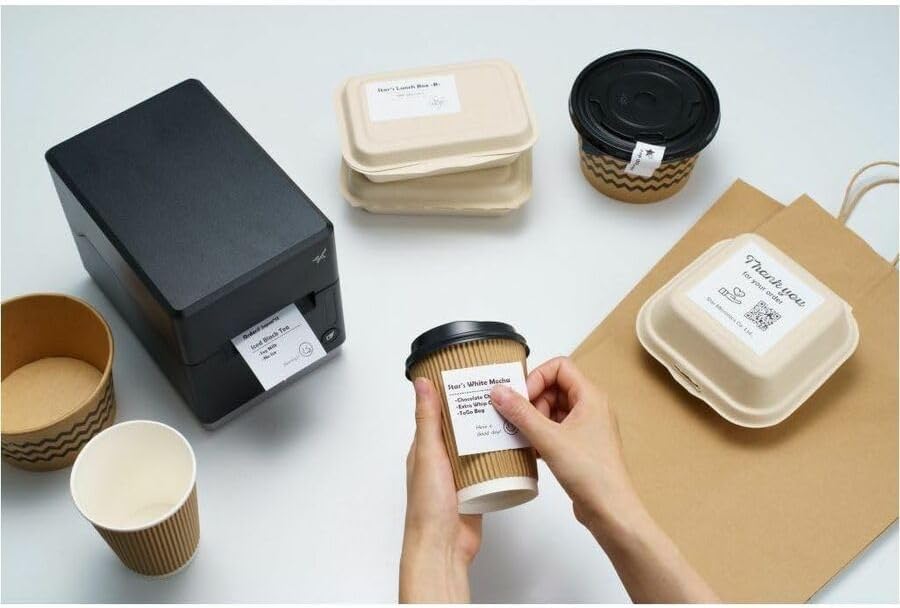
Image: A hand pressing the feed button on the mC-Label3 printer, demonstrating the printing of a 'Thank you' label.

Image: The mC-Label3 printer shown in a practical setting, printing labels for food containers and coffee cups, illustrating its versatility.
Mirëmbajtja
1. Pastrimi i printerit
Regular cleaning ensures optimal performance and extends the life of your printer.
- Përdorni një leckë të butë, pa garzë dampened with isopropyl alcohol to clean the print head.
- Wipe down the exterior of the printer with a soft, dry cloth.
- Shmangni përdorimin e pastruesve ose tretësve gërryes.
2. Replacing Media
When the media roll is depleted, follow the media loading instructions in the Setup section to replace it.
3. Effortless Repairs
The mC-Label3 is designed for effortless, no-tools-required repairs with minimal upkeep, simplifying any necessary component replacements.
Zgjidhja e problemeve
Ky seksion ofron zgjidhje për problemet e zakonshme që mund të hasni.
| Problem | Shkaku i mundshëm | Zgjidhje |
|---|---|---|
| Printeri nuk ndizet | Kablloja e energjisë nuk është e lidhur; Problem me prizën e energjisë | Sigurohuni që kablloja e energjisë është e lidhur mirë; provoni një prizë tjetër elektrike. |
| Nuk ka rezultat printimi | Out of media; Media loaded incorrectly; Driver issue | Load new media; Re-load media correctly; Reinstall printer drivers. |
| Cilësi e dobët e printimit | Dirty print head; Low quality media | Clean the print head; Use recommended thermal media. |
| Problemet e lidhjes | Incorrect cable connection; Bluetooth not paired; Network configuration | Check USB/Ethernet cables; Re-pair Bluetooth; Verify network settings. |
Specifikimet
| Veçori | Detaj |
|---|---|
| Emri i modelit | mC-Etiketa3 |
| Numri i modelit të artikullit | MCL32CBI |
| Teknologjia e printimit | Termike direkte |
| Prodhimi i printerit | Njëngjyrëshe |
| Shpejtësia maksimale e printimit njëngjyrëshe | 23 ppm |
| Rezolucioni Maksimal i Printimit Bardh e Zi | 203 DPI (203 x 203 DPI) |
| Media e shkruar | Labels (Linerless, Die-Cut, Continuous), Thermal Receipt |
| Teknologjia e lidhjes | Bluetooth, Wired (USB, Ethernet) |
| Ndërfaqja e harduerit | USB-Ethernet |
| Pajisjet e përputhshme | PC, Android, iOS |
| Lloji i kontrolluesit | iOS, Android |
| Dimensionet e produktit | 6.7"Th x 5.6"Gj x 8.3"L (17.0 x 14.2 x 21.1 cm) |
| Pesha e artikullit | 7.2 paund (3.27 kg) |
| Kapaciteti i ruajtjes së memories | 64 MB |
| Ngjyra | E zezë |
| Prodhuesi | STAR MICRONICS |
| Vendi i origjinës | Kinë |
Informacioni i Garancisë
The Star Micronics mC-Label3 MCL32CBI printer comes with a manufacturer's warranty. For specific terms and conditions, please refer to the warranty card included in your package or visit the official Star Micronics webfaqe.
Lloji i garancisë: Prodhuesi
Mbështetje
For further assistance, technical support, or to download the latest drivers and firmware, please visit the official Star Micronics support webfaqe ose kontaktoni shërbimin e tyre ndaj klientit.
Star Micronics Official Webfaqe: www.starmicronics.com
Lidhja e mbështetjes: www.starmicronics.com/support