Hyrje
Welcome to the user manual for your Infinity Smartwatch, Model NX 10. This device is designed to enhance your daily life with advanced fitness tracking, communication features, and smart notifications. Featuring a vibrant 1.43" AMOLED screen and robust IP68 water resistance, your smartwatch is built for both everyday use and active lifestyles. Please read this manual carefully to ensure proper operation and maintenance of your device.

Figure 1: Infinity Smartwatch NX 10. This image shows the smartwatch from an angled perspective, highlighting its round AMOLED display, black silicone strap, and two side buttons.
Konfigurimi
1. Hapja e kutisë dhe pagesa fillestare
Upon unboxing, ensure all components are present: the Infinity Smartwatch NX 10 and the charging cable.
- Lidhni kabllon magnetik të karikimit me pikat e karikimit në pjesën e pasme të orës inteligjente.
- Lidhni skajin USB të kabllit në një përshtatës standard të energjisë USB (nuk përfshihet) ose në portën USB të një kompjuteri.
- The watch display will show a charging indicator. Fully charge the device before first use, which typically takes approximately 2 hours.

Figure 2: Smartwatch charging. The image illustrates the smartwatch being charged magnetically, with a green lightning bolt icon on the screen indicating charging status and a "400mAh Battery Capacity" label.
2. Instalimi dhe çiftëzimi i aplikacionit
To unlock the full potential of your Infinity Smartwatch, download and install the companion application, Fit Cloud Pro, në telefonin tuaj inteligjent.
- Scan the QR code provided in the quick start guide (if available) or search for "Fit Cloud Pro" in your smartphone's app store (Google Play Store for Android, Apple App Store for iOS).
- Instaloni aplikacionin.
- Open the Fit Cloud Pro app and follow the on-screen instructions to create an account or log in.
- Sigurohuni që Bluetooth të jetë i aktivizuar në smartphone tuaj.
- In the app, navigate to the device pairing section and search for your smartwatch (e.g., "NX 10" or similar Bluetooth name).
- Select your smartwatch from the list to initiate pairing. Confirm the pairing request on both your phone and the smartwatch if prompted.
- Once paired, the app will synchronize data with your smartwatch, and you can customize settings.
Udhëzimet e funksionimit
1. Navigimi bazë
- Ekran me prekje: Swipe left/right to navigate between main screens (e.g., activity, heart rate, weather). Swipe up/down to access quick settings or notifications. Tap to select an option.
- Butonat anësore: The top button typically acts as a power button (long press) or a back/home button (short press). The bottom button may be customizable or provide quick access to sports modes.

Figure 3: 1.43" AMOLED Screen. This image highlights the vibrant display of the smartwatch, showing a detailed watch face with various data points like time, date, steps, and heart rate.
2. Kryerja dhe përgjigjja e thirrjeve
Your Infinity Smartwatch supports Bluetooth calling, allowing you to make and receive calls directly from your wrist when connected to your smartphone.
- Për të bërë një telefonatë: Access the dialer or contacts list on your smartwatch. You can dial a number directly or select a contact to call.
- Për t'iu përgjigjur një telefonate: When a call comes in, the smartwatch will display the caller ID. Tap the green answer icon to accept the call or the red icon to decline.

Figure 4: Stay Connected On The Go. This image shows a user interacting with the smartwatch to make a call, illustrating the microphone, dialing, call records, and contacts features.
3. Ndjekja e gjendjes fizike dhe shëndetit
The smartwatch is equipped with multiple sensors to monitor your health and fitness activities.
- hapamatës: Gjurmoni automatikisht hapat, distancën dhe kaloritë e djegura gjatë gjithë ditës.
- Monitorimi i rrahjeve të zemrës: Provides real-time heart rate data. Access this feature from the main menu or set up continuous monitoring in the app.
- Monitorimi i presionit të gjakut: Offers blood pressure readings. For accurate results, ensure the watch is worn correctly and remain still during measurement. Shënim: Kjo veçori është vetëm për referencë dhe nuk duhet të përdoret për diagnozë mjekësore.
- Monitorimi i gjumit: Tracks your sleep patterns, including deep sleep, light sleep, and awake times. View detailed analysis in the Fit Cloud Pro app.
- Mënyrat sportive: Supports over 100 sports modes, including running, cycling, swimming, and more. Select your desired activity to track specific metrics.

Figure 5: Track Every Move. This image displays the smartwatch tracking a swimming activity, with additional visuals of rock climbing and cycling, indicating its multi-sport tracking capabilities.

Figure 6: More than 110 sports modes. This image shows a variety of colorful icons representing different sports activities supported by the smartwatch, overlaid on a background of a person cycling.
4. Përshtatje
Personalize your smartwatch experience through the Fit Cloud Pro app.
- Fytyrat e shikimit: Choose from a wide range of pre-installed watch faces or download new ones via the app. You can also create custom watch faces using your own photos.
- Njoftimet: Configure which app notifications you wish to receive on your smartwatch (e.g., calls, SMS, social media alerts).
- Alarmet dhe rikujtuesit: Set alarms, sedentary reminders, and hydration reminders through the app.
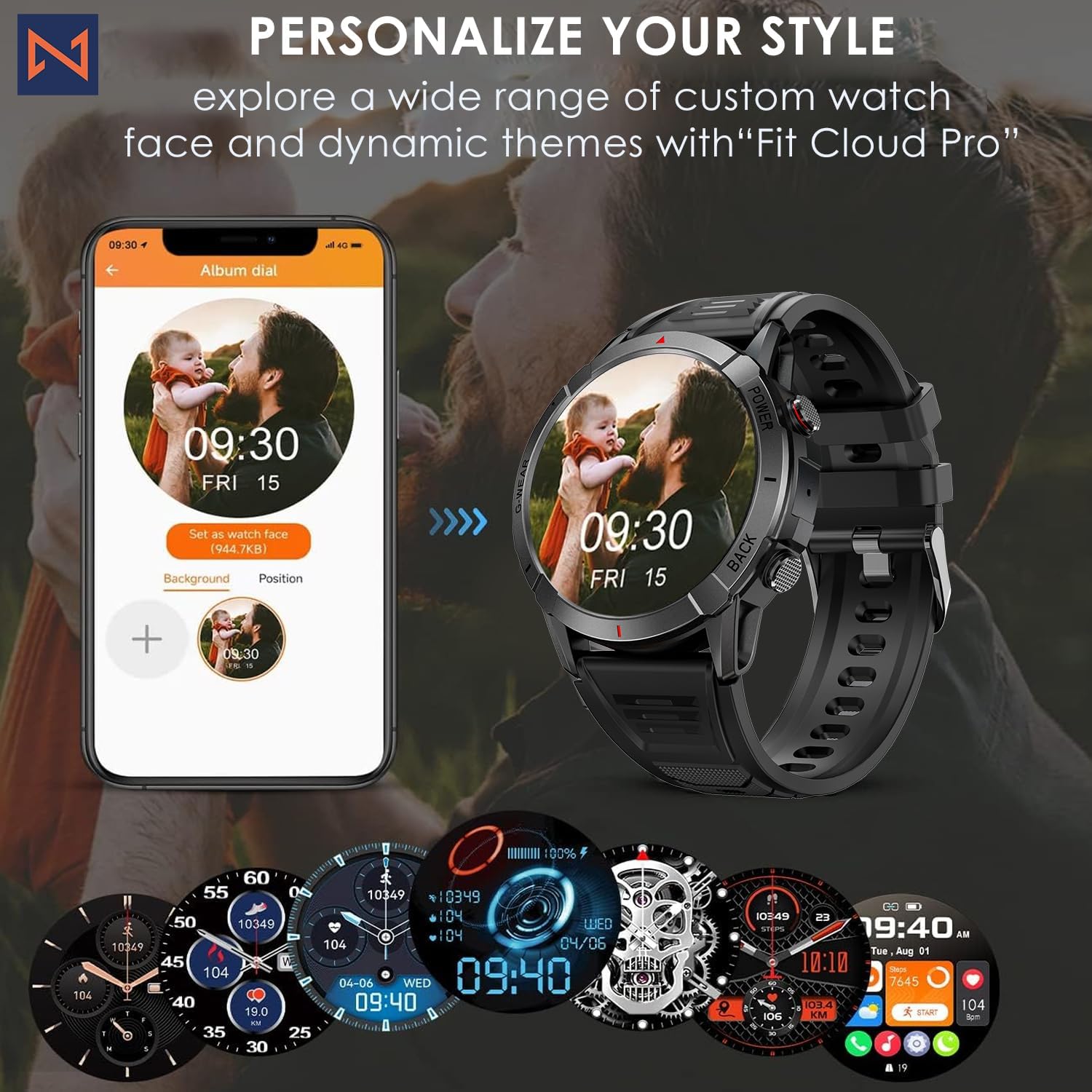
Figure 7: Personalize Your Style. This image demonstrates how to customize watch faces using the "Fit Cloud Pro" app, showing various digital and analog watch face options.
Mirëmbajtja
1. Pastrimi i orës suaj inteligjente
Regular cleaning helps maintain the appearance and functionality of your device.
- Fshijeni ekranin dhe trupin me një leckë të butë pa push.
- Për njolla kokëforta, dampLajeni pak leckën me ujë. Shmangni përdorimin e kimikateve të ashpra ose materialeve gërryese.
- Clean the charging contacts periodically to ensure proper connection.
2. Rezistencë ndaj ujit (IP68)
Your Infinity Smartwatch is rated IP68, meaning it is resistant to dust and can withstand immersion in water up to 1.5 meters for up to 30 minutes.
- Është i përshtatshëm për përdorim të përditshëm, larje duarsh dhe shi të lehtë.
- Avoid prolonged immersion, hot water, steam, or high-pressure water jets (e.g., showering, sauna, diving).
- Nëse ora laget, thajeni mirë përpara se ta karikoni ose të përdorni butonat.

Figure 8: Engineered for Adventure. This image highlights the smartwatch's durability features, including waterproof, dustproof, anti-magnetic, and shockproof capabilities, with corresponding icons.
3. Kujdesi për baterinë
- Për të zgjatur jetëgjatësinë e baterisë, shmangni temperaturat ekstreme.
- Ngarkojeni orën rregullisht; shmangni shkarkimin e plotë të baterisë për periudha të gjata kohore.
- Përdorni vetëm kabllon e karikimit të dhënë.
Zgjidhja e problemeve
| Problem | Zgjidhja e mundshme |
|---|---|
| Ora nuk ndizet | Sigurohuni që ora të jetë plotësisht e karikuar. Lidheni me karikuesin dhe prisni disa minuta përpara se të provoni ta ndizni. |
| Nuk mund të çiftëzohet me smartphone |
|
| Të dhëna të pasakta shëndetësore |
|
| Njoftimet nuk janë marrë |
|
| Jetëgjatësia e shkurtër e baterisë |
|
Specifikimet
| Veçori | Detaj |
|---|---|
| Numri i modelit | NX 10 |
| Ekrani | 1.43" AMOLED Screen |
| Rezolucioni i ekranit | 466x466 HD |
| Kapaciteti i baterisë | Polimer litiumi 400 mAh |
| Rezistenca ndaj ujit | IP68 |
| Lidhshmëria | Bluetooth |
| Sistemi Operativ | Android (i pajtueshëm me iOS) |
| Materiali i rripit | 22mm Silicon Belt |
| Materiali i shfaqjes | Aliazh zinku |
| Pesha e artikullit | 1.76 ons |
| Kapaciteti i ruajtjes së memories | 128 MB |
Garancia dhe Mbështetja
For warranty information and technical support, please refer to the documentation included with your purchase or visit the official Infinity webfaqe.
Manufacturer: Infiniity
For further assistance, you may contact Infiniity customer service through the contact information provided on their official website or within the Fit Cloud Pro application.


