1. Hyrje
This manual provides comprehensive instructions for the safe and efficient use of your new artfone C1+ 4G mobile phone. Please read this manual thoroughly before operating the device to ensure proper functionality and to familiarize yourself with all features. Keep this manual for future reference.

Image 1.1: The artfone C1+ 4G mobile phone with its dedicated charging dock.
2. Produkti i Mbaruarview
2.1 Karakteristikat kryesore
- Dizajn miqësor për përdoruesit: Features a large 1.77-inch color display with clear menu icons and larger fonts for easy readability.
- Audioja e përmirësuar: Amazingly high volume and clear speakers, ideal for individuals with hearing difficulties.
- Karakteristikat e sigurisë: Integrated SOS button for up to 5 emergency contacts and a conveniently located flashlight button.
- Jetë e gjatë e baterisë: Equipped with a robust 1800mAh battery, offering 5-6 hours of continuous talk time and 240-300 hours (10-12 days) of standby time.
- Ndërtim i qëndrueshëm: Non-slip back panel and sturdy PC materials provide protection against impacts and drops.
- Versatile Network Compatibility: Unlocked and compatible with major Canadian 4G networks, supporting 2G, 3G, and 4G bands for voice calls and text messaging.
- Funksionet thelbësore: Includes audio, video, Bluetooth, FM radio, calculator, alarm, and calendar.
2.2 Përmbajtja e paketës
Pasi të hapni paketën, sigurohuni që të gjitha sendet janë të pranishme:
- Telefon celular artfone C1+ 4G
- Bateri e rikarikueshme
- Kabllo karikimi USB-C
- Përshtatës i karikuesit në mur
- Doku i karikimit
- Manuali i Përdoruesit

Image 2.1: The complete package contents, including the phone, battery, charger, dock, and manual.
3. Konfigurimi
3.1 Instalimi i Kartës SIM dhe Baterisë
- Hiqni mbulesën e pasme: Gently slide the back cover of the phone downwards or pry it open from the designated notch.
- Fut kartën SIM: Locate the SIM card slot(s). Insert your 4G compatible SIM card(s) into the slot(s) with the gold contacts facing down and the cut corner aligned as indicated.
- Fut baterinë: Place the battery into the battery compartment, ensuring the gold contacts on the battery align with the contacts in the phone.
- Zëvendësoni Mbulesën e Pasme: Rivendosni mirë mbulesën e pasme derisa të fiksohet në vendin e saj me një klik.
3.2 Ngarkimi i telefonit
Para përdorimit të parë, ngarkoni plotësisht baterinë e telefonit.
- Përdorimi i stacionit të karikimit: Connect the USB-C charging cable to the wall charger adapter, then plug the adapter into a power outlet. Connect the other end of the USB-C cable to the charging dock. Place the phone into the charging dock, ensuring it sits securely and the charging indicator appears on the screen.
- Ngarkimi i drejtpërdrejtë: Alternatively, connect the USB-C charging cable directly to the USB-C port on the phone and then to the wall charger adapter plugged into a power outlet.
Një karikim i plotë zakonisht zgjat afërsisht 2-3 orë. Ikona e baterisë në ekran do të tregojë statusin e karikimit.
4. Operacioni bazë
4.1 Ndez/Fik
- Ndezja: Shtypni dhe mbani shtypur Red Call/Power Off button (usually marked with a phone icon) until the screen lights up.
- Fike: Shtypni dhe mbani shtypur Red Call/Power Off button until a power off option appears on the screen. Select 'Power Off' and confirm.
4.2 Kryerja dhe marrja e thirrjeve
- Bërja e një telefonate: On the standby screen, dial the desired phone number using the keypad. Press the Thirrje e Gjelbër butonin për të filluar thirrjen.
- Përgjigjja e një thirrjeje: Kur të bjerë telefoni, shtypni butonin Thirrje e Gjelbër butonin për t'u përgjigjur.
- Përfundimi i një telefonate: Shtypni Red Call/Power Off button to end an active call.
4.3 Kontaktet
- Access Contacts: From the main menu, navigate to 'Contacts' or press the dedicated 'Contacts' button if available.
- Shto kontakt të ri: Select 'Options' or 'Add New' within the Contacts menu. Enter the contact's name and phone number, then save.
- Call from Contacts: Select a contact from the list and press the Thirrje e Gjelbër butonin.
4.4 Mesazhe (SMS)
- Access Messages: Nga menyja kryesore, shkoni te 'Mesazhet'.
- Create New Message: Select 'New Message' or 'Write Message'. Enter the recipient's phone number and type your message using the keypad.
- Dërgoni mesazh: Select 'Send' to transmit the message.

Image 4.1: The phone's user-friendly interface with large icons for easy navigation.
5. Veçori të veçanta
5.1 Butoni i Emergjencës SOS
The SOS button is located on the back of the phone. It allows you to quickly contact pre-set emergency numbers in critical situations.
- Konfigurimi i Kontakteve SOS: Navigate to the 'SOS Settings' menu. You can add up to 5 emergency contact numbers.
- Aktivizimi i SOS: In an emergency, press and hold the SOS button on the back of the phone for a few seconds. The phone will emit an alarm sound and automatically send an emergency SMS to the pre-set contacts, then sequentially call them until one answers.

Image 5.1: Location of the SOS button and other functional side buttons.
5.2 Elektrik dore
Telefoni përfshin një elektrik dore të integruar për lehtësi.
- Aktivizo/Fikur: Locate the dedicated flashlight button on the side of the phone. Slide or press this button to turn the flashlight on or off.

Image 5.2: The phone's strong flashlight feature in use.
Radio FM 5.3
Enjoy listening to FM radio stations on your device.
- Access FM Radio: Shko te aplikacioni 'Radio FM' nga menyja kryesore.
- Skanoni kanalet: Use the options within the FM Radio app to automatically scan for available stations.
- Rregullo volumin: Use the side volume buttons to adjust the radio volume.
5.4 Talking Numbers
The talking numbers feature provides audio feedback when dialing, enhancing usability for visually impaired users.
- Aktivizo/çaktivizo: This feature can usually be toggled on or off in the phone's 'Settings' menu under 'Sound' or 'Accessibility' options.
6. Mirëmbajtja
Proper maintenance ensures the longevity and optimal performance of your artfone C1+ 4G.
- Pastrimi: Përdorni një leckë të butë dhe të thatë për të pastruar ekranin dhe trupin e telefonit. Shmangni përdorimin e pastruesve të lëngshëm ose materialeve gërryese.
- Kujdesi për baterinë: Avoid extreme temperatures. Do not expose the battery to direct sunlight or very cold conditions. Charge the phone regularly, but avoid overcharging for extended periods.
- Magazinimi: If storing the phone for a long time, ensure the battery is partially charged (around 50%) and store it in a cool, dry place.
- Mbrojtja: The phone features a non-slip design and sturdy PC materials for protection. However, avoid dropping the phone or exposing it to excessive force.
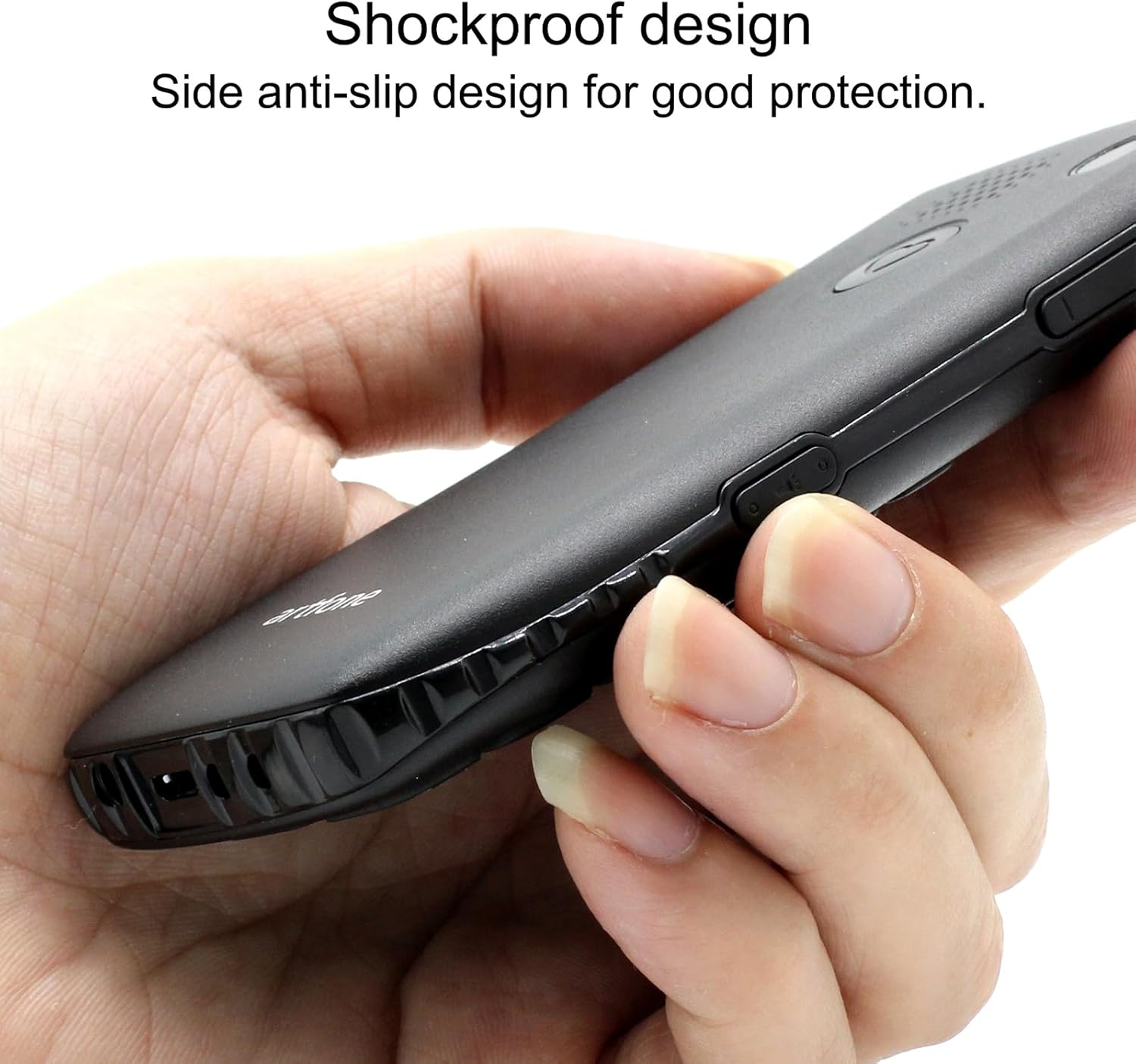
Image 6.1: The phone's shockproof design with side anti-slip features.
7. Troubleshooting
If you encounter issues with your phone, refer to the following common problems and solutions:
| Problem | Shkaku i mundshëm | Zgjidhje |
|---|---|---|
| Telefoni nuk ndizet | Bateri e ulët; Bateria nuk është instaluar siç duhet; | Charge the phone for at least 30 minutes; Reinstall the battery, ensuring contacts align. |
| Nuk mund të bëj/marr thirrje | No SIM card; SIM card not active; Out of network coverage | Ensure SIM card is inserted and active; Move to an area with better network signal. |
| Poor call quality/low volume | Weak signal; Speaker/microphone obstruction | Move to an area with better signal; Ensure speaker/microphone are not covered. Adjust call volume using side buttons. |
| Bateria zbrazet shpejt | Frequent use; Background features active | Reduce usage; Turn off unnecessary features like flashlight when not in use. |
| Butoni SOS nuk funksionon | No emergency contacts set; Feature disabled | Verify emergency contacts are correctly configured in SOS settings; Ensure SOS feature is enabled. |
Nëse problemi vazhdon pasi të provoni këto zgjidhje, ju lutemi kontaktoni mbështetjen e klientit.
8. Specifikimet
| Veçori | Specifikimi |
|---|---|
| Model | C1+ 4G |
| Sistemi Operativ | Artfone OS |
| Përpunues | Snapdragon |
| RAM | 48 MB |
| Flash Memorie | 128 MB |
| Kapaciteti i ruajtjes dixhitale | 32 GB (for media/contacts) |
| Madhësia e ekranit | LCD 1.8 inç |
| Rezolucioni | 240 x 320 |
| Shpejtësia e rifreskimit | 60 Hz |
| Rezolucioni i kamerës | 2 MP |
| Rezolucioni i kapjes së videos | 1280 x 720 |
| Lloji i baterisë | Jon litium |
| Kapaciteti i baterisë | 1400 mAh |
| Average Battery Life (Talk) | 5.5 orë |
| Teknologjia celulare | 4G, 3G, 2G |
| Lloji i lidhësit | USB-C |
| Hyrja e ndërfaqes njerëzore | Butonat |
| Faktori i formës | Bar |
| Dimensionet | 13.1 x 11.8 x 6.1 cm |
| Pesha | 240 g |
9. Videot Zyrtare të Produkteve
Video 9.1: Një përshkrim i detajuarview of the artfone C1+ 4G phone's features and design. This video demonstrates the phone's physical attributes and user interface.
Video 9.2: A demonstration of the phone's ease of use and key functionalities, highlighting its suitability for seniors.
10. Garancia dhe Mbështetja
Your artfone C1+ 4G mobile phone comes with a standard manufacturer's warranty. Please refer to the warranty card included in your package for specific terms and conditions, including the warranty period and coverage details.
For technical support, troubleshooting assistance beyond this manual, or warranty claims, please contact artfone customer service through their official webfaqja e internetit ose informacioni i kontaktit i dhënë në paketimin e produktit tuaj.


