1. Hyrje
Thank you for choosing the techno line WT2600 Digital Calendar. This device provides accurate time, date, indoor temperature, and humidity readings, along with alarm functions. This manual will guide you through the setup, operation, and maintenance of your new digital calendar.
2. Informacion mbi sigurinë
- Mos e ekspozoni pajisjen ndaj temperaturave ekstreme, rrezeve të diellit direkte ose lagështisë së lartë.
- Shmangni rënien e pajisjes ose ekspozimin e saj ndaj goditjeve të forta.
- Mos u përpiqni ta çmontoni ose riparoni vetë njësinë. Kontaktoni personelin e kualifikuar të shërbimit.
- Hidhni bateritë e përdorura me përgjegjësi, sipas rregullave lokale.
- Mbajeni pajisjen jashtë mundësive të fëmijëve.
3. Përmbajtja e paketës
Ju lutemi kontrolloni që të gjitha artikujt të jenë të pranishëm në paketën tuaj:
- techno line WT2600 Digital Calendar Unit
- Manuali i Përdoruesit (ky dokument)
- Batteries (may be included depending on region)
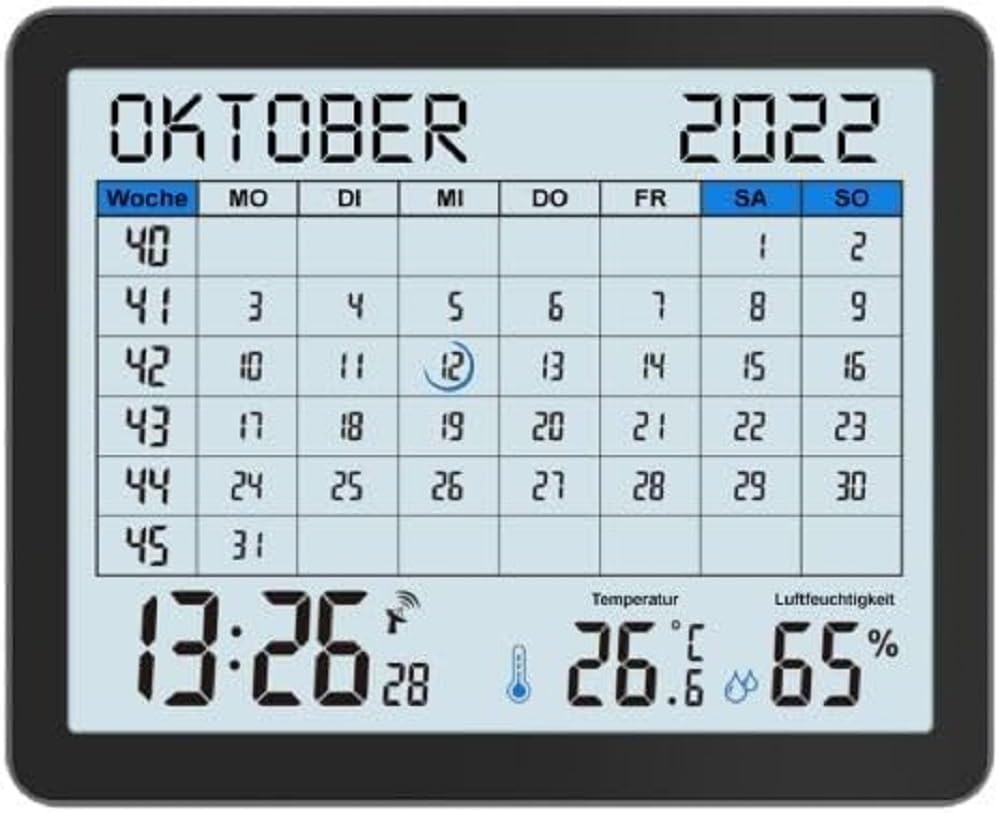
Image of the techno line WT2600 Digital Calendar packaging, showing the device and its key features.
4. Karakteristikat e produkteve
The techno line WT2600 Digital Calendar offers the following key features:
- DCF-77 Radio-Controlled Clock: Automatic time synchronization for precise timekeeping, with an option for manual setting.
- 12/24 Hour Time Display: Select your preferred time format.
- Shfaqja e kalendarit: Shows the current date, day of the week, and month.
- 7-Language Month Display: Choose from seven languages for the month display.
- Ekrani i temperaturës së brendshme: Shows indoor temperature in Celsius (°C) or Fahrenheit (°F).
- Indoor Humidity Display: Displays the current indoor humidity level.
- MIN/MAX Display: Records and displays the minimum and maximum temperature and humidity values.
- Dual Alarms with Snooze: Set two independent alarms with a convenient snooze function.
- Treguesi i baterisë së ulët: Ju njofton kur bateritë kanë nevojë për zëvendësim.
- Vendosja e gjithanshme: Designed for both wall mounting and table standing.

Përpara view of the techno line WT2600 Digital Calendar display, showing the calendar grid, current time, temperature, and humidity.
5. Konfigurimi
5.1 Instalimi i baterisë
- Gjeni ndarjen e baterisë në pjesën e pasme të njësisë.
- Hapni kapakun e ndarjes së baterisë.
- Insert the required batteries (e.g., 2 x AAA, not specified in data, common for such devices) according to the polarity markings (+ and -).
- Mbyllni mirë kapakun e ndarjes së baterisë.
5.2 Initial Power On and DCF-77 Signal Reception
Upon battery insertion, the device will power on and automatically begin searching for the DCF-77 radio signal. This process may take several minutes. For optimal reception, place the unit near a window and away from electronic interference.
- A signal icon (e.g., an antenna symbol) will flash during signal search.
- Once the signal is received, the time and date will be set automatically, and the signal icon will become solid.
- If no signal is received after 10-15 minutes, try repositioning the unit.
5.3 Manual Time and Date Setting
If automatic synchronization is not desired or unsuccessful, you can set the time and date manually.
- Press and hold the 'SET' button (or similar, refer to device buttons) for a few seconds to enter manual setting mode.
- Përdorni butonat '+' ose '-' për të rregulluar vlerën që ndizet (p.sh., orë, minutë, vit, muaj, ditë).
- Press 'SET' again to confirm the current setting and move to the next adjustable parameter.
- Repeat until all settings are complete.
5.4 Cilësimi i gjuhës
To change the display language for the month:
- Enter the setting mode (e.g., by pressing 'SET').
- Navigate through the settings until the language option appears.
- Use the '+' or '-' buttons to cycle through the available 7 languages.
- Konfirmoni zgjedhjen tuaj.
6. Operative
6.1 Viewing Time, Date, Temperature, and Humidity
The main display continuously shows the current time, date, indoor temperature, and indoor humidity. You can switch between 12-hour and 24-hour time formats by pressing a dedicated button (e.g., '12/24H' or 'MODE').
6.2 Vendosja e alarmeve
Pajisja ka dy alarme të pavarura.
- Press the 'ALARM' button (or similar) to view Alarm 1 herë.
- Press and hold 'ALARM' to enter Alarm 1 setting mode.
- Use '+' or '-' to adjust the hour and minute, pressing 'ALARM' to confirm each.
- Repeat for Alarm 2.
- To activate/deactivate an alarm, press 'ALARM' repeatedly until the alarm icon appears/disappears.
6.3 Using Snooze
When an alarm sounds, press the 'SNOOZE' button (or similar, often a large button on top) to temporarily silence the alarm. The alarm will sound again after a few minutes (typically 5-10 minutes). To stop the alarm completely, press any other button.
6.4 MIN/MAX Display Function
The device records the minimum and maximum temperature and humidity values since the last reset.
- Press the 'MIN/MAX' button (or similar) once to view the maximum recorded values.
- Press it again to view the minimum recorded values.
- To reset the MIN/MAX records, press and hold the 'MIN/MAX' button while viewduke i regjistruar.

Close-up of the techno line WT2600 Digital Calendar display, highlighting the time, temperature, and humidity readings.
7. Mirëmbajtja
7.1 Pastrimi
Fshijeni pajisjen me një të butë, damp leckë. Mos përdorni pastrues ose tretës gërryes, pasi këto mund të dëmtojnë ekranin oseasing.
7.2 Ndërrimi i baterisë
When the low battery indicator appears on the display, replace all batteries with new ones of the same type. Follow the battery installation steps in Section 5.1.
8. Troubleshooting
- Pa shfaqje: Check battery polarity and ensure batteries are fresh.
- Ora/Data e gabuar: Ensure the DCF-77 signal icon is solid. If not, reposition the unit or set the time manually (Section 5.3). Check your time zone setting if applicable (not explicitly mentioned in data, but common).
- Temperature/Humidity Readings Seem Inaccurate: Ensure the unit is placed in a location with good air circulation, away from direct heat sources or drafts. Allow some time for readings to stabilize after initial setup or relocation.
- Alarmi nuk bie: Verify that the alarm is activated (alarm icon displayed) and the alarm time is set correctly.
9. Specifikimet
| Veçori | Specifikimi |
|---|---|
| Numri i modelit | WT2600 |
| Dimensionet (J x P x H) | 17.3 x 3.81 x 14 cm |
| Pesha | 380 g |
| Ngjyra | E zezë |
| Materiali | Plastike |
| Burimi i energjisë | Me bateri |
| Lloji i ekranit | Dixhitale |
| Përdorimi i brendshëm/jashtë | Të brendshme |
10. Garancia dhe Mbështetja
Information regarding product warranty and customer support was not available in the provided product data. Please refer to the retailer or manufacturer's official webfaqe interneti për detaje mbi mbulimin e garancisë dhe opsionet e mbështetjes.


