1. Hyrje
This manual provides detailed instructions for the installation, operation, and maintenance of your Jennov JS7015 5MP Dual-Band Wi-Fi Outdoor Security Camera. Please read this manual thoroughly before using the product to ensure correct usage and optimal performance.

Figure 1: Jennov JS7015 Outdoor Security Camera
The Jennov JS7015 is a 5-megapixel outdoor security camera featuring dual-band Wi-Fi connectivity (2.4GHz and 5GHz). It offers 360-degree viewing capabilities, PIR human detection, auto-tracking, 24/7 recording, and two-way audio for comprehensive outdoor surveillance.
2. Përmbajtja e paketës
Ju lutemi kontrolloni përmbajtjen e paketës pas marrjes. Nëse ndonjë artikull mungon ose është i dëmtuar, kontaktoni mbështetjen ndaj klientit.
- Jennov JS7015 5MP Dual-Band Wi-Fi Outdoor Security Camera
- Përshtatës i energjisë
- Vida dhe spiranca montimi
- Manuali i Përdoruesit (ky dokument)
3. Produkti i Mbaruarview
Njihuni me përbërësit e kamerës.

Figure 2: Camera Pan and Tilt Mechanism
The camera features a motorized pan and tilt mechanism, allowing for a 355° horizontal rotation (pan) and a 60° vertical rotation (tilt). This enables comprehensive coverage of the surveillance area. The camera body houses the lens, infrared LEDs, white light LEDs, microphone, and speaker. Two external antennas provide enhanced Wi-Fi signal reception.
- Lentet e kamerës: Regjistron video footage.
- LED infra të kuqe: Siguron ndriçim për shikim bardh e zi natën.
- LED me dritë të bardhë: Provide illumination for color night vision and act as a spotlight.
- Mikrofoni: Kap audio për komunikim dhe regjistrim dypalësh.
- Folësi: Outputs audio for two-way communication and alarms.
- Antenat: Për lidhjen Wi-Fi.
- Porti i energjisë: Lidhet me përshtatësin e energjisë.
- Butoni i rivendosjes: Used to reset the camera to factory settings (usually located near the SD card slot or under a cover).
- Vendi i kartës SD: For local video storage (supports up to 128GB, not included).
4. Udhëzuesi i konfigurimit
4.1 Instalimi fizik
The camera is designed for outdoor use and is IP66 waterproof. Choose a suitable location for mounting, ensuring a clear view of the area you wish to monitor and proximity to a power source.
- Mark Drilling Positions: Përdorni shabllonin e montimit (nëse ofrohet) ose bazën e kamerës për të shënuar vrimat e vidave në mur.
- Vrimat e shpimit: Hapni vrima në pozicionet e shënuara. Vendosni spiranca muri nëse i montoni në murature.
- Kamera e sigurt: Attach the camera base to the wall using the provided screws.
- Rregulloni këndin: Loosen the adjustment screws (if any) to position the camera for optimal coverage before tightening.

Figura 3: Dizajn IP66 i papërshkueshëm nga uji
The camera is built with waterproof materials and has an IP66 rating, making it suitable for outdoor installation and resistant to dust and water jets.
4.2 Lidhja e energjisë
Lidhni adaptorin e dhënë të energjisë me portën e energjisë të kamerës dhe më pas lidheni atë në një prizë elektrike. Kamera do të ndizet dhe do të fillojë sekuencën e saj të ndezjes.
4.3 Shkarkimi i Aplikacionit dhe Regjistrimi i Llogarisë
The Jennov JS7015 camera uses the EseeCloud application for remote access and control.
- Shkarkoni aplikacionin: Kërko për "EseeCloud" in your smartphone's app store (Google Play Store for Android or Apple App Store for iOS) and download the application.
- Regjistro llogarinë: Open the EseeCloud app and follow the on-screen instructions to register a new account using your email address or phone number.
4.4 Shtimi i Kamerës në Aplikacion
Ensure your smartphone is connected to the same Wi-Fi network (2.4GHz or 5GHz) that you intend to connect the camera to.
- Hap aplikacionin: Launch the EseeCloud app and log in.
- Shto pajisje: Tap the "+" icon or "Add Device" option.
- Zgjidhni llojin e pajisjes: Choose "Wi-Fi Camera" or similar option.
- Skano kodin QR: The app may prompt you to scan a QR code located on the camera or its packaging.
- Konfigurimi Wi-Fi: Follow the app's instructions to enter your Wi-Fi network name (SSID) and password. The camera supports both 2.4GHz and 5GHz Wi-Fi bands.
- Lidhu: The camera will attempt to connect to your Wi-Fi network. Once connected, it will appear in your device list within the app.
- Vendosni fjalëkalimin: Create a strong password for your camera for security purposes.
5. Udhëzimet e funksionimit
5.1 Drejtpërdrejt View dhe Kontroll Panoramike/Pjerrësi
From the EseeCloud app, select your camera to access the live view.
- Furnizimi i drejtpërdrejtë: View real-time video from your camera.
- Pan/Pjerrësi: Use the directional controls within the app to remotely adjust the camera's horizontal (pan) and vertical (tilt) angles.
5.2 Ndjekja automatike
Kamera mund të gjurmojë automatikisht objektet në lëvizje brenda fushës së saj view.

Figure 4: Auto Tracking in Action
Enable the auto-tracking feature in the app settings. The camera will then detect and follow moving targets until they leave the camera's view.
5.3 Zbulimi i Lëvizjes dhe Alarmet
The camera features advanced PIR (Passive Infrared) human detection to minimize false alarms.

Figure 5: PIR Human Detection and Alarm Options
When a human thermal profile is detected, the camera can trigger various alarms.
- Zbulimi i PIR: Activates recording and sends notifications when a human is detected.
- Alarmi zanor: Configure the camera to emit a siren sound upon detection.
- Spotlight Alarm: The integrated spotlight can be activated to deter intruders.
- Njoftimet: Receive instant alerts on your smartphone via the EseeCloud app.
5.4 Audio me dy drejtime
Communicate directly with individuals near the camera using the built-in microphone and speaker.

Figura 6: Komunikim audio dypalësh
Tap the microphone icon in the app to speak, and listen through the camera's speaker. This feature is useful for interacting with visitors or deterring unwanted guests.
5.5 Regjistrimi dhe ruajtja
The camera supports continuous 24/7 recording and offers flexible storage options.
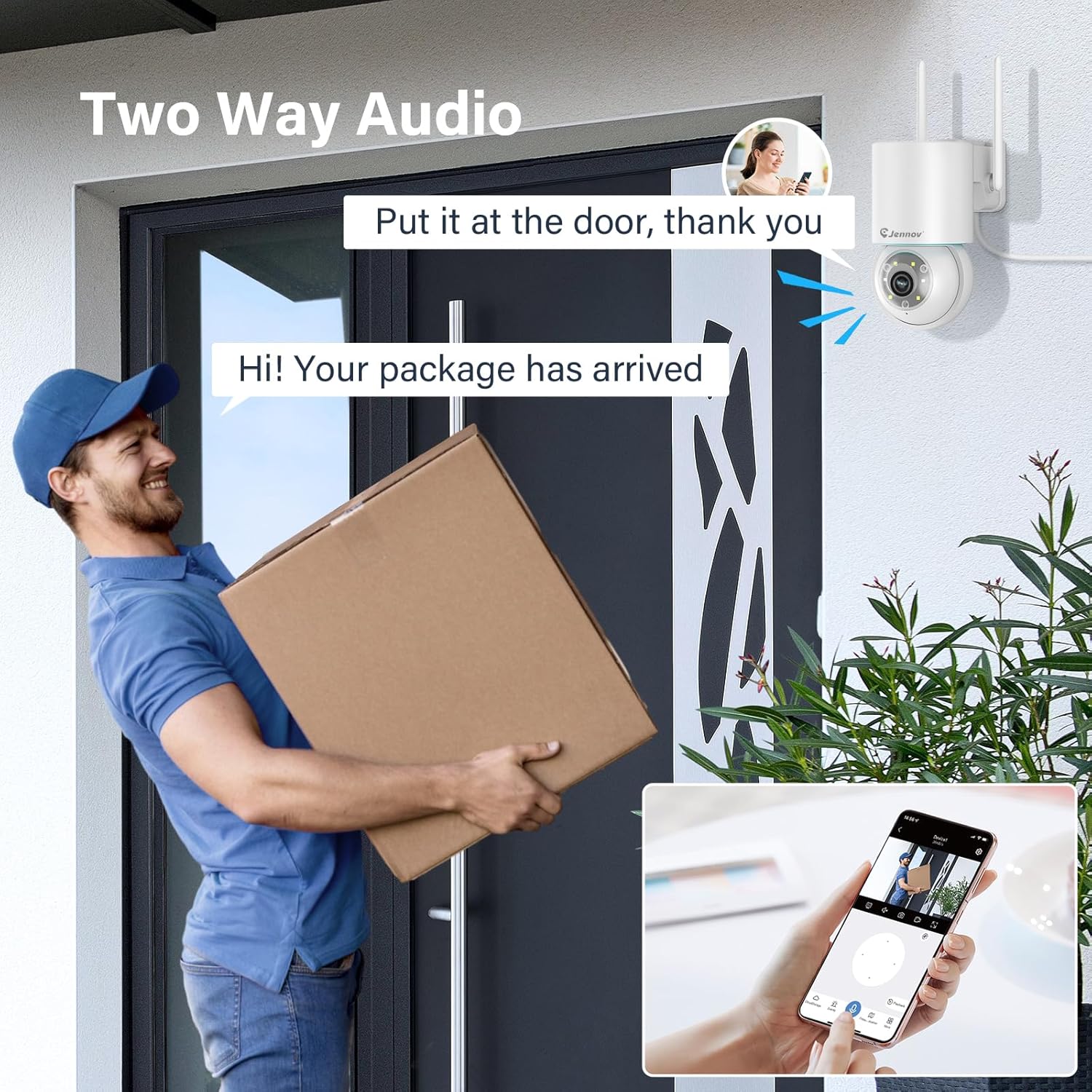
Figure 7: 24/7 Recording and Storage Options
Qasja në fondet e regjistruaratagnëpërmjet funksionit të riprodhimit të aplikacionit.
- Regjistrim 24/7: The camera can continuously record footage, ensuring no vital moments are missed.
- Hapësira ruajtëse lokale: Insert a microSD card (up to 128GB, not included) into the camera's SD card slot for local storage.
- Ruajtja në renë kompjuterike: Optional cloud storage service is available, often with a free trial period (e.g., 7 days). This provides off-site backup of your recordings.
5.6 Modalitetet e Shikimit të Natës
The camera offers three night vision modes for clear visibility in low-light conditions.

Figure 8: 5MP Color Night Vision
The camera provides clear night vision up to 65 feet (20 meters) with 5MP resolution.
- Modaliteti me ngjyra të plota: Utilizes white LEDs to provide full-color video at night.
- Black and White Mode: Uses infrared LEDs for traditional black and white night vision.
- Modaliteti i zgjuar: Automatically switches between black and white and full color based on detected motion or light conditions.
You can switch between these modes within the EseeCloud mobile application.
5.7 Customized Detection Area
Përcaktoni zona specifike brenda kamerës view ku detektimi i lëvizjes duhet të jetë aktiv.

Figure 9: Customized Detection Area Settings
This feature helps reduce unwanted alerts by focusing detection on critical zones. The app typically offers "Area mode" and "Cordon mode" for defining these zones.
6. Mirëmbajtja
- Pastrimi: Pastroni rregullisht lentet e kamerës me një leckë të butë dhe të thatë për të siguruar cilësi të qartë të imazhit. Mos përdorni kimikate të ashpra.
- Përditësimet e firmuerit: Check the EseeCloud app periodically for available firmware updates. Keeping your camera's firmware updated ensures optimal performance and security.
- Menaxhimi i kartave SD: If using local storage, periodically check the SD card's status in the app. Format the card as needed to maintain recording efficiency.
- Furnizimi me energji elektrike: Ensure the power adapter and cable are free from damage and properly connected.
7. Troubleshooting
- Kamera jashtë linje:
- Kontrolloni fuqinë e sinjalit Wi-Fi.
- Sigurohuni që kamera të jetë e ndezur.
- Rinisni kamerën dhe routerin tuaj Wi-Fi.
- If using 5GHz Wi-Fi, ensure your router supports it and the camera is connected to the correct band.
- Try re-adding the camera to the EseeCloud app.
- Cilësi e dobët e imazhit:
- Pastroni lentet e kamerës.
- Ensure sufficient lighting, especially at night.
- Kontrolloni shpejtësinë e lidhjes suaj në internet.
- Zbulimi i lëvizjes nuk funksionon:
- Verify motion detection settings in the app are enabled.
- Rregulloni ndjeshmërinë e zbulimit.
- Sigurohuni që të mos ketë pengesa që bllokojnë kamerën view.
- Check if detection areas are correctly configured.
- Problemet e audios me dy drejtime:
- Ensure microphone and speaker permissions are granted to the EseeCloud app on your smartphone.
- Check volume settings on both the app and your phone.
- Ensure there are no physical obstructions blocking the camera's microphone or speaker.
- Cannot Access SD Card Recordings:
- Sigurohuni që karta SD është futur siç duhet.
- Check if the SD card is formatted correctly (usually FAT32).
- Verify that continuous recording or event recording to SD card is enabled in the app.
- The SD card might be full; consider formatting it or replacing it.
8. Specifikimet
| Veçori | Specifikimi |
|---|---|
| Numri i modelit | JS7015 |
| Markë | Jennov |
| Rezolucioni | 5 Megapixel (1920p video recording) |
| Këndi i panelit / pjerrësisë | Pan 355 °, Pjerrësi 60 ° |
| Vizioni i Natës | Color Night Vision, Black & White Night Vision, Smart Mode (up to 65ft/20m) |
| Lidhja Wi-Fi | Dy-Band (2.4GHz / 5GHz) |
| Audio | Audio me dy drejtime (Mikrofon dhe altoparlant i integruar) |
| Zbulimi i lëvizjes | PIR Human Detection, Auto Tracking |
| Opsionet e ruajtjes | Kartë MicroSD (deri në 128 GB), Ruajtje në renë kompjuterike |
| Vlerësimi i papërshkueshëm nga uji | IP66 |
| Fuqia hyrëse | 5 volt |
| Konsumi i energjisë | 24 Watts |
| Dimensionet (J x P x H) | 12 x 8 x 16 cm |
| Materiali | Plastike |
| Lloji i montimit | Montimi në mur |
| Pajisjet e përputhshme | Telefon inteligjent, tablet, kompjuter |
| Aplikacioni i kontrollit | EseeCloud |
9. Garancia dhe Mbështetja
For warranty information and technical support, please refer to the warranty card included with your product or visit the official Jennov webfaqe.
- Shërbimi ndaj klientit: Contact Jennov customer support for assistance with product issues, technical questions, or warranty claims.
- Burimet në internet: Check the Jennov webfaqe interneti për pyetje të shpeshta, manuale të përditësuara dhe shkarkime softuerësh.


