Hyrje
This manual provides detailed instructions for setting up and operating your blurams 3MP 2.4/5GHz WiFi Indoor PTZ Security Camera (Model A31). This camera is designed for versatile indoor monitoring, offering features such as high-resolution video, pan-tilt-zoom functionality, two-way audio, and intelligent detection capabilities. Please read this manual thoroughly before use to ensure proper installation and optimal performance.
Përmbajtja e paketës
Verifikoni që të gjitha artikujt e listuar më poshtë janë të përfshirë në paketën tuaj:
- Njësia e kamerës
- Përshtatës i energjisë
- Kabllo USB
- Screw Set (for mounting)
- Fletë montimi
- Japanese Instruction Manual

Image: All components included in the blurams A31 package, including the camera, power adapter, USB cable, mounting accessories, and manual.
Produkti Mbiview
Familiarize yourself with the main components of your blurams A31 camera:
- Lente: Captures video and images.
- Vendi i kartës MicroSD: Për ruajtje lokale të videos (mbështet deri në 256 GB, shitet veçmas).
- Porti i energjisë: Lidhet me përshtatësin e energjisë.
- Butoni i rivendosjes: Përdoret për të rivendosur kamerën në cilësimet e fabrikës.
- Drita treguese: Displays the camera's status (e.g., red/blue flashing for pairing, solid blue for connected).
- Altoparlanti/Mikrofoni: Për komunikim audio me dy drejtime.

Imazh: Përpara dhe prapa views of the blurams A31 camera, highlighting the lens, microSD card slot, power port, reset button, and indicator light.
Konfigurimi
1. Instalimi i aplikacionit
Download the "blurams" app from the App Store (iOS) or Google Play Store (Android). The app is compatible with iOS 10+ and Android 5+.

Image: Screenshots illustrating the process of downloading and installing the blurams app from an app store.
2. Lidhja e energjisë
Connect the camera to a power source using the provided USB cable and power adapter. The indicator light will illuminate.
3. Lidhja Wi-Fi
- Hap aplikacionin blurams dhe krijo një llogari ose identifikohu.
- Trokitni ikonën "+" për të shtuar një pajisje të re.
- Select your camera model (A31) and choose "Bluetooth Wi-Fi Connection".
- Follow the on-screen prompts to connect the camera to your 2.4GHz or 5GHz Wi-Fi network. The camera supports both frequencies for stable connection.
- Pasi të lidhet, drita treguese do të ndizet vazhdimisht me ngjyrë blu.
Video: A step-by-step guide on how to connect the blurams camera to Wi-Fi using Bluetooth pairing via the app.
4. Instalimi i kartës MicroSD
To enable 24-hour continuous recording, insert a microSD card (up to 256GB, sold separately) into the camera's card slot. Gently push the lens upwards to reveal the slot.

Image: A hand inserting a microSD card into the designated slot on the camera.
Udhëzimet e funksionimit
1. Jeto View
Pas konfigurimit të suksesshëm, mundeni view the live feed from your camera anytime, anywhere through the blurams app.
2. Pan/Tilt/Zoom (PTZ) Control
The camera features 360° horizontal and 110° vertical rotation. Use the app to remotely control the lens direction and digitally zoom up to 4x to view detajet.

Image: The blurams A31 camera rotating horizontally and vertically, showcasing its PTZ capabilities within a room setting.
3. Audio me dy drejtime
Engage in real-time two-way conversations through the app. This feature is ideal for communicating with family members or pets.
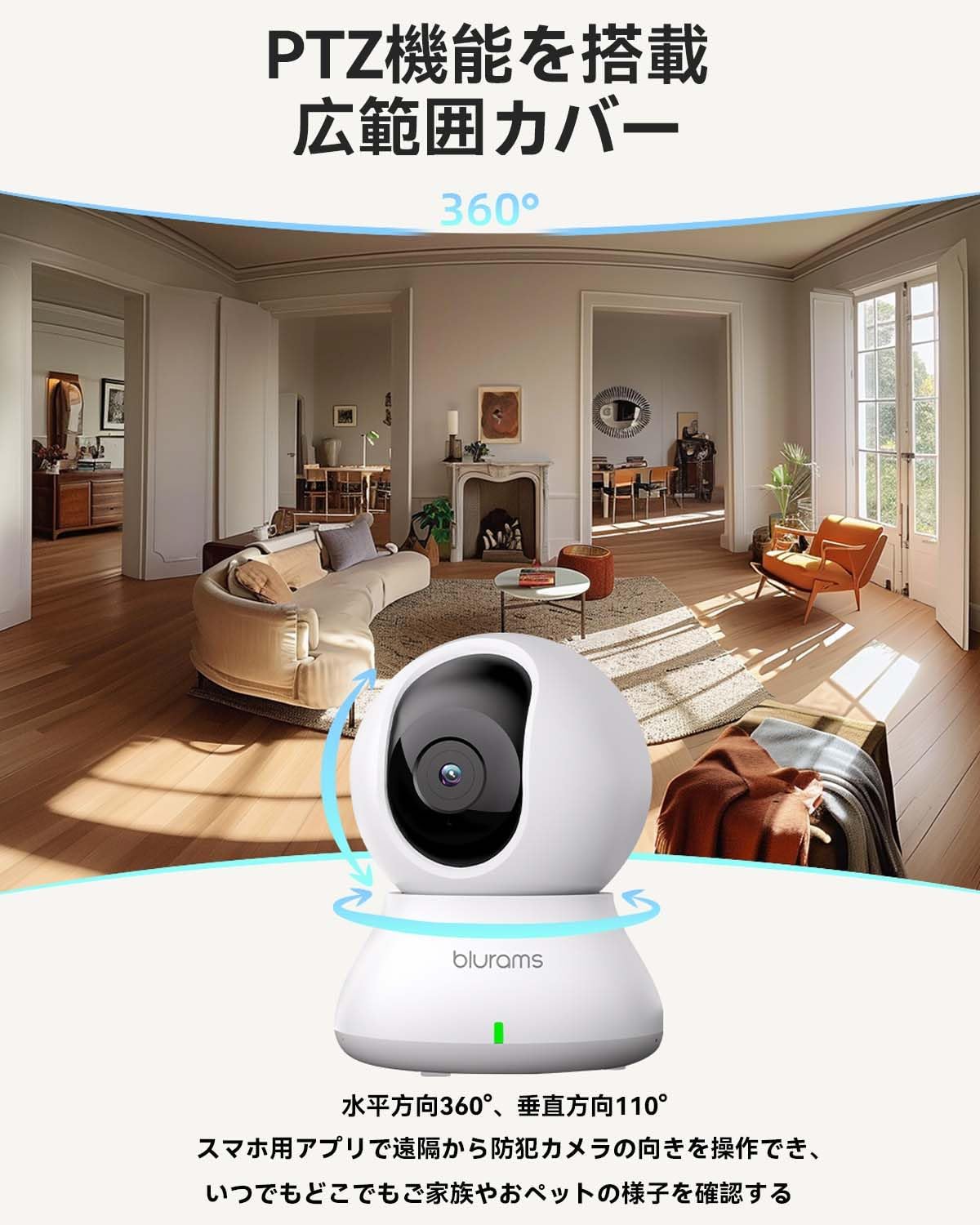
Image: A dog looking at the blurams A31 camera, with a speech bubble indicating two-way audio communication.
4. Motion, Sound, and Human Detection & Alerts
The camera is equipped with AI detection systems for motion, sound, and human recognition. Enable notifications in the app to receive real-time alerts on your smartphone when activity is detected.
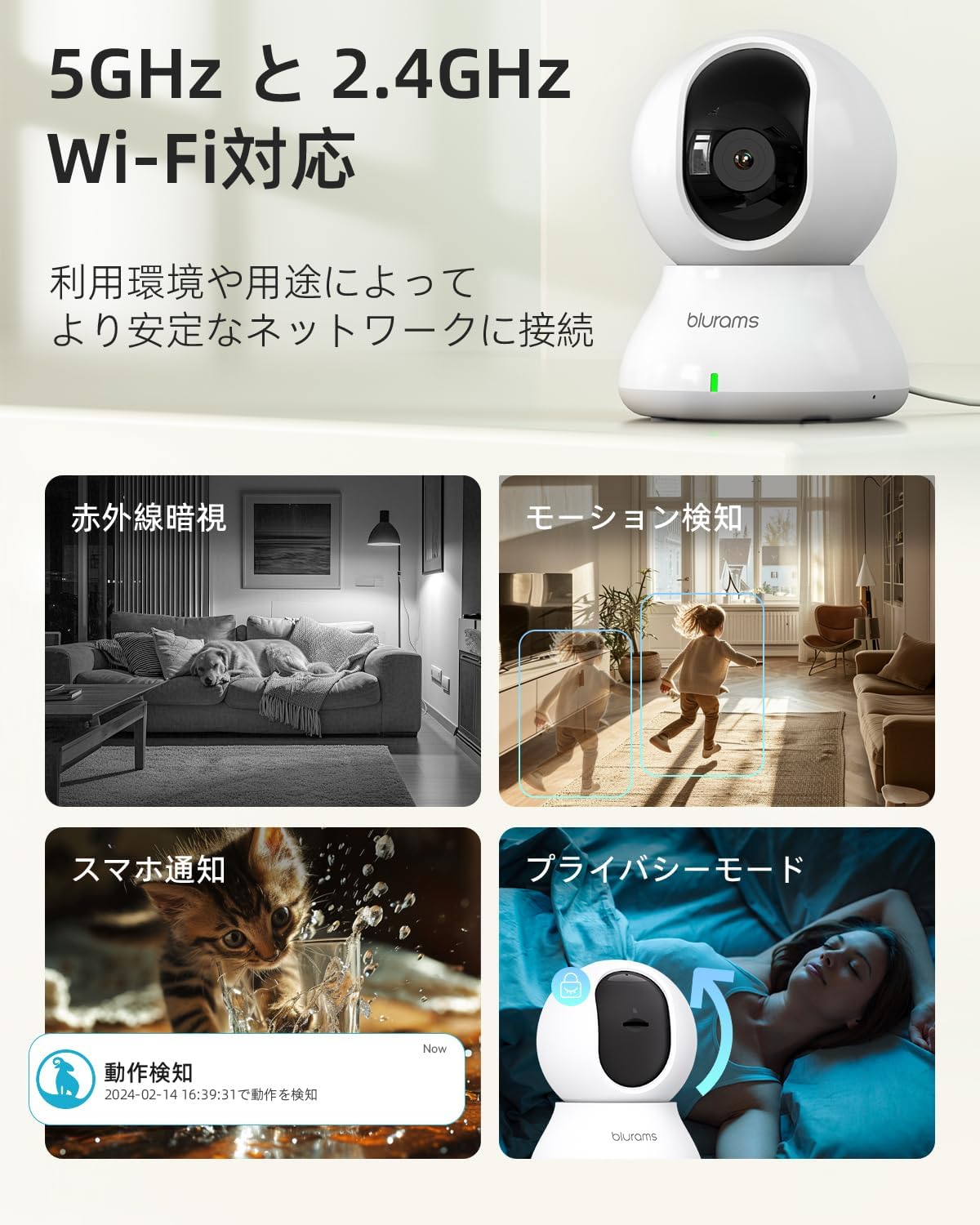
Image: Visual representation of the camera's features including 2.4/5GHz WiFi, motion detection, night vision, and privacy mode.
5. Modalitetet e Shikimit të Natës
The camera features 6*850nm infrared LEDs for night vision up to 10 meters. It automatically switches between color images in bright conditions and monochrome images in dark conditions. You can also manually select different night vision modes via the app.
6. Mënyra e privatësisë
For privacy, you can manually turn off the camera lens via the app, physically blocking the view and stopping recording.
7. Recording & Storage
Recordings can be saved to a microSD card (up to 256GB, sold separately) for 24-hour continuous recording, or to the optional paid cloud storage service. The product also records past 24-hour motion events (approx. 12 seconds) without a microSD card or cloud service.

Image: Comparison of H.265 and H.264 compression, and a close-up of the microSD card slot on the camera.
8. Ndarja e Qasjes
You can share camera access with multiple users through the app, allowing family members to monitor simultaneously.
Karakteristikat e avancuara
1. AI Motion Tracking
When "Automatic Tracking" is enabled in the app, the camera will automatically follow detected movement horizontally and vertically, ensuring the subject remains in view.
Video: A demonstration of the blurams camera's automatic motion tracking feature, following a pet's movement.
2. Image Quality and Resolution
Equipped with a 3.6mm lens and a high-performance CMOS sensor, the camera delivers 3MP (2304x1296) high-definition images, offering improved resolution compared to traditional 1080P cameras.

Image: A side-by-side comparison demonstrating the superior clarity of 3MP resolution versus 1080P, showing a dog on a couch.
Specifikimet
| Veçori | Detaj |
|---|---|
| Markë | bluramet |
| Numri i modelit | A31 |
| Teknologjia e lidhjes | Wireless (Wi-Fi) |
| Lloji me valë | 2.4GHz & 5GHz WiFi compatible |
| Rezolucioni i kapjes së videos | 1296p (3MP) |
| Rezolucioni i sensorit të fotografisë | 3 MP |
| Karakteristika të veçanta | Vizioni i natës, Teknologjia PTZ, Sensori i Lëvizjes |
| Përdorimi i brendshëm/jashtë | Të brendshme |
| Pajisjet e përputhshme | Smartphones (iOS 10+, Android 5+), PC, Alexa, Google Assistant, IFTTT |
| Burimi i energjisë | Elektrike me kabllo |
| Lloji i montimit | Montim në mur, montim në tavolinë |
| Zmadhim dixhital | 4x |
| Gama e Vizionit të Natës | 10 metra |
| Mbështetje për Kartën MicroSD | Deri në 256 GB |
| Dimensionet e produktit | 8.3 x 8.3 x 11 cm |
| Pesha e produktit | 280 gram |
Mirëmbajtja
- Pastrimi: Use a soft, dry cloth to clean the camera lens and body. Avoid harsh chemicals.
- Përditësimet e firmuerit: Regularly check the blurams app for firmware updates to ensure optimal performance and security.
- Menaxhimi i kartës MicroSD: If using a microSD card, periodically check its storage capacity and format it if necessary to maintain recording quality.
Zgjidhja e problemeve
Nëse hasni probleme, ju lutemi referojuni zgjidhjeve të zakonshme të mëposhtme:
- Kamera nuk lidhet me Wi-Fi: Ensure your Wi-Fi password is correct and that your router is within range. Try resetting the camera by pressing and holding the reset button until you hear a beep.
- Cilësi e dobët e imazhit: Check your internet connection speed. Ensure the lens is clean and free from obstructions.
- Nuk ka audio: Verify that the microphone and speaker settings are enabled in the app.
- Pa njoftime: Check your app notification settings and your smartphone's system notification settings for the blurams app.
Garancia dhe Mbështetja
blurams offers a 3-year warranty for this product. The product has obtained technical standards compliance for the Radio Law (Mark Number: 204-B00738).
For any questions or requests, please contact customer support via your Amazon "Order History" -> "Contact Seller". We aim to respond within 24 hours.

Image: A customer support representative, symbolizing available assistance for product inquiries.


