1. Hyrje
Welcome to the user manual for your Jooeniok L81 Smart Watch. This guide provides detailed instructions on how to set up, operate, and maintain your device, ensuring you get the most out of its features. The Jooeniok L81 is designed to enhance your daily life with its communication, fitness tracking, and health monitoring capabilities.
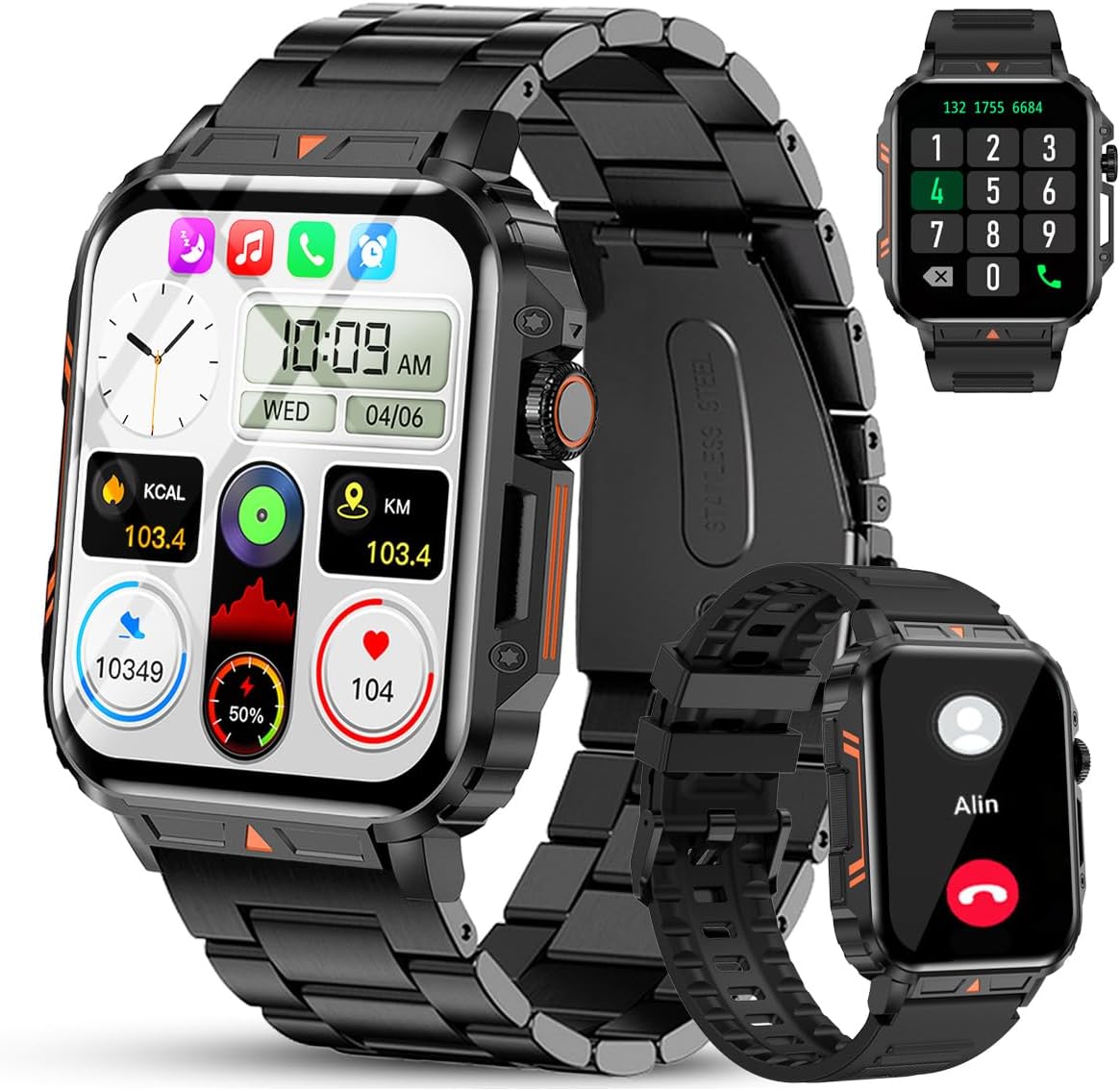
Image 1.1: The Jooeniok L81 Smart Watch, showcasing its main display and interchangeable straps.
2. Karakteristikat kryesore
- Bluetooth Calling & Message Alerts: Make and receive calls, read messages, and receive notifications from various apps directly on your watch.
- 1.95'' HD Touch Screen & DIY Dial: Enjoy a clear display and personalize your watch face.
- 112+ mënyra sportive: Track a wide range of activities including running, cycling, badminton, and hiking.
- IP68 I papërshkueshëm nga uji: Suitable for daily use, hand washing, and outdoor activities in rain. (Note: Not recommended for diving, showering, or sauna.)
- Monitorimi i shëndetit: Monitor heart rate, blood oxygen (SpO2), blood pressure, and sleep patterns.
- Bateria me jetëgjatësi: Equipped with a 340mAh battery for extended use.
- Multifunksionale: Includes features like timer, alarm, stopwatch, weather, calendar, water reminder, sedentary reminder, and remote photo control.
3. Udhëzuesi i konfigurimit
3.1. Ngarkimi i Orës Inteligjente
Before initial use, fully charge your Jooeniok L81 Smart Watch. Connect the magnetic charging cable to the charging contacts on the back of the watch and plug the USB end into a standard USB power adapter (not included) or a computer's USB port. The watch display will indicate charging status.

Image 3.1: Illustration of the watch dimensions and the location of the charging contacts.
3.2. Instalimi dhe çiftëzimi i aplikacionit
- Shkarkoni Aplikacionin: Scan the QR code provided in the watch's quick start guide or search for the official companion app (e.g., "FitCloudPro" or similar, check packaging for exact name) in the Apple App Store (for iOS) or Google Play Store (for Android).
- Aktivizo Bluetooth: Sigurohuni që Bluetooth të jetë i aktivizuar në smartphone tuaj.
- Hapni aplikacionin: Hap aplikacionin e instaluar dhe ndiq udhëzimet në ekran për të krijuar një llogari ose për t'u identifikuar.
- Shto pajisje: Within the app, navigate to the "Device" or "Add Device" section. The app will search for available Bluetooth devices. Select "L81" or the corresponding device name when it appears.
- Konfirmo çiftimin: Një kërkesë për çiftim mund të shfaqet në orën dhe telefonin tuaj. Konfirmoni çiftimin në të dyja pajisjet.
- Jepni lejet: Jepni lejet e nevojshme (p.sh., njoftimet, vendndodhja, kontaktet) që aplikacioni të funksionojë siç duhet.
The watch is compatible with Android 5.1 and above, and iOS 10.0 and above.
3.3. Initial Settings and Language
After successful pairing, the watch should automatically synchronize time and language settings with your phone. If the watch displays an incorrect language, navigate to the watch's settings menu (usually by swiping down from the main screen or pressing the side button to access the app list, then finding the 'Settings' icon). Look for 'Language' or 'System' settings to change it to English or your preferred language.
4. Udhëzimet e funksionimit
4.1. Navigimi bazë
- Ekrani me prekje: Rrëshqitni majtas/djathtas, lart/poshtë për të lundruar nëpër menu dhe veçori. Trokitni për të zgjedhur.
- Butoni anësor: Press to return to the main screen or access the app list. Long press for power options.
- Crown Button (if present): Rotate to scroll through lists or adjust settings, press to select.
4.2. Thirrjet dhe Njoftimet me Bluetooth
Once paired, your watch can handle calls and display notifications. Ensure Bluetooth is connected and the companion app has the necessary permissions.
- Kryerja e thirrjeve: Hyr në tastierën e numrave ose në listën e kontakteve në orën tënde për të nisur thirrje.
- Marrja e thirrjeve: Kur të merrni një telefonatë, mund t'i përgjigjeni ose ta refuzoni atë direkt nga ora.
- Njoftimet: Swipe down from the main screen or access the notification center to view incoming messages from SMS, WhatsApp, Facebook, and other apps.
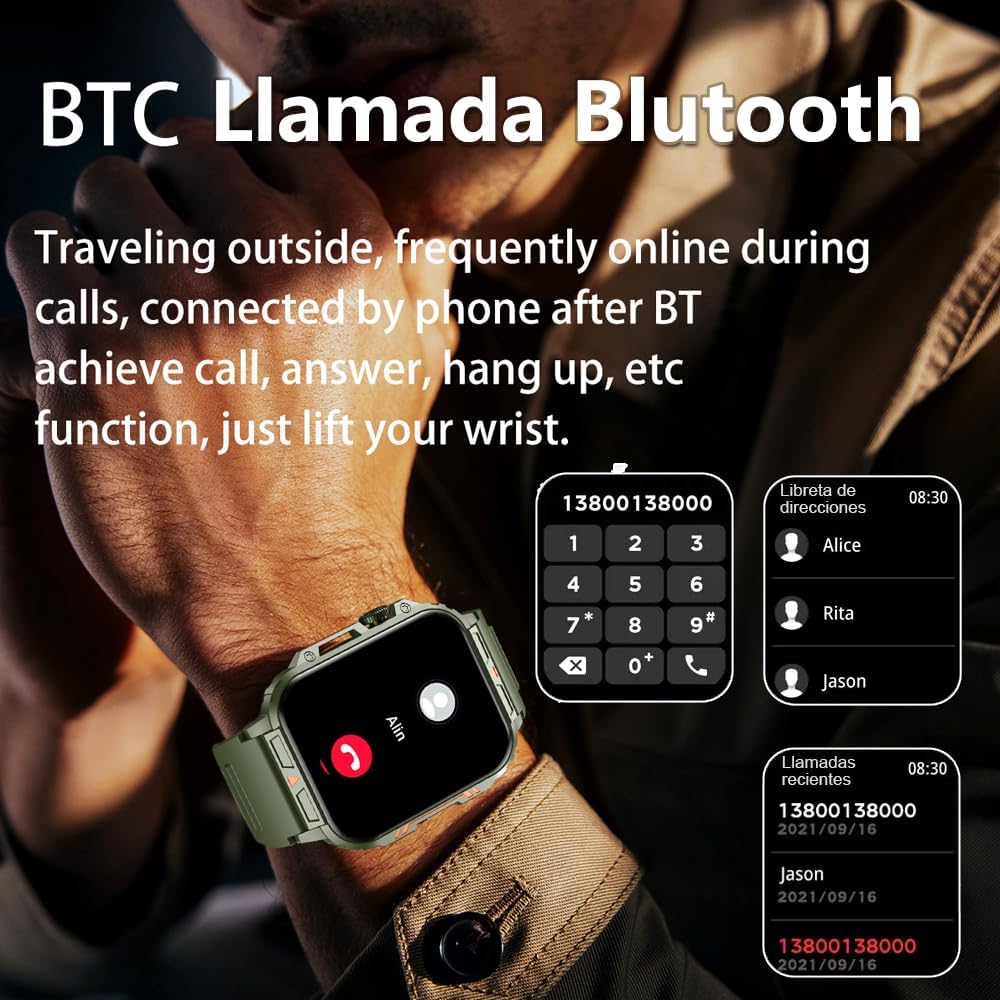
Image 4.1: The watch screen showing an incoming call and the dial pad for making calls.

Image 4.2: The watch displaying notifications from various social media and messaging applications.
4.3. Modalitetet Sportive
The watch supports over 112 sports modes. To access them, navigate to the 'Sports' or 'Workout' section on your watch. Select your desired activity to start tracking. The watch will record steps, distance, and calories.

Image 4.3: Icons representing various sports modes available on the watch.
4.4. Monitorimi i Shëndetit
The Jooeniok L81 provides continuous monitoring of several health metrics. Access these features through the watch's menu or the companion app.
- Ritmi i zemrës: The watch uses an optical sensor to monitor your heart rate. View të dhëna në kohë reale në orë ose trende të detajuara në aplikacion.
- Blood Oxygen (SpO2) & Blood Pressure: Initiate a measurement from the watch. Results are displayed on the screen and recorded in the app for historical analysis.
- Monitorimi i gjumit: Wear the watch to bed for automatic sleep tracking. It analyzes deep sleep, light sleep, and awake times, providing a comprehensive sleep quality report in the app.
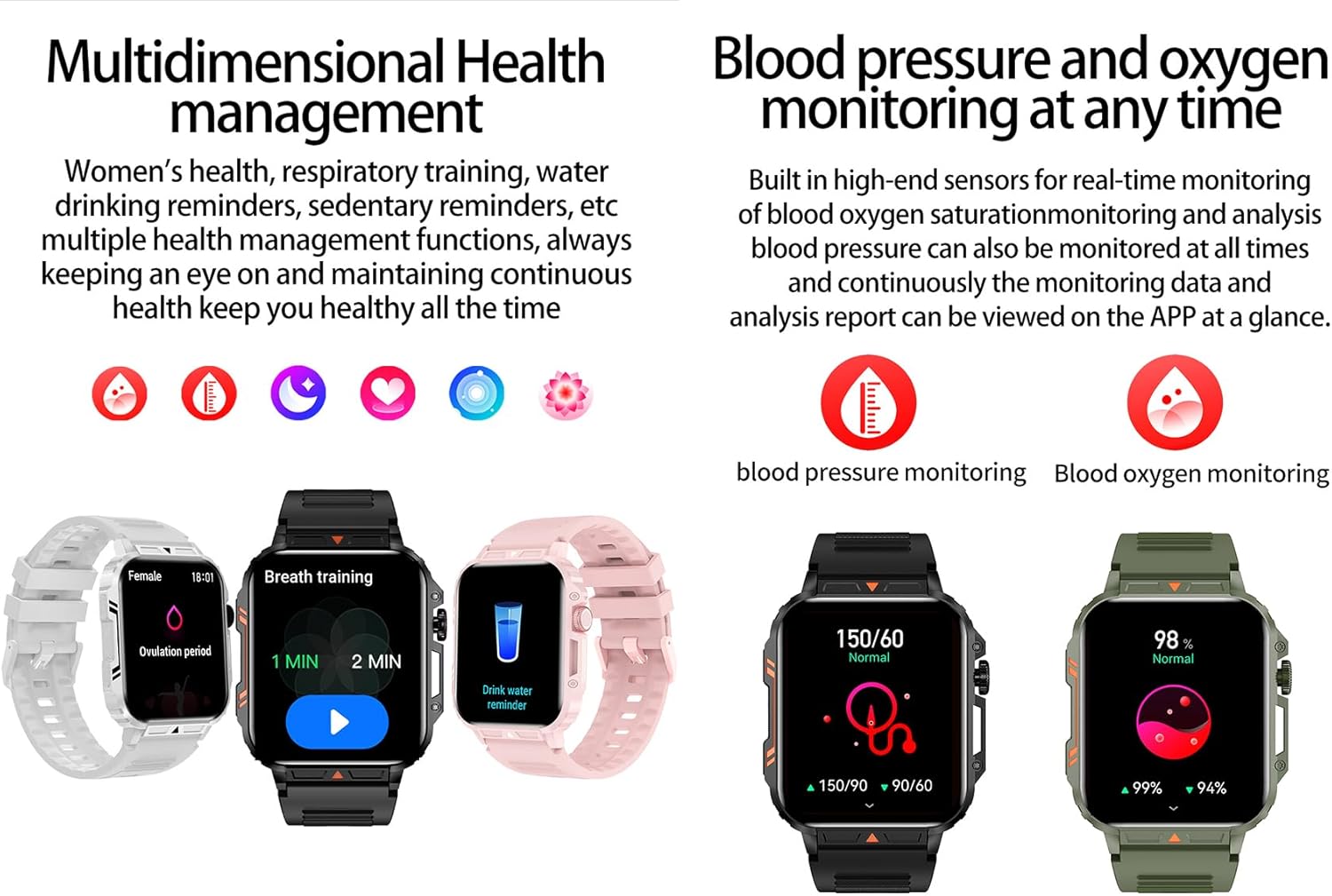
Image 4.4: Watch screens showing blood pressure and blood oxygen monitoring results.

Image 4.5: Watch screens showing real-time heart rate and a summary of sleep data.
4.5. AI Intelligent Voice Function
After connecting the watch to your phone via Bluetooth, activate the voice function on the watch. This allows you to use voice commands to open applications, check weather, make calls, or navigate, offering a hands-free experience.
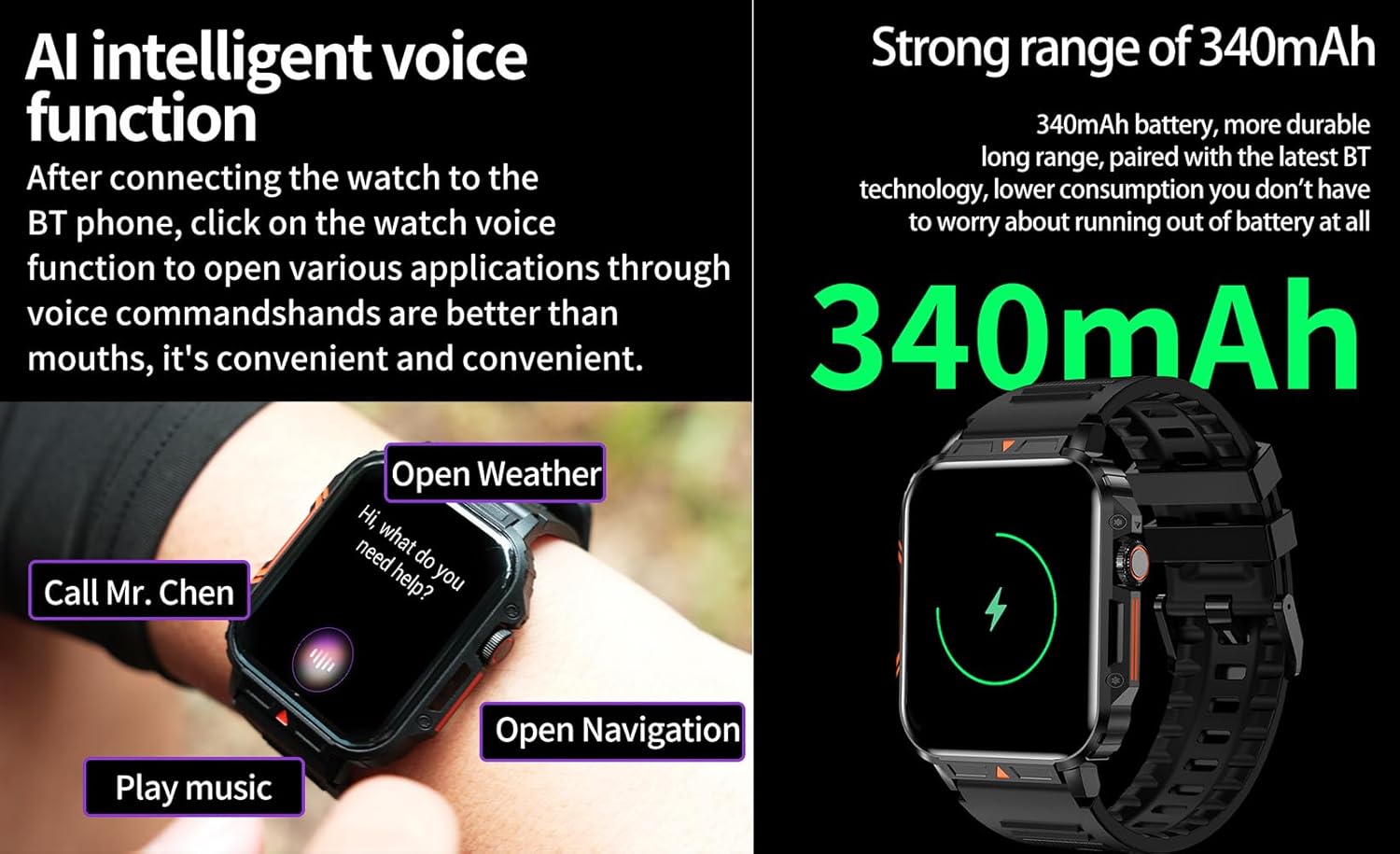
Image 4.6: The watch screen illustrating the AI voice assistant interface with exampkomandat le.
4.6. DIY Dial
Personalize your watch face by using the DIY dial feature within the companion app. You can often upload custom images or choose from a variety of pre-designed watch faces.
5. Mirëmbajtja
5.1. Rezistenca ndaj ujit
The Jooeniok L81 Smart Watch is IP68 waterproof and dustproof. This means it is resistant to dust and can withstand immersion in water up to 1.5 meters for up to 30 minutes. It is suitable for daily use, hand washing, and light rain.
E rëndësishme: Ora është jo recommended for diving, hot showers, or saunas, as steam and high water pressure can compromise the seals and cause damage.

Image 5.1: The watch shown with water splashes, indicating its water resistance.
5.2. Pastrimi
Pastroni rregullisht orën dhe rripin tuaj për të parandaluar acarimin e lëkurës dhe për të ruajtur funksionalitetin. Përdorni një pastrues të butë.amp cloth to wipe the screen and body. For the strap, follow the manufacturer's recommendations for the specific material (e.g., silicone, metal).
- Shmangni përdorimin e kimikateve të ashpra ose materialeve gërryese.
- Sigurohuni që ora të jetë plotësisht e thatë para se ta karikoni ose ta përdorni për një kohë të gjatë.
5.3. Kujdesi për baterinë
Për të zgjatur jetën e baterisë:
- Shmangni temperaturat ekstreme.
- Mos e lini baterinë të shkarkohet plotësisht shpesh.
- Karikoni orën duke përdorur kabllon e dhënë.
Image 5.2: The watch screen highlighting its 340mAh battery capacity.
6. Troubleshooting
| Problem | Zgjidhja e mundshme |
|---|---|
| Ora nuk ndizet. | Sigurohuni që ora të jetë plotësisht e karikuar. Lidheni atë me karikuesin për të paktën 30 minuta. |
| Nuk mund të çiftëzohet me smartphone. |
|
| Incorrect language displayed. | Navigate to the watch's settings menu, find 'Language' or 'System' settings, and select your preferred language. If paired, the app might also have a language setting. |
| Touch screen unresponsive or intermittent. |
|
| Njoftimet nuk janë marrë. |
|
| Health monitoring data seems inaccurate. |
|
7. Specifikimet
| Veçori | Detaj |
|---|---|
| Emri i modelit | L81 |
| Markë | Jooeniok |
| Madhësia e ekranit | 1.95 inç |
| Teknologjia e lidhjes | Bluetooth |
| Standardi i komunikimit pa tel | Bluetooth |
| Sistemi Operativ | Android (i pajtueshëm me Android 5.1+ dhe iOS 10.0+) |
| Kapaciteti i ruajtjes së memories | 128 MB |
| Bateria | 1 bateri litium-polimer (340mAh, përfshirë) |
| Rezistenca ndaj ujit | IP68 |
| Karakteristika të veçanta | Activity Tracker, Notifications, Phone Call, Time Display, Heart Rate Monitor, Blood Oxygen Monitor, Sleep Monitor, 112+ Sports Modes, AI Voice Function |
| Dimensionet (përafërsisht) | Watch face: 44mm (width) x 52mm (height); Thickness: 12mm; Strap length: 260mm |
8. Garanci dhe Mbështetje
The Jooeniok L81 Smart Watch is backed by a Garanci 365 ditore nga data e blerjes. Kjo garanci mbulon defektet e prodhimit dhe keqfunksionimet nën përdorim normal.
For technical support, warranty claims, or any questions regarding your product, please contact Jooeniok customer service through the retailer's platform or the contact information provided on the product packaging or official webfaqe.
Ju lutemi ruani provën e blerjes për validimin e garancisë.


