Hyrje
Welcome to the user manual for your Tibuta Smartpad A40 tablet. This guide provides essential information on setting up, operating, maintaining, and troubleshooting your device. The Smartpad A40 is designed for versatile use, featuring a large 10.1-inch display, a powerful quad-core processor, and the Android 14 operating system.

Image: The Tibuta Smartpad A40 tablet, shown with its protective case, highlighting its Android 14 operating system and 6GB RAM + 64GB ROM configuration.
Udhëzuesi i konfigurimit
1. Çboksimi dhe inspektimi fillestar
Carefully remove all components from the packaging. Ensure the tablet, protective case, charging cable, and power adapter are present. Inspect the tablet for any physical damage.

Image: The Tibuta Smartpad A40 tablet with its included case and headphones, illustrating its core features such as Android 14, IPS display, memory, battery capacity, and camera specifications.
2. Ngarkimi i tabletit
Before first use, fully charge the tablet. Connect the Type-C charging cable to the tablet's charging port and the other end to the power adapter. Plug the adapter into a wall outlet. The charging indicator will show the charging status.

Image: The Tibuta Smartpad A40 tablet connected to a Type-C charger, emphasizing its 5000mAh battery capacity and estimated usage times for video playback and overall endurance.
3. Ndezja/Fikur
- Për të ndezur: Press and hold the Power button located on the side of the tablet until the Tibuta logo appears.
- Për të fikur: Shtypni dhe mbani shtypur butonin e ndezjes derisa të shfaqet menyja e opsioneve të ndezjes. Zgjidhni "Fik" dhe konfirmoni.
- Për të rifilluar: Nga menyja e opsioneve të energjisë, zgjidhni "Rinis" dhe konfirmoni.
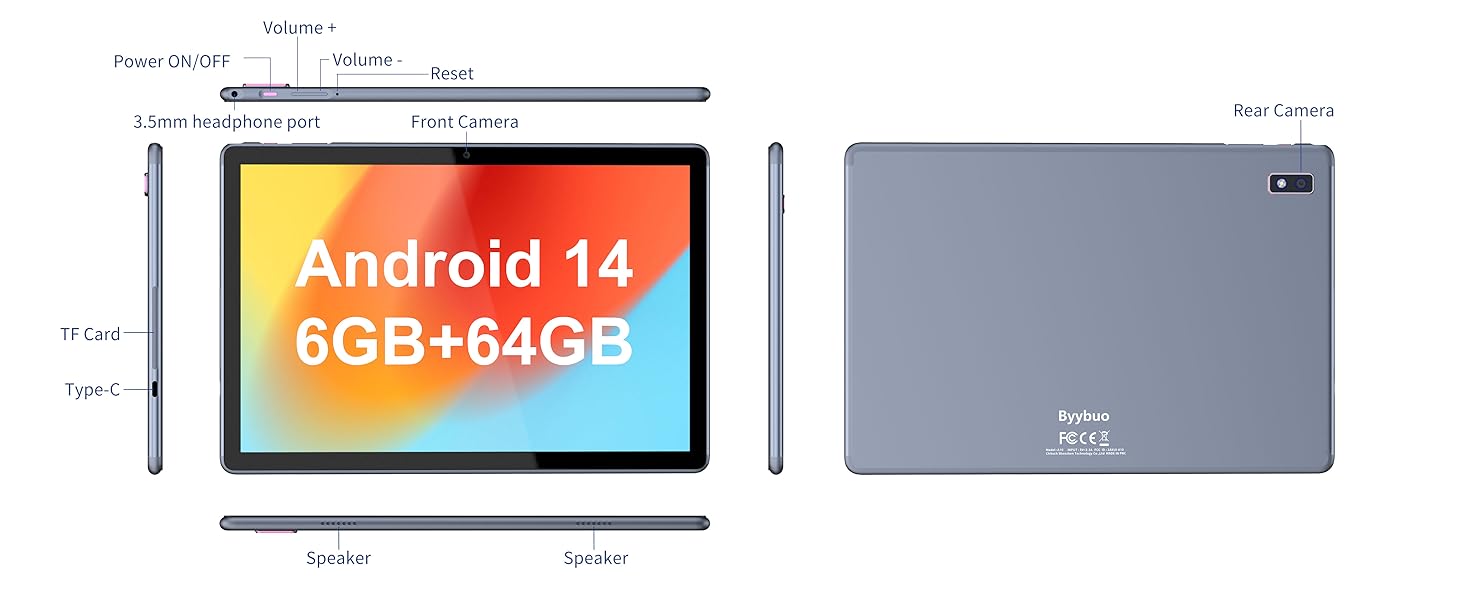
Image: A detailed diagram illustrating the physical layout of the Tibuta Smartpad A40, including the positions of its buttons, ports, and cameras for easy identification.
4. Initial Setup Wizard
Pas ndezjes së parë, tableti do t'ju udhëzojë përmes procesit fillestar të konfigurimit. Ndiqni udhëzimet në ekran për të:
- Zgjidhni gjuhën tuaj.
- Lidhu me një rrjet Wi-Fi.
- Hyni me llogarinë tuaj Google ose krijoni një të re.
- Konfiguro kyçjen e ekranit (PIN, model, fjalëkalim).
- Review dhe pranoni termat dhe kushtet.
Operating Your Tibuta Smartpad A40
1. Navigation and Touchscreen Gestures
The Smartpad A40 features a responsive multi-touch display. Common gestures include:
- Trokit: Për të zgjedhur një artikull ose për të hapur një aplikacion.
- Prekni dhe mbajeni: Për të hyrë në menutë kontekstuale ose për të lëvizur ikonat.
- Rrëshqitni: To scroll through pages or navigate between screens.
- Zmadho me gishta: Për të zmadhuar ose zvogëluar imazhet dhe web faqet.
2. Ekrani dhe Audioja
Experience vibrant visuals on the 10.1-inch IPS HD display with a resolution of 1280 x 800 pixels. The tablet also features an eye protection mode to reduce strain during prolonged use. Enjoy clear audio through the integrated dual high-fidelity speakers.

Image: The Tibuta Smartpad A40 tablet showcasing its IPS Full HD display and dual speakers, emphasizing its 10.1-inch screen size, 1280x800 IPS resolution, eye protection mode, and high-fidelity audio output.
3. Performanca dhe Sistemi Operativ
Powered by a robust Quad-Core processor and running on Android 14, the Smartpad A40 delivers smooth performance for multitasking, gaming, and streaming. The Android 14 system ensures access to the latest features and security updates.

Image: The Tibuta Smartpad A40 tablet showcasing its Android 14 operating system and GMS certification, with various application icons visible on the screen.
4. Hapësira e ruajtjes dhe kujtesa
The tablet comes with 6GB of RAM (2GB + 4GB virtual) and 64GB of internal storage, providing ample space for your applications, photos, videos, and documents. Storage can be expanded up to 128GB using a microSD card (not included).

Image: The Tibuta Smartpad A40 tablet highlighting its 6GB RAM and 64GB internal storage, along with the option to expand storage up to 128GB via a microSD card.
5. Kamerat
Capture moments with the tablet's dual cameras: a 5 MP front camera for video calls and selfies, and an 8 MP rear camera for photos and videos.

Image: Demonstrates the Tibuta Smartpad A40's camera capabilities, featuring a 5.0 MP front camera for HD video and an 8.0 MP rear camera with autofocus for capturing photos.
6. Lidhshmëria
The Smartpad A40 supports Wi-Fi (802.11ac) for fast internet access and Bluetooth for connecting to wireless peripherals like headphones and speakers.
7. Versatile Use Cases
The Tibuta Smartpad A40 is designed for a wide range of activities, from entertainment to productivity. Its portability makes it ideal for on-the-go use, while its features support various daily needs.

Image: Illustrates the diverse applications of the Tibuta Smartpad A40, including watching videos, assisting with daily tasks, and serving as a tablet for both children and seniors.
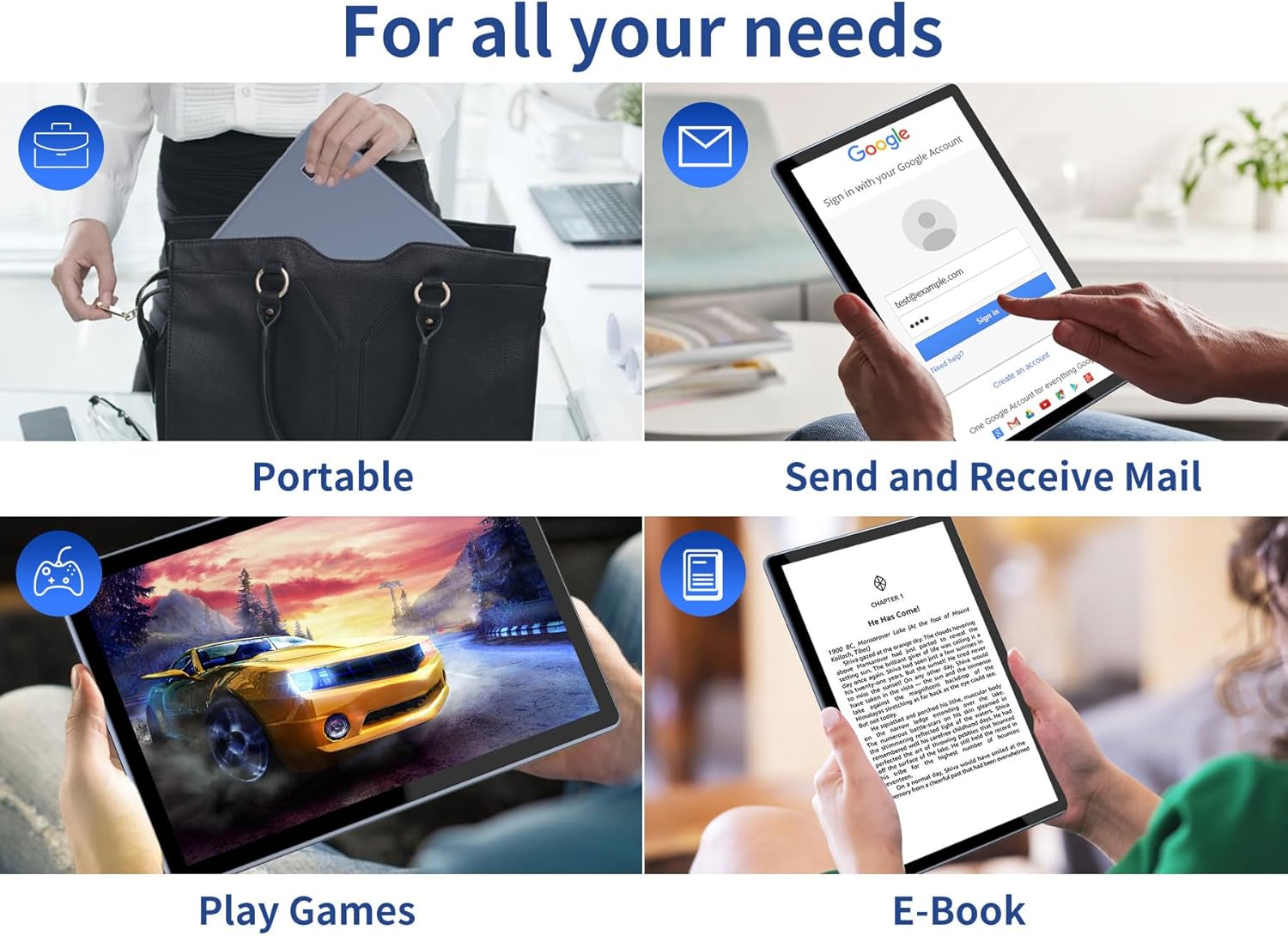
Image: Depicts the versatility of the Tibuta Smartpad A40 for various user needs, including portability, email communication, gaming, and e-book reading.
Mirëmbajtja
1. Pastrimi i tabletit tuaj
Përdorni një leckë të butë pa push për të pastruar ekranin dhe trupin e tabletit. Për njolla kokëforta, fërkojeni pak.ampLani leckën me ujë ose me një pastrues ekrani. Shmangni përdorimin e kimikateve të ashpra ose materialeve gërryese.
2. Përditësimet e softuerit
Regularly check for and install system updates to ensure your tablet has the latest features, security patches, and performance improvements. Go to Cilësimet > Sistemi > Përditësimi i sistemit për të kontrolluar për përditësime.
3. Kujdesi për baterinë
Për të zgjatur jetën e baterisë:
- Shmangni temperaturat ekstreme.
- Mos e lini baterinë të shkarkohet plotësisht para se ta ngarkoni shpesh.
- Shkëputeni nga priza pasi bateria të jetë plot.
4. Menaxhimi i ruajtjes
Periodikisht riview your installed applications and files. Uninstall unused apps and delete unnecessary files to free up storage space and maintain optimal performance. Utilize the microSD card slot for additional storage if needed.
Zgjidhja e problemeve
| Problem | Shkaku i mundshëm | Zgjidhje |
|---|---|---|
| Tableti nuk ndizet. | Low battery; system crash. | Charge the tablet for at least 30 minutes. Press and hold the Power button for 10-15 seconds to force restart. If unresponsive, locate the small reset pinhole (refer to diagram in Setup Guide) and gently press it with a paperclip. |
| Probleme me lidhjen Wi-Fi. | Incorrect password; router issue; tablet Wi-Fi off. | Ensure Wi-Fi is enabled in Settings. Re-enter Wi-Fi password. Restart your Wi-Fi router. Forget the network and reconnect. |
| Performancë e ngadaltë. | Shumë aplikacione në punë; pak hapësirë ruajtjeje; softuer i vjetëruar. | Close background apps. Clear cache. Uninstall unused apps. Check for system updates. Restart the tablet. |
| Aplikacionet që bllokohen ose ngrijnë. | App bug; insufficient resources. | Force close the app (Settings > Apps > [App Name] > Force Stop). Clear app cache/data. Reinstall the app. Ensure system is updated. |
Specifikimet
| Veçori | Detaj |
|---|---|
| Markë | Tibuta |
| Numri i modelit | A40 |
| Sistemi Operativ | Android 14 (Android 13 listed in some specs, but product title indicates 14) |
| Madhësia e ekranit | 10.1 inç |
| Rezolucioni i ekranit | 1280 x 800 Pixels (IPS HD) |
| Marka e procesorit | Allwinner (Quad-Core) |
| Madhësia e RAM-it të instaluar | 6 GB (2+4GB) |
| Kapaciteti i ruajtjes së memories | 64 GB |
| Hapësirë ruajtëse e zgjerueshme | Micro SD (deri në 128 GB) |
| Kamera e përparme | 5 MP |
| Kamera e pasme | 8 MP |
| Kapaciteti i baterisë | 5000 mAh |
| Lidhshmëria | Wi-Fi (802.11ac), Bluetooth |
| Porta e karikimit | Lloji-C |
| Dimensionet e artikullit (L x P x H) | 25.8 x 15.8 x 2 cm |
| Pesha e artikullit | 1.16 kilogramë |
Garancia dhe Mbështetja
Informacioni i Garancisë
Specific warranty details for the Tibuta Smartpad A40 are typically provided with your purchase documentation or on the product packaging. Please refer to these resources for information regarding warranty period, coverage, and terms. In general, manufacturer warranties cover defects in materials and workmanship under normal use.
Mbështetja e klientit
For technical assistance, troubleshooting beyond this manual, or warranty claims, please contact Tibuta customer support through the following channels:
- Referojuni informacionit të kontaktit të dhënë në paketimin e produktit tuaj.
- Visit the official Tibuta webfaqe interneti për burime mbështetjeje, pyetje të shpeshta dhe formularë kontakti.
- If purchased through an online retailer, their customer service portal may also offer support or direct you to the manufacturer.


