1. Hyrje
This manual provides detailed instructions for the safe and effective use of your KKnoon Digital Multimeter, specifically focusing on the FY128 model. This compact and intelligent electrical tester is designed for accurate measurements of various electrical parameters, making it suitable for professionals, educational institutions, and home users. It adheres to the safety requirements of the International Electrotechnical Safety Standard (IEC-61010) for electronic measuring instruments.
The multimeter features a 5999-count backlit LCD for clear readings, along with functions for AC/DC voltage, resistance, frequency, continuity, live wire checking, and Non-Contact VoltagZbulimi i e-së (NCV).

Figura 1: Përpara view of the KKnoon Digital Multimeter (Model FY128) showing the display and control buttons.
2. Informacion mbi sigurinë
To ensure safe operation and prevent damage to the meter, please read and follow all safety instructions carefully. Improper use can result in electric shock or damage to the instrument.
- Always verify the meter's functionality before use by testing a known voltage ose burimi aktual.
- Mos i tejkaloni vlerat maksimale të hyrjes të specifikuara për secilin diapazon matjeje.
- Ensure test leads are in good condition, free from cracks or damaged insulation, before connecting them to any circuit.
- Mos e përdorni kurrë matësin nëse duket i dëmtuar ose nëse casing është e hapur.
- Tregoni kujdes ekstrem kur punoni me voltagmbi 30V AC RMS, kulmin 42V ose 60V DC. Këto vëllimetagparaqesin rrezik goditjeje.
- Remove test leads from the circuit before changing functions or ranges.
- Zëvendësoni bateritë menjëherë kur shfaqet treguesi i baterisë së ulët për të siguruar lexime të sakta.
- Mos e përdorni matësin në mjedise me gaz, avuj ose pluhur që mund të shkaktojnë shpërthime.
3. Karakteristikat e produkteve
The KKnoon Digital Multimeter offers a range of features designed for convenience and accuracy:
- Multifunksionaliteti: Masat AC/DC Voltage, Resistance, Frequency, Continuity, Live Wire Checking, and NCV (Non-Contact Voltage)
- Two Measurement Modes:
- Auto Identification: Automatically detects and measures AC/DC voltage, frequency, resistance, and continuity.
- Ndërrimi manual: Allows selection of specific functions including AC/DC voltage, frequency, resistance, continuity, diode, capacitance (FY129C only), and LIVE NCV.
- Mbajtja e të dhënave: Lock the current measurement reading on the display with a single button press.
- Ekran i madh LCD: Provides clear and easy-to-read values with a 5999-count resolution.
- Flashlight & Screen Backlight: Rrit dukshmërinë në kushte me dritë të ulët.
- Compact Design with Bracket: Portable and includes a built-in support bracket for hands-free operation.
- Pajtueshmëria me sigurinë: Designed and produced according to IEC-61010 safety standards.

Figure 2: The multimeter's large LCD display clearly shows various measurement functions.

Figure 3: The integrated support bracket allows for convenient hands-free use.
4. Përmbajtja e paketës
Upon opening your package, please verify that all items listed below are present and in good condition:
- 1 x KKnoon Digital Multimeter (Model FY128)
- 1 x Pair of Test Leads (Red and Black)
- 1 x Manual Përdoruesi (Anglisht)
5. Konfigurimi
5.1 Instalimi i baterisë
The multimeter requires 2 x 1.5V AAA batteries (not included). To install or replace batteries:
- Ensure the multimeter is powered off and test leads are disconnected.
- Gjeni kapakun e ndarjes së baterisë në pjesën e pasme të pajisjes.
- Përdorni një kaçavidë për të hapur ndarjen e baterisë.
- Insert two 1.5V AAA batteries, observing the correct polarity (+/-) as indicated inside the compartment.
- Zëvendësoni kapakun e ndarjes së baterisë dhe sigurojeni me vidë.
5.2 Lidhja e Përçuesve të Testimit
The multimeter comes with a pair of test leads (red and black). Connect them as follows:
- Futni kabllon e zezë të testimit në prizën hyrëse 'COM' (të përbashkët).
- Insert the red test lead into the 'INPUT' jack for most measurements (Voltage, Resistance, Frequency, Continuity, Diode, Capacitance).

Figure 4: Labeled diagram of the multimeter's functions and input jacks.
6. Udhëzimet e funksionimit
6.1 Ndez/Fik
Press the red power button (Butoni i ndezjes) to turn the multimeter on or off. The device features an auto-shutdown function to conserve battery life after a period of inactivity.
6.2 Mënyrat e matjes
The multimeter offers two primary measurement modes:

Figure 5: The multimeter supports both auto identification and manual switching modes.
- Auto Identification Mode: When powered on, the meter defaults to auto identification. In this mode, it automatically detects and measures AC/DC voltage, frequency, resistance, and continuity. Simply connect the test leads to the circuit, and the meter will display the relevant measurement.
- Modaliteti i ndërrimit manual: To access specific functions not covered by auto identification or to manually select a range, press the 'NCV/LIVE' button (or other function buttons if available on your specific model, e.g., FY129C for Diode/Capacitance). This allows you to cycle through AC/DC voltage, frequency, resistance, continuity, LIVE, and NCV.
6.3 Matja e AC/DC Voltage
- Connect the black test lead to the 'COM' jack and the red test lead to the 'INPUT' jack.
- If in auto identification mode, the meter will automatically detect voltage. If in manual mode, select the appropriate AC or DC voltagfunksioni e.
- Connect the test leads in parallel across the component or circuit to be measured.
- Lexoni vëllimintagvlera e në ekranin LCD.
6.4 Matja e rezistencës
- Sigurohuni që qarku të jetë i çaktivizuar para se të matni rezistencën.
- Connect the black test lead to 'COM' and the red test lead to 'INPUT'.
- If in auto identification mode, the meter will automatically detect resistance. If in manual mode, select the resistance function (Ω).
- Lidhni telat e provës nëpër komponentin rezistencën e të cilit dëshironi të matni.
- Lexoni vlerën e rezistencës në ekranin LCD.
6.5 Frekuenca e matjes
- Connect the black test lead to 'COM' and the red test lead to 'INPUT'.
- If in auto identification mode, the meter will automatically detect frequency. If in manual mode, select the frequency function (Hz).
- Connect the test leads to the circuit where frequency is to be measured.
- Lexoni vlerën e frekuencës në ekranin LCD.
6.6 Testi i vazhdimësisë
- Sigurohuni që qarku të jetë i çaktivizuar nga energjia.
- Connect the black test lead to 'COM' and the red test lead to 'INPUT'.
- If in auto identification mode, the meter will automatically detect continuity. If in manual mode, select the continuity function (★)).
- Touch the test leads to the two points of the circuit or component you want to test.
- A continuous beep indicates a low resistance path (continuity). The display will show the resistance value.
6.7 Live Wire Checking
This function helps identify live AC wires.
- Connect the black test lead to 'COM' and the red test lead to 'INPUT'.
- Press the 'NCV/LIVE' button until 'LIVE' is indicated on the display.
- Insert the red test lead into the socket or touch it to the wire you suspect is live.
- The meter will beep and the display will indicate 'LIVE' if a live wire is detected.
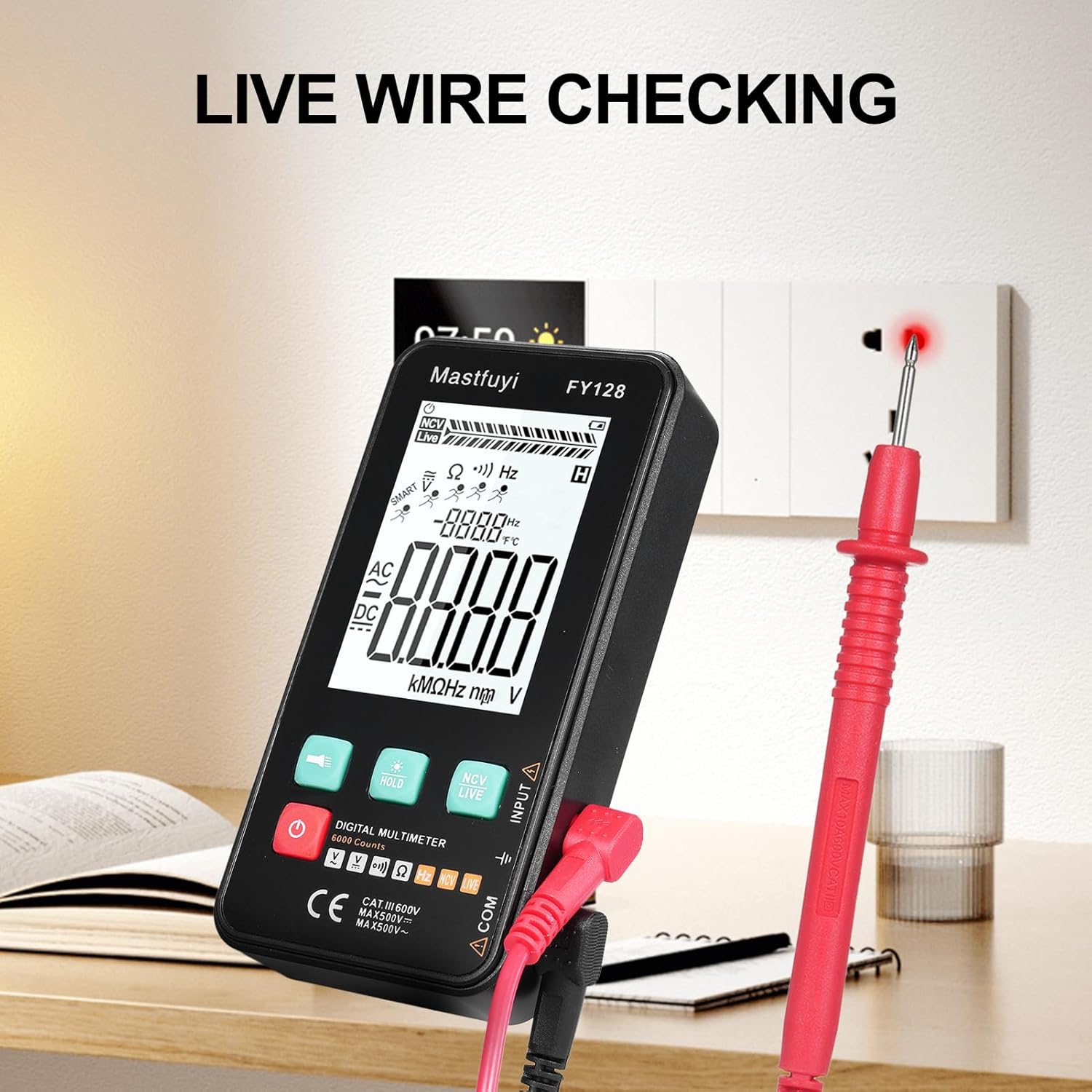
Figure 6: Using the multimeter for live wire detection.
6.8 NCV (Vëllimi pa kontakt)tage) Testi
The NCV function allows for detection of AC voltage pa kontakt të drejtpërdrejtë.
- Press the 'NCV/LIVE' button until 'NCV' is indicated on the display.
- Bring the top front part of the multimeter close to the wire or electrical outlet.
- The meter will beep and the NCV indicator on the display will illuminate or increase in intensity as it detects AC voltage.

Figure 7: Non-Contact Voltage (NCV) detection in progress.
6.9 Funksioni i mbajtjes së të dhënave
To freeze the current reading on the display, press the 'HOLD' button. Press it again to release the hold and resume live measurements.
6.10 Flashlight & Backlight
Press the flashlight button (🔦) to turn on the built-in flashlight. Long press the 'HOLD' button to activate the screen backlight for improved visibility in dark environments.
7. Mirëmbajtja
7.1 Ndërrimi i baterisë
When the low battery indicator appears on the display, replace the batteries as described in Section 5.1. Always use new 1.5V AAA batteries.
7.2 Pastrimi
Për të pastruar multimetrin, fshijeni kutinë me aditivë.amp leckë dhe një detergjent të butë. Mos përdorni lëndë gërryese ose tretës. Sigurohuni që pajisja të jetë plotësisht e thatë para përdorimit.
7.3 Ruajtja
If the multimeter is not used for an extended period, remove the batteries to prevent leakage and corrosion. Store the device in a cool, dry place, away from direct sunlight and extreme temperatures.
8. Troubleshooting
If you encounter issues with your multimeter, refer to the following common problems and solutions:
| Problem | Shkaku i mundshëm | Zgjidhje |
|---|---|---|
| Pa ekran ose ekran i zbehtë | Bateri të ulëta ose të fikura; Instalimi i gabuar i baterisë | Zëvendësoni bateritë; Kontrolloni polaritetin e baterisë |
| Lexime të pasakta | Low batteries; Damaged test leads; Incorrect function selected | Replace batteries; Inspect/replace test leads; Select correct measurement function |
| Continuity test does not beep | Open circuit; High resistance; Incorrect function | Ensure circuit is closed; Check for breaks; Select continuity function |
| Matësi nuk përgjigjet | Frozen display (Data Hold); Internal fault | Press 'HOLD' button to release; Contact customer support if issue persists |
9. Specifikimet
The following specifications apply to the KKnoon Digital Multimeter Model FY128 (and FY128C, unless specified for FY129C):
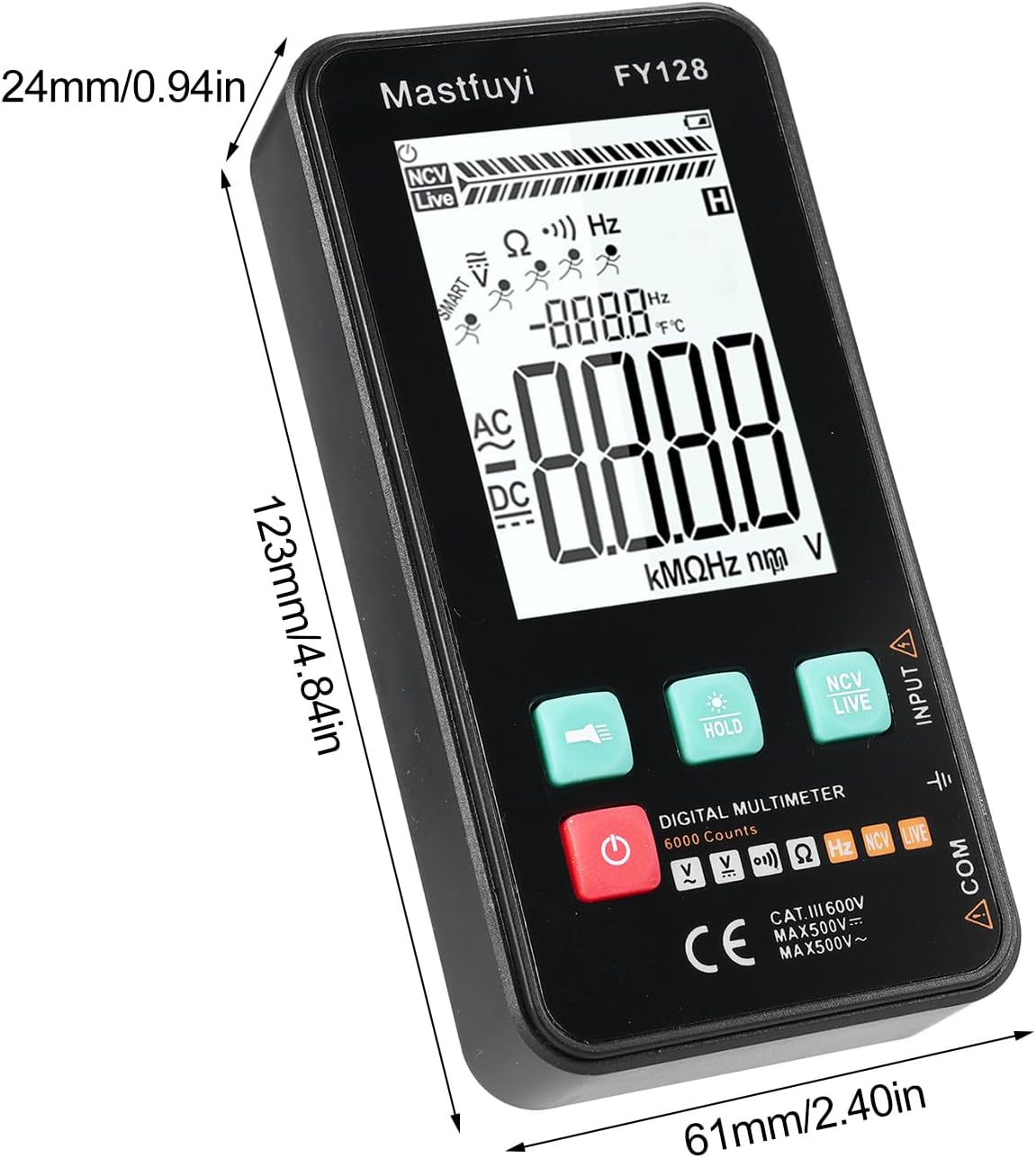
Figure 8: Physical dimensions of the KKnoon Digital Multimeter.
| Parametri | Specification (FY128/FY128C) | Specification (FY129C - if different) |
|---|---|---|
| AC Voltage | 1V~500V, ±(1.5%+3) | 0.8V~500V, ±(1.5%+5) |
| DC Voltage | 0.5V~500V, ±(1.2%+5) | 0.8V~500V, ±(1.2%+5) |
| Rezistenca | 30Ω~10000KΩ, ±(2%+5) | 30Ω~60000KΩ, ±(2%+5) |
| Frekuenca | 40Hz~1000Hz, ±(2.5%+5) | 10Hz~6000Hz, ±(2.5%+5) |
| Kapaciteti | N/A | 6nf~60000µf, ±(2.5%+5) |
| Temperatura | N/A | -20℃~1000℃, ±(5%+4) |
| Temperatura e Ambientit | N/A | 0℃~70℃ |
| Diodë | Nr | po |
| Vazhdimësia | po | po |
| NCV | po | po |
| Live Wire Checking | po | po |
| Fikja automatike | po | po |
| Furnizimi me energji elektrike | 2 * 1.5V AAA batteries (Not included) | 2 * 1.5V AAA batteries (Not included) |
| Madhësia e artikullit | 123 * 61 * 24 mm / 4.84 * 2.40 * 0.94 inç | 123 * 61 * 24 mm / 4.84 * 2.40 * 0.94 inç |
| Pesha e artikullit | 113 g / 3.98 oz | 113 g / 3.98 oz |
10. Garancia dhe Mbështetja
For warranty information or technical support, please refer to the product packaging or contact your retailer. Keep your purchase receipt as proof of purchase. For general inquiries, you may visit the KKnoon brand page on Amazon.
