1. Hyrje
This manual provides detailed instructions for the MESWAO 15.6 Inch Android 14 Tablet, model MES-B3. It covers essential information regarding product features, setup, operation, maintenance, and troubleshooting to ensure optimal performance and user experience. Please read this manual thoroughly before using your device.
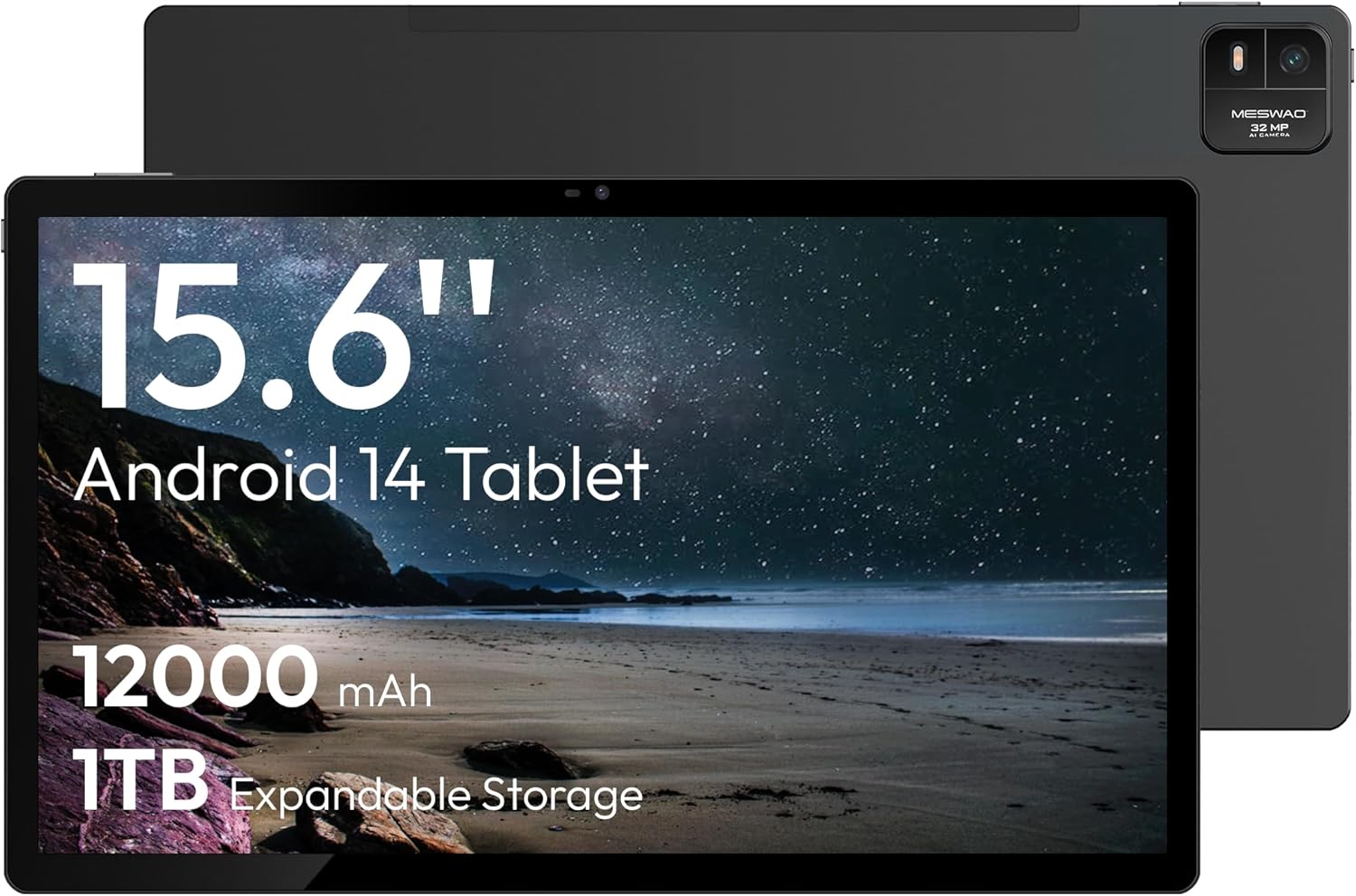
Figure 1.1: MESWAO 15.6 Inch Android 14 Tablet. This image displays the front and back view of the tablet, highlighting its large screen and rear camera module.
2. Informacion mbi sigurinë
To prevent damage to your device or injury to yourself or others, please observe the following precautions:
- Mos e ekspozoni tabletën ndaj temperaturave ekstreme, rrezeve të diellit direkte ose lagështisë së lartë.
- Shmangni rënien ose ekspozimin e tabletës ndaj goditjeve të forta.
- Përdorni vetëm karikues dhe aksesorë të miratuar.
- Do not attempt to disassemble or repair the tablet yourself.
- Mbajeni tabletën larg ujit dhe lëngjeve të tjera.
- Observe all local regulations regarding the use of electronic devices.
3. Përmbajtja e paketës
Verifikoni që të gjitha sendet janë të pranishme në paketim:
- 15.6-inch Tablet x1
- 15W Charger x1
- Type-C to 3.5mm Adapter x1
- USB-A to Type-C Adapter x1
- Stuck Pin x1 (for SIM/TF card tray)
4. Pajisja Mbaroiview
Familiarize yourself with the physical components of your MESWAO tablet.
4.1. Karakteristikat fizike
- Kamera e përparme: Located at the top center of the screen when held horizontally.
- Kamera e pasme me blic: Located on the back, typically in a corner.
- Butoni i energjisë: Usually on the side, used to power on/off or wake/sleep the device.
- Butonat e volumit: Rregulloni nivelet e audios.
- Porta USB-C: Për karikimin dhe transferimin e të dhënave.
- Vendi i kartës TF: Për hapësirë ruajtjeje të zgjerueshme.
- Folësit: Quad speakers with 8 sound chambers for audio output.

Figura 4.1: Mbiview of MESWAO Tablet's physical features. This image illustrates the location of stereo speakers, power and volume buttons, front camera, rear camera with flashlight, Type-C port, and TF card slot.
5. Konfigurimi
5.1. Ngarkimi fillestar
Before first use, fully charge the tablet using the provided 15W charger and USB-C cable. Connect the charger to the USB-C port on the tablet and plug it into a power outlet. The battery indicator on the screen will show charging progress.

Figure 5.1: Tablet charging illustration. This image shows the tablet connected to a charger, displaying a charging icon and indicating 100% charge in 3.5 hours.
5.2. Ndezja/Fikur
- Për të ndezur: Shtypni dhe mbani shtypur butonin e ndezjes derisa të shfaqet logoja e MESWAO.
- Për të fikur: Shtypni dhe mbani shtypur butonin e ndezjes derisa të shfaqet menyja e opsioneve të ndezjes, pastaj zgjidhni "Fik".
- Për të fjetur/zgjuar: Shtypni shkurtimisht butonin e energjisë.
5.3. Konfigurimi fillestar
Upon first power-on, follow the on-screen prompts to set up your tablet:
- Zgjidhni gjuhën tuaj të preferuar.
- Lidhu me një rrjet Wi-Fi.
- Hyni me llogarinë tuaj Google ose krijoni një të re.
- Review dhe pranoni termat dhe kushtet.
- Konfiguro kyçjen e ekranit (PIN, model ose fjalëkalim).
5.4. Inserting a TF Card
To expand storage, insert a TF (microSD) card:
- Gjeni vendin e kartës TF në anën e tabletit.
- Use the provided stuck pin to gently eject the card tray.
- Place the TF card into the tray with the gold contacts facing down.
- Vendoseni me kujdes tabakanë në tabletë.

Figure 5.2: Tablet storage capabilities. This image highlights the 128GB ROM and support for up to 1TB expandable storage via TF card.
6. Udhëzimet e funksionimit
6.1. Navigimi bazë
The MESWAO tablet uses Android 14, offering intuitive touch-based navigation:
- Trokit: Zgjidhni një artikull ose hapni një aplikacion.
- Rrëshqitni: Shfletoni ekranet ose listat.
- Zmadho me gishta: Zmadhoni ose zvogëloni përmbajtjen në ekran.
- Shtypi i gjatë: Hyni në menutë kontekstuale ose lëvizni ikonat.

Figure 6.1: Android 14 operating system interface. This image displays various application icons and highlights features like smooth multitasking, parental control, and enhanced privacy.
6.2. Lidhja me Wi-Fi
- Shko tek Cilësimet > Rrjeti dhe interneti > Wi-Fi.
- Aktivizo/çaktivizo Wi-Fi-në On.
- Zgjidhni rrjetin e dëshiruar nga lista.
- Futni fjalëkalimin nëse ju kërkohet, pastaj prekni Lidhu.
6.3. Menaxhimi i Aplikacioneve
- Instaloni aplikacionet: Download from the Google Play Store.
- Çinstaloni Aplikacionet: Long-press an app icon, then drag it to "Uninstall" or go to Cilësimet > Aplikacionet.
- Mbyll aplikacionet: Swipe up from the bottom of the screen and swipe away the app card.
6.4. Përdorimi i kamerës
The tablet features a 32MP rear camera with flash and a 5MP front camera.
- Hapni Kamera aplikimi.
- Trokitni butonin e diafragmës për të bërë një foto.
- Kaloni midis kamerave të përparme dhe të pasme duke përdorur ikonën e ndërrimit të kamerës.
- Access settings for flash, modes, and other options.
6.5. Menaxhimi i baterive
Bateria 12000mAh ofron përdorim të zgjatur. Për të optimizuar jetëgjatësinë e baterisë:
- Rregulloni ndriçimin e ekranit.
- Mbyll aplikacionet e papërdorura.
- Aktivizo modalitetin e kursimit të baterisë në Cilësimet > Bateria.
6.6. Lidhshmëria
- Bluetooth: Pair with wireless headphones, speakers, or other devices via Cilësimet > Pajisjet e lidhura > Bluetooth.
- USB-C: Lidhu me një kompjuter për file transfer or use with compatible USB-C accessories.
- Transmetim pa tel i ekranit: Share your tablet's screen to a compatible smart TV or monitor. Access this feature from the Quick Settings panel or Cilësimet > Pajisjet e lidhura > Cast.
6.7. Cilësimet e zërit
Adjust volume and audio output options:
- Use the physical volume buttons on the side of the tablet.
- Access detailed settings in Cilësimet > Tingulli dhe vibrimi.
- The tablet supports multiple audio options, including USB-C audio and 3.5mm via the provided adapter.
7. Mirëmbajtja
7.1. Pastrimi i tabletit tuaj
Për të pastruar tabletin, përdorni një leckë të butë pa push. Për njollat kokëforta, fërkojeni pak.ampLani leckën me ujë ose me një pastrues ekrani të projektuar për elektronikë. Shmangni kimikatet e ashpra ose materialet gërryese.
7.2. Përditësimet e softuerit
Kontrolloni dhe instaloni rregullisht përditësime të softuerit për të siguruar performancë optimale, siguri dhe qasje në veçoritë e reja. Shkoni te Cilësimet > Sistemi > Përditësimi i sistemit.
7.3. Menaxhimi i ruajtjes
Për të ruajtur performancën, menaxhoni periodikisht hapësirën ruajtëse të tabletit tuaj:
- Fshini aplikacionet e panevojshme dhe files.
- Lëvizni në një shkallë të madhe files to the TF card or cloud storage.
- Fshi të dhënat e memorjes së përkohshme për aplikacionet në Cilësimet > Aplikacionet > [Emri i Aplikacionit] > Hapësira e ruajtjes dhe memoria e përkohshme.
8. Troubleshooting
Referojuni problemeve dhe zgjidhjeve të zakonshme të mëposhtme:
| Problem | Zgjidhje |
|---|---|
| Tableti nuk ndizet. | Sigurohuni që bateria është e ngarkuar. Lidhni ngarkuesin dhe prisni disa minuta përpara se të provoni ta ndizni përsëri. |
| Nuk mund të lidhet me Wi-Fi. | Check if Wi-Fi is enabled. Verify the Wi-Fi password. Restart your router and the tablet. |
| Aplikacionet po bllokohen ose ngrijnë. | Close background apps. Clear the app's cache. Restart the tablet. Ensure the app is updated. |
| Performancë e ngadaltë. | Free up storage space. Close unused apps. Restart the tablet. |
| Bateria zbrazet shpejt. | Reduce screen brightness. Disable unused features like Bluetooth or GPS. Close background apps. Check battery usage in settings. |
9. Specifikimet
Key technical specifications for the MESWAO 15.6 Inch Android 14 Tablet (MES-B3):
| Veçori | Detaj |
|---|---|
| Markë | MESWAO |
| Emri i modelit | MASH-B3 |
| Sistemi Operativ | Android 14 |
| Madhësia e ekranit | 15.6 inç |
| Rezolucioni i ekranit | 1920 x 1080 piksel (IPS HD) |
| Përpunues | Octa-Core (MediaTek Helio G99, up to 2.2 GHz) |
| Bashkëprocesor grafik | Mali-G57 |
| RAM (Memory Storage Capacity) | 6GB (DDR3 SDRAM) |
| Internal Storage (Flash Memory Size) | 128 GB |
| Hapësirë ruajtëse e zgjerueshme | Deri në 1TB nëpërmjet kartës TF |
| Rezolucioni i kamerës së pasme | 32 MP |
| Rezolucioni i kamerës së përparme | 5 MP |
| Kapaciteti i baterisë | 12000 mAh |
| Jetëgjatësia mesatare e baterisë | 12 orë |
| Lloji me valë | 802.11a/b/g/n/ac (Wi-Fi 5) |
| Ngjyra | Gri |
| Pesha e artikullit | 2.35 paund |
| Dimensionet e produktit (LxWxH) | 14.53 x 8.78 x 0.43 inç |

Figure 9.1: Processor and performance details. This image highlights the Helio G99 Octa-Core chipset, 6nm process, 950MHz GPU, and smooth gaming/streaming capabilities.
10. Garancia dhe Mbështetja
10.1. Informacioni i garancisë
The MESWAO 15.6 Inch Android 14 Tablet comes with a 12 muaj garanci mbulimi i defekteve të prodhimit. Ju lutemi ruani provën e blerjes për kërkesat e garancisë.
10.2. Mbështetja e klientit
For technical assistance, troubleshooting, or warranty inquiries, please contact MESWAO customer support. They offer Mbështetje 24-orëshe ndaj klientit dhe kanë local service centers in the US, EU, and Japan.
- Metoda e Kontaktit: Refer to the contact information provided with your product packaging or visit the official MESWAO webfaqe.
- Zgjidhja e problemit: Issues reported are typically responded to within 24 hours, with problems resolved or replaced according to policy.

Figure 10.1: MESWAO customer support and warranty details. This image highlights the 12-month warranty, 24-hour customer support, local after-sales centers, and quick response flow.


