1. Hyrje
This manual provides essential information for the safe and efficient use of your SPC Discovery 2 ME smartphone. Please read this guide thoroughly before operating the device to ensure proper functionality and to prevent damage.
2. Informacion mbi sigurinë
- Siguria e baterisë: Do not disassemble, puncture, or modify the battery. Use only approved chargers and cables. Avoid extreme temperatures.
- Rezistenca ndaj ujit: Kjo pajisje nuk është rezistente ndaj ujit. Shmangni ekspozimin ndaj lëngjeve.
- Mbrojtja e dëgjimit: Shmangni dëgjimin e zgjatur në nivele të larta volumit për të parandaluar dëmtimin e dëgjimit.
- Siguria në drejtimin e automjetit: Do not use your phone while driving. Follow local laws and regulations regarding mobile device use.
- Pajisjet mjekësore: Maintain a safe distance between the phone and medical implants like pacemakers. Consult your physician and medical device manufacturer for specific guidelines.
- Asgjesimi: Dispose of the device and battery responsibly according to local regulations. Do not dispose of with household waste.
3. Përmbajtja e paketës
Verifikoni që të gjitha artikujt janë të pranishëm në paketimin e produktit tuaj:
- SPC Discovery 2 ME Smartphone
- Kabllo USB-C në USB-C
- Mjeti i nxjerrjes së kartës SIM
- Udhëzues i shpejtë për fillimin (nëse ka)
Note: A power adapter is not included and must be purchased separately. For optimal charging, use an 18W USB Power Delivery (PD) compatible charger.
4. Paraqitja e pajisjes
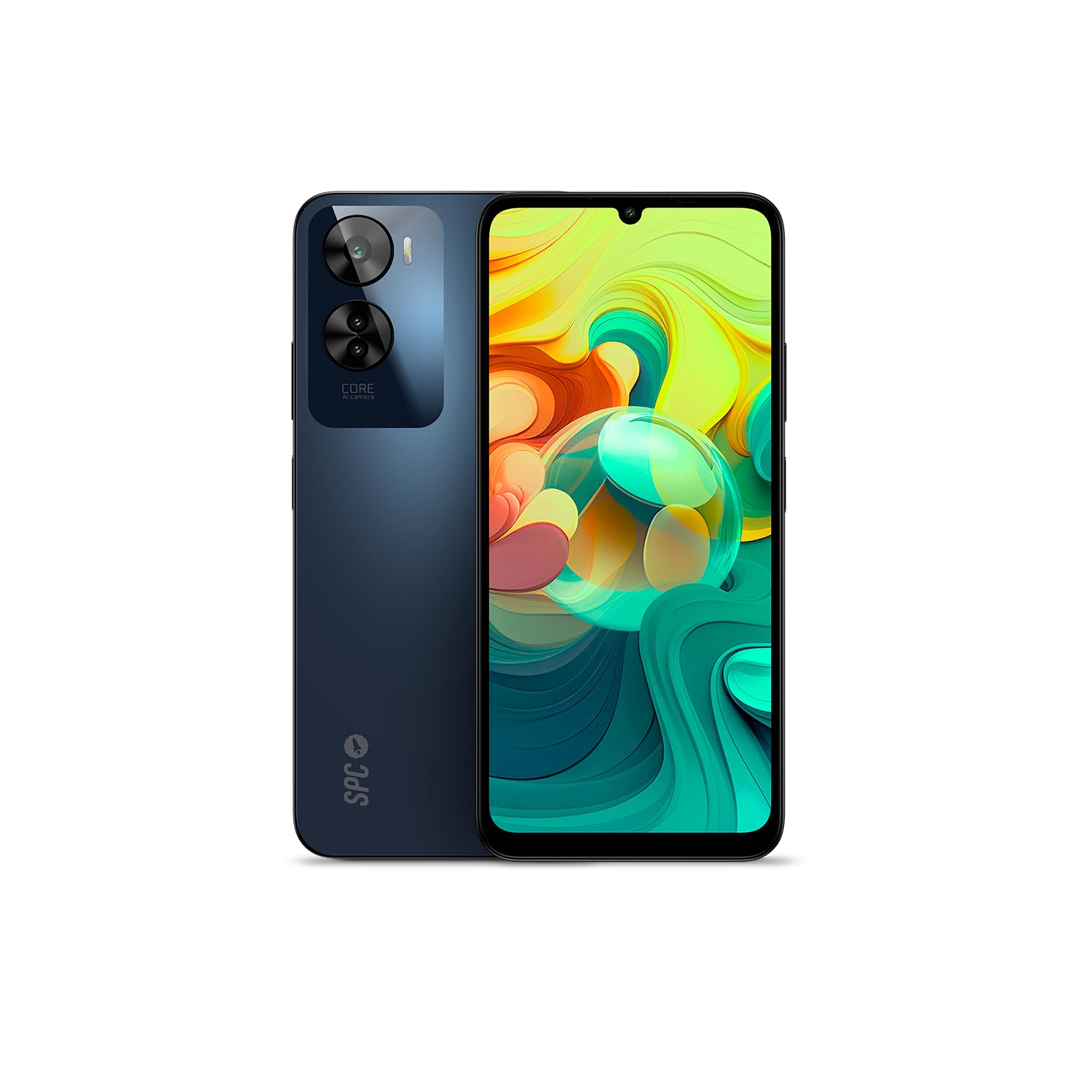
Figura 4.1: Përpara view of the SPC Discovery 2 ME, showing the display and front camera.

Figura 4.2: Mbrapa view of the SPC Discovery 2 ME, highlighting the triple camera module and fingerprint sensor.

Figura 4.3: Me kënd view of the SPC Discovery 2 ME, showing both front and back, and side buttons.
- Kamera e përparme: Ndodhet në pjesën e sipërme qendrore të ekranit.
- Shfaq: 6.75-inch HD+ IPS InCell screen.
- Butonat e volumit: Në anën e djathtë të pajisjes.
- Butoni i ndezjes/Sensori i gjurmëve të gishtave: On the right side, below the volume buttons.
- Porta USB-C: Në pjesën e poshtme për karikim dhe transferim të të dhënave.
- Jack audio 3.5 mm: Për kufje.
- Sirtari i kartës SIM/MicroSD: Në anën e majtë të pajisjes.
- Kamera e trefishtë e pasme: Ndodhet në pjesën e sipërme të majtë të panelit të pasmë.
5. Konfigurimi
5.1. Vendosja e kartave SIM dhe MicroSD
- Locate the SIM/MicroSD card tray on the left side of the phone.
- Insert the SIM ejector tool into the small hole on the tray and press firmly until the tray pops out.
- Place your Nano-SIM card(s) and/or MicroSD card into the designated slots on the tray. Ensure the gold contacts face downwards. The device supports dual SIM and MicroSD expansion up to 512GB.
- Vendoseni me kujdes sirtarin në telefon derisa të fiksohet në vendin e tij.
5.2. Ndezja fillestare dhe konfigurimi bazë
- Press and hold the Power button on the right side of the device until the SPC logo appears.
- Ndiqni udhëzimet në ekran për të përfunduar konfigurimin fillestar:
- Zgjidhni gjuhën tuaj.
- Lidhu me një rrjet Wi-Fi.
- Review dhe pranoni termat dhe kushtet.
- Hyni me llogarinë tuaj Google ose krijoni një të re.
- Set up screen lock (PIN, pattern, password) and biometric security (fingerprint, facial recognition).
6. Udhëzimet e funksionimit
6.1. Navigimi bazë
- Gjestet e prekjes: Trokit për të zgjedhur, rrëshqit për të lëvizur me shpejtësi, afro gishtat për të zmadhuar.
- Ekrani bazë: Qasuni në aplikacione, widget-e dhe njoftime.
- Paneli i njoftimeve: Rrëshqitni poshtë nga pjesa e sipërme e ekranit në view njoftime dhe cilësime të shpejta.
- Sirtari i aplikacionit: Rrëshqitni lart nga fundi i ekranit për të aksesuar të gjitha aplikacionet e instaluara.
6.2. Kryerja e thirrjeve dhe dërgimi i mesazheve
- Thirrjet: Hap aplikacionin "Telefon", fut numrin dhe trokit ikonën e thirrjes.
- Mesazhet: Open the "Messages" app, tap the new message icon, enter the recipient and your message.
- SIM i dyfishtë: If using two SIM cards, you can select which SIM to use for calls or messages from the respective app settings.
6.3. Përdorimi i kamerës
The SPC Discovery 2 ME features a triple AI camera system, including a 50MP main sensor.
- Hapni aplikacionin "Kamera".
- Zgjidhni modalitetin e dëshiruar (Foto, Video, Portret, Makro, etj.).
- Trokitni butonin e diafragmës për të kapur një imazh ose për të filluar/ndaluar regjistrimin e videos.
- Use the AI scene detection for optimized settings.
- For close-up shots, switch to Macro mode.
6.4. NFC for Contactless Payments
Your device supports NFC (Near Field Communication) for secure contactless payments.
- Ensure NFC is enabled in your phone's settings (Settings > Connected devices > Connection preferences > NFC).
- Set up your preferred payment app (e.g., Google Pay) and add your credit/debit cards.
- To make a payment, unlock your phone and hold the back of the device near the contactless payment terminal.
6.5. Biometric Unlock
The device offers both fingerprint and facial recognition for secure unlocking.
- Sensori i gjurmës së gishtit: Located on the side power button. Register your fingerprints via Settings > Security & privacy > Device unlock > Fingerprint unlock.
- Njohja e fytyrës: Register your face via Settings > Security & privacy > Device unlock > Face unlock. Ensure good lighting when setting up and using this feature.
6.6. Menaxhimi i baterive
The 5000 mAh battery provides extended usage. For optimal battery life:
- Charge your device using the provided USB-C cable and an 18W PD compatible charger.
- Shmangni shkarkimin e plotë të baterisë shpesh.
- Aktivizo modalitetin e kursimit të baterisë kur bateria është e ulët.
- Mbyllni aplikacionet e papërdorura që funksionojnë në sfond.
7. Mirëmbajtja
- Pastrimi: Përdorni një leckë të butë pa push për të pastruar ekranin dhe trupin. Shmangni materialet gërryese ose kimikatet e ashpra.
- Përditësimet e softuerit: Regularly check for and install system updates (Settings > System > System update) to ensure optimal performance and security. The device runs on Android 14.
- Magazinimi: Manage your 256GB internal storage by regularly deleting unnecessary files or moving them to the expandable MicroSD card (up to 512GB).
8. Troubleshooting
| Çështja | Zgjidhja e mundshme |
|---|---|
| Pajisja nuk ndizet. | Sigurohuni që bateria është e ngarkuar. Lidheni me një karikues për të paktën 15 minuta, pastaj provoni ta ndizni përsëri. |
| Bateria zbrazet shpejt. | Reduce screen brightness, close background apps, disable unused features like GPS or Bluetooth, or enable battery saver mode. |
| Aplikacionet po bllokohen ose ngrijnë. | Clear the app's cache (Settings > Apps > [App Name] > Storage & cache > Clear cache). If the issue persists, restart the device. |
| Nuk mund të lidhet me Wi-Fi. | Restart your router and phone. Forget the network and reconnect. Ensure Wi-Fi is enabled on your device. |
| Sensori i gjurmëve të gishtave nuk funksionon. | Sigurohuni që gishti juaj të jetë i pastër dhe i thatë. Regjistroni përsëri gjurmët e gishtërinjve te cilësimet. |
9. Specifikimet
| Veçori | Detaj |
|---|---|
| Emri i modelit | Discovery 2 ME |
| Numri i modelit | 25246256D |
| Sistemi Operativ | Android 14 |
| Madhësia e ekranit | 6.75 inç |
| Rezolucioni i ekranit | 1600 x 720 (HD+) |
| Shpejtësia e rifreskimit | 90 Hz |
| Shpejtësia e CPU-së | 1.6 GHz (Octa-core) |
| RAM | 6 GB (expandable up to 14 GB virtual RAM) |
| Ruajtja e brendshme | 256 GB |
| Hapësirë ruajtëse e zgjerueshme | MicroSD deri në 512 GB |
| Rezolucioni i kamerës së pasme | 50 Megapixels (Main) |
| Kapaciteti i baterisë | 5000 mAh (Lithium-jon) |
| Ngarkimi | 18W Fast Charge (USB PD) |
| Lidhshmëria | 4G, Bluetooth, Wi-Fi, NFC |
| Portet | USB Type-C, fole 3.5 mm |
| Karakteristika të veçanta | Dual SIM, Integrated GPS, Expandable Memory, USB OTG Support, Biometric Unlock (Fingerprint, Facial Recognition) |
10. Garancia dhe Mbështetja
Your SPC Discovery 2 ME smartphone is covered by a standard manufacturer's warranty. For detailed warranty terms and conditions, please refer to the warranty card included in your package or visit the official SPC webfaqe.
For technical support, troubleshooting assistance, or service requests, please contact SPC customer support through their official channels. Contact information can typically be found on the SPC webfaqja e internetit ose në udhëzuesin e fillimit të shpejtë.


